https://github.com/elb4rto/craplog-gui
Parse Apache2 logs to create statistics
https://github.com/elb4rto/craplog-gui
apache2 apache2-logs gui java logs statistics
Last synced: about 1 year ago
JSON representation
Parse Apache2 logs to create statistics
- Host: GitHub
- URL: https://github.com/elb4rto/craplog-gui
- Owner: elB4RTO
- License: agpl-3.0
- Archived: true
- Created: 2022-04-30T16:15:47.000Z (about 4 years ago)
- Default Branch: main
- Last Pushed: 2024-04-28T20:09:55.000Z (about 2 years ago)
- Last Synced: 2025-02-24T08:45:45.241Z (over 1 year ago)
- Topics: apache2, apache2-logs, gui, java, logs, statistics
- Language: Java
- Homepage:
- Size: 339 KB
- Stars: 0
- Watchers: 1
- Forks: 0
- Open Issues: 1
-
Metadata Files:
- Readme: README.md
- License: LICENSE
Awesome Lists containing this project
README
# craplog-GUI
A tool that scrapes Apache2 logs to create both Single-Session and Global statistics
## Table of contents
- [Overview](#overview)
- [Installation and usage](#installation-and-usage)
- [Requirements, dependencies and plugins](#requirements--dependencies--plugins)
- [Usage without installation](#usage-without-installation)
- [Usage with installation](#usage-with-installation)
- [Compilation](#compilation)
- [How to compile](#how-to-compile)
- [Additional steps](#additional-steps)
- [Log files](#log-files)
- [Default logs path](#default-logs-path)
- [Default logs structure](#default-logs-structure)
- [Statistics](#statistics)
- [Storage](#storage)
- [Examined fields](#examined-fields)
- [Sessions statistics](#sessions-statistics)
- [Global statistics](#global-statistics)
- [Whitelist](#whitelist)
- [Extra features](#extra-features)
- [Note-block](#note-block)
- [Check updates](#check-updates)
- [Final considerations](#final-considerations)
- [Estimated working speed](#estimated-working-speed)
- [Backups](#backups)
- [Contributions](#contributions)
## Overview
Craplog is a tool that takes Apache2 logs in their default form, parses them and creates simple statistics.
Welcome to the fully **graphical** version
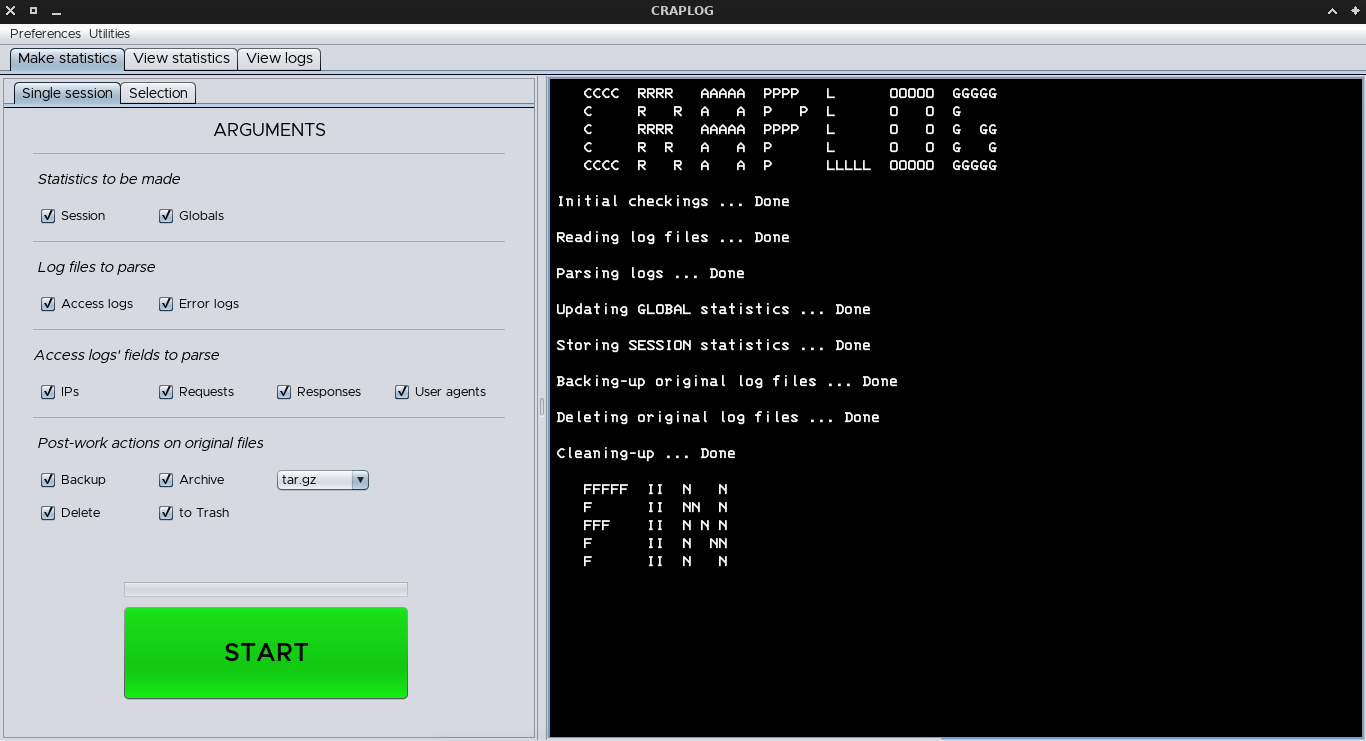
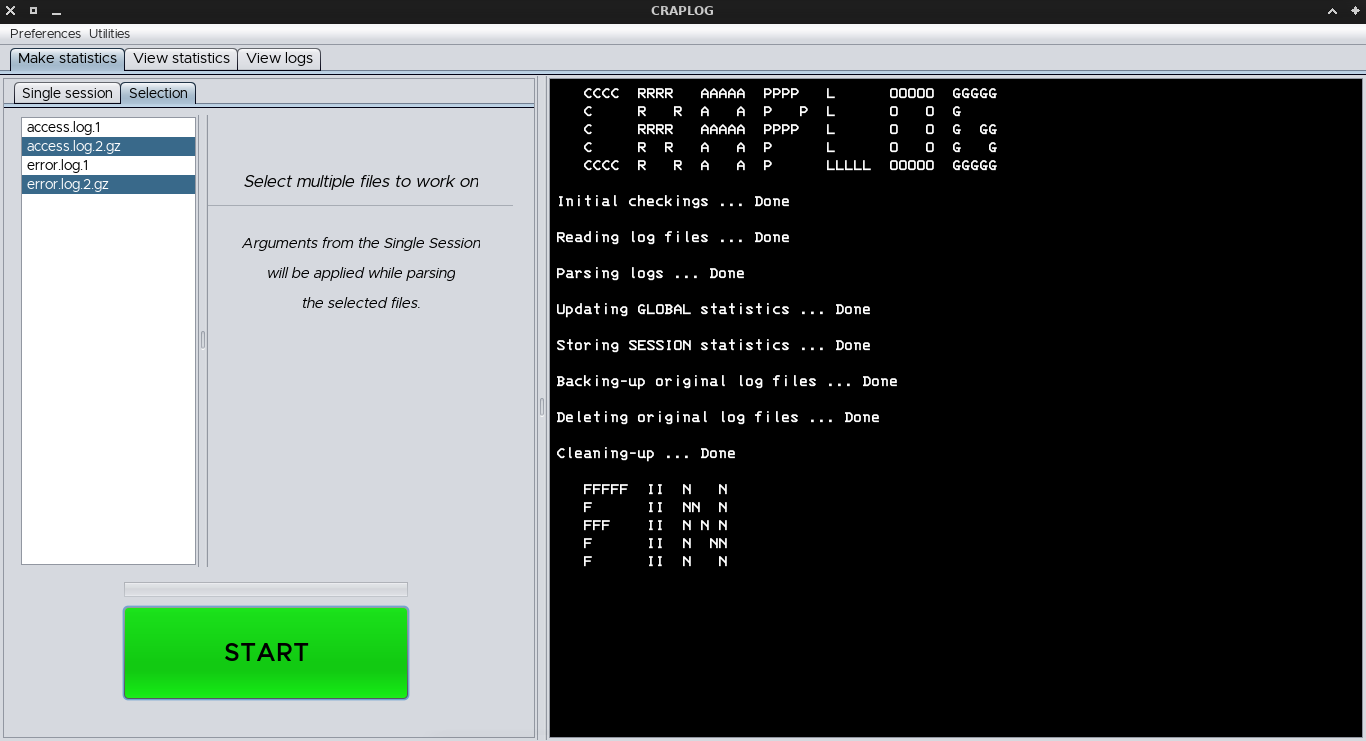
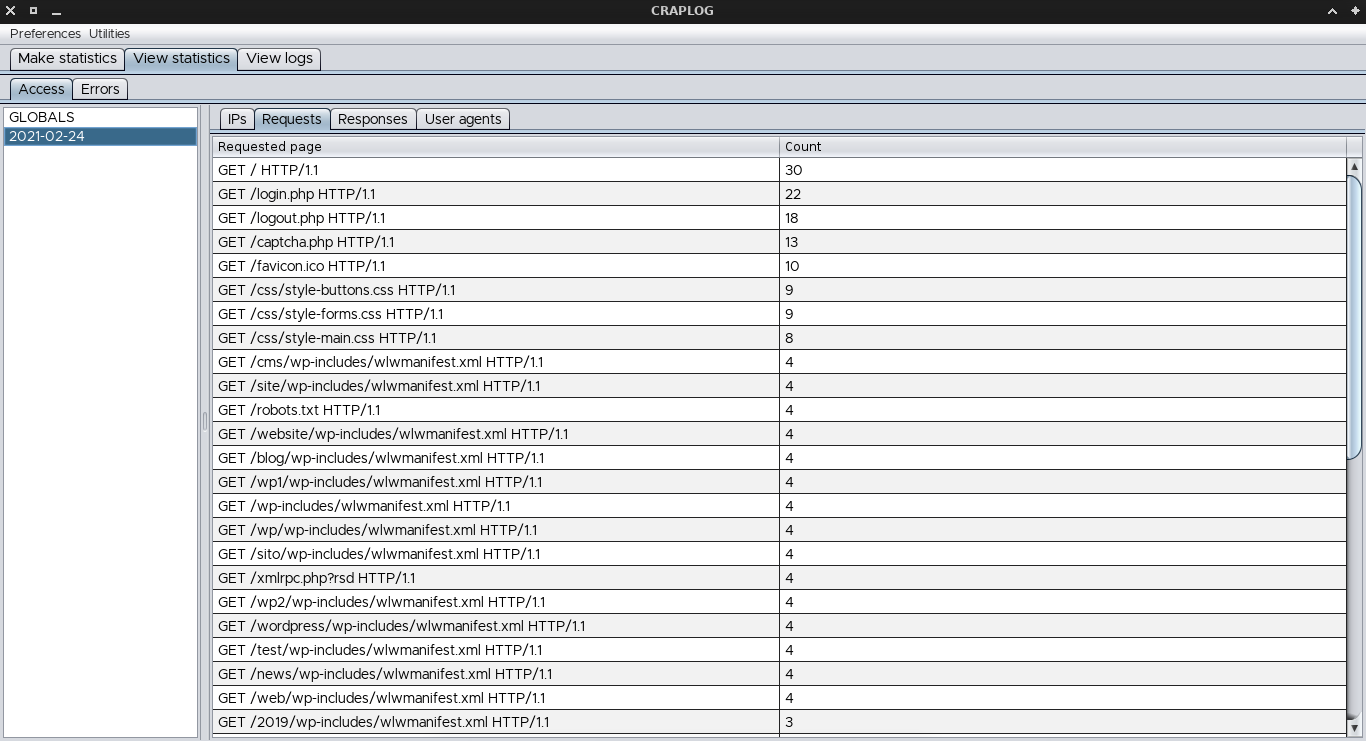
Craplog will store statistics depending on the date of the single lines, to analyze/backtrack statistics more easily.
Be aware that log-files usage is not tracked, be careful of not parsing the same logs twice, which will lead to altered statistics.
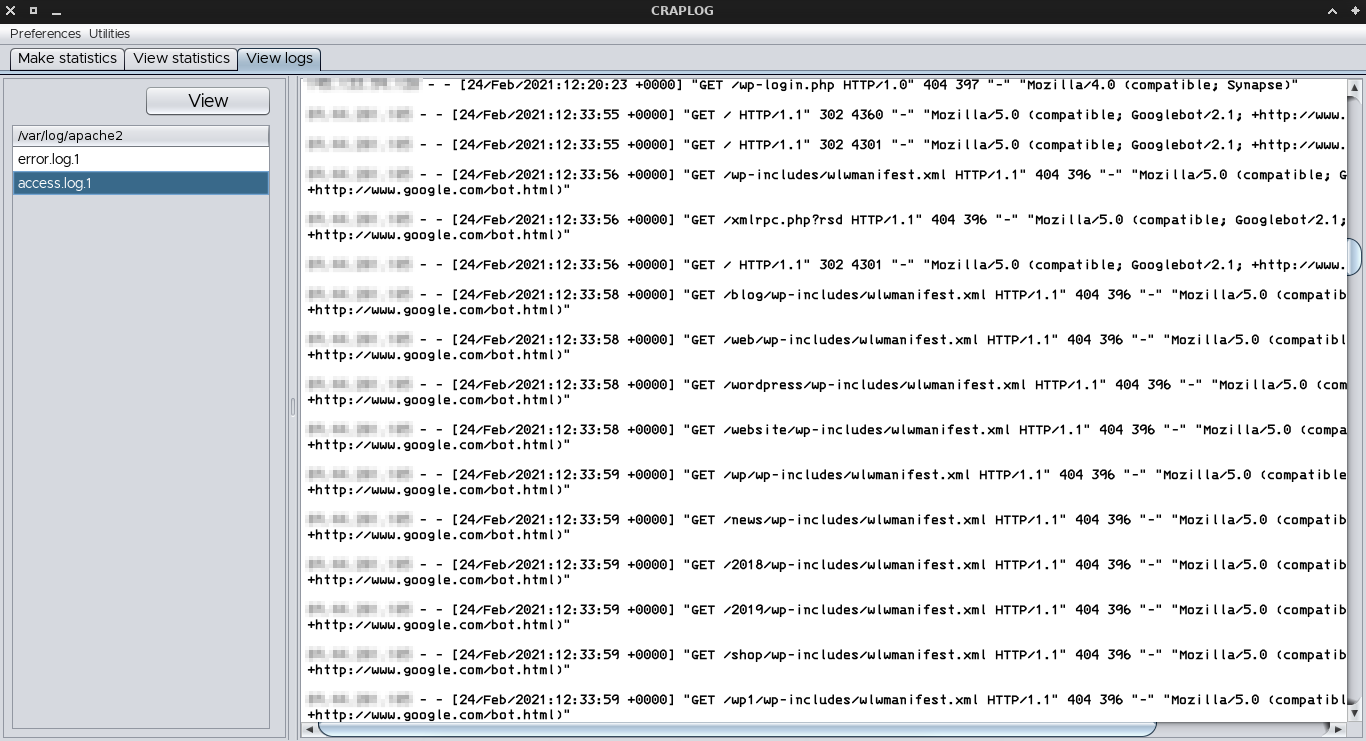
It is also possible to display the log files contained in the logs folder, to directly view their content.
Searching for something different? Try the [other versions of CRAPLOG](https://github.com/elB4RTO/CRAPLOG).
## Installation and usage
### Requirements / Dependencies / Plugins
- *JavaSE 11*
- *Maven plugins*
- *Apache common compress*
### Usage without installation
- Download a pre-compiled [Release](https://github.com/elB4RTO/craplog-GUI/releases)
*or*
Follow the step-by-step "[How to compile](#how-to-compile)" guide
- Execute the *jar* file by using your installed **Java Runtime Environment** (usually *openJDK jre*)
*or*
By using this command from terminal (replace the */path/to/craplog* to fit yours, and use the *version* number you have!):
`java -jar /path/to/craplog/CRAPLOG-version.jar`
### Usage with installation
- **From source**
- Download and unzip this repo
*or*
`git clone https://github.com/elB4RTO/craplog-GUI`
- Open a terminal inside "*craplog-GUI-main/craplog*"
*or*
`cd craplog-GUI/craplog`
- Run the installation script
`chmod +x ./build_install.sh && ./build_install.sh`
- **From binary**
- Download a pre-compiled [Release](https://github.com/elB4RTO/craplog-GUI/releases)
- Run the installation script
`chmod +x ./install.sh && ./install.sh`
## Compilation
### How to compile
- Install the **Maven Project Manager** from your system's package manager:
* *Debian / Ubuntu / Mint / ...*
`sudo apt install maven`
* *Arch / Manjaro / ...*
`sudo pacman -S maven`
* *Fedora*
`sudo dnf install maven`
* *OpenSUSE*
`sudo zypper install maven`
* *Slackware*
`sudo slackpkg install apache-maven`
* *Void*
`sudo xbps-install apache-maven-bin`
* *FreeBSD*
`sudo pkg install maven`
- Download and unzip this repo
*or*
`git clone https://github.com/elB4RTO/craplog-GUI`
- Open a terminal inside "*craplog-GUI-main/craplog*"
*or*
`cd craplog-GUI/craplog`
- Make sure you're inside the folder containing the "**pom.xml**" file
`if [ -f "./pom.xml" ]; then echo "You're good to go!"; else echo "Hmm... no, wrong location"; fi`
- Use **Maven** to compile the entire project:
`mvn clean install`
This command will download and build the necessary dependencies (if you don't have them already), so make sure you're connected to the internet during this step
- At this point you should see a new folder named "**target**", which contains two **jar** archives along with other folders:
- The "*CRAPLOG-x.xx.jar*" file needs the *Apache Common Compress* library to be installed on the system and some [additional steps](#additional-steps) to be taken
- The "*CRAPLOG-x.xx-jar-with-dependencies.jar*" file is a ready-to-use standalone (can be portable), the difference in dimensions is negligible and is therefore recommended to use this one.
You can use the following commands (as they are) to remove the dependent archive and rename the standalone one:
`cd target && version=$(ls | grep CRAPLOG-[0-9]\.[0-9][0-9]-jar-with-dependencies.jar | cut -d \- -f2)`
If the previous command succeeded:
`rm "CRAPLOG-$version.jar" && mv "CRAPLOG-$version-jar-with-dependencies.jar" "CRAPLOG-$version.jar"`
- To run Craplog, just use this command (replace the */path/to/craplog* to fit yours, and use the *version* number you have!):
`java -jar /path/to/craplog/CRAPLOG-version.jar`
- You can now move the jar file (just the archive! Whatever archive you choose, you'll not need the other folders created during compilation) wherever you want and execute it from there.
A pre-made folder can be found at "*craplog-GUI/pre-made_folder*", which contains the configurations file (you'll need it, otherwise you'll have default settings at every run) and the crapstats directory (default to contain the statistics files created, can be modified in the configurations). This folder can be then renamed and/or moved anywhere (better before the first run)
**Tip**: you can make a *craplog* script (), containing the command of the option you choose and move it inside */bin* or */usr/bin* to be able to run Craplog from terminal
**ProTip**: you can then make a *craplog.desktop* file (), containing the informations to the *craplog* script (it must be present inside your bins!) and then move the *craplog.desktop* file inside *~/.local/share/applications* to have a menu entry for Craplog
### Additional steps
Please follow these additional steps **if and only if** you've decided to use the *CRAPLOG-x.xx.jar* file while following the compilation guide
Also, make sure to replace the */path/to/craplog* to fit yours, and use the *version* number you have
There are two ways to use this file:
- By passing the Main class inline, using this command instead of the one provided for the standalone:
`java -cp /path/to/craplog/CRAPLOG-version.jar Main`
- Or by manually adding the **Main Class** to the *MANIFEST*:
- Open the *jar* archive with your archive manager
- Step inside the "*META-INF*" folder
- Extract the "*MANIFEST.MF*" file
- Modify it by adding the following line (wherever you want, but make sure to have a new-line at the end of the file):
`Main-Class: Main`
- Save the document
- Delete the old "*MANIFEST.MF*" entry from the archive and add the freshly modified one in the same position
- Save and update the archive if needed
- You can now run Craplog using the following command:
`java -jar /path/to/craplog/CRAPLOG-version.jar`
## Log files
At the moment, it still only supports **Apache2** log files in their **default** form, but a different path can easily be set from the `Preferences`→`Settings`>`Paths` menu.
Archived (**gzipped**) log files can be used as well as normal files.
### Default logs path
/var/log/apache2/
### Default logs structure
At the moment of writing, this is the only supported logs structure.
#### access.log.*
IP - - [DATE:TIME] "REQUEST URI" RESPONSE "FROM URI" "USER AGENT"
*123.123.123.123 - - [01/01/2000:00:10:20 +0000] "GET /style.css HTTP/1.1" 200 321 "/index.php" "Mozilla/5.0 (Windows NT 10.0; Win64; x64; rv:86.0) Firefox/86.0"*
#### error.log.*
[DATE TIME] [LOG LEVEL] [PID] ERROR REPORT
*[Mon Jan 01 10:20:30.456789 2000] [headers:trace2] [pid 12345] [client 123.123.123.123:45678] AH00128: File does not exist: /var/www/html/domain/readme.txt*
## Statistics
### Storage
You can now store statistics wherever you want by modifyng the path to be used from the *Settings menu*.
While running Craplog select `Preferences`→`Settings`>`Paths`.
Be aware that modifiyng a path which already contains statistics files/folders, will **not** move the contents in the new location!
### Examined fields
#### Access logs
Four fields can be examined while parsing **access** logs:
- IP address of the client
- Requested page/URL
- Response code from the server
- User-agent of the client
#### Error logs
While parsing **error** logs, only two fields will be used:
- Log level
- Error report
### Sessions statistics
**Sessions** are made by grouping statistics depending on the **date** of the single lines and will be stored consequently: new content will be created if that date is not present yet, or it will be merged if the date already exists.
Olny '**\*.log.\***' files will be taken as input ('*.1*' in case of a single-session job, different numbers if working with a selection). This is because these files (usually) contain the full logs stack of an entire (*past*) day.
Running it against a *today*'s file (which is not complete yet) may lead to re-running it in the future on the same file, parsing the same lines twice.
### Global statistics
Additionally, **global statistics** may be created and/or updated *consequently*.
These statistics are identical to the session ones, in fact they're just merged sessions, for a larger view.
### Whitelist
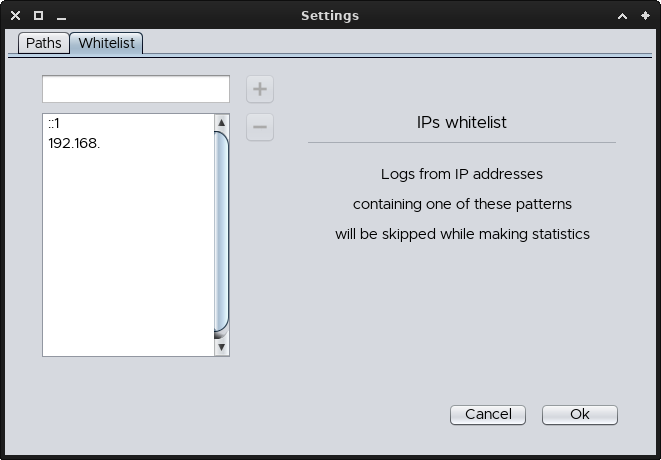
You can now add IP addresses to this list (may them be full *IPs*, only a the *net-ID* part or just a portion of your choice), in order to skip the relative lines by whitelisting (or blacklisting..?) them, in both **access** and **error** logs.
Please notice that the given sequence must be the starting part: it's not possible (at the moment, and more likely also in future versions) to skip IPs ending or just containing that sequence.
As an example, if you insert "123", then only IP addresses starting with that sequence will be skipped.
If you insert ".1", then nothing will be skipped, since no IP will ever start with a dot.
But the shortcut "::1" is used by Apache2 for internal connections and will therefore be valid to skip those lines.
## Extra features
### Note-block
A note-block utility is available at `Utilities`→`Note` which can be used to temporary write text, notes, etc
### Check updates
You can use `Utilities`→`Check updates` to query this repo and receive informations about version-updates.
No update will be done though, the utility just checks the version number: the *download* has to be done manually, but a *build_update.sh* script is provided
## Final considerations
### Estimated working speed
1~10 MB/s
May be higher or lower depending on the complexity of the logs, the complexity of the stored statistics (in case of merge), your hardware and the workload of your system during the execution.
Usually, if Craplog is taking more than 10 seconds to parse 10 MB of data, it means you've probably been tested in some way (better to check).
### Backups
Craplogwill automatically backup **global statistics** files (in case of fire).
If something goes wrong and you lose your actual globals, you can recover them (at least the last backup).
Move inside the folder you choose to store statistics in (if you don't remember the path, you can open the `Preferences`→`Settings`>`Paths` menu, to view it. Beware that modifiyng a path which already contains statistics, will not move the files/folders in the new location), open the "**globals**" folder, show hidden files and open the folder named "**.backups**'.
The complete path should look like **//craplog/crapstats/globals/.backups/**
Here you will find the last 3 backups taken. Folder named '3' is always the oldest and '1' the newest.
Starting by this version, a new ackupis made every time you run Craplog *successfully* over GLOBALS.
Please notice that session statistics will **not** be backed-up
## Contributions
CRAPLOG is under development
If you have suggestions about how to improve it please open an  or make a 
If you're not running Apache, but you like this tool: same as the above (bring a sample of a log file)