https://github.com/electronsandstuff/py-pfeiffer-vacuum-protocol
Python implementation of the Pfeiffer vaccum protocol for vacuum gauge control
https://github.com/electronsandstuff/py-pfeiffer-vacuum-protocol
Last synced: 4 months ago
JSON representation
Python implementation of the Pfeiffer vaccum protocol for vacuum gauge control
- Host: GitHub
- URL: https://github.com/electronsandstuff/py-pfeiffer-vacuum-protocol
- Owner: electronsandstuff
- License: bsd-3-clause
- Created: 2020-05-17T02:36:11.000Z (about 6 years ago)
- Default Branch: master
- Last Pushed: 2025-01-15T05:14:50.000Z (over 1 year ago)
- Last Synced: 2025-01-15T07:12:51.134Z (over 1 year ago)
- Language: Python
- Homepage:
- Size: 195 KB
- Stars: 16
- Watchers: 1
- Forks: 2
- Open Issues: 0
-
Metadata Files:
- Readme: README.md
- License: LICENSE.txt
Awesome Lists containing this project
README
# Pfeiffer Vacuum Protocol
[](https://pypi.org/pypi/pfeiffer-vacuum-protocol/)
[](https://pypi.org/pypi/pfeiffer-vacuum-protocol/)
[](https://pypi.org/pypi/pfeiffer-vacuum-protocol/)
A python interface for controlling Pfeiffer vacuum gauges over RS485.
## Installation, Testing, and Dependencies
This library is available on pip. Please install it with the following command.
```
pip install pfeiffer-vacuum-protocol
```
Testing is done with python's unit testing framework. You can verify the current branch is working with the following command run from the root of this repo.
```
$ python -m unittest
...............................
----------------------------------------------------------------------
Ran 31 tests in 0.006s
OK
```
The only required dependency is your favorite serial library. This package was developed and tested against `pySerial`. However, it should be compatible with any library that implements python's IO interface.
## Description and Hardware Compatibility
This library was created to communicate with a Pfeiffer vacuum PPT 100 over its RS485 interface. These gauges can be purchased cheaply from ebay and this library enables simple readout of pressure from the gauges through python.
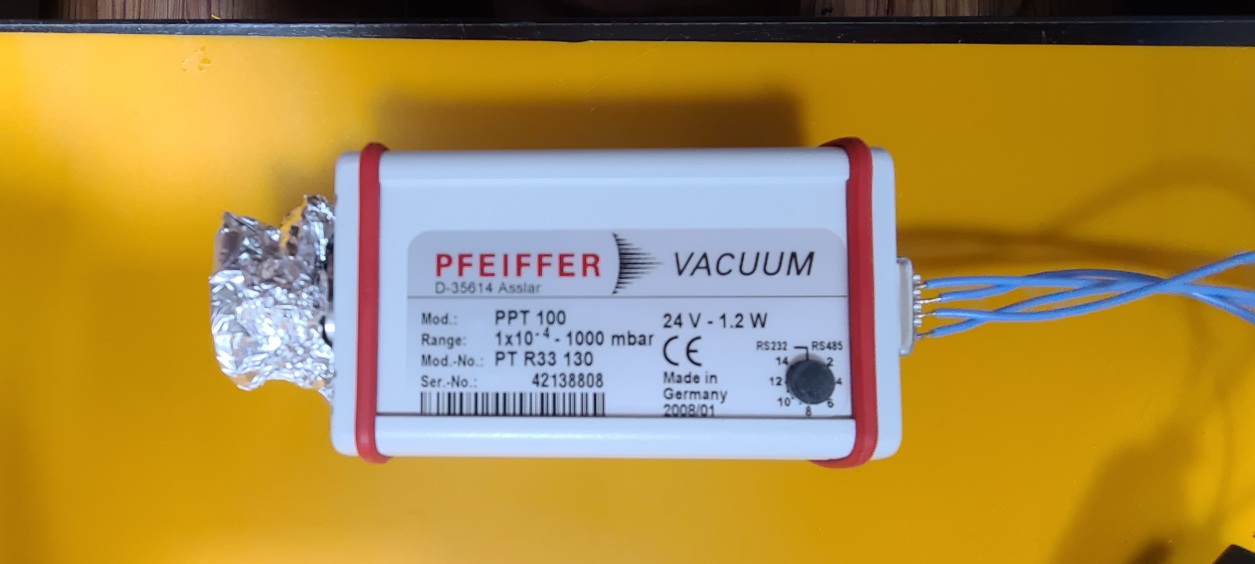
To correctly do this, you'll need to make a quick custom cable for the device. Please follow the pinout in the PPT 100 manual reproduced here. On this particular gauge, V DC is 24 V.
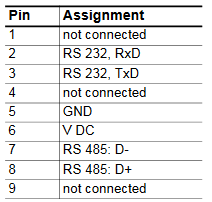
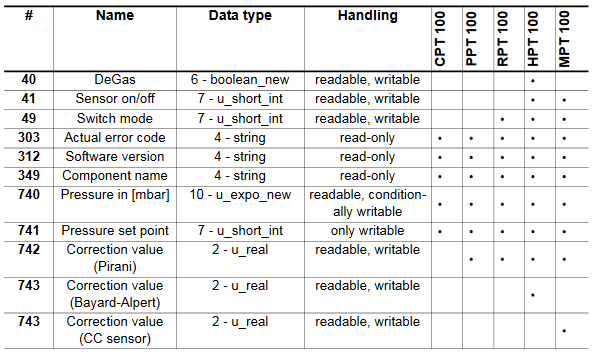
Cheap RS485 adapters exist that allow the gauge to be directly connected to a PC. Currently, only functions relevant to the PPT 100 are implemented in the library. The following is a table of compatibility for other models reproduced from the PPT 100 manual. If you are interested in other gauges, then please consider contributing.
## Quickstart Guide
The library is designed for and tested against the `pySerial` interface for communicating with the gauges. However, because it can technically be used with any serial interface that implements python's IO interface, I have decided against imposing which library to use in the dependencies of this project. To use pySerial as in this example, please installit through pip with `pip install pySerial`.
The most common operation is to read out pressure from the gauge. The following example will read out pressure from a gauge attached to COM port 1 with address 1 on the RS485 network. The pressure returned will be in bar.
```python
import serial
import pfeiffer_vacuum_protocol as pvp
# Open the serial port with a 1 second timeout
s = serial.Serial("COM1", timeout=1)
# Read the pressure from address 1 and print it
p = pvp.read_pressure(s, 1)
print("Pressure: {:.3f} bar".format(p))
```
## Invalid Character Filter
Some users have reported invalid characters coming from their serial device. Sometimes this can be resolved by simply ignoring those extra characters. The library comes with a filter built in. This is kept off by default to properly display errors to the user. However, it can be enabled/disabled by running one of the following function after import.
```python
import pfeiffer_vacuum_protocol as pvp
pvp.enable_valid_char_filter() # Filter on
pvp.disable_valid_char_filter() # Turn it off again
```
The filter can also be overridden on a per-function basis. The relevant functions have an optional argument called `valid_char_filter` which can be set to `True` or `False` to enable or disable the filter in a more targeted way.
## Package Reference
##### read_error_code(s, addr, valid_char_filter=None)
Reads Pfeiffer's low level error code on the gauge. This appears to be useful for diagnosing failure of the transmitter itself.
###### Parameters
* s: pySerial object
The open serial device attached to the gauge
* addr: int
The address of the gauge
* valid_char_filter: bool
Manually override the valid character filter
###### Returns
* error_code: pfeiffer_vacuum_protocol.ErrorCode enum element
The error code returned by the gauge, this can be one of `NO_ERROR`, `DEFECTIVE_TRANSMITTER`,
or `DEFECTIVE_MEMORY`
##### read_software_version(s, addr, valid_char_filter=None)
Returns the vacuum gauge's firmware version.
###### Parameters
* s: pySerial object
The open serial device attached to the gauge
* addr: int
The address of the gauge
* valid_char_filter: bool
Manually override the valid character filter
###### Returns
* firmware_version: three element tuple if ints
The version numbers as the tuple (major, minor, sub-minor)
##### read_gauge_type(s, addr, valid_char_filter=None)
Returns the name of the vacuum gauge attached at this address.
###### Parameters
* s: pySerial object
The open serial device attached to the gauge
* addr: int
The address of the gauge
* valid_char_filter: bool
Manually override the valid character filter
###### Returns
* gauge_type: str
The model name of the gauge attached
##### read_pressure(s, addr, valid_char_filter=None)
Reads the pressure from the gauge and returns it in bars.
###### Parameters
* s: pySerial object
The open serial device attached to the gauge
* addr: int
The address of the gauge
* valid_char_filter: bool
Manually override the valid character filter
###### Returns
* pressure: float
Pressure measured by gauge in bars
##### write_pressure_setpoint(s, addr, val, valid_char_filter=None)
Sets the gauge's "vacuum setpoint". In the manual, this appears to tell the gauge if it's operating in a high or low pressure regime to change some of its signal processing.
###### Parameters
* s: pySerial object
The open serial device attached to the gauge
* addr: int
The address of the gauge
* valid_char_filter: bool
Manually override the valid character filter
###### Returns
* None
##### read_correction_value(s, addr, valid_char_filter=None)
Returns the current correction value used to adjust pressure measurements for different gas compositions.
###### Parameters
* s: pySerial object
The open serial device attached to the gauge
* addr: int
The address of the gauge
* valid_char_filter: bool
Manually override the valid character filter
###### Returns
* correction_value: float
The current correction value
##### write_correction_value(s, addr, val, valid_char_filter=None)
Sets the correction value on the gauge. Used to adjust the pressure measurement for different gas compositions.
###### Parameters
* s: pySerial object
The open serial device attached to the gauge
* addr: int
The address of the gauge
* valid_char_filter: bool
Manually override the valid character filter
###### Returns
* None
##### enable_valid_char_filter()
Globally enable a filter to ignore invalid characters coming from the serial device.
##### disable_valid_char_filter()
Globally disable a filter to ignore invalid characters coming from the serial device.