https://github.com/elementumjs/router
Very basic HTML5 History router implementation for SPA apps.
https://github.com/elementumjs/router
javascript javascript-library router spa-router typescript webcomponents
Last synced: 8 months ago
JSON representation
Very basic HTML5 History router implementation for SPA apps.
- Host: GitHub
- URL: https://github.com/elementumjs/router
- Owner: elementumjs
- License: mit
- Created: 2021-11-01T11:55:13.000Z (over 4 years ago)
- Default Branch: main
- Last Pushed: 2021-11-01T16:48:42.000Z (over 4 years ago)
- Last Synced: 2025-05-22T09:26:31.153Z (about 1 year ago)
- Topics: javascript, javascript-library, router, spa-router, typescript, webcomponents
- Language: TypeScript
- Homepage: https://elementumjs.github.io/router/
- Size: 373 KB
- Stars: 4
- Watchers: 1
- Forks: 0
- Open Issues: 0
-
Metadata Files:
- Readme: README.md
- License: LICENSE
Awesome Lists containing this project
README
[][1]
[][2]
[][3]
[][4]
[][5]
`@elementumjs/router` is a very basic HTML5 History router implementation for SPA apps.
- [📝 How to use it][6]
- [Route definition][7]
- [Router initialization][8]
- [Navigate between routes][9]
- [🧪 Full example][10]
- [⚙️ Installation][11]
- [Import from CDN as ES Module][12]
- [Or install the package locally][13]
- [Other import methods][14]
---

## How to use it
### Route definition
Any route must have two properties at least: `path` and `view`.
* **`route.path`** property contains the URI string definition for this route (the part of the URL that is after the hash character `#`).
* **`route.view`** property contains the root route element definition, and it can be defined as a string, that represents the element tagName to be created, or as a HTMLElement, that contains the raw element.
The routes have also another two optional properties:
* **`route.title`** that is used to update the `document.title` when a transition occurs.
* **`route.handler`** property contains a function to be called when a transition occurs.
Example of routes definition:
```javascript
const aboutView = document.createElement('div');
// ...
const routes = [
{
path: '/',
title: 'Home | My personal site',
view: 'my-homepage' // Set the route view as string tagName
},
{
path: '/about',
title: 'About | My personal site',
view: aboutView, // Set the route view as HTMLElement instance
handler: () => {
// Get route transition data
console.log('[About View handler]', window.history.state);
}
}
];
```
### Router initialization
To initialize the router, is required to define a root HTMLElement (`target`) to use as route container and a correct routes definition (check the previous section).
Example of router initialization:
```javascript
import Router from '@elementumjs/router';
const routes = [ /** ... */ ];
const target = document.querySelector('container');
// Basic router initialization
const router = Router(target, routes);
```
To use the router instance across the app, it will be defined as global object into the `window` instance:
```javascript
import Router from '@elementumjs/router';
const routes = [ /** ... */ ];
const target = document.querySelector('container');
// Global router initialization
window['router'] = Router(target, routes);
```
### Navigate between routes
The navigation is possible with two ways, with HTML anchors or programmatically. The programmatically way allows to send some data to the following view.
| Method | Example |
|:---|:---|
| HTML anchor | `About me` |
| Programmatically | `window.router.go('/home', { param1: 'value1' });` |

## Full example
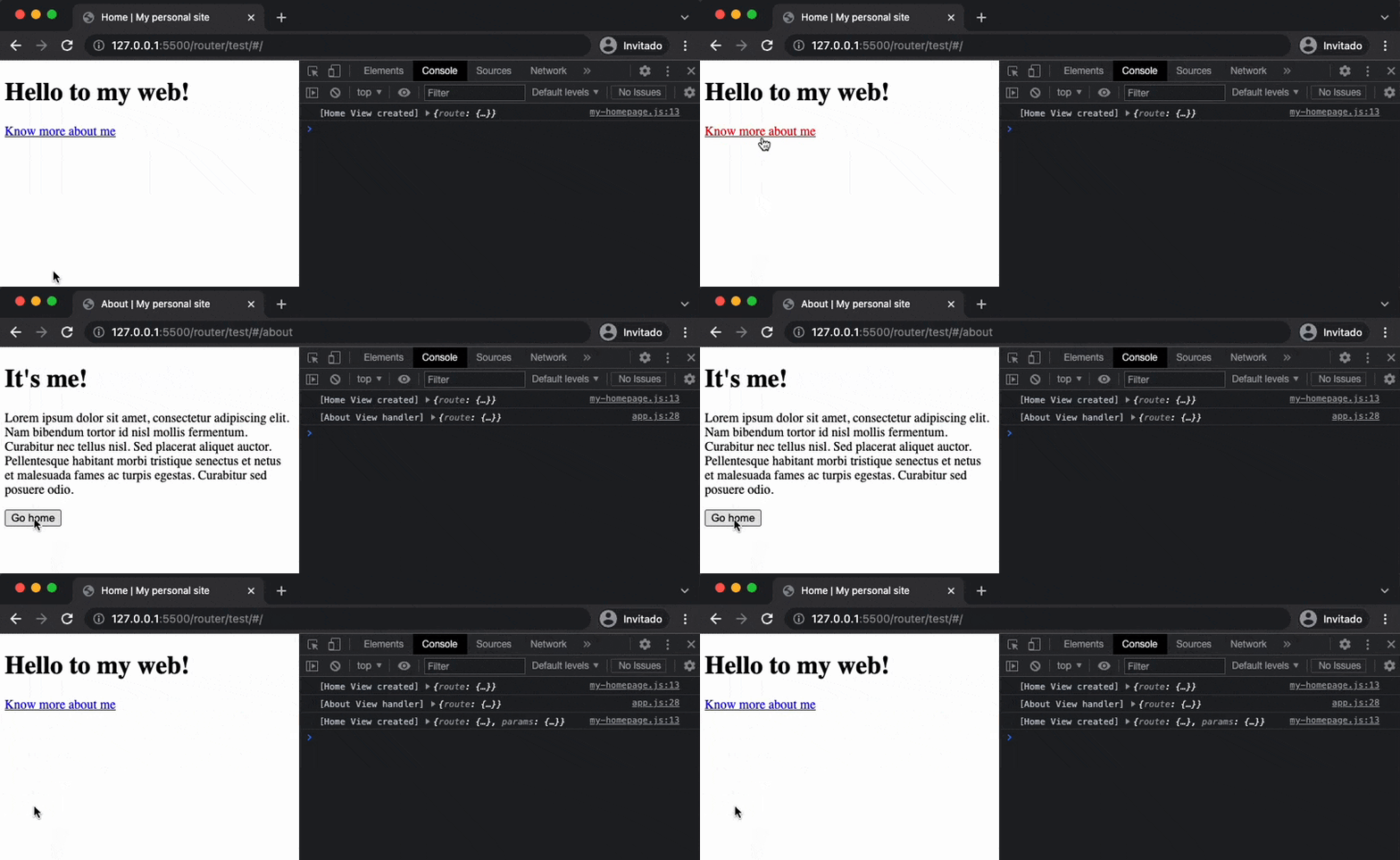
WebApp entry point `app.js`;
```javascript
import Router from '@elementumjs/router';
import './my-homepage.js';
const aboutView = document.createElement('div');
aboutView.innerHTML = `
It's me!
Lorem ipsum dolor sit amet, consectetur adipiscing elit. Nam bibendum tortor id nisl mollis fermentum. Curabitur nec tellus nisl. Sed placerat aliquet auctor. Pellentesque habitant morbi tristique senectus et netus et malesuada fames ac turpis egestas. Curabitur sed posuere odio.
Go home
`;
// Go to Home programmatically
aboutView.lastElementChild.onclick = () => window.router.go('/', { param1: 'value1' });
// Get target defined on index.html
const target = document.querySelector('container');
const routes = [
{
path: '/',
title: 'Home | My personal site',
view: 'my-homepage'
},
{
path: '/about',
title: 'About | My personal site',
view: aboutView,
handler: () => {
// Get route transition data
console.log('[About View handler]', window.history.state);
}
}
];
// Make router instance available globally
window['router'] = Router(target, routes);
```
Home page component definition: `my-homepage.js`.
```javascript
import { Component, html } from '@elementumjs/component';
Component.attach('my-homepage', class extends Component {
template() {
return html`
`;
}
created() {
// Get route transition data
console.log('[Home View created]', window.history.state);
}
});
```
`index.html` definition:
```html
```

## Installation
### Import from CDN as ES Module
Import from [jsDelivr CDN](https://www.jsdelivr.com/):
```javascript
import Router from "https://cdn.jsdelivr.net/gh/elementumjs/router/dist/router.esm.js";
```
### Or install the package locally
#### Download the package
Install via `npm`:
```sh
npm install @elementumjs/router
```
#### Import as ES Module
[ES Module](http://exploringjs.com/es6/ch_modules.html) builds are intended for use with modern bundlers like [webpack 2](https://webpack.js.org) or [rollup](http://rollupjs.org/). Use it with ES6 JavaScript `import`:
```javascript
import Router from '@elementumjs/router';
```
### Other import methods
Checkout other import methods in [`dist/README.md`](./dist/README.md).
[1]: https://cdn.jsdelivr.net/gh/elementumjs/router/dist/router.umd.js
[2]: https://www.npmjs.com/package/@elementumjs/router
[3]: https://github.com/elementumjs/router/actions?query=workflow%3Aproduction
[4]: docs/modules.md
[5]: ./LICENSE
[6]: #how-to-use-it
[7]: #route-definition
[8]: #router-initialization
[9]: #navigate-between-routes
[10]: #full-example
[11]: #installation
[12]: #import-from-cdn-as-es.module
[13]: #or-install-the-package-locally
[14]: #other-import-methods