https://github.com/elenionl/elpickerview-swift
A Picker View with animation build in Swift 3
https://github.com/elenionl/elpickerview-swift
picker picker-component pickerview swift swift-3
Last synced: about 1 year ago
JSON representation
A Picker View with animation build in Swift 3
- Host: GitHub
- URL: https://github.com/elenionl/elpickerview-swift
- Owner: Elenionl
- License: mit
- Created: 2017-04-22T03:06:18.000Z (about 9 years ago)
- Default Branch: master
- Last Pushed: 2018-01-22T05:14:39.000Z (over 8 years ago)
- Last Synced: 2025-04-10T00:01:26.726Z (about 1 year ago)
- Topics: picker, picker-component, pickerview, swift, swift-3
- Language: Swift
- Homepage:
- Size: 2.39 MB
- Stars: 5
- Watchers: 1
- Forks: 2
- Open Issues: 1
-
Metadata Files:
- Readme: README IN CHINESE.md
- Changelog: CHANGELOG.md
- License: LICENSE.md
Awesome Lists containing this project
README
ELPickerView: 简单易用的 Picker View, 使用 Swift 4 开发
======================================
[](https://travis-ci.org/Elenionl/ELPickerView-Swift)
[](http://cocoapods.org/pods/ELPickerView)
[](http://cocoapods.org/pods/ELPickerView)
[](https://cocoapods.org/pods/ELPickerView)
[](https://cocoapods.org/pods/ELPickerView)
[](https://img.shields.io/badge/Swift-3.0-blue.svg)
[](https://img.shields.io/badge/iOS-8.0-blue.svg)
**:warning: ELPickerView 适用于 Swift 3.**
## Screenshots
简单易用的 Picker View, 使用 Swift 4 开发
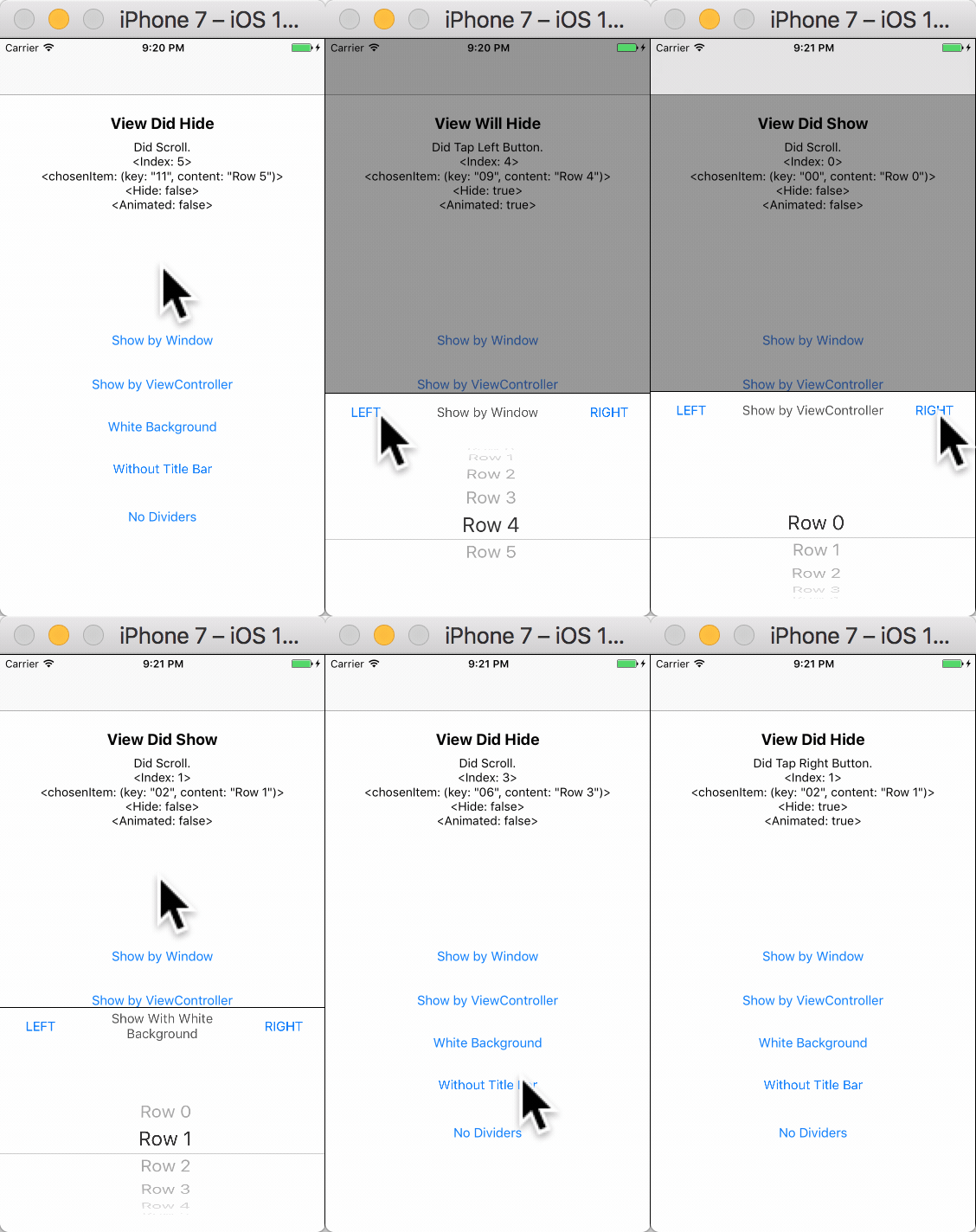
-----------
## 安装方法
### 使用 [CocoaPods](https://cocoapods.org/pods/ELPickerView)
-----------
* 在 ``podfile`` 中添加下面一行代码 :
``pod 'ELPickerView'``
* 使用 Terminal 运行 `pod install`
* Swift 3* 使用 3.0.0 pod 版本
* Swift 4* 使用 4.* pod 版本
* 完成!
-----------
### 直接添加
* 用浏览器打开 [Elenionl/ELPickerView-Swift](https://github.com/Elenionl/ELPickerView-Swift)
* 下载或克隆项目: ``https://github.com/Elenionl/ELPickerView-Swift.git``
* 复制项目中的 ``ELCustomPickerView.swift`` 文件到您的项目中
* 完成!
------------
## 如何使用
### ELPickerView 十分简便,使用仅需要两步:
* 构造
```Swift
lazy var customPickerView: ELCustomPickerView = {
return ELCustomPickerView(pickerType: .singleComponent, items: [
"Row 0"
, "Row 1"
, "Row 2"
, "Row 3"
, "Row 4"
, "Row 5"
])
}
```
* 展示
```Swift
override func viewDidLoad() {
super.viewDidLoad()
customPickerView.show(viewController: self, animated: true)
}
```
------------
### 如果想让 Picker View 的北京覆盖导航栏和工具栏
* 只需要让 window 来展示 Picker View 代码如下:
```Swift
override func viewDidLoad() {
super.viewDidLoad()
customPickerView.show(viewController: nil, animated: true)
}
```
-------------
### ELPickerView 中没有代理, 使用闭包来处理回调, 代码聚合性更好
* 针对各种事件都有回调
利用 Set 方法完成
```Swift
view.setDidScrollHandler({ [weak self] (view, chosenIndex, chosenItem) -> (shouldHide: Bool, animated: Bool) in
let hide = false
let animated = false
self?.logLabel.text = "Did Scroll. \n \n \n \n"
print(self?.logLabel.text ?? "")
return (hide, animated)
})
```
直接设置
```Swift
customPickerView.leftButtoTapHandler = { [weak self] (view: ELCustomPickerView?, chosenIndex: Int, chosenItem: (key: String, content: String)) in
let hide = true
let animated = true
self?.logLabel.text = "Did Tap Left Button. "
print(self?.logLabel.text ?? "")
return (hide, animated)
}
```
* 这个闭包是这样定义的
```Swift
/// 当点击左侧按钮的时候出发
// view: 触发时间的 Picker View
// chosenIndex: Picker View 当前选中栏的 index
// chosenItem: 当前选中栏的 index 所对应的 item 数据
// shouldHide: 通知 Picker View 是否要隐藏, 默认是 true
// animated: 通知 Picker View 隐藏时是否有动画, 默认是 true
public var leftButtoTapHandler: ((_ view: ELCustomPickerView?, _ chosenIndex: Int, _ chosenItem: T) -> (shouldHide: Bool, animated: Bool))?
```
-------------------------
### Picker View 中的栏目对用的不仅仅是 String, 也可是 **对象** **结构体** **枚举** 以及 **元组**
* 使用方法: 构造时通过泛型指定 item 的类型, 并将带有 item 的数组作为参数传入构造函数
```Swift
typealias CustomView = ELCustomPickerView<(key: String, content: String)>
...
let view = CustomView(pickerType: .singleComponent, items: [
("00", "Row 0")
, ("02", "Row 1")
, ("04", "Row 2")
, ("06", "Row 3")
, ("09", "Row 4")
, ("11", "Row 5")
])
```
* 给 itemConfigHandler 属性赋值, 该属性是一个将 item 转化成 String 类型对象的闭包, 当为Picker View 提供数据的时候, ELPickerView 将会调用该闭包将 item 转化成要展现的条目
```Swift
view.itemConfigHandler = { (key: String, content: String) in
return content
}
```
* 完成!
-------------------------
### Picker View 的配置也十分简单
```Swift
view.blackBackground = true
view.isTitleBarHidden = false
view.isTapBackgroundEnabled = true
view.leftButton.setTitle("LEFT", for: .normal)
view.rightButton.setTitle("RIGHT", for: .normal)
view.title.text = "TITLE"
view.foregroundView.picker.backgroundColor = UIColor.white
view.foregroundView.bottomDivider.isHidden = true
```
----------------
## 下面是可进行配置的相关属性
```Swift
// MARK: - Settings
/// Type of Picker View
public let pickerType: ELCustomPickerViewType
/// Items used to config Picker View rows Default value is []
public var items: [T]
/// Background of the screen Default value is true
public var blackBackground: Bool
/// Set Title Bar hidden or not Default value is false
public var isTitleBarHidden = false
/// Set Taping Background to hide Picker View enabled or not Default value is true
public var isTapBackgroundEnabled = true
/// Left Button of the Title Bar, shortcut to foregroundView.leftButton
public lazy var leftButton: UIButton
/// Right Button of the Title Bar, shortcut to foregroundView.rightButton
public lazy var rightButton: UIButton
/// Title of the Title Bar, shortcut to foregroundView.title
public lazy var title: UILabel
// MARK: - Handler
/// Function used to transform Item into String. If the Item is String kind, itemConfigHandler is not necessory to be set.
public var itemConfigHandler: ((T) -> String)?
/// Triggered when Left Button is tapped.
// view: the CustomPickerView
// chosenIndex: the current chosen index of row in Picker View
// chosenItem: the Item connected with the chosen row
// shouldHide: tell the Picker View whether it should be hide Default value is true
// animated: tell the Picker View whether the hide action should have animation Default value is true
public var leftButtoTapHandler: ((_ view: ELCustomPickerView?, _ chosenIndex: Int, _ chosenItem: T) -> (shouldHide: Bool, animated: Bool))?
/// Triggered when Right Button is tapped.
// view: the CustomPickerView
// chosenIndex: the current chosen index of row in Picker View
// chosenItem: the Item connected with the chosen row
// shouldHide: tell the Picker View whether it should be hide Default value is true
// animated: tell the Picker View whether the hide action should have animation Default value is true
public var rightButtoTapHandler: ((_ view: ELCustomPickerView?, _ chosenIndex: Int, _ chosenItem: T) -> (shouldHide: Bool, animated: Bool))?
/// Triggered when user picked one row in Picker View.
// view: the CustomPickerView
// chosenIndex: the current chosen index of row in Picker View
// chosenItem: the Item connected with the chosen row
// shouldHide: tell the Picker View whether it should be hide Default value is false
// animated: tell the Picker View whether the hide action should have animation Default value is false
public var didScrollHandler: ((_ view: ELCustomPickerView?, _ chosenIndex: Int, _ chosenItem: T) -> (shouldHide: Bool, animated: Bool))?
/// Triggered when Picker View will show
public var willShowHandler: ((_ view: ELCustomPickerView?) -> Void)?
/// Triggered when Picker View did show
public var didShowHandler: ((_ view: ELCustomPickerView?) -> Void)?
/// Triggered when Picker View will hide
public var willHideHandler: ((_ view: ELCustomPickerView?) -> Void)?
/// Triggered when Picker View did hide
public var didHideHandler: ((_ view: ELCustomPickerView?) -> Void)?
// MARK: - Views
/// The bottom view containing Title Bar and Picker
public lazy var foregroundView: ELPickerForegroundView
```
----------------
## 需求
* Xcode 8.0
* Swift 3.0
* 使用 ARC
* iOS 8.0
-------------------
## 作者
Hanping Xu ([Elenionl](https://github.com/Elenionl)), stellanxu@gmail.com
-------------------
## 协议
ELPickerView is available under the MIT license, see the LICENSE file for more information.