https://github.com/elenionl/eltabscrollcontroller
Easily Used Tab Scroll ViewController build with Swift 3
https://github.com/elenionl/eltabscrollcontroller
swift swift3 switch tab-scroll-viewcontroller tabcontroller tabs
Last synced: 11 months ago
JSON representation
Easily Used Tab Scroll ViewController build with Swift 3
- Host: GitHub
- URL: https://github.com/elenionl/eltabscrollcontroller
- Owner: Elenionl
- License: mit
- Created: 2017-04-22T16:22:08.000Z (about 9 years ago)
- Default Branch: master
- Last Pushed: 2018-11-16T05:09:45.000Z (over 7 years ago)
- Last Synced: 2025-02-02T15:51:38.394Z (over 1 year ago)
- Topics: swift, swift3, switch, tab-scroll-viewcontroller, tabcontroller, tabs
- Language: Swift
- Homepage:
- Size: 2.65 MB
- Stars: 4
- Watchers: 2
- Forks: 3
- Open Issues: 0
-
Metadata Files:
- Readme: README IN CHINESE.md
- Changelog: CHANGELOG.md
- License: LICENSE.md
Awesome Lists containing this project
README
ELTabScrollChontroller: 简单易用的 Tab Scroll Controller, 使用 Swift 3 开发
======================================
[](https://travis-ci.org/Elenionl/ELTabScrollController)
[](http://cocoapods.org/pods/ELTabScrollController)
[](http://cocoapods.org/pods/ELTabScrollController)
[](https://cocoapods.org/pods/ELPickerView)
[](https://cocoapods.org/pods/ELPickerView)
[](https://cocoapods.org/pods/ELPickerView)
**:warning: ELTabScrollChontroller 适用于 Swift 3.X 和 iOS 9.X
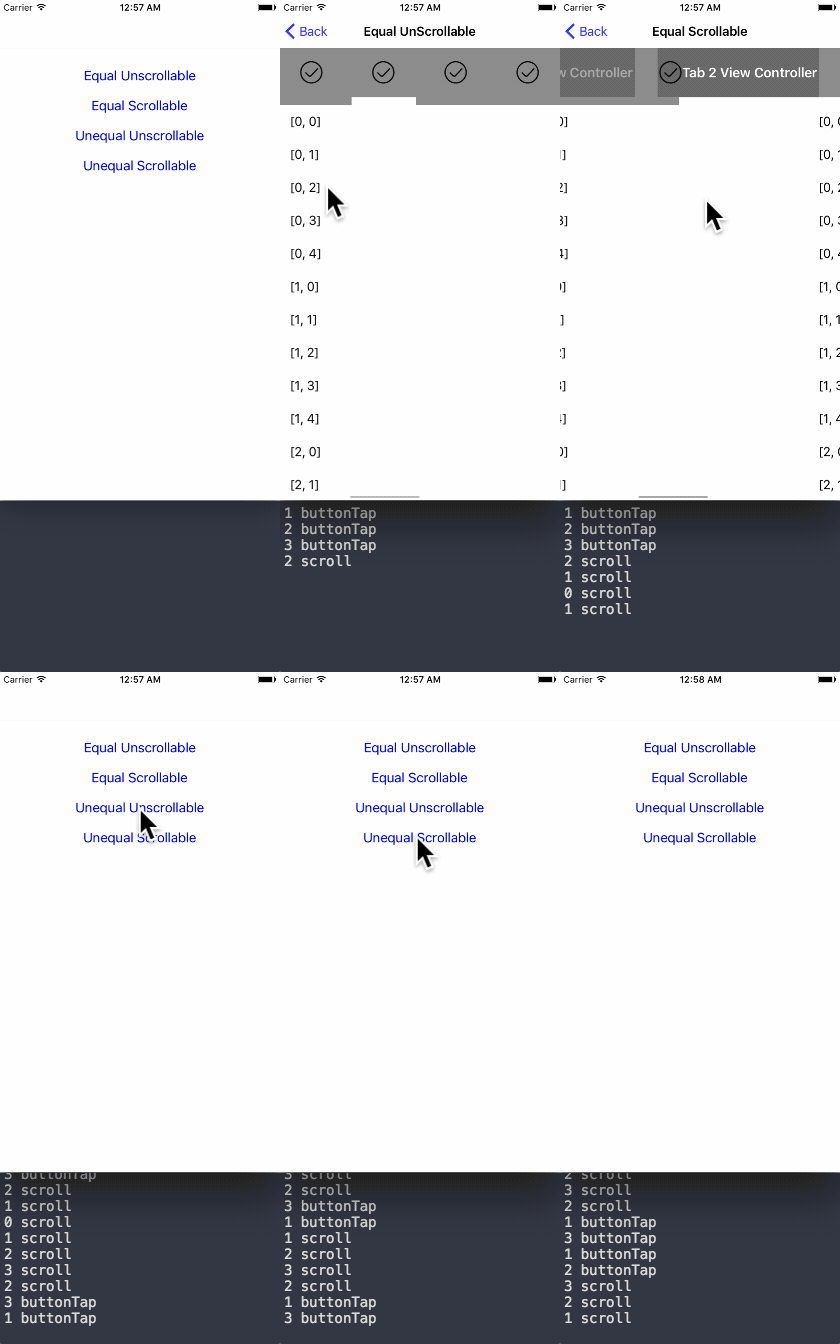
## 截图
简单易用的 Tab Scroll Controller, 使用 Swift 3 开发
-----------
## 安装方法
### 使用 [CocoaPods](https://cocoapods.org/pods/ELTabScrollController)
-----------
* 在 ``podfile`` 中添加下面一行代码 :
``pod 'ELTabScrollChontroller'``
* Swift 3.* 对应 3.0.0 版本的 pod
* Swift 4.* 对应 4.* 版本的 pod
* 使用 Terminal 运行 `pod install`
* 完成!
-----------
### 直接添加
* 用浏览器打开 [Elenionl/ELTabScrollChontroller](https://github.com/Elenionl/ELTabScrollController)
* 下载或克隆项目: ``https://github.com/Elenionl/ELTabScrollController.git``
* 复制项目中的 ``ELTabScrollChontroller.swift`` 与 ``UIKit+EL.swift``文件到您的项目中
* 完成!
------------
## 如何使用
### 如果您想在您的 App 中使用 ELTabScrollController, 只需要简单的两步:
* 创建
```Swift
class TabScrollController: ELTabScrollController {
// MARK: - LifeCircle
init() {
super.init()
}
```
或者在创建时指定类型
```Swift
class TabScrollController: ELTabScrollController {
// MARK: - LifeCircle
init() {
super.init(width: 200, type: .equal_scrollable)
}
```
* 添加要显示的内容
```Swift
override func viewDidLoad() {
super.viewDidLoad()
let ctrl1 = ViewController(nibName: nil, bundle: nil)
let ctrl2 = ViewController(nibName: nil, bundle: nil)
let ctrl3 = ViewController(nibName: nil, bundle: nil)
let ctrl4 = ViewController(nibName: nil, bundle: nil)
let item1 = ELTabScrollItem(title: "Tab 1", image: nil, viewController: ctrl1, view: nil)
let item2 = ELTabScrollItem(title: "Tab 2", image: nil, viewController: ctrl2, view: nil)
let item3 = ELTabScrollItem(title: "Tab 3", image: nil, viewController: ctrl3, view: nil)
let item4 = ELTabScrollItem(title: "Tab 4", image: nil, viewController: ctrl4, view: nil)
items = [item1, item2, item3, item4]
}
```
----------------------
### ELTabScrollController 的类型
ELTabScrollController 共有四种类型
* equal_unscrollable
* equal_scrollable
* unequal_unscrollable
* unequal_scrollable
**equal** 所有按钮宽度相等
**unequal** 按钮宽度由其本身的 contentSize 决定
**unscrollable** tab 不可滚动且宽度等于 ELTabScrollController.width
**scrollable** tab 可以滚动, 宽度可能大于 ELTabScrollController.width
----------------------
### 如果你想要只显示 ChildViewController 的某一个 view, 只需要如下操作
```Swift
let ctrl1 = ViewController(nibName: nil, bundle: nil)
let item1 = ELTabScrollItem(title: "Tab 1", image: nil, viewController: ctrl1, view: ctrl1.tableView)
```
--------------
### 滑动分页或点击按钮会产生回调
* 设置回调
```Swift
self.switchHandler = { (index, type) in
print(index, type)
}
```
* 打印内容如下
```Swift
2 buttonTap
2 buttonTap
3 buttonTap
1 buttonTap
1 buttonTap
0 scroll
0 scroll
1 scroll
```
--------------------------
### 按钮可以定制
***:warning: 对于 button 订制优先级低于对 tabScrollController 的设置, 例如 ELTabScrollController.buttonSelectedBackgroudColor 属性会覆盖掉 ELTabScrollItem.button 的设置.***
* 设置按钮的标题和图片
```Swift
let item4 = ELTabScrollItem(title: "Tab 4", image: UIImage(named: "image"), viewController: ctrl4, view: nil)
```
* 完全自定义按钮
```Swift
public init(button: UIButton, viewController: UIViewController, view: UIView?)
```
--------------------
### ELTabScrollController 也可以自定义
```Swift
override func viewDidLoad() {
super.viewDidLoad()
self.title = "Demo"
tab.backgroundColor = UIColor.orange
sliderView.backgroundColor = .white
container.backgroundColor = UIColor.lightGray
tabButtonHeight = 66
sliderViewHeight = 10
buttonFont = UIFont.boldSystemFont(ofSize: 18)
buttonSelectedTitleColor = UIColor.white
buttonNormalTitleColor = UIColor.lightGray
switchHandler = { (index, type) in
print(index, type)
}
}
```
-----------------
## 可用的设置
```Swift
// MARK: - Settings
/// Items containing buttons and viewControllers
open var tabBarType: ELTabBarType = ELTabBarType.equal_unscrollable
/// Distance between buttons. Default value: 30.0 for scrollable, 0 for unscrollable.
open var tabSpacing: CGFloat
/// The zoom factor for buttons, only available in scrollable tabs. Default value: 1.05
open var buttonHorizontalZoomFactor: CGFloat = 1.05
/// Items containing buttons and viewControllers
open var items: [ELTabScrollItem]! = []
/// The width of the base view. Default value is screen width
open var width: CGFloat! = UIScreen.main.bounds.size.width
/// Triggered by switch behavior
open var switchHandler: ELSwitchHandler?
/// Height of button
open var tabButtonHeight: CGFloat = 44
/// Hight of slider
open var sliderViewHeight: CGFloat = 5
/// Font of button
open var buttonFont: UIFont?
open var buttonSelectedBackgroudColor: UIColor?
open var buttonNormalBackgroudColor: UIColor?
open var buttonSelectedTitleColor: UIColor?
open var buttonNormalTitleColor: UIColor?
```
------------
## 要求
* Xcode 8.X
* Swift 3.X
* Using ARC
* iOS 9.0
--------------
## TODO
* ✅ More Tab Style
* ❎ More Slider Style
## 作者
Hanping Xu ([Elenionl](https://github.com/Elenionl)), stellanxu@gmail.com
--------------------------
## License
ELTabScrollController is available under the MIT license, see the LICENSE file for more information.