https://github.com/elfive/homebridge-advanced-timer
homebridge advanced timer, with homekit and iOS shortcut, you could do much more things.
https://github.com/elfive/homebridge-advanced-timer
homebridge homekit timer
Last synced: 8 months ago
JSON representation
homebridge advanced timer, with homekit and iOS shortcut, you could do much more things.
- Host: GitHub
- URL: https://github.com/elfive/homebridge-advanced-timer
- Owner: elfive
- License: apache-2.0
- Created: 2021-01-11T01:54:48.000Z (over 5 years ago)
- Default Branch: master
- Last Pushed: 2021-01-14T08:42:03.000Z (over 5 years ago)
- Last Synced: 2025-02-01T04:41:21.449Z (over 1 year ago)
- Topics: homebridge, homekit, timer
- Language: JavaScript
- Homepage:
- Size: 263 KB
- Stars: 17
- Watchers: 2
- Forks: 0
- Open Issues: 2
-
Metadata Files:
- Readme: README.md
- License: LICENSE
Awesome Lists containing this project
README
## homebridge-advanced-timer
## 1) Description
advanced timer, get full use of iOS automation.
### features
- controled by a Homekit switch, easy to control.
- setting up interval plan, and can loop infinite or loop certain cycles.
### limitations
- after homebridge restart, can only start from the loop beginning
- ......
### examples
- every 30 mins, heat your room for 10 mins.
- check home temperature every 5 mins, and change heater target temperature.
- ......
## 2) Configure
### trigger mode
- TTL
- Pulse
- Trigger status compare
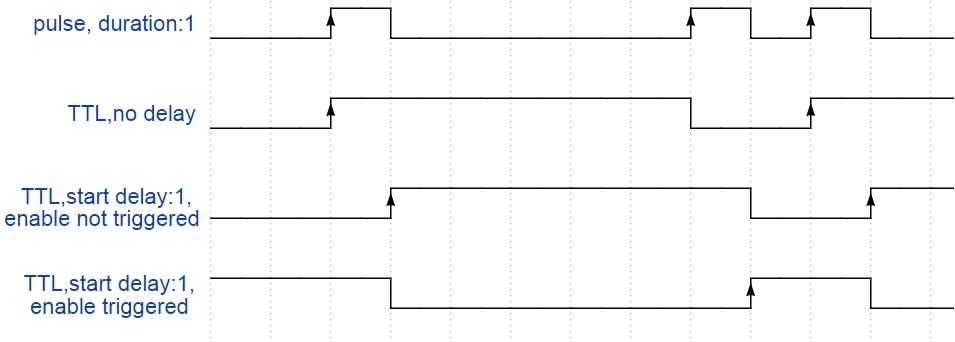
*note: trigger plan(intervals): 2,6*
### config.json field
| field name | type | required | default | range | description |
| :------------------------: | :----: | :------: | :-------------: | :---------: | ------------------------------------------------------------ |
| accessory | string | yes | 'advanced_timer' | 'advanced_timer' | MUST BE 'advanced_timer' |
| name | string | yes | 'AdvancedTimer' | --- | device name shows in HomeKit. we don't need it, but homebridge need it. |
| intervals | string | yes | --- | 0 to 86400
(each value) | Comma-separated trigger plan, every interval(in second), if pulse trigger mode is selected, all interval value should longer than trigger_duration below. |
| repeat | int | no | 0 | 0 to 86400 | How many trigger plan cycles repeat, 0 for infinite loop. |
| enable_name | string | no | 'Enable' | --- | Timer enable switch name shows in HomeKit |
| trigger_name | string | no | 'Trigger' | --- | Timer trigger indicator name shows in HomeKit. |
| trigger_type | int | no | 1 | 0, 1 | like electronic, trigger type has two different type:
0: Pulse
1: TTL |
| pulse_trigger_duration | int | no | 3 | 1 to 3 | Each time a trigger signal last duration, in second,
only works in Pulse trigger type |
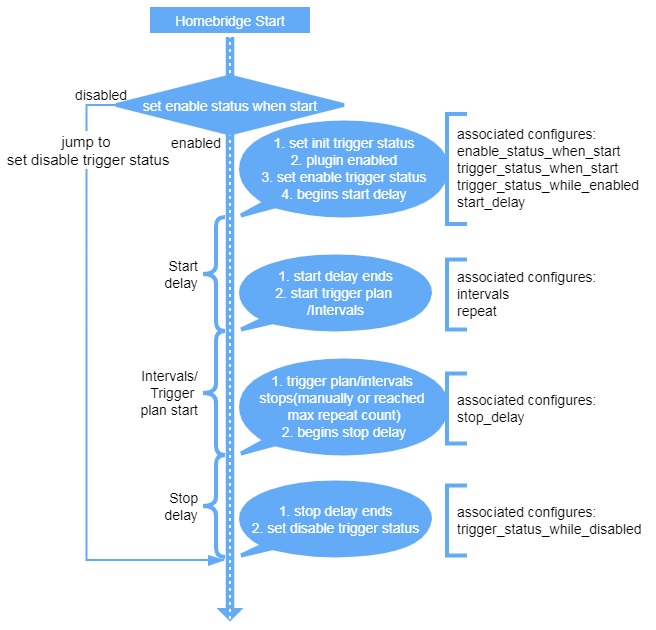
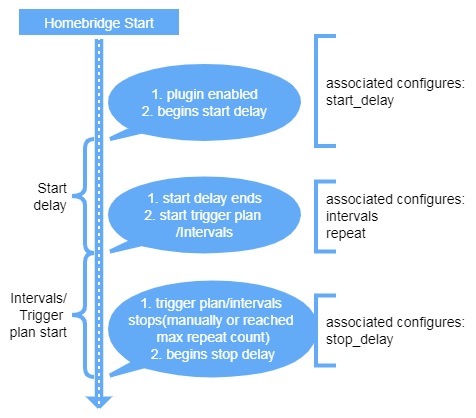
| start_delay
(unit: second) | int | no | 0 | 0 to 86400 | After timer enable status set to enable, delay before trigger plan starts. |
| stop_delay
(unit: second) | int | no | 0 | 0 to 86400 | Delay after trigger plan stops or after timer enable status set to disable, only works in TTL trigger type. |
| enable_status_when_start | int | no | 2 | 0, 1, 2 | Enable status after Homebridge start, only works in TTL trigger type.
0: OFF,
1: ON,
2: Last Status. |
| trigger_status_when_start | int | no | 2 | 0, 1, 2 | Enable status after Homebridge start, only works in TTL trigger type.
0: OFF,
1: ON,
2: Last Status. |
| trigger_status_while_enabled | int | no | 0 | 0, 1, 2 | Trigger status while service enabled, only works in TTL trigger type.
0: Not Triggered,
1: Triggered,
2: Last Status. |
| trigger_status_while_disabled | int | no | 0 | 0, 1, 2 | Trigger status while service disabled, only works in TTL trigger type.
0: Not Triggered,
1: Triggered,
2: Last Status. |
### example of config.json file
```json
"accessories": [
{
"name": "heater_timer",
// trigger plan:
// trigger after 5s then trigger after 10s, means trigger at 5s and 15s
"intervals": "5,10",
// repeat trigger plan for 4 times
"repeat": 4,
"enable_name": "Enable",
"trigger_name": "Trigger",
"enabled_status_after_restart": 2,
"trigger_duration": 3,
"accessory": "advanced_timer"
}
]
```
## 3) How to contribute
everyone is welcome to contribute to this plugin. PR/issue/debug all are welcome.
or you can send me an e-mail: elfive@elfive.cn