https://github.com/elliotttate/splicekit
Direct in-process control of Final Cut Pro via dylib injection and MCP server
https://github.com/elliotttate/splicekit
fcp fcpx fcpxml finalcutpro
Last synced: 3 months ago
JSON representation
Direct in-process control of Final Cut Pro via dylib injection and MCP server
- Host: GitHub
- URL: https://github.com/elliotttate/splicekit
- Owner: elliotttate
- License: mit
- Created: 2026-03-30T15:45:29.000Z (4 months ago)
- Default Branch: main
- Last Pushed: 2026-04-16T02:52:20.000Z (3 months ago)
- Last Synced: 2026-04-16T03:30:54.529Z (3 months ago)
- Topics: fcp, fcpx, fcpxml, finalcutpro
- Language: Objective-C
- Homepage: https://splicekit.fcp.cafe
- Size: 19.7 MB
- Stars: 42
- Watchers: 2
- Forks: 7
- Open Issues: 28
-
Metadata Files:
- Readme: README.md
- License: LICENSE
- Agents: AGENTS.md
Awesome Lists containing this project
README
# SpliceKit
Welcome to **SpliceKit**!
SpliceKit gives superpowers to Apple's Final Cut Pro.
If you're a video editor, the best place to get started is the official [SpliceKit website](https://splicekit.fcp.cafe). Definitely check out the [FAQ](https://splicekit.fcp.cafe/faq/) for an easier explanation of some of what SpliceKit can do.
You can also join us on [FCP Cafe](https://fcp.cafe) in the SpliceKit [Discord channels](https://discord.com/invite/HD3FPc4Azu) for help, questions, or feature requests.
For bug reports please [open a GitHub Issue](https://github.com/elliotttate/SpliceKit/issues).
We can't wait to see what you do with SpliceKit!
Onwards & Upwards! 🥳
---
## Built-in Features
### Transcript Editor — Text-Based Video Editing
[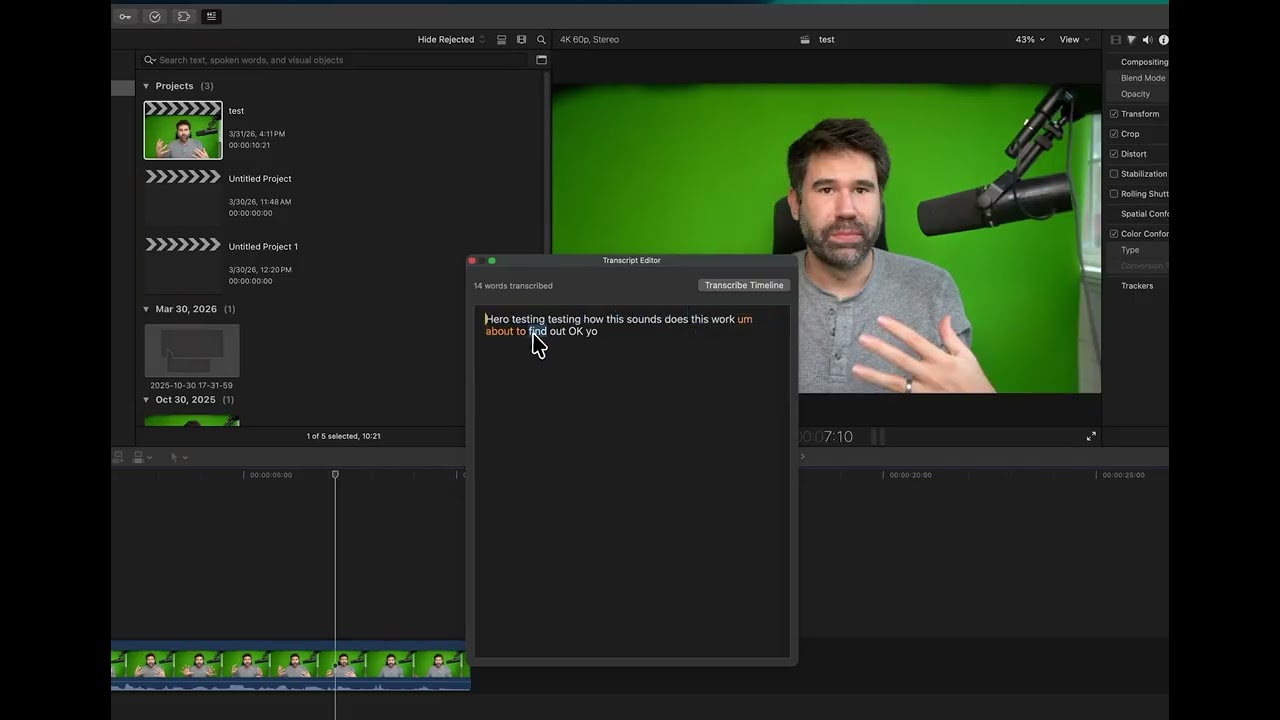](https://www.youtube.com/watch?v=JxxDSH4Ly0I)
> Click a word to jump the playhead. Select words and press Delete to remove video segments. Drag words to reorder clips. All changes apply directly to the FCP timeline.
Powered by **NVIDIA Parakeet TDT 0.6B** (on-device via FluidAudio) with v3 multilingual (25 languages) as the default engine and v2 English-optimized as an option. Speaker diarization identifies who's speaking. All clips are transcribed in a single batch process for speed.
### Command Palette — Apple Intelligence for Final Cut Pro
Hit **Cmd+Shift+P** inside the modded FCP to open a VS Code-style command palette with fuzzy search across 100+ editing actions. Type what you want to do in plain English and Apple Intelligence (on-device LLM via FoundationModels) translates your intent into editing actions.
**Built-in commands include:**
- **Editing**: Blade, delete, cut/copy/paste, trim, nudge, compound clips, detach audio, lift/overwrite, create storylines
- **Playback**: Play/pause, frame stepping, go to start/end, loop, play selection, JKL-style controls
- **Color**: Color Board, Color Wheels, Color Curves, Hue/Saturation, auto-enhance, match color, balance color
- **Speed**: Normal, 2x/4x/8x/20x fast, 50%/25%/10% slow, reverse, freeze frame, hold frame
- **Markers**: Standard, to-do, and chapter markers with navigation
- **Effects & Transitions**: Browse, search, and apply any effect, transition, generator, or title by name
- **Audio**: Volume up/down, fade in/out, audio enhancements, **Remove Silences** (auto-detects and removes silent segments)
- **Scene Detection**: Analyze video for shot boundaries and automatically add markers or blade at every scene change
- **Transform**: Crop, distort, reframe, stabilize
- **Multicam**: Switch and cut angles 1-4, create multicam clips
- **Captions**: Add/import captions and subtitles
- **Ratings & Roles**: Favorite, reject, role assignment
- **View**: Zoom to fit, snapping, skimming, timeline index, inspector
- **Export**: Render, share selection, export FCPXML
**Natural language examples you can ask Apple Intelligence:**
- *"add markers every 5 seconds"*
- *"slow this clip to half speed"*
- *"add a cross dissolve"*
- *"color correct this clip"*
- *"blade at every scene change"*
- *"remove all the silences"*
- *"zoom to fit the timeline"*
The AI understands your intent, maps it to the right sequence of FCP actions, and executes them — all without leaving the keyboard.
**Remove Silences** uses Apple-native AVFoundation + Accelerate (vDSP) to analyze audio and detect silent segments. No ffmpeg or external dependencies. An options panel lets you configure the detection threshold, minimum silence duration, and padding. The audio analysis runs in the background with a processing indicator, then silences are bladed and ripple-deleted from the timeline.
**Scene Detection** uses histogram-based frame comparison via the Accelerate framework's vImage to detect cuts and shot changes. Configurable sensitivity and sample interval. Markers are inserted programmatically at exact timecodes — no playhead movement required — making it fast even on long sequences.
---
## What This Does
SpliceKit injects a dynamic library into a re-signed copy of Final Cut Pro that:
- Exposes the entire ObjC runtime (78,000+ classes, including all private APIs)
- Runs a JSON-RPC 2.0 server on `127.0.0.1:9876` for external control
- Provides an MCP server for AI-assisted FCP automation
- Swizzles out CloudKit/ImagePlayground calls that crash without iCloud entitlements
- Gives direct access to Flexo, Ozone, TimelineKit, LunaKit, and all internal frameworks
---
## Architecture
```
┌─────────────────────────────────────────────────┐
│ Final Cut Pro (modded copy) │
│ ┌───────────────────────────────────────────┐ │
│ │ SpliceKit.framework (injected via │ │
│ │ LC_LOAD_DYLIB) │ │
│ │ │ │
│ │ - ObjC runtime introspection │ │
│ │ - JSON-RPC server on TCP :9876 │ │
│ │ - Method swizzling │ │
│ │ - CloudContent crash prevention │ │
│ └───────────┬───────────────────────────────┘ │
│ │ direct objc_msgSend │
│ ┌───────────▼───────────────────────────────┐ │
│ │ Flexo, Ozone, TimelineKit, LunaKit ... │ │
│ │ (78,000+ ObjC classes) │ │
│ └───────────────────────────────────────────┘ │
└──────────────────────┬──────────────────────────┘
│ TCP :9876
┌──────────────▼──────────────┐
│ MCP Server (mcp/server.py) │
│ Python Client │
│ nc / curl / any TCP client │
└─────────────────────────────┘
```
---
## Quick Setup
### GUI Patcher (Recommended)
[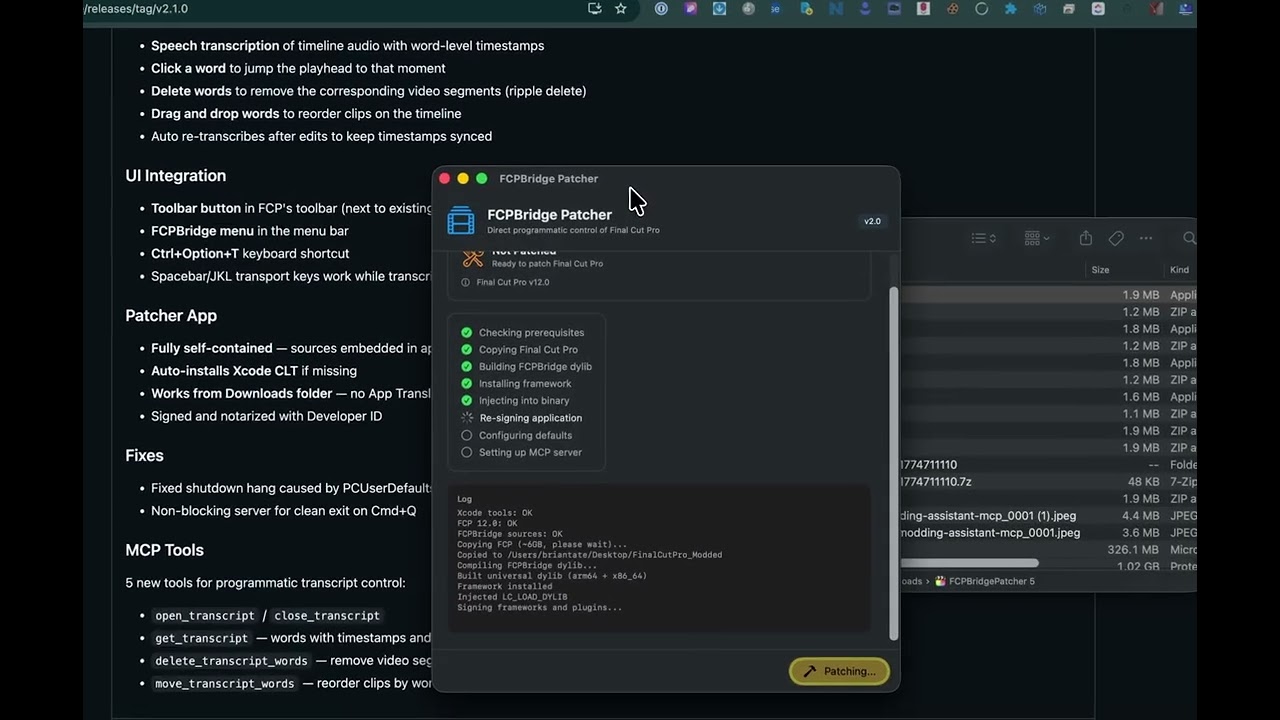](https://www.youtube.com/watch?v=NxbInKlXQVs)
Download **SpliceKit** from the [latest release](https://github.com/elliotttate/SpliceKit/releases/latest), unzip it, and run the app. It handles everything automatically — just click the button to patch.

The patcher will:
1. Copy Final Cut Pro to `~/Applications/SpliceKit/`
2. Build and inject the SpliceKit dylib
3. Re-sign with custom entitlements (no sandbox)
4. Patch crash points (CloudContent/ImagePlayground)
5. Set up the MCP server config
Once patched, click **Launch FCP** in the patcher or open the modded app directly.
### Command Line Patcher
Alternatively, use the shell script:
```bash
git clone https://github.com/elliotttate/SpliceKit.git
cd SpliceKit
./patcher/patch_fcp.sh
```
Options:
```bash
./patcher/patch_fcp.sh --dest ~/my-fcp # Custom destination
./patcher/patch_fcp.sh --rebuild # Rebuild dylib only (after code changes)
./patcher/patch_fcp.sh --uninstall # Remove the modded copy
```
---
## Manual Setup
### Prerequisites
- macOS 14+ with Xcode Command Line Tools
- Final Cut Pro installed at `/Applications/Final Cut Pro.app`
- Python 3 with `mcp` package (`pip install mcp`)
### 1. Create the Modded Final Cut Pro Copy
```bash
# Copy FCP
mkdir -p ~/Applications/SpliceKit
cp -R "/Applications/Final Cut Pro.app" ~/Applications/SpliceKit/"Final Cut Pro.app"
# Copy MAS receipt (needed for licensing)
cp "/Applications/Final Cut Pro.app/Contents/_MASReceipt/receipt" \
~/Applications/SpliceKit/"Final Cut Pro.app/Contents/_MASReceipt/receipt"
# Remove quarantine
xattr -cr ~/Applications/SpliceKit/"Final Cut Pro.app"
```
### 2. Build and Inject SpliceKit
```bash
# Build the dylib
make all
# Deploy to the modded app (creates framework, signs everything)
make deploy
# Inject LC_LOAD_DYLIB into the binary (requires insert_dylib)
# Build insert_dylib: git clone https://github.com/tyilo/insert_dylib.git && cd insert_dylib && clang -o /usr/local/bin/insert_dylib insert_dylib/main.c -framework Foundation
insert_dylib --inplace --all-yes \
"@rpath/SpliceKit.framework/Versions/A/SpliceKit" \
~/Applications/SpliceKit/"Final Cut Pro.app"/Contents/MacOS/"Final Cut Pro"
# Re-sign with a local codesigning identity when available, otherwise ad-hoc
SIGN_IDENTITY="$(security find-identity -v -p codesigning 2>/dev/null | awk '/"Apple Development:/ { print $2; exit } /"Developer ID Application:/ && developer == "" { developer = $2 } /[0-9]+\) [0-9A-F]+ "/ && first == "" { first = $2 } END { if (developer != "") print developer; else if (first != "") print first }')"
codesign --force --sign "${SIGN_IDENTITY:--}" --entitlements entitlements.plist \
~/Applications/SpliceKit/"Final Cut Pro.app"
```
### 3. Launch
```bash
~/Applications/SpliceKit/"Final Cut Pro.app"/Contents/MacOS/"Final Cut Pro"
```
Check `~/Library/Logs/SpliceKit/splicekit.log` for startup messages. You should see:
```
[SpliceKit] Control server listening on 127.0.0.1:9876
```
---
## Usage
### Python Client (Interactive REPL)
```bash
python3 Scripts/splicekit_client.py
```
```
splicekit> version
splicekit> classes FFAnchored
splicekit> methods FFPlayer
splicekit> props FFAnchoredSequence
splicekit> super FFAnchoredSequence
splicekit> ivars FFLibrary
```
### Direct TCP
```bash
echo '{"jsonrpc":"2.0","method":"system.version","id":1}' | nc 127.0.0.1 9876
```
### MCP Server
First, create a Python virtual environment for the MCP server and install the `mcp` package:
```bash
python3 -m venv ~/.venvs/splicekit-mcp
~/.venvs/splicekit-mcp/bin/python -m pip install --upgrade pip mcp
```
Use the virtual environment's Python as the MCP `command`.
#### From a repository checkout
If you cloned this repository locally, point MCP at the repo copy of `mcp/server.py`:
```json
{
"mcpServers": {
"splicekit": {
"command": "/Users/yourname/.venvs/splicekit-mcp/bin/python",
"args": ["/absolute/path/to/SpliceKit/mcp/server.py"]
}
}
}
```
#### From the packaged installer
If you installed SpliceKit using the packaged app, point MCP at the server script inside the installed SpliceKit app bundle:
```json
{
"mcpServers": {
"splicekit": {
"command": "/Users/yourname/.venvs/splicekit-mcp/bin/python",
"args": ["/Applications/SpliceKit.app/Contents/Resources/mcp/server.py"]
}
}
}
```
Notes:
- The MCP server connects to the SpliceKit bridge running inside Final Cut Pro on `127.0.0.1:9876`, so the modded Final Cut Pro must be running.
---
## JSON-RPC API
| Method | Description |
|--------|-------------|
| `system.version` | SpliceKit + FCP version info |
| `system.getClasses` | List/filter all ObjC classes |
| `system.getMethods` | List methods on a class |
| `system.getProperties` | List @property declarations |
| `system.getIvars` | List instance variables |
| `system.getProtocols` | List protocol conformances |
| `system.getSuperchain` | Get inheritance chain |
| `system.callMethod` | Call any ObjC class/instance method |
### Key FCP Internal Classes
| Class | Methods | Purpose |
|-------|---------|---------|
| `FFAnchoredTimelineModule` | 1435 | Primary timeline controller |
| `FFAnchoredSequence` | 1074 | Timeline data model |
| `FFLibrary` | 203 | Library container |
| `FFLibraryDocument` | 231 | Library persistence |
| `FFEditActionMgr` | 42 | Edit command dispatcher |
| `FFPlayer` | 228 | Playback engine |
| `PEAppController` | 484 | App controller |
### Key FCP Frameworks
| Prefix | Framework | Classes | Purpose |
|--------|-----------|---------|---------|
| FF | Flexo | 2849 | Core engine, timeline, editing |
| OZ | Ozone | 841 | Effects, compositing, color |
| PE | ProEditor | 271 | App controller, windows |
| LK | LunaKit | 220 | UI framework |
| TK | TimelineKit | 111 | Timeline UI |
| IX | Interchange | 155 | FCPXML import/export |
---
## How It Works
1. **App duplication**: Final Cut Pro is copied to a writable location
2. **Re-signing**: Ad-hoc signature with entitlements that disable library validation and sandbox
3. **Binary patching**: `insert_dylib` adds an `LC_LOAD_DYLIB` command pointing to `SpliceKit.framework`
4. **Auto-load**: On launch, dyld loads SpliceKit before `main()` runs
5. **Constructor**: `__attribute__((constructor))` caches class references and swizzles CloudContent
6. **Server start**: On `NSApplicationDidFinishLaunchingNotification`, starts TCP server on port 9876
7. **Runtime access**: All calls use `objc_getClass()`, `objc_msgSend()`, and the ObjC runtime API
---
## Project Structure
```
SpliceKit/
├── patcher/
│ ├── SpliceKitPatcher.app/ # Signed & notarized GUI patcher
│ ├── SpliceKitPatcher/
│ │ └── main.swift # Patcher source (SwiftUI)
│ └── patch_fcp.sh # Command line patcher
├── Sources/
│ ├── SpliceKit.h # Public header
│ ├── SpliceKit.m # Constructor, class caching, crash fixes, menu/toolbar
│ ├── SpliceKitRuntime.m # ObjC runtime utilities
│ ├── SpliceKitServer.m # JSON-RPC TCP server (33 tool endpoints)
│ ├── SpliceKitSwizzle.m # Method swizzling infrastructure
│ ├── SpliceKitTranscriptPanel.h # Transcript editor header
│ ├── SpliceKitTranscriptPanel.m # Speech transcription, text-based editing UI
│ ├── SpliceKitCommandPalette.h # Command palette header
│ └── SpliceKitCommandPalette.m # Cmd+Shift+P palette with Apple Intelligence + 100 commands
├── tools/
│ ├── silence-detector.swift # Audio silence detection CLI (AVFoundation + vDSP)
│ └── parakeet-transcriber/ # On-device speech-to-text CLI (NVIDIA Parakeet via FluidAudio)
├── Scripts/
│ ├── splicekit_client.py # Interactive Python REPL client
│ └── launch.sh # Launch helper script
├── mcp/
│ └── server.py # MCP server (33 tools)
├── docs/
│ └── FCP_API_REFERENCE.md # Full API reference for FCP internals
├── CLAUDE.md # Skill documentation for Claude
├── Makefile # Build, deploy, launch targets
├── entitlements.plist # Unsandboxed entitlements for re-signing
└── LICENSE # MIT License
```
---
## Is This Legal / Safe to Use?
A few things worth clarifying up front -- this isn't for everyone, but it's very easy to set up if you do want to try it.
**On reverse engineering and the EULA:** Reverse engineering for interoperability is explicitly protected under the DMCA ([17 U.S.C. § 1201(f)](https://www.law.cornell.edu/uscode/text/17/1201)) and similar laws in the EU. This is the same legal basis that allows tools like Homebrew, Hammerspoon, and countless other macOS utilities that hook into Apple apps. Apple's EULA doesn't override federal law. That said, SpliceKit doesn't really involve reverse engineering in the traditional sense -- once the library is loaded, Final Cut Pro exposes all of its own classes and methods through the Objective-C runtime. There's no decompilation required.
**On "injecting code":** What SpliceKit does is no different from what accessibility tools, screen readers, and automation utilities do every day on macOS. `DYLD_INSERT_LIBRARIES` is a documented Apple mechanism -- it's not an exploit. Apps like BetterTouchTool, Alfred, and Bartender all inject into running processes using the same techniques.
**On Apple disabling your Apple ID:** There is no precedent for Apple disabling an Apple ID for running a modified local app. Apple can't even distinguish between "ran a modded app" and "loaded a dylib for debugging in Xcode," which developers do constantly. Apple's focus is on protecting the App Store and code signing for distribution -- not policing what developers do on their own machines.
**The real risk** is the same as any unsigned software: make sure you trust the source. The code is fully open, the techniques are well-established, and nothing here is novel or dangerous from a security perspective.
On a personal note -- I've been frustrated by how little progress Final Cut Pro has made over the years, and my hope is that this project can help it finally get some of the features it desperately needs. There's a huge precedent in modding software and games. I've modded quite a few games where the developers officially adopted features based on community work. It can be a really productive relationship where proof of concepts demonstrate what would be genuinely useful to add officially.
---
## License
[MIT](LICENSE)