https://github.com/em-geeklab/nvidia-driver-installer
支持多种 Linux 发行版的交互式/自动化 NVIDIA 驱动安装脚本
https://github.com/em-geeklab/nvidia-driver-installer
Last synced: 11 months ago
JSON representation
支持多种 Linux 发行版的交互式/自动化 NVIDIA 驱动安装脚本
- Host: GitHub
- URL: https://github.com/em-geeklab/nvidia-driver-installer
- Owner: EM-GeekLab
- License: apache-2.0
- Created: 2025-07-06T18:38:10.000Z (11 months ago)
- Default Branch: main
- Last Pushed: 2025-07-06T20:16:22.000Z (11 months ago)
- Last Synced: 2025-07-06T20:28:30.212Z (11 months ago)
- Language: Shell
- Size: 34.2 KB
- Stars: 1
- Watchers: 0
- Forks: 0
- Open Issues: 0
-
Metadata Files:
- Readme: README.en.md
- License: LICENSE
Awesome Lists containing this project
README

Universal NVIDIA Driver Installation Script
One script to automate NVIDIA driver installation across multiple Linux distributions.
```bash
curl -sSL https://raw.githubusercontent.com/EM-GeekLab/nvidia-driver-installer/main/nvidia-install.sh -o nvidia-install.sh
sudo bash nvidia-install.sh
```
简体中文 | English



Operating System
Supported Versions
 Ubuntu
20.04, 22.04, 24.04
 Debian
12
KylinOS
V10 SP3
 Red Hat Enterprise Linux
8.x, 9.x
 Rocky Linux
8.x, 9.x
 Oracle Linux
8.x, 9.x
 Fedora
Officially supports 41
Script theoretically supports 39~42
 openSUSE
15 SP6
SUSE Linux Enterprise Server
15 SP6
 Amazon Linux
2023
 Azure Linux
2.0, 3.0
> [!WARNING]
> The script may also be compatible with other Debian or RHEL-based derivative distributions, but it has not been fully tested.
### 📖 Introduction
This project aims to provide a universal NVIDIA driver installation script that supports multiple Linux distributions. It automates the installation of NVIDIA drivers through package managers (such as `dnf`, `apt`, `zypper`, etc.), avoiding the tedious process of manually downloading and running `.run` files.
The script also provides a highly automated installation experience, supporting unattended installation, idempotent operations, state recovery, and a rollback mechanism to ensure stable operation in various environments.
### 🚀 Quick Start
> [!NOTE]
> For security reasons, it is recommended to use the following two-step installation method. This gives you an opportunity to review the script's content before execution.
```bash
curl -sSL https://raw.githubusercontent.com/EM-GeekLab/nvidia-driver-installer/main/nvidia-install.sh -o nvidia-install.sh
sudo bash nvidia-install.sh
```
This command will launch an interactive installation wizard to help you complete the NVIDIA driver installation.
If you need to use it in a CI/CD environment or automated script, you can add the `-y` parameter for unattended installation:
```bash
sudo bash nvidia-install.sh -y -q --auto-reboot
```
### 🛠️ Usage and Options
The script provides a rich set of command-line options to meet the needs of different scenarios.
Usage: `./nvidia-install.sh [options]`
#### Basic Options:
-h, --help Show this help message
-t, --type TYPE Installation type: full, compute-only, desktop-only (default: full)
-m, --modules TYPE Kernel module type: open, proprietary (default: open)
-l, --local Install using a local repository
-v, --version VERSION Specify driver version (e.g., 575)
#### Automation Options:
-y, --yes Automatically confirm all prompts (non-interactive mode)
-q, --quiet Quiet mode, reduce output
-f, --force Force reinstallation, even if drivers are already installed
-s, --skip-checks Skip existing installation checks
--auto-reboot Automatically reboot after installation
#### Advanced Options:
--cleanup Clean up failed installation state and exit
--rollback Roll back to the pre-installation state
--show-exit-codes Show all exit codes and their meanings
#### Examples
* **Interactive Installation (Recommended)**
```bash
sudo bash nvidia-install.sh
```
* **Fully Automated Installation (CI/CD Environment)**
```bash
sudo bash nvidia-install.sh -y -q --auto-reboot
```
* **Install Compute-Only Drivers with Proprietary Kernel Modules**
```bash
sudo bash nvidia-install.sh -t compute-only -m proprietary -y
```
* **Roll Back All Changes**
```bash
sudo bash nvidia-install.sh --rollback
```
* **View All Exit Code Meanings**
```bash
./nvidia-install.sh --show-exit-codes
```
### ✨ Features
This script aims to solve the inconveniences of manual or official `.run` file installation methods by providing a more modern and reliable solution.
* **🤖 Highly Automated**
* With parameters like `-y` (yes) and `-q` (quiet), it can achieve fully non-interactive silent installation without manual intervention.
* Automatically detects the operating system distribution, version, and GPU architecture to select the best installation strategy.
* Automatically handles existing driver conflicts and cleans them up based on user choice or automated policies.
* **🔄 Idempotency and State Recovery**
* The script supports **idempotent operations**, meaning it can be safely run multiple times. If the driver is already correctly installed, the script will detect it and skip, preventing system damage.
* Every step of the installation process is logged. If the script is interrupted unexpectedly (e.g., network issues, SSH disconnection), it will automatically prompt to **resume installation** from the breakpoint on the next run, without starting from scratch.
* **⏪ Reliable Rollback Mechanism**
* Before performing any substantial modifications to the system (like installing packages or adding repositories), the script records the corresponding "undo" operation.
* If the installation fails or you want to uninstall the drivers, simply run the `--rollback` parameter to **restore the system to its pre-installation state**.
* **🔒 Intelligent Secure Boot Handling**
* Automatically detects the system's UEFI Secure Boot status.
* If Secure Boot is enabled, the script provides a detailed explanation and multiple solutions (disabling SB or configuring MOK keys).
* In interactive mode, it can guide the user to automatically generate and enroll MOK keys to meet Secure Boot's signing requirements.
* **⚙️ Flexible Installation Options**
* Supports selection between **open-source** (`open`) and **proprietary** (`proprietary`) kernel modules.
* Supports three installation types: **full**, **compute-only**, and **desktop-only**, to meet the needs of different scenarios.
* Supports installation from NVIDIA's official network repository or a local repository.
### 🎯 Applicable Scenarios
This script is particularly useful in the following scenarios:
* **Data Centers and Server Clusters**: For unified and repeatable driver deployment across a large number of servers. The automation and idempotency features ensure deployment consistency and reliability.
* **DevOps & CI/CD Environments**: In automated pipelines, a predictable script with clear exit codes is needed to build images or environments that include NVIDIA drivers.
* **Multi-Distribution Environments**: Supports installing NVIDIA drivers on multiple machines with different distributions simultaneously. The script automatically identifies and adapts, reducing maintenance costs with a unified deployment standard.
### 🆚 Comparison with Runfile Installation Method
| Feature | This Script (Package Manager Method) | Official `.run` File |
| :------------------ | :------------------------------------------------------------------------------------------------------------------------- | :--------------------------------------------------------------------------------------------------------------------------------- |
| **Integration** | ✅ **High**: Deeply integrated with the system package manager (`dnf`/`apt`/`zypper`), with clear dependency relationships. | ❌ **Low**: Independent of the package manager, like being "air-dropped" into the system, which may conflict with system libraries. |
| **Uninstallation** | ✅ **Clean, Thorough**: Easily uninstalled via the package manager. The `--rollback` feature can revert all changes. | ⚠️ **Difficult, Incomplete**: `nvidia-uninstall` may leave residues; manual cleanup is complex and error-prone. |
| **Automation** | ✅ **Very Easy**: Rich command-line options and environment variables are tailored for automation. | ⚠️ **More Complex**: Requires concatenating many `--silent` series parameters, with poor fault tolerance. |
| **Idempotency** | ✅ **Yes**: Can be safely re-run. | ❌ **No**: Re-running usually leads to installation failure or conflicts. |
| **Rollback** | ✅ **Supported**: One-click rollback to the pre-installation state. | ❌ **Not Supported**: No rollback mechanism. |
| **Secure Boot** | ✅ **Intelligent Handling**: Automatically detects and provides solutions, can assist with MOK signing. | ❌ **Not Supported**: Requires the user to manually handle all Secure Boot related issues before installation. |
| **Offline Install** | ⚠️ **Indirectly Supported**: Requires setting up a local repository first. | ✅ **Directly Supported**: The `.run` file itself is an offline installation package. |
| **Latest Drivers** | ⚠️ **Depends on Repository**: Driver version update speed depends on the official NVIDIA repository. | ✅ **Fastest**: NVIDIA's official website usually releases the latest drivers in `.run` format first. |
---
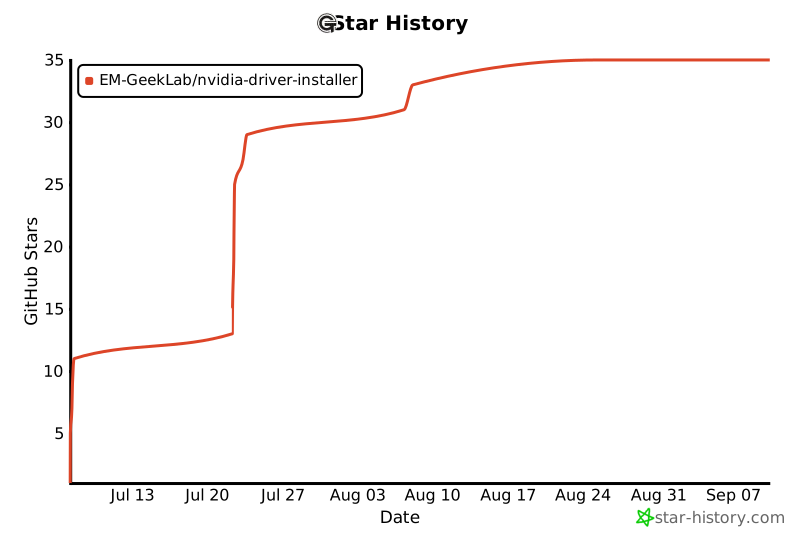
If you find this project helpful, please click the ⭐ Star at the top right of the repository and share it with more friends!