https://github.com/embedded-graphics/simulator
Desktop simulator for embedded-graphics
https://github.com/embedded-graphics/simulator
embedded-graphics simulator
Last synced: 11 months ago
JSON representation
Desktop simulator for embedded-graphics
- Host: GitHub
- URL: https://github.com/embedded-graphics/simulator
- Owner: embedded-graphics
- License: apache-2.0
- Created: 2020-11-03T09:25:02.000Z (over 5 years ago)
- Default Branch: master
- Last Pushed: 2025-06-08T20:08:42.000Z (about 1 year ago)
- Last Synced: 2025-08-24T19:49:08.354Z (11 months ago)
- Topics: embedded-graphics, simulator
- Language: Rust
- Homepage: https://crates.io/crates/embedded-graphics-simulator
- Size: 142 KB
- Stars: 107
- Watchers: 6
- Forks: 19
- Open Issues: 7
-
Metadata Files:
- Readme: README.md
- Changelog: CHANGELOG.md
- Funding: .github/FUNDING.yml
- License: LICENSE-APACHE
Awesome Lists containing this project
README
# Embedded graphics simulator
[](https://circleci.com/gh/embedded-graphics/simulator/tree/master)
[](https://crates.io/crates/embedded-graphics-simulator)
[](https://docs.rs/embedded-graphics-simulator)
[](https://matrix.to/#/#rust-embedded-graphics:matrix.org)
## [Documentation](https://docs.rs/embedded-graphics-simulator)
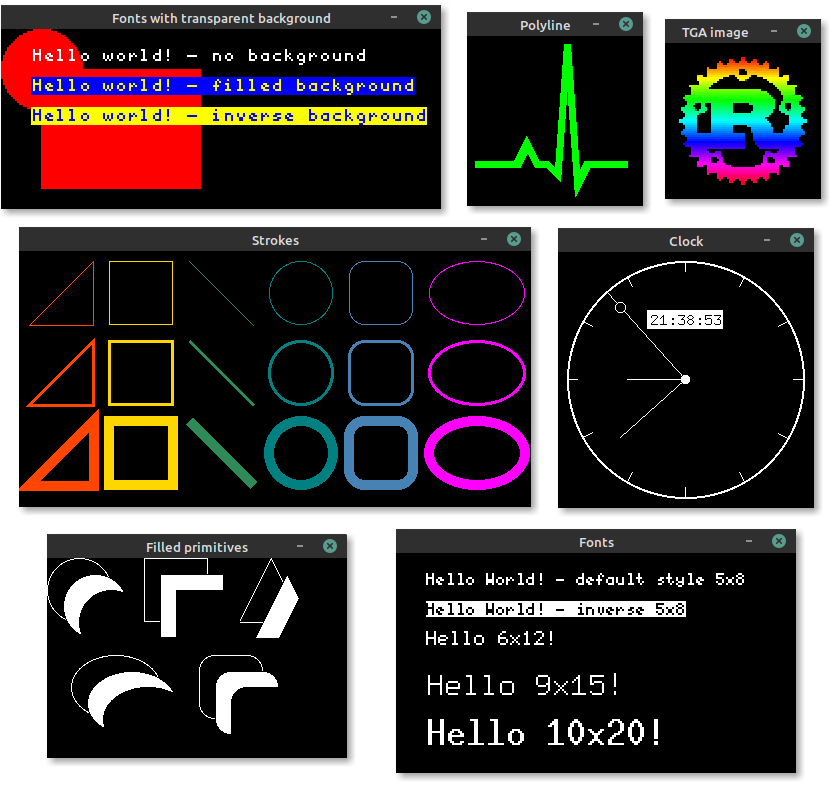
The simulator can be used to test and debug
[embedded-graphics](https://crates.io/crates/embedded-graphics) code, or produce examples and
interactive demos to show off embedded graphics features.
## [Examples](https://github.com/embedded-graphics/examples)
More simulator examples can be found in the [examples repository](https://github.com/embedded-graphics/examples).
### Simulate a 128x64 SSD1306 OLED
```rust
use embedded_graphics::{
pixelcolor::BinaryColor,
prelude::*,
primitives::{Circle, Line, Rectangle, PrimitiveStyle},
mono_font::{ascii::FONT_6X9, MonoTextStyle},
text::Text,
};
use embedded_graphics_simulator::{BinaryColorTheme, SimulatorDisplay, Window, OutputSettingsBuilder};
fn main() -> Result<(), core::convert::Infallible> {
let mut display = SimulatorDisplay::::new(Size::new(128, 64));
let line_style = PrimitiveStyle::with_stroke(BinaryColor::On, 1);
let text_style = MonoTextStyle::new(&FONT_6X9, BinaryColor::On);
Circle::new(Point::new(72, 8), 48)
.into_styled(line_style)
.draw(&mut display)?;
Line::new(Point::new(48, 16), Point::new(8, 16))
.into_styled(line_style)
.draw(&mut display)?;
Line::new(Point::new(48, 16), Point::new(64, 32))
.into_styled(line_style)
.draw(&mut display)?;
Rectangle::new(Point::new(79, 15), Size::new(34, 34))
.into_styled(line_style)
.draw(&mut display)?;
Text::new("Hello World!", Point::new(5, 5), text_style).draw(&mut display)?;
let output_settings = OutputSettingsBuilder::new()
.theme(BinaryColorTheme::OledBlue)
.build();
Window::new("Hello World", &output_settings).show_static(&display);
Ok(())
}
```
## Setup
The simulator uses SDL2 and its development libraries which must be installed to build and run
it.
### Linux (`apt`)
```bash
sudo apt install libsdl2-dev
```
### macOS (`brew`)
```bash
brew install sdl2
```
Users on Apple silicon or with custom installation directories will need to
set `LIBRARY_PATH` for the linker to find the installed SDL2 package:
```bash
export LIBRARY_PATH="$LIBRARY_PATH:$(brew --prefix)/lib"
```
More information can be found in the
[SDL2 documentation](https://github.com/Rust-SDL2/rust-sdl2#homebrew).
### Windows
The Windows install process is a bit more involved, but it _does_ work. See [the Rust-SDL2
crate's README](https://github.com/Rust-SDL2/rust-sdl2) for instructions. There are multiple
ways to get it working, but probably the simplest method is copying the binaries as shown
[here](https://github.com/Rust-SDL2/rust-sdl2#windows-msvc).
## Creating screenshots
Screenshots of programs, that use `Window` to display a simulated display, can be created by
setting the `EG_SIMULATOR_DUMP` or `EG_SIMULATOR_DUMP_RAW` environment variable:
```bash
EG_SIMULATOR_DUMP=screenshot.png cargo run
```
By setting the variable the display passed to the first `Window::update` call gets exported as
a PNG file to the specified path. After the file is exported the process is terminated.
The difference between `EG_SIMULATOR_DUMP` and `EG_SIMULATOR_DUMP_RAW` is that the first method
applies the output settings before exporting the PNG file and the later dumps the unaltered
display content.
## Exporting images
If a program doesn't require to display a window and only needs to export one or more images, a
`SimulatorDisplay` can also be converted to an `image` crate
`ImageBuffer` by using the `to_rgb_output_image` or `to_grayscale_output_image` methods.
The resulting buffer can then be used to save the display content to any format supported by
`image`.
## Using the simulator in CI
The simulator supports two environment variables to check if the display content matches a
reference PNG file: `EG_SIMULATOR_CHECK` and `EG_SIMULATOR_CHECK_RAW`. If the display content
of the first `Window::update` call doesn't match the reference image the process exits with a
non zero exit exit code. Otherwise the process will exit with a zero exit code.
```bash
EG_SIMULATOR_CHECK=screenshot.png cargo run || echo "Display doesn't match PNG file"
```
`EG_SIMULATOR_CHECK` assumes that the reference image was created using the same
`OutputSetting`s, while `EG_SIMULATOR_CHECK_RAW` assumes an unstyled reference image.
## Usage without SDL2
When the simulator is used in headless/CI environments that don't require showing a window, SDL2
support can be disabled. This removes the requirement of SDL2 being installed on the target machine,
but still allows the simulator to be used to generate images.
The `with-sdl` feature is enabled by default and can be disabled by adding `default-features = false` to the dependency:
```toml
[dependencies.embedded-graphics-simulator]
version = "0.2.0"
default-features = false
```
See the [Choosing
Features](https://doc.rust-lang.org/cargo/reference/specifying-dependencies.html#choosing-features)
Cargo manifest documentation for more details.
## Minimum supported Rust version
The `embedded-graphics-simulator` crate is tested to compile on the latest stable Rust release.
## License
Licensed under either of
- Apache License, Version 2.0 ([LICENSE-APACHE](LICENSE-APACHE) or http://www.apache.org/licenses/LICENSE-2.0)
- MIT license ([LICENSE-MIT](LICENSE-MIT) or http://opensource.org/licenses/MIT)
at your option.
### Contribution
Unless you explicitly state otherwise, any contribution intentionally submitted for inclusion in the
work by you, as defined in the Apache-2.0 license, shall be dual licensed as above, without any
additional terms or conditions.