https://github.com/emperorpenguin18/stone-dotfiles
Configuration for Pi
https://github.com/emperorpenguin18/stone-dotfiles
dotfiles kitty kitty-terminal linux movies mpv mpv-player raspberry-pi raspberry-pi-4 raspberrypi sbc streaming tv-shows video-player wayland
Last synced: 2 months ago
JSON representation
Configuration for Pi
- Host: GitHub
- URL: https://github.com/emperorpenguin18/stone-dotfiles
- Owner: EmperorPenguin18
- License: mit
- Created: 2021-01-09T19:04:21.000Z (over 5 years ago)
- Default Branch: main
- Last Pushed: 2025-05-08T03:28:14.000Z (about 1 year ago)
- Last Synced: 2025-05-08T04:27:42.473Z (about 1 year ago)
- Topics: dotfiles, kitty, kitty-terminal, linux, movies, mpv, mpv-player, raspberry-pi, raspberry-pi-4, raspberrypi, sbc, streaming, tv-shows, video-player, wayland
- Language: Shell
- Homepage:
- Size: 582 KB
- Stars: 2
- Watchers: 1
- Forks: 0
- Open Issues: 0
-
Metadata Files:
- Readme: README.md
- Funding: .github/FUNDING.yml
- License: LICENSE
Awesome Lists containing this project
README
# stone-dotfiles
Turns your Raspberry Pi into a minimal Jellyfin client. Stream video files directly all controllable from the couch.
### How to use:
1. Install [Manjaro ARM Minimal (RPi 4)](https://manjaro.org/download/) to a micro SD card of at least 8GB. Plug that in to a Raspberry Pi 4 with cooling. Plug in a display, keyboard and optionally ethernet. If using Wi-Fi, SSID and password can be entered during setup.
2. Boot up and complete the setup.
3. Log in as root. Run the following commands:
```
pacman -Syu --noconfirm
reboot
curl -sL https://raw.github.com/EmperorPenguin18/stone-dotfiles/main/setup.sh | sh
```
This will take a while. Some stuff needs to be compiled.
4. The Jellyfin plugin is already installed, but needs to be configured according to https://github.com/EmperorPenguin18/mpv-jellyfin#configuration
5. Reboot. You should automatically enter into mpv (video player).
6. You can navigate Jellyfin and control mpv with a gamepad or keyboard (https://mpv.io/manual/master).
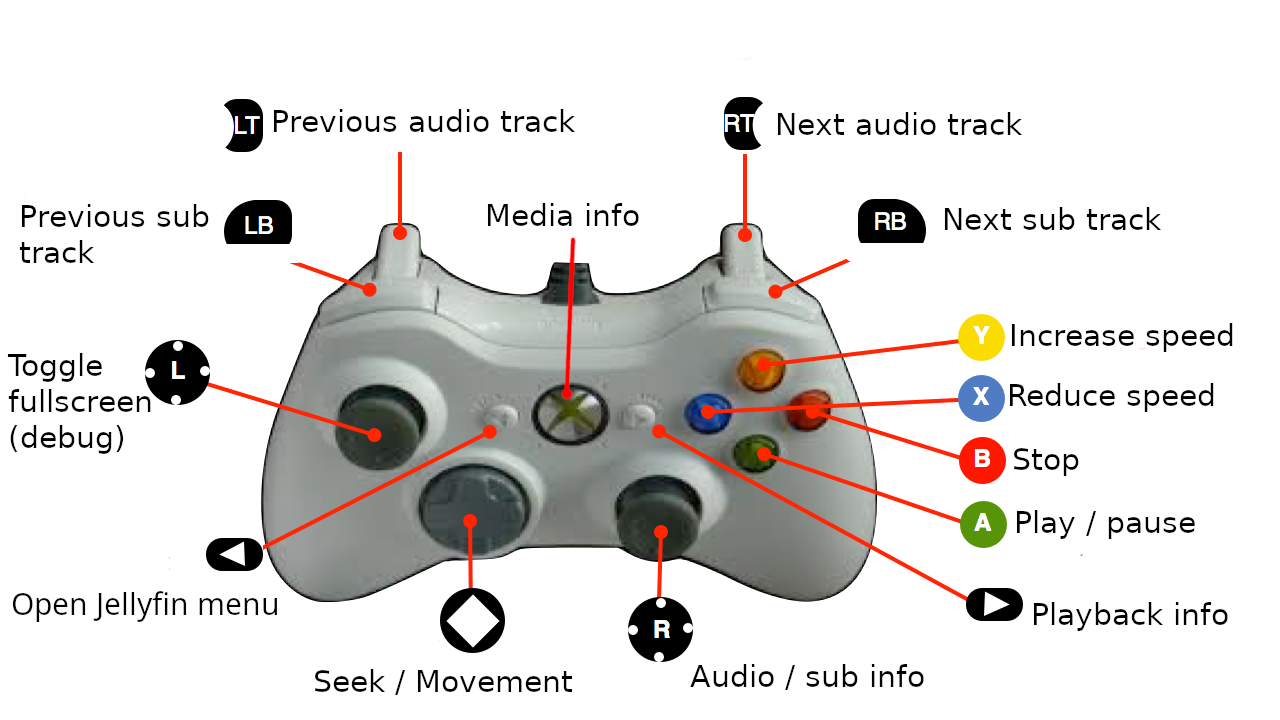
Yes this is a JoJo reference.