https://github.com/emrecoban/twitternote
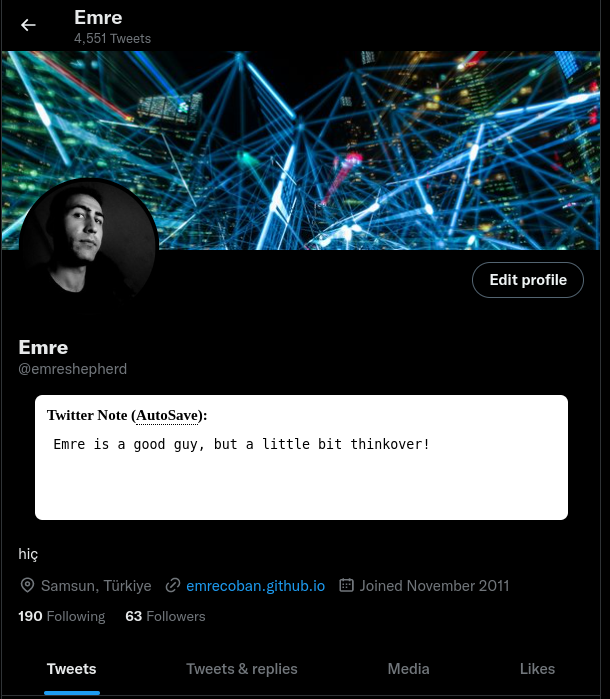
📝 A Chrome Extension that helps you to take notes about the people who you blocked, or muted.
https://github.com/emrecoban/twitternote
brave-extension chrome chrome-extension extension
Last synced: 9 months ago
JSON representation
📝 A Chrome Extension that helps you to take notes about the people who you blocked, or muted.
- Host: GitHub
- URL: https://github.com/emrecoban/twitternote
- Owner: emrecoban
- License: mit
- Created: 2022-12-17T20:18:50.000Z (over 3 years ago)
- Default Branch: main
- Last Pushed: 2024-12-06T17:24:34.000Z (over 1 year ago)
- Last Synced: 2025-04-04T13:52:49.087Z (about 1 year ago)
- Topics: brave-extension, chrome, chrome-extension, extension
- Language: JavaScript
- Homepage: https://chrome.google.com/webstore/detail/twitter-note/hkgdpppefidcddecmcchdkplfgjkjcdk
- Size: 640 KB
- Stars: 3
- Watchers: 2
- Forks: 2
- Open Issues: 0
-
Metadata Files:
- Readme: README.md
- License: LICENSE
- Code of conduct: CODE_OF_CONDUCT.md
Awesome Lists containing this project
README
# Twitter Note




Twitter Note is an **open-source** MIT-licensed Chrome and Brave **browser extension** that helps you to take notes about the people who you blocked, or muted.
## The Problem
Twitter is a very crowded platform. Sometimes I need to mute, or block someone on Twitter but most of time I forget why I muted, or blocked them. Using the other note-taking apps is troublesome. That's exactly why I developed this browser extension. It's easy, simple, and clean for everyone.
## Features
- [x] Take a note (limitless characters) about someone.
- [x] Delete all the notes with one click.
- [x] See all the notes.
- [ ] Reverse the notes (_the newest in the order will appear at the top of the list_).
- [ ] Pagination in the note list.
- [ ] Modern UI Design.
## Screenshots


## Installation
For **Google Chrome** or **Brave**:
1. Go to [Google Chrome Web Store](https://chrome.google.com/webstore/detail/twitter-note/hkgdpppefidcddecmcchdkplfgjkjcdk)
OR
1. Download this repo as [a ZIP file from GitHub](https://github.com/emrecoban/twitterNote/archive/refs/heads/main.zip).
2. Unzip the file and you should have a folder named twitterNote-main.
3. In Chrome/Brave go to the extensions page (chrome://extensions or brave://extensions).
4. Enable Developer Mode.
5. Click on the load unpacked button, or drag the twitterNote-main folder anywhere on the page to import it (do not delete the folder afterwards).
## Contributing
Bug reports, feature requests, and pull requests are welcome. This project is intended to be a safe, welcoming space for collaboration, and contributors are expected to adhere to the [Contributor Covenant](https://www.contributor-covenant.org/) code of conduct.
## Support
- Give a star to this repo.
- Upvote on [ProductHunt](https://www.producthunt.com/posts/twitter-note).
- Drop a review on [Google Chrome Web Store](https://chrome.google.com/webstore/detail/twitter-note/hkgdpppefidcddecmcchdkplfgjkjcdk).
- Follow me on Twitter [@emreshepherd](https://twitter.com/emreshepherd), or GitHub [@emrecoban](https://github.com/emrecoban).
- Buy me a coffee, or book: https://www.buymeacoffee.com/emrecoban
## References
- [Chrome Extensions Getting Started Guides](https://developer.chrome.com/docs/extensions/mv3/getstarted/)
- [Detect DOM changes with mutation observers](https://developer.chrome.com/blog/detect-dom-changes-with-mutation-observers/)
- [The chrome.storage API](https://developer.chrome.com/docs/extensions/reference/storage/)
- [Deprecate Mutation Events (Deprecated)](https://chromestatus.com/feature/5083947249172480)
## Changelog
- **[v1.2](https://github.com/emrecoban/twitterNote/releases/tag/v1.1):** Replaced the deprecated DOMNodeInserted event with MutationObserver for improved performance and compatibility by [Chip Thien](https://github.com/MacroChip).
- **[v1.1](https://github.com/emrecoban/twitterNote/releases/tag/v1.1):** Compatible with X.
- **[v1.0](https://github.com/emrecoban/twitterNote/releases/tag/v1.0):** The first version was born!
## License
The Twitter Note is available as open source under the terms of the [MIT License](https://github.com/emrecoban/twitterNote/blob/main/LICENSE).