https://github.com/ender-wang/edgemark
A SideNotes alternative.
https://github.com/ender-wang/edgemark
codemirror6 macos-app markdown markdown-editor sidenotes swift
Last synced: 15 days ago
JSON representation
A SideNotes alternative.
- Host: GitHub
- URL: https://github.com/ender-wang/edgemark
- Owner: Ender-Wang
- License: gpl-3.0
- Created: 2026-02-23T10:11:13.000Z (4 months ago)
- Default Branch: main
- Last Pushed: 2026-06-05T06:00:23.000Z (16 days ago)
- Last Synced: 2026-06-05T07:33:34.362Z (15 days ago)
- Topics: codemirror6, macos-app, markdown, markdown-editor, sidenotes, swift
- Language: Swift
- Homepage:
- Size: 6.62 MB
- Stars: 131
- Watchers: 1
- Forks: 6
- Open Issues: 3
-
Metadata Files:
- Readme: README.md
- Contributing: CONTRIBUTING.md
- License: LICENSE
Awesome Lists containing this project
README

EdgeMark
A native macOS side-panel Markdown notes app. Always one edge away.




**Why EdgeMark exists:** [SideNotes](https://www.apptorium.com/sidenotes) nailed the interaction — a notes panel that slides in from the screen edge, always one gesture away. But it's closed-source and paid, with no way to contribute, customize, or verify what it does with your data.
EdgeMark is the open-source alternative: **lightweight, Markdown-first**, and yours to inspect, modify, and extend. Your notes are plain `.md` files on disk — open them in any editor, sync with any service, back them up however you want.

# Install
```bash
brew install --cask ender-wang/tap/edgemark
```
Or download the latest `.dmg` from [Releases](https://github.com/Ender-Wang/EdgeMark/releases), install it, and then run this command in Terminal:
```bash
xattr -cr /Applications/EdgeMark.app
```
---
# Features
🪟 **Side Panel**
- 🔲 Borderless floating panel, full-height, always on top
- 🖥️ Works on every virtual Desktop and alongside fullscreen apps
- ✨ Smooth slide-in/out or fade animation (configurable) with edge activation — move mouse to screen edge to reveal
- 🖱️ Click outside, Escape, or auto-hide dismissal
- 📌 Pin to keep the panel open — survives focus changes, mouse exit, and Space switches (great for copy-pasting back and forth)
- 📐 Multi-monitor support with configurable left or right edge
- ↔️ Adjustable width — drag the inner edge to resize, saved across restarts
- 🎨 Panel tint — pick from a curated palette (System, Graphite, Slate, Sand, Sage, Rose)
✍️ **Markdown Editing**
- 👁️ Native TextKit 2 WYSIWYG editor — powered by [swift-markdown-engine](https://github.com/nodes-app/swift-markdown-engine), no JavaScript or WebKit involved
- 📝 Full Markdown: headings, bold, italic, code, lists, task lists, blockquotes, links, tables, wiki-links
- 🖼️ Inline images — paste (`⌘V`) or drag to embed; stored as co-located asset files alongside the note
- ✅ Checked task items are automatically struck through; uncheck to restore
- 📋 One-click Copy button on fenced code blocks
- 🔴 *Native spell check, grammar check, and autocorrect (macOS system dictionary) (deferred)*
- ⚡ Slash commands (`/h1`, `/todo`, `/code`, `/quote`, `/table`, `/divider`, and more)
- ⌨️ Formatting shortcuts: `⌘B` bold, `⌘I` italic, `⌘E` inline code, `⌘K` link, `⇧⌘X` strikethrough
- 🔗 Click a rendered link to open it in the browser
- 🔍 *Find & Replace (`⌘F`) (deferred)*
- 🔤 Customizable editor font and size — pick any installed font via the system font panel with live preview
- 🧮 LaTeX rendering — block (`$$...$$`) and inline (`$...$`) via SwiftMath
🗂️ **Notes & Storage**
- 📄 Plain `.md` files with no injected headers — open in any editor, sync with any service; metadata lives in a hidden `.edgemark/meta.json` sidecar
- 📁 Folder-based organization with drag-and-drop
- 📂 Configurable storage directory
- 💾 1-second debounced auto-save
- 🔍 Search shows all notes sorted by most recently modified when the query is empty — a quick "recent notes" feed
- 🏷️ Finder-style color tags (Red, Orange, Yellow, Green, Blue, Purple, Gray) with rename-able labels; multi-tag per note
- 🎯 Tag filter inside search — click tag dots to narrow results, multi-select acts as OR, combines with text search
- 🔄 External file sync — edits from other apps are detected on panel open; prompts when both sides changed
- 🗑️ Trash with 30-day auto-purge and read-only preview
⌨️ **Keyboard & Shortcuts**
- 🌐 Global shortcut: `Ctrl+Shift+Space` toggles from any app (customizable)
- 🎹 Fully customizable local shortcuts — new note, new folder, search, pin, prev/next note — all rebindable in Settings with conflict detection
- ⏱️ Configurable activation delay and corner exclusion zones
- 🔑 Default panel shortcuts: `⌘N` new note, `⇧⌘N` new folder, `⌘F` search, `⌘P` pin/unpin
- 👆 Two-finger trackpad swipe right on the header to navigate back (configurable toggle and sensitivity)
- 👆 Two-finger swipe left/right on the editor or `⌘←`/`⌘→` to navigate between notes in the current folder
🔄 **Auto-Update & CI/CD**
- 🔔 In-app update check (GitHub Releases, 24h throttle)
- 📦 Download with progress bar, SHA256 verification, install & restart
- ⚙️ GitHub Actions build pipeline (unsigned Release, DMG, SHA256)
- 🍺 Homebrew Cask installation
🌟 **Quality of Life**
- 🌗 Appearance override: System, Light, or Dark mode
- 📌 Menu bar resident (no Dock icon)
- 🚀 Launch at login
- 📋 Copy as Plain Text, Markdown, or Rich Text — selection-aware in editor with right-click context menu
- 🎨 SF Symbol icons throughout all context menus
- 🔀 Smooth directional page transitions
- 🌍 English + Simplified Chinese (JSON-based, easy to contribute)
---
# Contributing
See [CONTRIBUTING.md](CONTRIBUTING.md) for architecture overview, source tree, key patterns, localization guide, and development setup.
---
# License
EdgeMark is licensed under the [GNU General Public License v3.0](LICENSE).
# Acknowledgments
EdgeMark is built on top of these open-source projects:
| Project | License | Description |
|---------|---------|-------------|
| [swift-markdown-engine](https://github.com/nodes-app/swift-markdown-engine) | Apache 2.0 | TextKit 2 / NSTextView WYSIWYG Markdown editor — powers the editing experience. Bundles [HighlighterSwift](https://github.com/smittytone/HighlighterSwift) for code block syntax highlighting and [SwiftMath](https://github.com/mgriebling/SwiftMath) for LaTeX rendering. |
| [SwiftFormat](https://github.com/nicklockwood/SwiftFormat) | MIT | Code formatting tool used in the build pipeline |
---
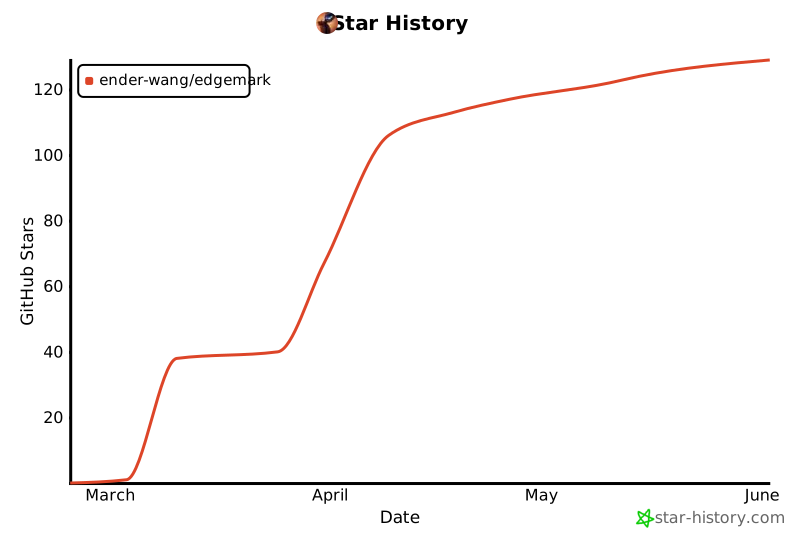
# Star History