https://github.com/engineervix/wagtail-branching-workflows
Wagtail Branching Workflows based on value of specified Page field. See https://stackoverflow.com/questions/69028083/
https://github.com/engineervix/wagtail-branching-workflows
wagtail
Last synced: over 1 year ago
JSON representation
Wagtail Branching Workflows based on value of specified Page field. See https://stackoverflow.com/questions/69028083/
- Host: GitHub
- URL: https://github.com/engineervix/wagtail-branching-workflows
- Owner: engineervix
- Created: 2021-10-05T22:54:46.000Z (almost 5 years ago)
- Default Branch: main
- Last Pushed: 2025-04-03T20:32:12.000Z (over 1 year ago)
- Last Synced: 2025-04-03T21:29:47.326Z (over 1 year ago)
- Topics: wagtail
- Language: CSS
- Homepage: https://importthis.tech/wagtail-branching-workflows
- Size: 754 KB
- Stars: 1
- Watchers: 2
- Forks: 1
- Open Issues: 12
-
Metadata Files:
- Readme: README.md
- Changelog: CHANGELOG.md
- Contributing: CONTRIBUTING.md
Awesome Lists containing this project
README
# Branching Workflows in Wagtail
> Branching Workflows based on value of specified Page field.
>
> Stack Overflow Question:
>
> Blog Post:
>
> Video Demo:
[](https://github.com/engineervix/wagtail-branching-workflows/actions/workflows/main.yml)
[](https://github.com/psf/black)
[](http://commitizen.github.io/cz-cli/)
- [Features ✨](#features-)
- [Development 💻](#development-)
- [First things first](#first-things-first)
- [Getting Started](#getting-started)
- [Tests](#tests)
- [Code Formatting](#code-formatting)
- [Contributing 🤝](#contributing-)
- [Credits 👏](#credits-)
- [Video Demo](#video-demo)
## Features ✨
- This is a [Python](https://www.python.org/) project built using [Wagtail](https://wagtail.io/) – a powerful [Django](https://www.djangoproject.com/) Content Management System.
- As with most web projects, the frontend dependencies, tasks, etc. are managed using [Node.js](https://nodejs.org/). This project uses [Yarn](https://yarnpkg.com/) and [Gulp](https://gulpjs.com/)
- [PostgreSQL](https://www.postgresql.org/)/[PostGIS](https://postgis.net/) Database
- [Sendgrid](https://sendgrid.com/) for transactional email
- [Sentry](https://sentry.io) for error tracking in production
- [Memcached](http://memcached.org/) for caching image renditions in production
- [Frontend-cache invalidation](https://docs.wagtail.io/en/stable/reference/contrib/frontendcache.html#frontend-cache-invalidator) using [Cloudflare](https://www.cloudflare.com/)
- Tests via [pytest](https://pytest.org/)
- Linting using [Black](https://black.readthedocs.io/), [Flake8](https://flake8.pycqa.org/) and [isort](https://pycqa.github.io/isort/)
- Task execution and automation using [`invoke`](http://www.pyinvoke.org/).
- [Continuous integration (CI)](https://www.atlassian.com/continuous-delivery/continuous-integration) via [GitHub Actions](https://github.com/features/actions).
- Automatic dependency management via [Renovate](https://github.com/marketplace/renovate)
## Development 💻
### First things first
Start by ensuring that you have Docker and Docker Compose:
```sh
# check that you have docker on your machine
docker -v
# check that you have docker-compose on your machine
docker-compose -v
```
### Getting Started
Upon cloning this repository (or forking + cloning your fork), navigate to the cloned project directory: `cd wagtail-branching-workflows`
Then create the required `.env` files:
```sh
cp -v app/.envs/.dev.env.sample app/.envs/.dev.env
cp -v app/.envs/.test.env.sample app/.envs/.test.env
```
Build the images and spin up the containers:
```sh
docker-compose up -d --build
```
You'll have to wait a few seconds for some processes to initialize / run (postgres, database migrations, browser-sync, Django server, etc.). You can check the status via
```sh
docker-compose logs web
```
When all set, you should see something like this:
```txt
web_1 | Performing system checks...
web_1 |
web_1 | [Browsersync] Proxying: http://127.0.0.1:8000
web_1 | [Browsersync] Access URLs:
web_1 | -----------------------------------
web_1 | Local: http://localhost:3000
web_1 | External: http://172.19.0.3:3000
web_1 | -----------------------------------
web_1 | UI: http://localhost:3001
web_1 | UI External: http://localhost:3001
web_1 | -----------------------------------
web_1 | [Browsersync] Watching files...
web_1 | System check identified no issues (0 silenced).
web_1 |
web_1 | Django version 3.2.8, using settings 'config.settings.dev'
web_1 | Development server is running at http://0.0.0.0:8000/
web_1 | Using the Werkzeug debugger (http://werkzeug.pocoo.org/)
web_1 | Quit the server with CONTROL-C.
web_1 | [Browsersync] Reloading Browsers... (buffered 2 events)
web_1 | * Debugger is active!
web_1 | * Debugger PIN: 104-102-219
```
You can now proceed to create a superuser:
```sh
docker-compose exec web ./manage.py createsuperuser
```
Load initial data:
```sh
docker-compose exec web ./manage.py load_initial_data
```
This initial data includes 6 users with the following details:
| No. | Email Address | Password | Group | First Name | Last Name |
| --- | -------------------------- | ------------------ | ---------- | ---------- | ---------- |
| 1 | john.doe@example.com | WriterPassword1 | Writers | John | Doe |
| 2 | jane.doe@example.com | WriterPassword2 | Writers | Jane | Doe |
| 3 | another.writer@example.com | WriterPassword3 | Writers | Another | Writer |
| 4 | moderator.one@example.org | ModeratorPassword1 | Moderators | Gina | Stephenson |
| 5 | moderator.two@example.org | ModeratorPassword2 | Moderators | George | Benson |
| 6 | chief@example.org | ApproverPassword0 | Approvers | Connie | Montgomery |
You can access the dev server at . This project uses [MailDev](https://github.com/maildev/maildev) for viewing and testing emails generated during development. The MailDev server is accessible at .
### Tests
```sh
docker-compose exec web yarn test
```
### Code Formatting
- Run `docker-compose exec web invoke lint` to run [`flake8`](https://flake8.pycqa.org/en/latest/), [`black`](https://black.readthedocs.io/en/stable/), [`isort`](https://pycqa.github.io/isort/) on the code.
- If you get any errors from `black` and/or `isort`, run `docker-compose exec web invoke lint --fix` or `docker-compose exec web invoke lint -f` so that black and isort can format your files.
### Contributing 🤝
Contributions of any kind welcome! Please see [CONTRIBUTING.md](CONTRIBUTING.md) for guidelines on how to contribute. In addition, please note the following:
- if you're making code contributions, please try and write some tests to accompany your code, and ensure that the tests pass. Also, were necessary, update the docs so that they reflect your changes.
- commit your changes via `git commit`. Follow the prompts. When you're done, `pre-commit` will be invoked to ensure that your contributions and commits follow defined conventions. See `pre-commit-config.yaml` for more details.
- your commit messages should follow the conventions described [here](https://www.conventionalcommits.org/en/v1.0.0/). Write your commit message in the imperative: "Fix bug" and not "Fixed bug" or "Fixes bug." This convention matches up with commit messages generated by commands like `git merge` and `git revert`.
Once you are done, please create a [pull request](https://docs.github.com/en/free-pro-team@latest/github/collaborating-with-issues-and-pull-requests/creating-a-pull-request).
## Credits 👏
This project's structure is based on the [`engineervix/cookiecutter-wagtail-vix`](https://github.com/engineervix/cookiecutter-wagtail-vix) project template.
## Video Demo
[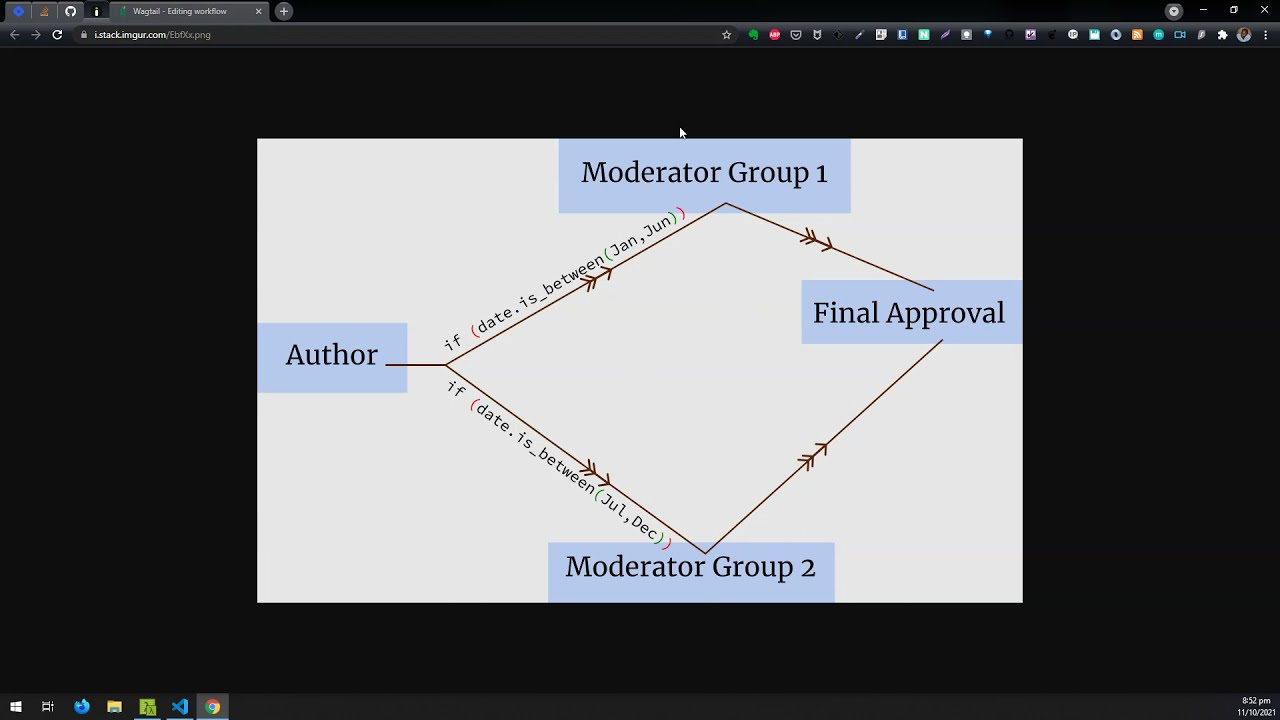](https://youtu.be/qx1LOqJkt9Y)
---