https://github.com/enisgetmez/kement
A modern, feature-rich SSH terminal application built with Electron and React. KEMENT combines traditional SSH functionality with AI-powered assistance to enhance productivity and streamline remote server management.
https://github.com/enisgetmez/kement
ai-assistant cli devops electron linux multi-terminal productivity remote-development server-management sftp ssh terminal xterm
Last synced: 3 months ago
JSON representation
A modern, feature-rich SSH terminal application built with Electron and React. KEMENT combines traditional SSH functionality with AI-powered assistance to enhance productivity and streamline remote server management.
- Host: GitHub
- URL: https://github.com/enisgetmez/kement
- Owner: enisgetmez
- License: mit
- Created: 2025-09-28T22:49:10.000Z (10 months ago)
- Default Branch: main
- Last Pushed: 2025-09-29T03:40:11.000Z (10 months ago)
- Last Synced: 2025-10-06T15:39:28.173Z (9 months ago)
- Topics: ai-assistant, cli, devops, electron, linux, multi-terminal, productivity, remote-development, server-management, sftp, ssh, terminal, xterm
- Language: JavaScript
- Homepage: https://github.com/enisgetmez/Kement
- Size: 4.17 MB
- Stars: 3
- Watchers: 0
- Forks: 0
- Open Issues: 0
-
Metadata Files:
- Readme: README.md
- Contributing: CONTRIBUTING.md
- License: LICENSE
Awesome Lists containing this project
README
# 🚀 KEMENT - AI-Powered SSH Terminal

[](https://github.com/enisgetmez/kement)
[](LICENSE)
[](https://github.com/enisgetmez/kement)
[](https://electronjs.org)
[](https://reactjs.org)
**Next-generation SSH terminal with AI assistance**
[🚀 Download](#installation) • [📖 Documentation](#usage) • [🤝 Contributing](#contributing) • [💡 Features](#features)
---
## ✨ Features
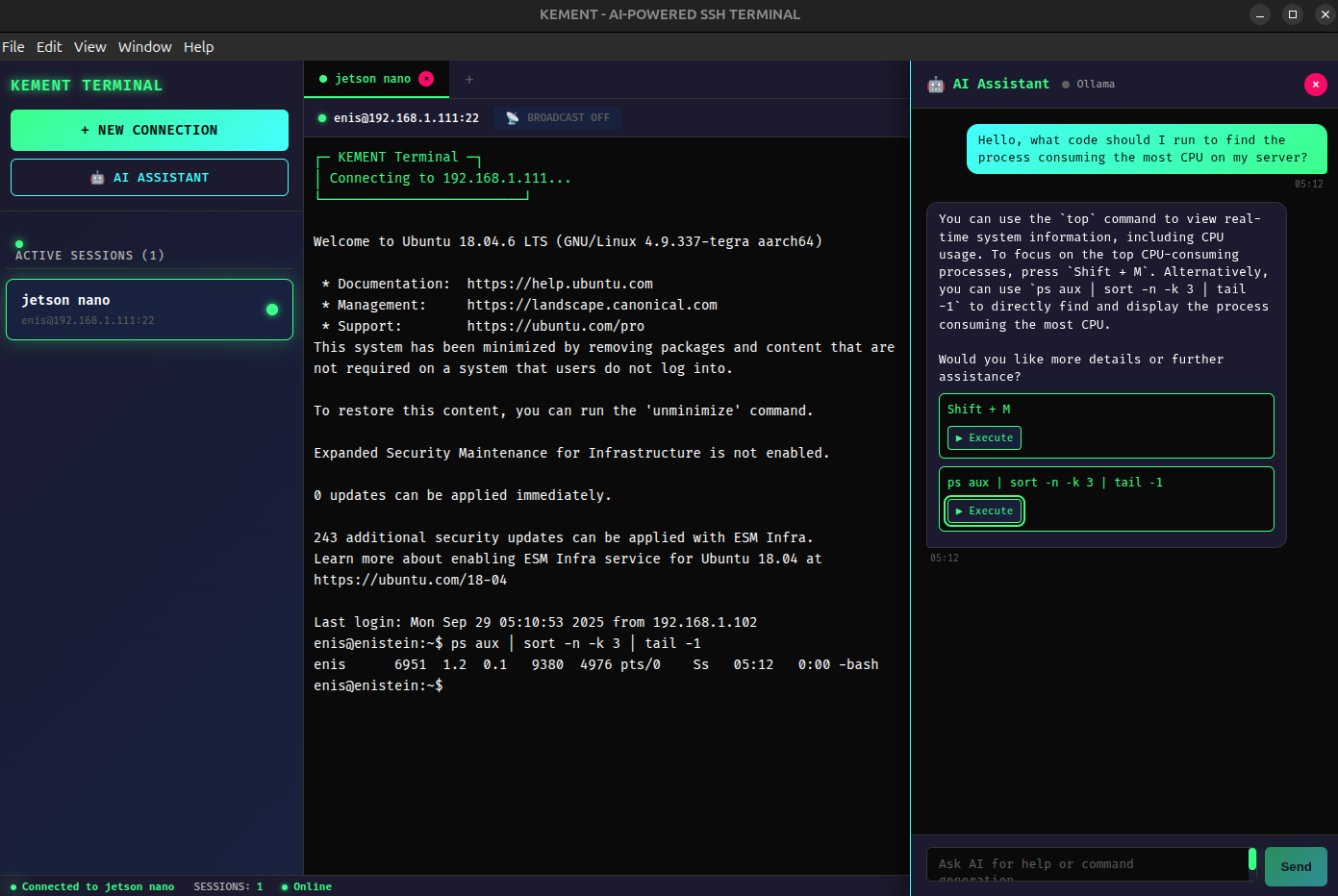
### 🤖 **AI-Powered Assistant**
- **Multi-Provider Support**: Integration with Ollama, OpenAI, Google Gemini, and Anthropic Claude
- **Intelligent Command Generation**: AI suggests commands based on natural language descriptions
- **Command Explanation**: Get detailed explanations for any terminal command
- **Context-Aware Assistance**: AI understands your current directory and system state
### 🔐 **Secure SSH Connections**
- **Multiple Authentication Methods**: Password, SSH keys, and certificate-based auth
- **Connection Profiles**: Save and manage multiple server configurations
- **Session Persistence**: Maintain connections across application restarts
- **Encrypted Credential Storage**: Secure local storage for sensitive data
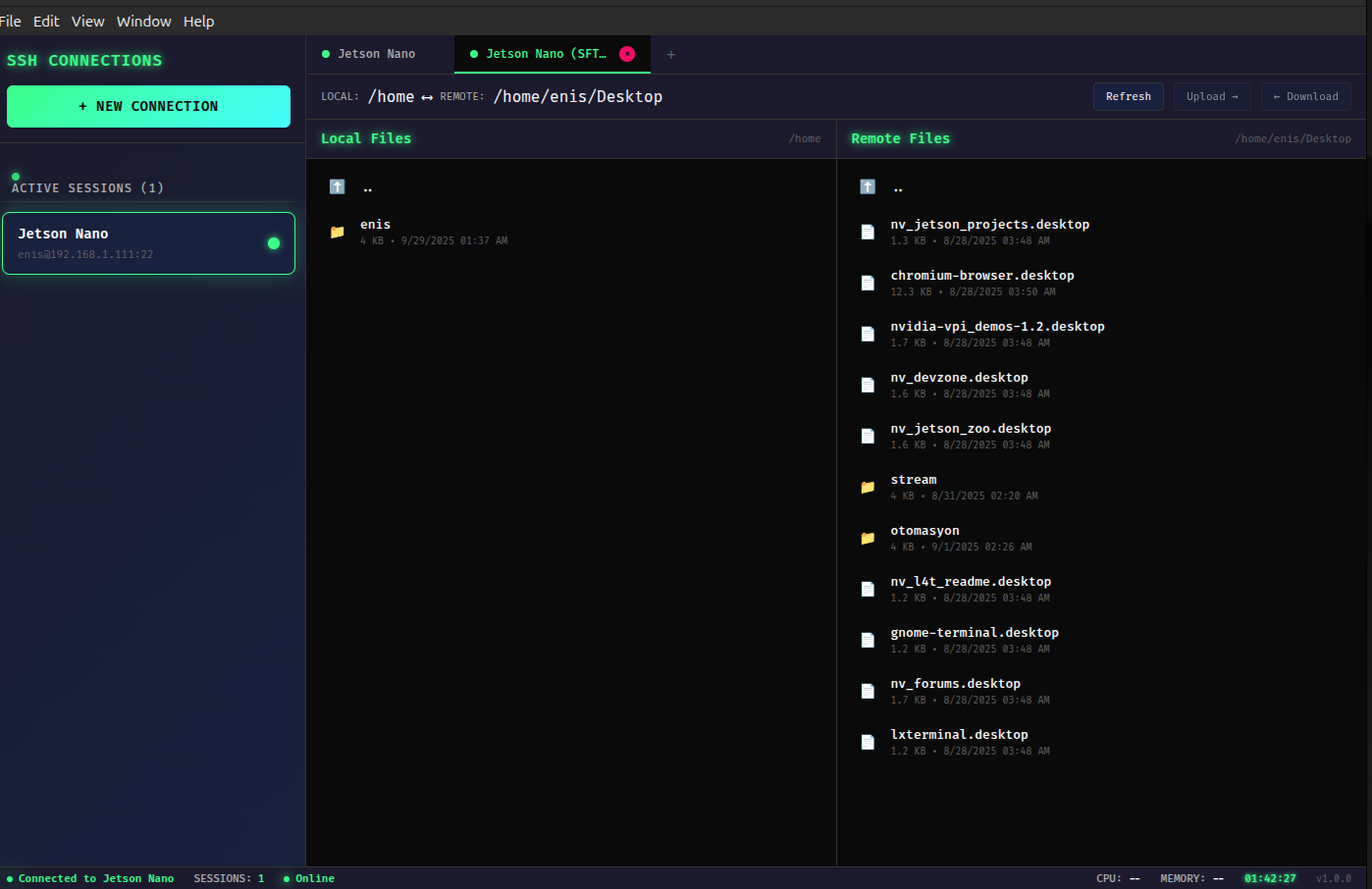
### 📁 **Advanced SFTP File Management**
- **Drag & Drop File Transfer**: Intuitive file upload/download
- **Remote Directory Navigation**: Browse remote filesystems with ease
- **Real-time Transfer Progress**: Track file operation status
- **Integrated File Editing**: Edit remote files directly in the terminal
### 💻 **Modern Terminal Experience**
- **Tabbed Interface**: Multiple simultaneous connections
- **Syntax Highlighting**: Enhanced readability for commands and outputs
- **Customizable Themes**: Cyberpunk aesthetics with dark mode support
- **Responsive Design**: Works seamlessly across different screen sizes
### ⚡ **Performance & Reliability**
- **Real-time Command Execution**: Instant feedback and streaming output
- **Session Recovery**: Automatic reconnection and state restoration
- **Memory Efficient**: Optimized for long-running sessions
- **Cross-platform Compatibility**: Built with Electron for Linux support
---
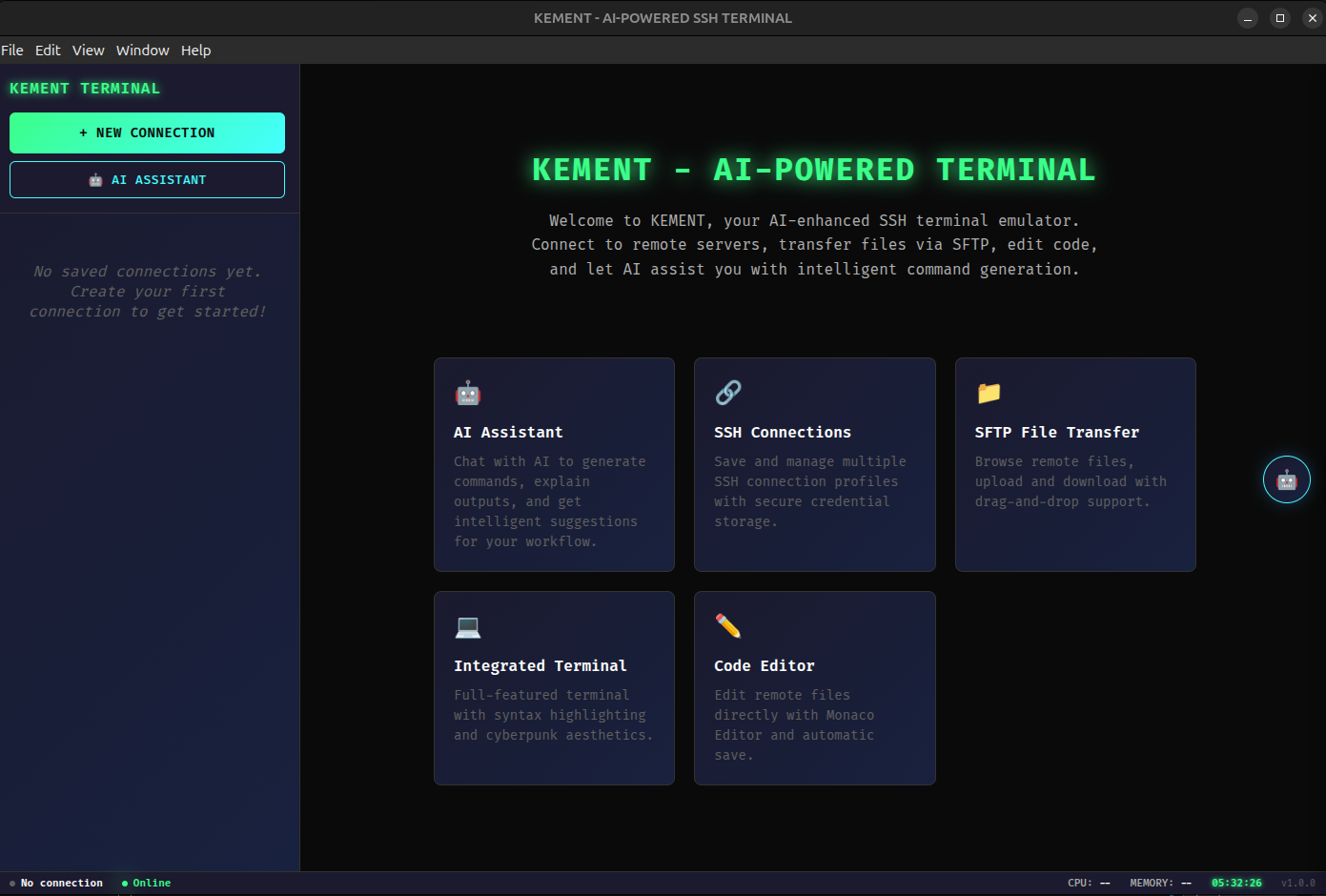
## 🎨 Screenshots
### Main Interface
### AI Assistant in Action
### SFTP File Manager
---
## 🚀 Installation
### Prerequisites
- **Node.js**: Version 18 or higher
- **npm**: Version 8 or higher
- **Linux**: Ubuntu 20.04+ or equivalent
### Quick Install (AppImage)
1. Download the latest AppImage from [Releases](https://github.com/enisgetmez/kement/releases)
2. Make it executable: `chmod +x KEMENT-2.0.0.AppImage`
3. Run: `./KEMENT-2.0.0.AppImage`
### Build from Source
```bash
# Clone the repository
git clone https://github.com/enisgetmez/kement.git
cd kement
# Install dependencies
npm install
# Build the application
npm run build
# Start KEMENT
npm start
```
### Development Setup
```bash
# Install development dependencies
npm install
# Start in development mode
npm run dev
# Run tests
npm test
# Build for production
npm run build
# Create AppImage distribution
npm run dist
```
---
## 🔧 Configuration
### AI Provider Setup
KEMENT supports multiple AI providers. Configure them through the AI Settings modal:
#### 🦙 Ollama (Local AI)
```json
{
"enabled": true,
"endpoint": "http://localhost:11434",
"model": "llama3.2:latest"
}
```
#### 🤖 OpenAI
```json
{
"enabled": true,
"apiKey": "sk-your-openai-key",
"model": "gpt-4"
}
```
#### 🔮 Google Gemini
```json
{
"enabled": true,
"apiKey": "AIza-your-gemini-key",
"model": "gemini-pro"
}
```
#### 🧠 Anthropic Claude
```json
{
"enabled": true,
"apiKey": "sk-ant-your-claude-key",
"model": "claude-3-sonnet-20240229"
}
```
### SSH Connection Profiles
Create and manage connection profiles:
1. Click the "+" button to add a new connection
2. Fill in connection details:
- **Name**: Friendly name for the connection
- **Host**: Server hostname or IP address
- **Port**: SSH port (default: 22)
- **Username**: SSH username
- **Authentication**: Choose password or key-based auth
3. Save and connect with a double-click
---
## 📚 Usage
### Basic Operations
#### Connecting to a Server
1. Create a new connection profile
2. Double-click the profile to connect
3. Start working in the terminal
#### Using AI Assistant
1. Click the AI button (🤖) on the right side
2. Type your request in natural language
3. Get command suggestions and explanations
4. Execute commands directly from AI responses
#### File Transfer via SFTP
1. Right-click on a connection and select "Open SFTP"
2. Navigate remote directories
3. Drag files from your local system to upload
4. Double-click remote files to download or edit
#### Command Examples with AI
**Generate Commands:**
- "show disk usage"
- "find large files in home directory"
- "create a backup of nginx config"
- "monitor system resources"
**Get Explanations:**
- Ask AI to explain any command output
- Understand complex shell scripts
- Learn about system administration tasks
### Advanced Features
#### Keyboard Shortcuts
- `Ctrl+T`: New terminal tab
- `Ctrl+W`: Close current tab
- `Ctrl+Shift+F`: Open SFTP browser
- `Ctrl+AI`: Toggle AI assistant
- `Ctrl+,`: Open settings
#### Session Management
- Connections persist between application restarts
- Multiple tabs per connection
- Automatic reconnection on network issues
---
## 🛠️ Development
### Architecture
KEMENT is built with modern web technologies:
- **Frontend**: React 19 with styled-components
- **Backend**: Electron main process with Node.js
- **SSH**: ssh2 library for secure connections
- **AI Integration**: REST APIs for multiple providers
- **Storage**: electron-store for configuration persistence
### Project Structure
```
kement/
├── src/
│ ├── components/ # React components
│ ├── services/ # Business logic and AI providers
│ ├── styles/ # Global styles and themes
│ └── utils/ # Helper functions
├── assets/ # Images and icons
├── dist/ # Built application
└── main.js # Electron main process
```
### API Integration
KEMENT's AI service architecture supports:
- **Provider Abstraction**: Unified interface for all AI providers
- **Configuration Management**: Secure credential storage
- **Error Handling**: Graceful fallbacks and user feedback
- **Testing Framework**: Built-in connection testing
---
## 🤝 Contributing
We welcome contributions! Please see our [Contributing Guide](CONTRIBUTING.md) for details.
### Quick Start for Contributors
1. Fork the repository
2. Create a feature branch: `git checkout -b feature/amazing-feature`
3. Make your changes and test thoroughly
4. Commit with conventional commits: `git commit -m "feat: add amazing feature"`
5. Push to your branch: `git push origin feature/amazing-feature`
6. Open a Pull Request
### Development Guidelines
- Follow React best practices and hooks conventions
- Use TypeScript for new features when possible
- Write tests for new functionality
- Maintain the existing code style
- Update documentation for user-facing changes
---
## 🐛 Bug Reports & Feature Requests
Found a bug or have a feature idea? We'd love to hear from you!
- **Bug Reports**: [Create an Issue](https://github.com/enisgetmez/kement/issues/new?template=bug_report.md)
- **Feature Requests**: [Request a Feature](https://github.com/enisgetmez/kement/issues/new?template=feature_request.md)
- **General Questions**: [GitHub Discussions](https://github.com/enisgetmez/kement/discussions)
---
## 📄 License
This project is licensed under the MIT License. See the [LICENSE](LICENSE) file for details.
---
## 🙏 Acknowledgments
- **ssh2** library for secure SSH connections
- **Electron** framework for cross-platform desktop apps
- **React** for the modern user interface
- **AI Providers** for intelligent assistance capabilities
- **Open Source Community** for inspiration and contributions
---
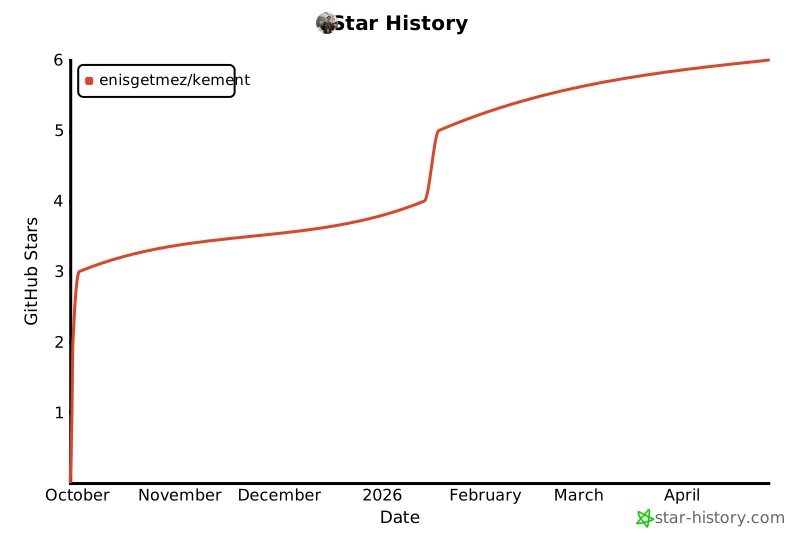
## 🌟 Star History
[](https://star-history.com/#enisgetmez/kement&Date)
**If you find KEMENT useful, please give it a ⭐ on GitHub!**
---
**Made with ❤️ by [Enis Getmez](https://github.com/enisgetmez)**