https://github.com/enisn/markdowndocumenting
AspNetCore Markdown Documenting
https://github.com/enisn/markdowndocumenting
aspnetcore documentation documentation-tool markdown netcore netcore-webapi
Last synced: about 1 year ago
JSON representation
AspNetCore Markdown Documenting
- Host: GitHub
- URL: https://github.com/enisn/markdowndocumenting
- Owner: enisn
- Created: 2018-11-29T21:30:55.000Z (over 7 years ago)
- Default Branch: master
- Last Pushed: 2021-10-13T09:44:50.000Z (almost 5 years ago)
- Last Synced: 2025-06-28T12:16:42.437Z (about 1 year ago)
- Topics: aspnetcore, documentation, documentation-tool, markdown, netcore, netcore-webapi
- Language: C#
- Homepage:
- Size: 94.7 KB
- Stars: 21
- Watchers: 1
- Forks: 2
- Open Issues: 3
-
Metadata Files:
- Readme: README.MD
Awesome Lists containing this project
README
# AspNetCore.MarkdownDocumenting
This project provides markdown documentation for your .net core projects automaticly.



# How does it work ?
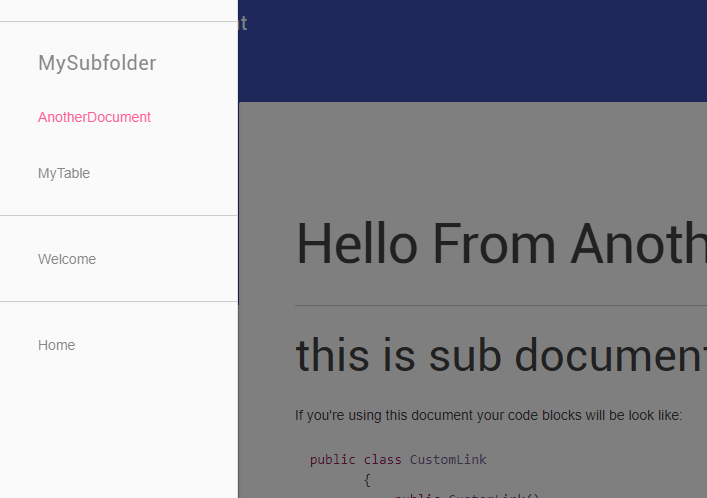
It's easy. Just place your markdown documents under Docs folder and go **/Docs** path in your project.

* * *
# How to start using ?
- Install [NuGet package](https://www.nuget.org/packages/AspNetCore.MarkdownDocumenting/).
- Create a folder into your project root which name is `Docs`. And put your **Markdown** files under it. You can use Sub Folders to group them.
- You must set your **.md** files `Copy To Output Directory` as `Copy Always`. *To do this. Right click the markdown file and go Properties, then you'll see that option. Just change it.*
- Or you can add following code to your .csproj file in `` tags to apply it all files in `/Docs` folder:
```xml
Always
```
- Go to `Startup.cs` and add following code to your ConfigureServices method:
```csharp
public void ConfigureServices(IServiceCollection services)
{
services.AddControllersWithViews(); // <-- Must be added Views into IoC. Also '.AddMvc' can be used too.
services.AddDocumentation(); // Add this for default configuration.
}
```
- Go to `Startup.cs` and add following code to your Configure method:
```csharp
public void Configure(IApplicationBuilder app, IHostingEnvironment env)
{
//...
app.UseDocumentation(); // < --- Add this for default configuration.
//...
}
```
* * *
# Customization:
- To Change Index Document
```csharp
app.UseDocumentation(builder =>
{
// this makes ~/Docs/Welcome.md file as your landing page at "/" and "/Docs"
builder.SetIndexDocument("Welcome.md");
});
```
## Custom links
- Use `AddCustomLink()` and `AddFooterLink()` to add menu items into UseDocumentation() method in Startup.cs.
Example:
```csharp
app.UseDocumentation(builder =>
{
builder
// this adds link to footer
.AddFooterLink(new Elements.CustomLink("See on NuGet", "https://www.nuget.org/packages/AspNetCore.MarkdownDocumenting/"))
// this adds link to end of menu drawer.
.AddCustomLink(new Elements.CustomLink("Swagger UI","/swagger"));
});
```
## Theming
- To Change Layout:
```csharp
app.UseDocumentation(builder =>
{
builder.Layout = "/Shared/_Layout";
});
```
- To Change Highlight.js theme:
```csharp
app.UseDocumentation(builder =>
{
builder.HighlightJsStyle = "https://cdnjs.cloudflare.com/ajax/libs/highlight.js/9.13.1/styles/vs2015.min.css";
});
```
- To Change GetMdl theme:
```csharp
app.UseDocumentation(builder =>
{
builder.GetMdlStyle = "https://code.getmdl.io/1.3.0/material.blue_grey-pink.min.css";
});
```