https://github.com/enquirer/prompt-expand
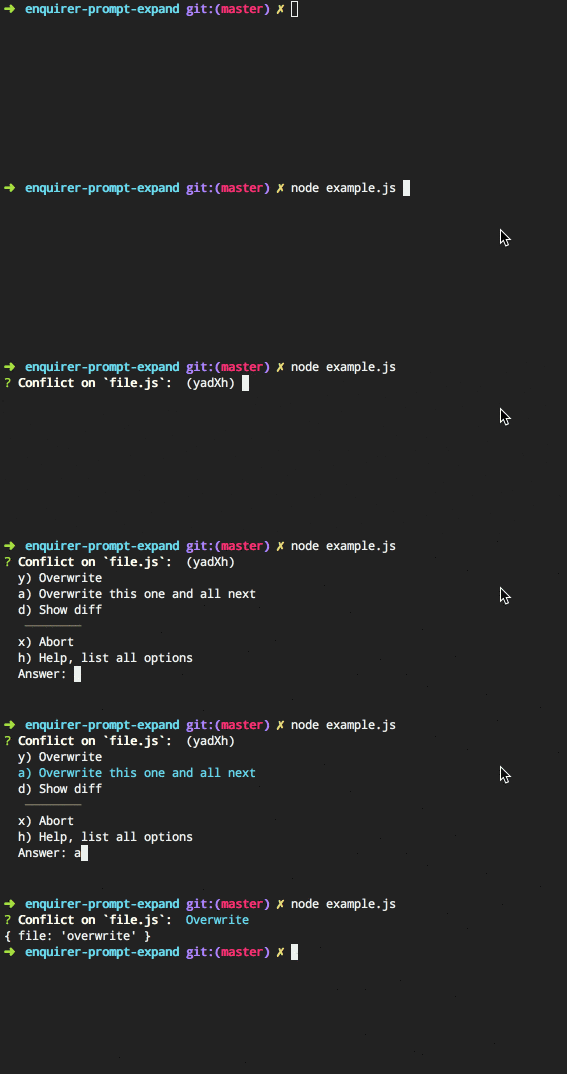
List prompt, where the answer is selected using a shortcut. Can be used as a standalone prompt, or as a plugin for Enquirer.
https://github.com/enquirer/prompt-expand
ask command-line expand prompt question terminal
Last synced: about 1 year ago
JSON representation
List prompt, where the answer is selected using a shortcut. Can be used as a standalone prompt, or as a plugin for Enquirer.
- Host: GitHub
- URL: https://github.com/enquirer/prompt-expand
- Owner: enquirer
- License: mit
- Created: 2016-08-29T02:43:35.000Z (almost 10 years ago)
- Default Branch: master
- Last Pushed: 2018-03-21T16:22:57.000Z (over 8 years ago)
- Last Synced: 2025-03-24T11:13:10.671Z (over 1 year ago)
- Topics: ask, command-line, expand, prompt, question, terminal
- Language: JavaScript
- Homepage: http://enquirer.io
- Size: 89.8 KB
- Stars: 4
- Watchers: 3
- Forks: 2
- Open Issues: 3
-
Metadata Files:
- Readme: README.md
- License: LICENSE
Awesome Lists containing this project
README
# prompt-expand [](https://www.npmjs.com/package/prompt-expand) [](https://npmjs.org/package/prompt-expand) [](https://npmjs.org/package/prompt-expand)
> Expand prompt. Can be used as a standalone prompt, or with a prompt system like [Enquirer](https://github.com/enquirer/enquirer).
## Install
Install with [npm](https://www.npmjs.com/):
```sh
$ npm install --save prompt-expand
```
## Usage
```js
var Prompt = require('prompt-expand');
var prompt = new Prompt({
message: 'What action should be taken on file.js?',
name: 'conflict',
default: 'x',
choices: [
{
key: 'y',
name: 'Overwrite',
value: 'overwrite'
},
{
key: 'a',
name: 'Overwrite this one and all next',
value: 'overwrite_all'
},
{
key: 'd',
name: 'Show diff',
value: 'diff'
},
new Prompt.Separator(),
{
key: 'x',
name: 'Abort',
value: 'abort'
}
]
});
// async
prompt.ask(function(answer) {
console.log({file: answer});
});
// promise
prompt.run()
.then(function(answer) {
console.log({file: answer});
})
.catch(function(err) {
console.log(err);
});
```
## Enquirer usage
Register as a plugin with [enquirer](https://github.com/enquirer/enquirer).
```js
var Enquirer = require('enquirer');
var enquirer = new Enquirer();
enquirer.register('expand', require('prompt-expand'));
```
### Functional-style questions
Define questions using the `.question` method.
```js
enquirer.question('file', 'Conflict on `file.js`: ', {
type: 'expand',
// "default" can be the index of the default choice,
// or the `key` or `name` of the default choice
default: 'x',
choices: [
{
key: 'y',
name: 'Overwrite',
value: 'overwrite'
},
{
key: 'a',
name: 'Overwrite this one and all next',
value: 'overwrite_all'
},
{
key: 'd',
name: 'Show diff',
value: 'diff'
},
enquirer.separator(),
{
key: 'x',
name: 'Abort',
value: 'abort'
}
]
});
enquirer.ask(questions)
.then(function(answers) {
console.log(answers);
})
.catch(function(err) {
console.log(err);
});
```
### Declarative-style questions
Define questions using a declarative, Inquirer-style format.
```js
var questions = [
{
type: 'expand',
message: 'Conflict on `file.js`: ',
default: 'x',
name: 'file',
choices: [
{
key: 'y',
name: 'Overwrite',
value: 'overwrite'
},
{
key: 'a',
name: 'Overwrite this one and all next',
value: 'overwrite_all'
},
{
key: 'd',
name: 'Show diff',
value: 'diff'
},
enquirer.separator(),
{
key: 'x',
name: 'Abort',
value: 'abort'
}
]
}
];
enquirer.ask(questions)
.then(function(answers) {
console.log(answers);
})
.catch(function(err) {
console.log(err);
});
```
## Attribution
Based on the `expand` prompt in inquirer.
## About
### Related projects
* [enquirer](https://www.npmjs.com/package/enquirer): Intuitive, plugin-based prompt system for node.js. Much faster and lighter alternative to Inquirer, with all… [more](https://github.com/enquirer/enquirer) | [homepage](https://github.com/enquirer/enquirer "Intuitive, plugin-based prompt system for node.js. Much faster and lighter alternative to Inquirer, with all the same prompt types and more, but without the bloat.")
* [prompt-base](https://www.npmjs.com/package/prompt-base): Base prompt module used for creating custom prompts. | [homepage](https://github.com/enquirer/prompt-base "Base prompt module used for creating custom prompts.")
* [prompt-checkbox](https://www.npmjs.com/package/prompt-checkbox): Multiple-choice/checkbox prompt. Can be used standalone or with a prompt system like [Enquirer](https://github.com/enquirer/enquirer). | [homepage](https://github.com/enquirer/prompt-checkbox "Multiple-choice/checkbox prompt. Can be used standalone or with a prompt system like [Enquirer].")
* [prompt-confirm](https://www.npmjs.com/package/prompt-confirm): Confirm (yes/no) prompt. Can be used standalone or with a prompt system like [Enquirer](https://github.com/enquirer/enquirer). | [homepage](https://github.com/enquirer/prompt-confirm "Confirm (yes/no) prompt. Can be used standalone or with a prompt system like [Enquirer].")
* [prompt-radio](https://www.npmjs.com/package/prompt-radio): Radio prompt. This prompt behaves like other radio-button interfaces, where only one choice is enabled… [more](https://github.com/enquirer/prompt-radio) | [homepage](https://github.com/enquirer/prompt-radio "Radio prompt. This prompt behaves like other radio-button interfaces, where only one choice is enabled whilst all others are disabled. Can be used as a standalone prompt, or with a prompt system like [Enquirer].")
### Contributing
Pull requests and stars are always welcome. For bugs and feature requests, [please create an issue](../../issues/new).
### Running tests
Running and reviewing unit tests is a great way to get familiarized with a library and its API. You can install dependencies and run tests with the following command:
```sh
$ npm install && npm test
```
### Author
**Jon Schlinkert**
* [github/jonschlinkert](https://github.com/jonschlinkert)
* [twitter/jonschlinkert](https://twitter.com/jonschlinkert)
### License
Copyright © 2017, [Jon Schlinkert](https://github.com/jonschlinkert).
Released under the [MIT License](LICENSE).
***
_This file was generated by [verb-generate-readme](https://github.com/verbose/verb-generate-readme), v0.6.0, on May 27, 2017._