https://github.com/epam/ai-dial-adapter-bedrock
The project implements AI DIAL API for language models from AWS Bedrock
https://github.com/epam/ai-dial-adapter-bedrock
ai-dial llm
Last synced: 6 months ago
JSON representation
The project implements AI DIAL API for language models from AWS Bedrock
- Host: GitHub
- URL: https://github.com/epam/ai-dial-adapter-bedrock
- Owner: epam
- License: apache-2.0
- Created: 2023-09-18T16:28:49.000Z (almost 3 years ago)
- Default Branch: development
- Last Pushed: 2026-01-16T11:10:50.000Z (6 months ago)
- Last Synced: 2026-01-17T00:59:34.491Z (6 months ago)
- Topics: ai-dial, llm
- Language: Python
- Homepage: https://dialx.ai
- Size: 2.54 MB
- Stars: 12
- Watchers: 17
- Forks: 5
- Open Issues: 13
-
Metadata Files:
- Readme: README.md
- Contributing: CONTRIBUTING.md
- License: LICENSE
- Codeowners: .github/CODEOWNERS
- Security: SECURITY.md
Awesome Lists containing this project
README
DIAL Bedrock Adapter


- [Overview](#overview)
- [Supported models](#supported-models)
- [Chat completion models](#chat-completion-models)
- [Implementation basis](#implementation-basis)
- [Configurable models](#configurable-models)
- [Converse API models](#converse-api-models)
- [Performance configuration](#performance-configuration)
- [Guardrail configuration](#guardrail-configuration)
- [Claude 3/4 models](#claude-34-models)
- [Claude 3.7 Sonnet](#claude-37-sonnet)
- [Claude models](#claude-models)
- [Stability AI models](#stability-ai-models)
- [Prompt caching](#prompt-caching)
- [Cross-region inference](#cross-region-inference)
- [Embedding models](#embedding-models)
- [Environment Variables](#environment-variables)
- [Resource limits](#resource-limits)
- [Default `max_tokens` for Claude models](#default-max_tokens-for-claude-models)
- [Compatibility mode](#compatibility-mode)
- [Compatibility configuration in DIAL Core config](#compatibility-configuration-in-dial-core-config)
- [Compatibility configuration in Adapter](#compatibility-configuration-in-adapter)
- [Load balancing](#load-balancing)
- [Authentication](#authentication)
- [AWS Bedrock](#aws-bedrock)
- [Anthropic API](#anthropic-api)
- [Development](#development)
- [Development environment](#development-environment)
- [IDE configuration](#ide-configuration)
- [Make on Windows](#make-on-windows)
- [Run](#run)
- [Lint](#lint)
- [Test](#test)
- [Clean](#clean)
---
# Overview
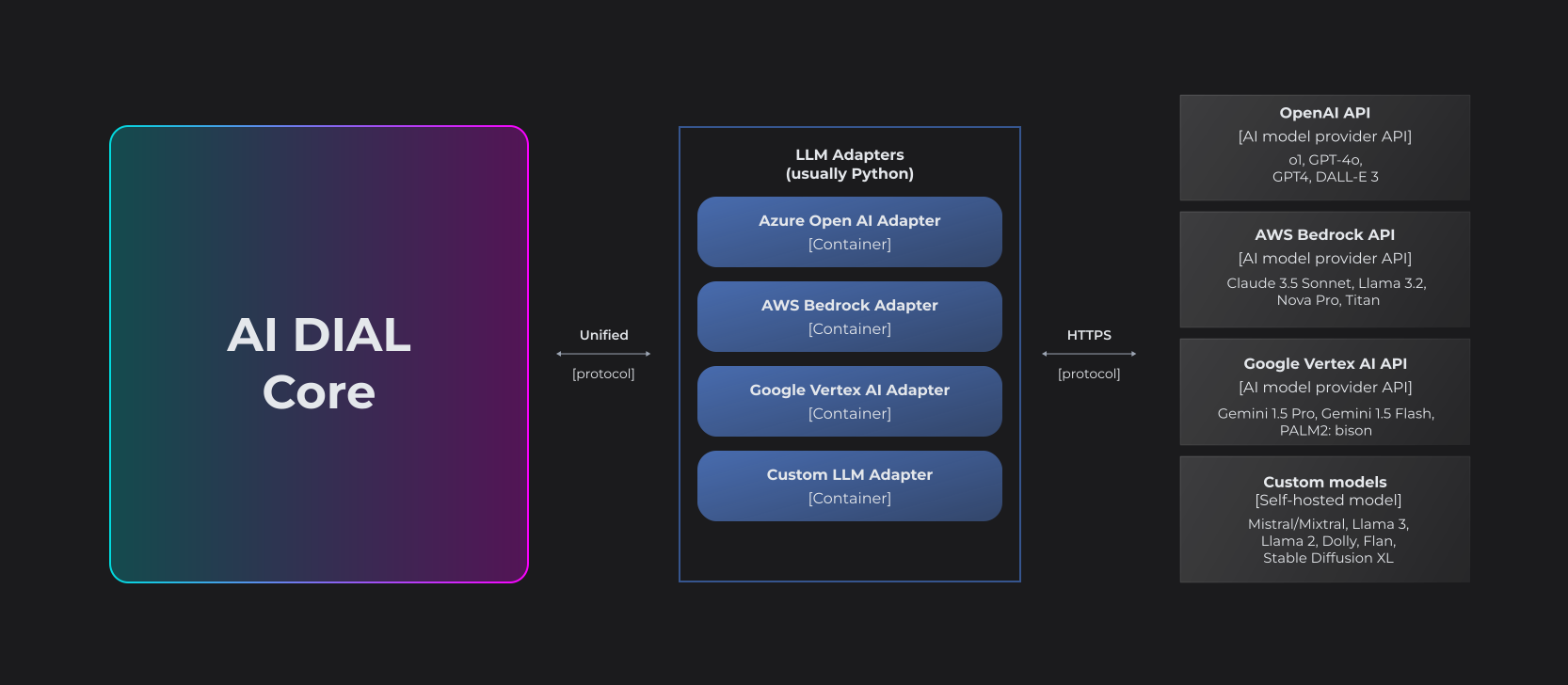
LLM Adapters unify the APIs of respective LLMs to align with the Unified Protocol of DIAL Core. Each Adapter operates within a dedicated container. Multi-modality allows supporting non-textual communications such as image-to-text, text-to-image, file transfers and more.
The project implements [AI DIAL API](https://dialx.ai/dial_api) for language models and embedding models from [AWS Bedrock](https://aws.amazon.com/bedrock/).
---
## Supported models
### Chat completion models
The following models support `POST SERVER_URL/openai/deployments/MODEL_ID/chat/completions` endpoint along with an optional support of `POST /tokenize` and `POST /truncate_prompt` endpoints:
Note that a model supports `/truncate_prompt` endpoint if and only if it supports `max_prompt_tokens` request parameter.
|Vendor|Model|Deployment name|Modality|`/tokenize`|`/truncate_prompt`, `max_prompt_tokens`|tools/functions|`/configuration`|Implementation|
|---|---|---|---|---|---|---|---|---|
|Anthropic|Claude 4.5 Sonnet|anthropic.claude-sonnet-4-5-20250929-v1:0|(text/image/document)-to-text|🟡|🟡|✅|✅|Anthropic SDK/Converse API|
|Anthropic|Claude 4.5 Haiku|anthropic.claude-haiku-4-5-20251001-v1:0|(text/image/document)-to-text|🟡|🟡|✅|✅|Anthropic SDK/Converse API|
|Anthropic|Claude 4.1 Opus|anthropic.claude-opus-4-1-20250805-v1:0|(text/image/document)-to-text|🟡|🟡|✅|✅|Anthropic SDK/Converse API|
|Anthropic|Claude 4 Opus|anthropic.claude-opus-4-20250514-v1:0|(text/image/document)-to-text|🟡|🟡|✅|✅|Anthropic SDK/Converse API|
|Anthropic|Claude 4 Sonnet|anthropic.claude-sonnet-4-20250514-v1:0|(text/image/document)-to-text|🟡|🟡|✅|✅|Anthropic SDK/Converse API|
|Anthropic|Claude 3.7 Sonnet|anthropic.claude-3-7-sonnet-20250219-v1:0|(text/image/document)-to-text|🟡|🟡|✅|✅|Anthropic SDK/Converse API|
|Anthropic|Claude 3.5 Sonnet|anthropic.claude-3-5-sonnet-20240620-v1:0|(text/image/document)-to-text|🟡|🟡|✅|✅|Anthropic SDK/Converse API|
|Anthropic|Claude 3.5 Sonnet 2.0|anthropic.claude-3-5-sonnet-20241022-v2:0|(text/image/document)-to-text|🟡|🟡|✅|✅|Anthropic SDK/Converse API|
|Anthropic|Claude 3.5 Haiku|anthropic.claude-3-5-haiku-20241022-v1:0|(text/document)-to-text|🟡|🟡|✅|✅|Anthropic SDK/Converse API|
|Anthropic|Claude 3 Sonnet|anthropic.claude-3-sonnet-20240229-v1:0|(text/image)-to-text|🟡|🟡|✅|✅|Anthropic SDK/Converse API|
|Anthropic|Claude 3 Haiku|anthropic.claude-3-haiku-20240307-v1:0|(text/image)-to-text|🟡|🟡|✅|✅|Anthropic SDK/Converse API|
|Anthropic|Claude 3 Opus|anthropic.claude-3-opus-20240229-v1:0|(text/image)-to-text|🟡|🟡|✅|✅|Anthropic SDK/Converse API|
|DeepSeek|DeepSeek R1|deepseek.r1-v1:0|text-to-text|🟡|🟡|❌|✅|Converse API|
|Meta|Llama 4 Chat Scout 17B Instruct|meta.llama4-scout-17b-instruct-v1:0|(text/image)-to-text|🟡|🟡|✅|✅|Converse API|
|Meta|Llama 4 Chat Maverick 17B Instruct|meta.llama4-maverick-17b-instruct-v1:0|(text/image)-to-text|🟡|🟡|✅|✅|Converse API|
|Meta|Llama 3.3 70B Instruct|meta.llama3-3-70b-instruct-v1:0|text-to-text|🟡|🟡|✅|✅|Converse API|
|Meta|Llama 3.2 90B Instruct|meta.llama3-2-90b-instruct-v1:0|(text/image)-to-text|🟡|🟡|✅|✅|Converse API|
|Meta|Llama 3.2 11B Instruct|meta.llama3-2-11b-instruct-v1:0|(text/image)-to-text|🟡|🟡|❌|✅|Converse API|
|Meta|Llama 3.2 3B Instruct|meta.llama3-2-3b-instruct-v1:0|text-to-text|🟡|🟡|❌|✅|Converse API|
|Meta|Llama 3.2 1B Instruct|meta.llama3-2-1b-instruct-v1:0|text-to-text|🟡|🟡|❌|✅|Converse API|
|Meta|Llama 3.1 405B Instruct|meta.llama3-1-405b-instruct-v1:0|text-to-text|🟡|🟡|✅|✅|Converse API|
|Meta|Llama 3.1 70B Instruct|meta.llama3-1-70b-instruct-v1:0|text-to-text|🟡|🟡|✅|✅|Converse API|
|Meta|Llama 3.1 8B Instruct|meta.llama3-1-8b-instruct-v1:0|text-to-text|🟡|🟡|❌|✅|Converse API|
|Meta|Llama 3 Chat 70B Instruct|meta.llama3-70b-instruct-v1:0|text-to-text|🟡|🟡|❌|✅|Converse API|
|Meta|Llama 3 Chat 8B Instruct|meta.llama3-8b-instruct-v1:0|text-to-text|🟡|🟡|❌|✅|Converse API|
|Stability AI|Stable Diffusion 3.5 Large|stability.sd3-5-large-v1:0|(text/image)-to-image|❌|🟡|❌|✅|Bedrock API|
|Stability AI|Stable Image Ultra 1.0|stability.stable-image-ultra-v1:1|text-to-image|❌|🟡|❌|✅|Bedrock API|
|Stability AI|Stable Image Core 1.0|stability.stable-image-core-v1:1|text-to-image|❌|🟡|❌|✅|Bedrock API|
|Amazon|Nova Pro|amazon.nova-pro-v1:0|(text/image/document)-to-text|🟡|🟡|✅|✅|Converse API|
|Amazon|Nova Lite|amazon.nova-lite-v1:0|(text/image/document)-to-text|🟡|🟡|✅|✅|Converse API|
|Amazon|Nova Micro|amazon.nova-micro-v1:0|text-to-text|🟡|🟡|❌|✅|Converse API|
|AI21 Labs|Jamba 1.5 Large|ai21.jamba-1-5-large-v1:0|text-to-text|🟡|🟡|✅|✅|Converse API|
|AI21 Labs|Jamba 1.5 Mini|ai21.jamba-1-5-mini-v1:0|text-to-text|🟡|🟡|✅|✅|Converse API|
|Cohere|Command R|cohere.command-r-v1:0|(text/document)-to-text|🟡|🟡|✅|✅|Converse API|
|Cohere|Command R+|cohere.command-r-plus-v1:0|(text/document)-to-text|🟡|🟡|✅|✅|Converse API|
✅, 🟡, and ❌ denote degrees of support of the given feature:
||`/tokenize`, `/truncate_prompt`, `max_prompt_token`|tools/functions|`/configuration`|
|---|---|---|---|
|✅|Fully supported via an official tokenization algorithm|Fully supported via native tools API or official prompts to enable tools|Configurable via the `/configuration` endpoint|
|🟡|Partially supported, because tokenization algorithm wasn't made public by the model vendor.
An approximate tokenization algorithm is used instead.
It conservatively counts **every byte in UTF-8 encoding of a string as a single token**.|Partially supported, because the model doesn't support tools natively.
Prompt engineering is used instead to emulate tools, which may not be very reliable.|Not applicable|
|❌|Not supported|Not supported|Not configurable|
#### Implementation basis
The model adapters differ in what SDKs/APIs they are based on:
1. [Converse API](https://docs.aws.amazon.com/bedrock/latest/APIReference/API_runtime_Converse.html) - the single API unifying different chat completion models
2. [Bedrock API](https://boto3.amazonaws.com/v1/documentation/api/latest/reference/services/bedrock-runtime/client/invoke_model.html) - the original Bedrock API for calling chat completion models
3. [Anthropic SDK](https://github.com/anthropics/anthropic-sdk-python) - the SDK for Anthropic Claude models that provides finer control over the model than the Converse API.
---
#### Configurable models
Certain models support configuration via the `/configuration` endpoint.
GET request to this endpoint returns the schema of the model configuration in [JSON Schema](https://json-schema.org/) format.
Such models expect that `custom_fields.configuration` field of the `chat/completions` request will contain a JSON value that conforms to the schema.
The `custom_fields.configuration` field is optional iff each field in the schema is optional too.
##### Converse API models
###### Performance configuration
Models accept a configuration parameter that enables the [optimized latency mode](https://docs.aws.amazon.com/bedrock/latest/userguide/latency-optimized-inference.html):
|Configuration|Comment|
|---|---|
|`{"performanceConfig": {"latency":"standard"}}`|Default latency|
|`{"performanceConfig": {"latency":"optimized"}}`|Optimized latency|
> [!NOTE]
> Not all Bedrock models actually support the optimized latency mode. Check the [official documentation](https://docs.aws.amazon.com/bedrock/latest/userguide/latency-optimized-inference.html) before use.
###### Guardrail configuration
Models accept a configuration parameter that enables guardrails for the given request:
```json
{
"messages": [
{
"role": "user",
"content": "hello"
}
],
"custom_fields": {
"configuration": {
"guardrailConfig": {
"guardrailIdentifier": "(identifier)",
"guardrailVersion": "(version)",
"streamProcessingMode": "sync | async (opt)",
"trace": "enabled | disabled | enabled_full (opt)"
}
}
}
}
```
The configuration is identical to the [GuardrailStreamConfiguration](https://docs.aws.amazon.com/bedrock/latest/APIReference/API_runtime_GuardrailStreamConfiguration.html) object in the Converse API.
Limitations:
1. [Evaluation](https://docs.aws.amazon.com/bedrock/latest/userguide/guardrails-use-converse-api.html#guardrails-use-converse-api-call) of a specific part of the chat completion request isn't supported.
2. The [trace](https://docs.aws.amazon.com/bedrock/latest/userguide/guardrails-use-converse-api.html#guardrails-use-converse-api-response) provided by the Bedrock Guardrail isn't attached to the response. When guardrail intervenes, the adapter returns an error with `code=content_filter`.
###### Claude 3/4 models
The default adapter for **Claude 3/4** models is based on the [Anthropic SDK](https://github.com/anthropics/anthropic-sdk-python) that [doesn't support](https://github.com/anthropics/anthropic-sdk-python/issues/971) optimized latency mode.
when Converse API specific configuration is enabled, the adapter automatically switches the models to Converse API.
When it happens, you are forfeiting all the features exclusive to the Anthropic SDK. Namely:
1. Support of `tool_choice=none`
2. Support of the Claude configurations [1](#claude-37-sonnet) [2](#claude-models)
##### Claude 3.7 Sonnet
The model accepts optional configuration that enables [thinking feature](https://docs.anthropic.com/en/docs/build-with-claude/extended-thinking):
|Configuration|Comment|
|---|---|
|`{"thinking": {"type": "enabled", "budget_tokens": 1024}}`|Thinking enabled with the given limit on reasoning tokens|
|`{"thinking": {"type": "disabled"}}`|Thinking disabled|
##### Claude models
The Claude models accept an optional list of beta feature flags.
The whole list of flags could be found in the [Anthropic SDK](https://github.com/anthropics/anthropic-sdk-python/blob/main/src/anthropic/types/anthropic_beta_param.py).
|Beta flag|Comment|Scope|
|---|---|---|
|`{"betas": ["token-efficient-tools-2025-02-19"]}`|[Token-efficient tool use](https://docs.anthropic.com/en/docs/build-with-claude/tool-use/token-efficient-tool-use)|Claude 3.7 Sonnet|
|`{"betas": ["output-128k-2025-02-19"]}`|[Extended output length](https://docs.anthropic.com/en/docs/build-with-claude/extended-thinking#extended-output-capabilities-beta)|Claude 3.7 Sonnet|
Not every model supports all flags. Refer to the official documentation before utilizing any flags.
##### Stability AI models
The models accept optional configuration with the following fields:
- `aspect_ratio: str` - one of "16:9", "1:1", "21:9", "2:3", "3:2", "4:5", "5:4", "9:16", "9:21"
- `negative_prompt: str` - a prompt to be used for negative examples
#### Prompt caching
Certain chat completion models support prompt caching via cache breakpoint inserted in tool definitions or request messages.
The adapter supports cache breakpoint for the models based on Converse API and Claude 3 models.
System cache breakpoint
```json
{
"messages": [
{
"role": "system",
"content": "Long system prompt",
"custom_fields": {
"cache_breakpoint": {}
}
},
{
"role": "user",
"content": "user query"
}
]
}
```
Message cache breakpoint
```json
{
"messages": [
{
"role": "system",
"content": "System prompt"
},
{
"role": "user",
"content": "user query"
"custom_fields": {
"cache_breakpoint": {}
}
}
]
}
```
Tools cache breakpoint
```json
{
"tools": [
{
"type": "function",
"name": "get_weather",
"description": "Get current temperature for a given location.",
"parameters": {
"type": "object",
"properties": {
"location": {
"type": "string",
"description": "City and country e.g. Bogotá, Colombia"
}
},
"required": [
"location"
]
},
"custom_fields": {
"cache_breakpoint": {}
}
}
],
"messages": [
{
"role": "system",
"content": "System prompt"
},
{
"role": "user",
"content": "user query"
}
]
}
```
> [!NOTE]
> Not every model supports prompt caching. Refer to the [official documentation](https://docs.aws.amazon.com/bedrock/latest/userguide/prompt-caching.html#prompt-caching-models) before utilizing any cache breakpoints.
#### Cross-region inference
The adapter supports cross-region inference for US, EU and APAC regions for the listed models.
E.g. `Claude 3.5 Sonnet 2.0` model can be accessed via the following deployment names:
1. `anthropic.claude-3-5-sonnet-20241022-v2:0`
2. `us.anthropic.claude-3-5-sonnet-20241022-v2:0`
3. `eu.anthropic.claude-3-5-sonnet-20241022-v2:0`
4. `apac.anthropic.claude-3-5-sonnet-20241022-v2:0`
[Check](https://docs.aws.amazon.com/bedrock/latest/userguide/inference-profiles-support.html#inference-profiles-support-system) that your AWS Bedrock account supports cross-region inference for a particular model before using it.
---
### Embedding models
The following models support `SERVER_URL/openai/deployments/MODEL_ID/embeddings` endpoint:
|Model|Deployment name|Modality|
|---|---|---|
|Titan Multimodal Embeddings Generation 1 (G1)|amazon.titan-embed-image-v1|image/text-to-embedding|
|Amazon Titan Text Embeddings V2|amazon.titan-embed-text-v2:0|text-to-embedding|
|Titan Embeddings G1 – Text v1.2|amazon.titan-embed-text-v1|text-to-embedding|
|Cohere Embed English|cohere.embed-english-v3|text-to-embedding|
|Cohere Multilingual|cohere.embed-multilingual-v3|text-to-embedding|
---
## Environment Variables
Copy `.env.example` to `.env` and customize it for your environment:
|Variable|Default|Description|
|---|---|---|
|AWS_ACCESS_KEY_ID|NA|AWS credentials with an access to the Bedrock service|
|AWS_SECRET_ACCESS_KEY|NA|AWS credentials with an access to the Bedrock service|
|AWS_SESSION_TOKEN|NA|AWS session token with an access the Bedrock service|
|AWS_DEFAULT_REGION||AWS region e.g. `us-east-1`|
|AWS_ASSUME_ROLE_ARN|| AWS assume role ARN e.g. `arn:aws:iam::123456789012:role/RoleName`|
|LOG_LEVEL|INFO|Log level. Use DEBUG for dev purposes and INFO in prod|
|AIDIAL_LOG_LEVEL|WARNING|AI DIAL SDK log level|
|DIAL_URL||URL of the core DIAL server. If defined, images generated by Stability are uploaded to the DIAL file storage and attachments are returned with URLs pointing to the images. Otherwise, the images are returned as base64 encoded strings.|
|WEB_CONCURRENCY|1|Number of workers for the server|
|COMPATIBILITY_MAPPING|{}|**Deprecated** in favour of [compatibility configuration in DIAL Core config](#compatibility-configuration-in-dial-core-config). A JSON dictionary that maps Bedrock deployments that **aren't supported** by the Adapter to the Bedrock deployments that **are supported** by the Adapter _(see the [Supported models](#supported-models)_ section). Find more details in the [compatibility mode](#compatibility-configuration-in-adapter) section.|
|CLAUDE_DEFAULT_MAX_TOKENS|1536|The default value of `max_tokens` chat completion parameter if it is not provided in the request.
**:warning: Using the variable is discouraged**.
Consider configuring the default in the DIAL Core Config instead as demonstrated in the [example below](#default-max_tokens-for-claude-models).|
|BOTOCORE_MAX_RETRY_ATTEMPTS|0|How many times to retry chat model requests made via the Bedrock API or Converse API when the provider returns a retriable error|
|ANTHROPIC_MAX_RETRY_ATTEMPTS|0|How many times to retry Anthropic chat model requests when the provider returns a retriable error|
### Resource limits
The following environment variables reveal adapter's implementation details and therefore are more susceptible to changes in future than the variables discussed so far.
:warning: Don't use the variables unless you are absolutely sure you know what you are doing.
|Variable|Applicable to models implemented via|Default|Description|
|---|---|---|---|
|ANTHROPIC_MAX_CONNECTIONS|[Anthropic SDK](#implementation-basis)|1000|The maximum number of concurrent requests. Corresponds to `max_connections` [parameter](https://www.python-httpx.org/advanced/resource-limits/) of the HTTPX client.|
|ANTHROPIC_MAX_KEEPALIVE_CONNECTIONS|[Anthropic SDK](#implementation-basis)|100|The maximum number of idle connections kept in a connection pool. Corresponds to the `max_keepalive_connections` [parameter](https://www.python-httpx.org/advanced/resource-limits/) of the HTTPX client.|
|BOTOCORE_CLIENT_MAX_POOL_CONNECTIONS|[Bedrock API & Conserve API](#implementation-basis)|1000|The maximum number of connections kept in a connection pool.|
### Default `max_tokens` for Claude models
Unlike OpenAI models, Claude models require the `max_tokens` parameter in the chat completion request.
We recommend configuring `max_tokens` default value on a per-model basis in the DIAL Core Config, for example:
```json
{
"models": {
"dial-claude-deployment-id": {
"type": "chat",
"description": "...",
"endpoint": "...",
"defaults": {
"max_tokens": 2048
}
}
}
}
```
If the default is missing in the DIAL Core Config, it will be taken from the `CLAUDE_DEFAULT_MAX_TOKENS` environment variable.
However, we strongly recommend not to rely on this variable and instead configure the defaults in the DIAL Core Config.
Such a **per-model** configuration is operationally cleaner since all the information relevant to tokens _(like pricing and token limits)_ is kept in the same place.
The default value set in the DIAL Core Config takes precedence over the one configured in the adapter.
Make sure the default doesn't exceed Claude's [max output tokens](https://docs.anthropic.com/en/docs/about-claude/models/all-models#model-comparison-table), otherwise, you will receive an error like this one: `The maximum tokens you requested exceeds the model limit of 131072`.
## Compatibility mode
The Adapter supports a predefined list of AWS Bedrock deployments. The [Supported models](#supported-models) section lists the models. These models could be accessed via `/openai/deployments/MODEL_ID/(chat_completions|embeddings)` endpoints. The Adapter won't recognize any other deployment name and will result in 404 error.
Now, suppose AWS Bedrock released a new version of a model, e.g. `anthropic.claude-3-5-sonnet-20250210-v3:0` that is a better version of an older `anthropic.claude-3-5-sonnet-20241022-v2:0` model.
Immediately after the release, the former model is **unsupported** by the Adapter, but the latter is **supported**.
Therefore, the request to `openai/deployments/anthropic.claude-3-5-sonnet-20250210-v3:0/chat/completions` will result in 404 error.
It will take some time for the Adapter to catch up with AWS Bedrock - support the v3 model and publish the release with the fix.
What to do in the meantime? Presumably, the v3 model is backward compatible with v2, so we may try to run v3 in **the compatibility mode** - that is to convince the Adapter to process v3 request as if it's v2 request with the only difference that the final upstream request to AWS Bedrock will be to v3 and not v2.
There are two way to enable compatibility mode in the adapter.
### Compatibility configuration in DIAL Core config
It's possible to define compatible model on per-upstream basis in the DIAL Core configuration.
E.g. the following configuration enables `anthropic.claude-3-5-sonnet-20250210-v3:0` model _(that isn't supported by the Adapter natively)_ via `anthropic.claude-3-5-sonnet-20241022-v2:0` model _(that is supported by the Adapter natively)_:
```json
{
"models": {
"dial-deployment-id-for-claude-3-5": {
"type": "chat",
"endpoint": "${ADAPTER_ORIGIN}/deployments/anthropic.claude-3-5-sonnet-20250210-v3:0/chat/completions",
"upstreams": [
{
"extraData": {
"compatible_model_id": "anthropic.claude-3-5-sonnet-20241022-v2:0"
}
}
]
}
}
}
```
The given configuration enables the adapter to handle requests to `anthropic.claude-3-5-sonnet-20250210-v3:0` deployment.
The requests will be processed by the same pipeline as `anthropic.claude-3-5-sonnet-20241022-v2:0`, but the call to AWS Bedrock will be done to `anthropic.claude-3-5-sonnet-20250210-v3:0` deployment name.
Naturally, this will only work if the APIs of v2 and v3 deployments are compatible:
1. The requests utilizing the modalities supported by both v2 and v3 will work just fine.
2. However, the requests with modalities that are supported by v3 _(e.g. audio)_ and aren't supported by v2, won't be processed correctly. You will have to wait until the adapter supports the v3 deployment natively.
When a version of the adapter supporting the v3 model is released, you may migrate to it and safely remove the `compatible_model_id` from the DIAL Core config.
Note that setting `compatible_model_id=stability.stable-image-ultra-v1:0` will be ineffectual, since the APIs of the two model and their capabilities are drastically different.
> [!IMPORTANT]
> If the DIAL deployment has many upstreams, the `compatible_model_id` field should be set in all of the upstreams.
### Compatibility configuration in Adapter
> [!IMPORTANT]
> Model compatibility configuration via `COMPATIBILITY_MAPPING` env variable has been deprecated in favour of [configuration on the DIAL Core side](#compatibility-configuration-in-dial-core-config) in DIAL Core config.
`COMPATIBILITY_MAPPING` env variable enables compatibility mode on the adapter level.
It hold a mapping from unsupported deployment ids to supported deployment ids.
E.g. the following mapping enables `anthropic.claude-3-5-sonnet-20250210-v3:0` via `anthropic.claude-3-5-sonnet-20241022-v2:0`:
```ini
COMPATIBILITY_MAPPING={"anthropic.claude-3-5-sonnet-20250210-v3:0": "anthropic.claude-3-5-sonnet-20241022-v2:0"}
```
## Load balancing
If you use DIAL Core load balancing mechanism, you can provide `extraData` upstream setting with different AWS account credentials/regions to use different model deployments:
```json
{
"upstreams": [
{
"extraData": {
"region": "eu-west-1",
"aws_access_key_id": "key_id_1",
"aws_secret_access_key": "access_key_1"
}
},
{
"extraData": {
"region": "eu-west-1",
"aws_access_key_id": "key_id_2",
"aws_secret_access_key": "access_key_2",
"aws_session_token": "optional session token"
}
},
{
"extraData": {
"region": "eu-west-1",
"aws_assume_role_arn": "arn:aws:iam::123456789012:role/BedrockAccessAdapterRoleName"
}
},
{
"key": "anthropic-api-key"
}
]
}
```
The fields in the extra data override the corresponding environment variables:
|`extraData` field|Env variable|
|---|---|
|`region`|`AWS_DEFAULT_REGION`|
|`aws_access_key_id`|`AWS_ACCESS_KEY_ID`|
|`aws_secret_access_key`|`AWS_SECRET_ACCESS_KEY`|
|`aws_session_token`|`AWS_SESSION_TOKEN`|
|`aws_assume_role_arn`|`AWS_ASSUME_ROLE_ARN`|
## Authentication
### AWS Bedrock
Authentication with AWS Bedrock is configured either:
1. globally via `AWS_*` environment vars, or
2. on a [per upstream basis](#load-balancing) via `upstreams.extraData` fields in DIAL Core Config.
### Anthropic API
The adapter supports authentication with Anthropic API for Claude deployments.
1. Choose one of the **Claude API** model names from [the official documentation](https://docs.claude.com/en/docs/about-claude/models/overview#model-names). Let's call it `CLAUDE_API_MODEL_NAME`.
2. Find which **AWS Bedrock** model name corresponds to the chosen **Claude API** model name on the same documentation page. Let's call it `AWS_BEDROCK_MODEL_NAME`.
3. Add the Claude deployment to the DIAL Core configuration with API key configured on a per upstream basis:
```json
{
"models": {
"dial-claude-deployment-name": {
"endpoint": "${ADAPTER_ORIGIN}/deployments/${CLAUDE_API_MODEL_NAME}/chat/completions",
"upstreams": [
{
"key": "${ANTHROPIC_API_KEY}",
"extraData": {
"compatible_model_id": "${AWS_BEDROCK_MODEL_NAME}"
}
}
]
}
}
}
```
Note that there is no need to configure the upstream endpoint, since there is only one endpoint for the model inference in the Anthropic API and it will be used by default: `https://api.anthropic.com/v1/messages`.
The same Anthropic models have [different model names](https://docs.anthropic.com/en/docs/about-claude/models/overview#model-names) in **Claude API** and **AWS Bedrock**. For example:
1. `claude-sonnet-4-5-20250929` _(`${CLAUDE_API_MODEL_NAME}`)_ in **Claude API** corresponds to
2. `anthropic.claude-sonnet-4-5-20250929-v1:0` _(`${AWS_BEDROCK_MODEL_NAME}`)_ in **AWS Bedrock**.
The Bedrock adapter uses model names from **AWS Bedrock**. Therefore, in order to use **Claude API** model name you need to specify the corresponding name from **AWS Bedrock** in the [compatible_model_id](#compatibility-configuration-in-dial-core-config) field. Otherwise, the adapter returns 404.
---
## Development
### Development environment
This project uses [Python>=3.11](https://www.python.org/downloads/) and [Poetry>=2.1.1](https://python-poetry.org/) as a dependency manager.
Check out Poetry's [documentation on how to install it](https://python-poetry.org/docs/#installation) on your system before proceeding.
To install requirements:
```sh
poetry install
```
This will install all requirements for running the package, linting, formatting and tests.
### IDE configuration
The recommended IDE is [VS Code](https://code.visualstudio.com/).
Open the project in VS Code and install the recommended extensions.
VS Code is configured to use PEP-8 compatible formatter [Black](https://black.readthedocs.io/en/stable/index.html).
Alternatively you can use [PyCharm](https://www.jetbrains.com/pycharm/).
Set up the Black in PyCharm [manually](https://black.readthedocs.io/en/stable/integrations/editors.html#pycharm-intellij-idea) or
install PyCharm>=2023.2 with [built-in Black support](https://blog.jetbrains.com/pycharm/2023/07/2023-2/#black).
### Make on Windows
As of now, Windows distributions do not include the make tool. To run make commands, the tool can be installed using
the following command (since [Windows 10](https://learn.microsoft.com/en-us/windows/package-manager/winget/)):
```sh
winget install GnuWin32.Make
```
For convenience, the tool folder can be added to the PATH environment variable as `C:\Program Files (x86)\GnuWin32\bin`.
The command definitions inside Makefile should be cross-platform to keep the development environment setup simple.
### Run
Run the development server locally:
```sh
make serve
```
Run the server from a Docker container:
```sh
make docker_serve
```
### Lint
Don't forget to run the linting before committing:
```sh
make lint
```
To auto-fix formatting issues run:
```sh
make format
```
### Test
To run the unit tests locally:
```sh
make test
```
To run the unit tests from the Docker container:
```sh
make docker_test
```
To run the integration tests locally:
```sh
make integration_tests
```
### Clean
To remove the virtual environment and build artifacts:
```sh
make clean
```