https://github.com/eperezcosano/hexagonal-grid
How to get a perfect hexagon grid using JavaScript to draw on a HTML canvas.
https://github.com/eperezcosano/hexagonal-grid
canvas hexagon hexagonal-grids javascript polygons
Last synced: 8 months ago
JSON representation
How to get a perfect hexagon grid using JavaScript to draw on a HTML canvas.
- Host: GitHub
- URL: https://github.com/eperezcosano/hexagonal-grid
- Owner: eperezcosano
- License: mit
- Created: 2020-07-23T14:29:29.000Z (almost 6 years ago)
- Default Branch: master
- Last Pushed: 2022-11-22T09:04:30.000Z (over 3 years ago)
- Last Synced: 2024-11-04T00:33:09.647Z (over 1 year ago)
- Topics: canvas, hexagon, hexagonal-grids, javascript, polygons
- Language: JavaScript
- Homepage: https://eperezcosano.github.io/hex-grid/
- Size: 26.4 KB
- Stars: 23
- Watchers: 3
- Forks: 1
- Open Issues: 1
-
Metadata Files:
- Readme: README.md
- License: LICENSE
Awesome Lists containing this project
- awesome-starred - eperezcosano/hexagonal-grid - How to get a perfect hexagon grid using JavaScript to draw on a HTML canvas. (javascript)
README
# How to draw a hexagonal grid on HTML Canvas
In this article we are going to learn how to get a perfect hexagon grid using JavaScript to draw on a HTML canvas. We first need to know a bit of trigonometry to solve this problem as it is necessary for all the calculations for the coordinate points composing a regular polygon.
## Table of Contents
1. [The Basics](#the-basics)
2. [A Hexagon](#a-hexagon)
3. [A Row](#a-row)
4. [The Grid](#the-grid)
## The Basics
First of all, we introduce a regular hexagon that is composed of six equal sides.
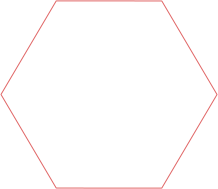
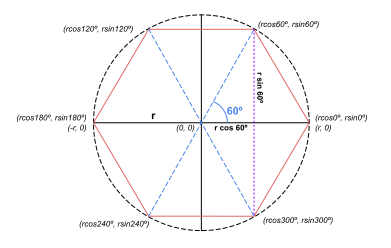
Any regular polygon can be inscribed within a circumference of radius **r**
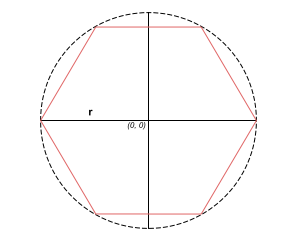
So each of its vertexes intersects with the circumference. Drawing from the premise that the center of the circumference is the point of origin _(0,0)_ we can easily calculate the most-right and most-left vertex are _(**r**, 0)_ and _(-**r**,0)_ respectively, however, what are the positions of the rest of the points? Here is where trigonometry comes into play.
Given any right triangle, the following trigonometric functions applies:
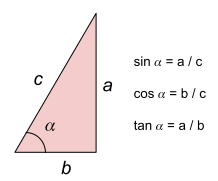
It is very useful to know any side of the triangle if you know one of its other sides and the angle it forms. For this case, the angle formed by each vertex with the horizontal axis is equal by dividing the circumference by the number of sides (360º / 6 = **60º**) and we also know that the hypotenuse is equal to the radius of the circumference **r**. From the first equation we can say that a = c * sinα and b = c *cosα. In summary, putting altogether the second vertex coordinates are _(**rcos60º**,**rsin60º**)_.
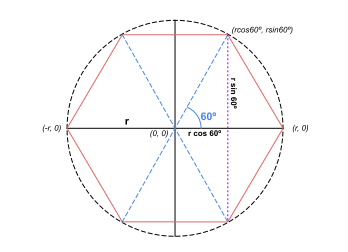
Then the rest comes as a multiple of 60º as 120º, 180º, 240º, 300º and 360º which is equal to 0º again. Notice that the most-right and most-left vertex coincide with what we have expected due to sin0º = 0, cos0º = 1, cos180º = -1 and sin0º = 0. These are the resulting vertexes:
## A Hexagon
As this point we can start a new project to put in practice all we have seen. In an **index.html** file we set the minimum required fields for a HTML canvas:
```html
HexGrid
```
And a **main.js** file:
```javascript
const canvas = document.getElementById('canvas');
const ctx = canvas.getContext('2d');
function init() {}
init();
```
As far as we know, we are going to set up the angle and the size of the hexagon as constants. Notice the angles are needed to be expressed in radians (360º = 2π rad)
```javascript
const a = 2 * Math.PI / 6;
const r = 50;
```
In order to draw a regular hexagon we define a function named _drawHexagon(x,y)_ being _x_ and _y_ the center point. We are going to use a path that allows to set the coordinates before drawing them and when finished we use _stroke()_ to draw only the border line. It is possible doing a _for loop_ to draw a line between each vertex so the result is as follows:
```javascript
function drawHexagon(x, y) {
ctx.beginPath();
for (var i = 0; i < 6; i++) {
ctx.lineTo(x + r * Math.cos(a * i), y + r * Math.sin(a * i));
}
ctx.closePath();
ctx.stroke();
}
```
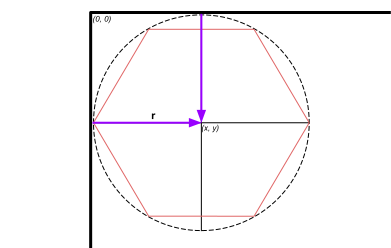
Before testing it, notice that the point _(0,0)_ in our canvas starts on the upper left corner, so in order to fit the drawing we need a minimum offset of **r**.
### Result
https://codepen.io/eperezcosano/pen/eYJXzXK
## A Row
Perfect! The next step is to draw a row of hexagons, like that:
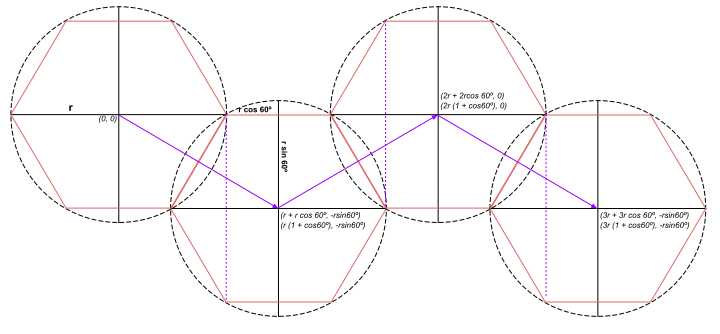
Essentially it is important to know where the next center is going to be located to fit perfectly with one another. First, notice how much horizontally is placed the purple arrow. It is a distance of the radius **r** plus a segment we already know as **rcos60º**. And same as vertically, a segment of **rsin60º** downwards. The procedure is always adding the same amount horizontally and alternating vertically.
The code that allows to draw the four hexagons showed before is:
```javascript
// 1st
x = r;
y = r;
drawHexagon(x, y);
// 2nd
x = x + r + r * Math.cos(a);
y = y + r * Math.sin(a);
drawHexagon(x, y);
// 3rd
x = x + r + r * Math.cos(a);
y = y - r * Math.sin(a);
drawHexagon(x, y);
// 4th
x = x + r + r * Math.cos(a);
y = y + r * Math.sin(a);
drawHexagon(x, y);
```
### Result
https://codepen.io/eperezcosano/pen/xxZBEwN
We need to find the pattern that will allow to made this scalable.
On the one hand, _x_ could be written as a increment of:
```javascript
x = x + r + r * Math.cos(a);
```
That shortened is expressed as:
```javascript
x += r * (1 + Math.cos(a));
```
On the other hand, _y_ is altered between adding or subtracting whether it is an even or odd position:
```javascript
y = y + r * Math.sin(a); // Even position
y = y - r * Math.sin(a); // Odd position
```
How it could be written for a general case?
Let's assign a new variable _j_ that increases just as it does the position we are in. If we use this mathematical trick, we can do like an if-statement for alternating whether is an even or an odd number:
```
(-1) ** j = -1 when j is odd
(-1) ** j = 1 when j is even
```
That is exactly what we were looking for! Let's wrap in altogether, and _y_ is expressed for every iteration as:
```javascript
j++;
y = y + (-1) ** j * r * Math.sin(a);
```
That shortened is expressed as:
```javascript
y += (-1) ** j++ * r * Math.sin(a);
```
Finally we arrive to the solution on how to draw many hexagons in a row as we initially intended. We define a function named _drawGrid(width,height)_ that prints what we have just explained up to this point:
```javascript
function drawGrid(width, height) {
let y = r;
for (let x = r, j = 0; x + r * (1 + Math.cos(a)) < width; x += r * (1 + Math.cos(a)), y += (-1) ** j++ * r * Math.sin(a)) {
drawHexagon(x, y);
}
}
```
Notice whether the subsequent hexagon, in every iteration, that we are going to draw fits inside the canvas.
### Result
https://codepen.io/eperezcosano/pen/XWXGKwP
## The Grid
That is it! We are just one step away from success. All we need is to repeat the same procedure but in the row below repeatedly. But, how much lower is it from the original row? Let's find it out:
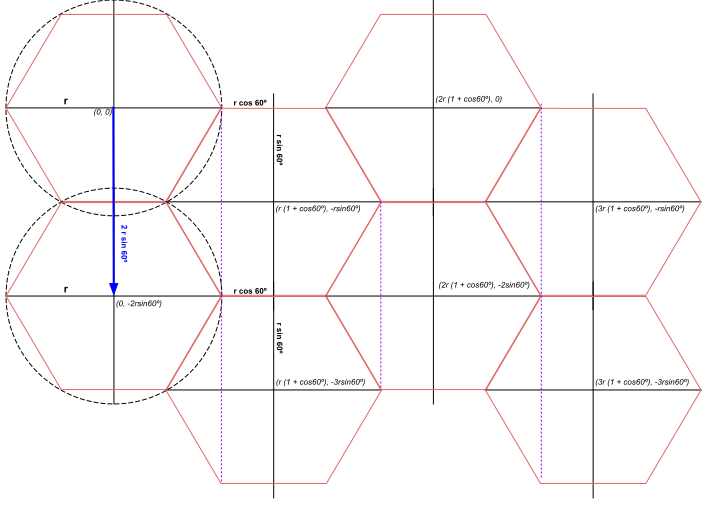
This would be the final scheme of our grid, showing the first four centers of each row to get a good view on what is going on. From the center _(0,0)_ we can see that the blue arrow takes a distance of twice the length of the hexagon height that sums up to **2rsin60º**. However, depending how many hexagons can fit in a row, we have to add **rsin60º** if is odd or **2rsin60º** if is even. The rest is going to be the same taking into account this offset. We modify our function to draw many lines as the last hexagon fits in the canvas height.
```javascript
function drawGrid(width, height) {
for (let y = r, j = 0; y + r * Math.sin(a) < height; y += 2 ** ((j + 1) % 2) * r * Math.sin(a), j = 0) {
for (let x = r; x + r * (1 + Math.cos(a)) < width; x += r * (1 + Math.cos(a)), y += (-1) ** j++ * r * Math.sin(a)) {
drawHexagon(x, y);
}
}
}
```
Let's put altogether and try it out!
### Result
https://codepen.io/eperezcosano/pen/vYLPXYO