https://github.com/epic-r-r/ttodo
A simple command-line todo tools to keeping the track of your tasks
https://github.com/epic-r-r/ttodo
Last synced: 9 months ago
JSON representation
A simple command-line todo tools to keeping the track of your tasks
- Host: GitHub
- URL: https://github.com/epic-r-r/ttodo
- Owner: Epic-R-R
- License: mit
- Created: 2020-09-07T17:28:53.000Z (almost 6 years ago)
- Default Branch: master
- Last Pushed: 2020-09-07T20:10:32.000Z (almost 6 years ago)
- Last Synced: 2025-10-13T13:06:54.827Z (9 months ago)
- Language: Python
- Size: 35.2 KB
- Stars: 1
- Watchers: 1
- Forks: 0
- Open Issues: 0
-
Metadata Files:
- Readme: README.md
- License: LICENSE
Awesome Lists containing this project
README
# tTodo (Terminal Todo)
>* *A simple command-line todo tools to keeping the track of your tasks
Built with Python 3 with Linux systems.*
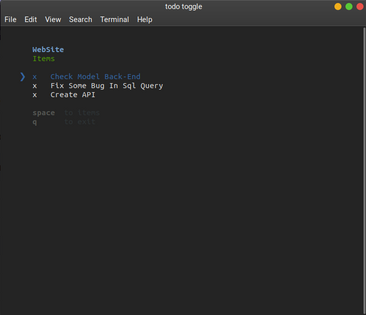
## Picture
*tTodo does not have a graphical interface have a graphic interface*
## Usage
### Clone the repositorie
```console
$ git clone https://github.com/Epic-R-R/tTodo
```
### Go to directory
```console
$ cd tTodo
```
### Install with [pip](https://github.com/pypa/pip)
```console
$ pip install .
```
You now can use the *tTodo* with this command `todo`.
### Create a Todo project
Before working on your Todo list, you need to create a project.
```console
$ todo project
Project name: (web-app) MyWebsite
```
now you created your project and can start adding tasks into your project
## Commands
* [Create a project](#create-a-project)
* [Add a task](#add-a-task)
* [Remove a task](#remove-a-task)
* [Check a task](#check-a-task)
* [Uncheck a task](#uncheck-a-task)
* [List all tasks](#list-all-tasks)
* [Search tasks](#search-tasks)
* [Toggle a task](#toggle-a-task)
* [Rename a project](#rename-a-project)
* [Delete a project](#delete-a-project)
### Create a project
```console
$ todo project
```
### Add a task
```console
$ todo add "Name of the task"
```
Multi-tasks adding with together:
```console
$ todo add "Task 1", Task 2, "Task 3"
```
### Remove a task
remove task by name:
```console
$ todo remove "Name"
```
remove with an interactive menu:
```console
$ todo remove
```
*You can use `rm` instead of `remove`.*
### Check a task
Chack with name:
```console
$ todo check "Name"
```
Check all items:
```console
$ todo check --all
```
*You can use `-a` instead of `--all`.*
### Uncheck a task
Uncheck with name:
```console
$ todo uncheck "Name"
```
Uncheck all items:
```console
$ todo uncheck --all
```
### List all tasks
```console
$ todo list
```
*You can use `ls` instead of `list`.*
### Search tasks
```console
$ todo search "keyword"
```
### Toggle a task
Toggle a specific task by name:
```console
$ todo toggle "Name"
```
Toggle with an interactive menu:
```console
$ todo toggle
```
*You can use `tg` instead of `toggle`.*
### Rename a project
```console
$ todo rename "New name"
```
### Delete a project
```console
$ todo delete
```
*You can use `del` instead of `delete`.*