https://github.com/epigen/dea_limma
A Snakemake workflow and MrBiomics module for performing and visualizing differential (expression) analyses (DEA) on NGS data powered by the R package limma.
https://github.com/epigen/dea_limma
atac-seq bioinformatics biomedical-data-science chip-seq differential-expression-analysis limma limma-trend limma-voom r rna-seq scrna-seq snakemake statistics visualization volcano-plot workflow
Last synced: over 1 year ago
JSON representation
A Snakemake workflow and MrBiomics module for performing and visualizing differential (expression) analyses (DEA) on NGS data powered by the R package limma.
- Host: GitHub
- URL: https://github.com/epigen/dea_limma
- Owner: epigen
- License: mit
- Created: 2022-08-12T10:02:19.000Z (almost 4 years ago)
- Default Branch: main
- Last Pushed: 2025-03-06T10:50:21.000Z (over 1 year ago)
- Last Synced: 2025-04-12T11:23:54.995Z (over 1 year ago)
- Topics: atac-seq, bioinformatics, biomedical-data-science, chip-seq, differential-expression-analysis, limma, limma-trend, limma-voom, r, rna-seq, scrna-seq, snakemake, statistics, visualization, volcano-plot, workflow
- Language: R
- Homepage: https://epigen.github.io/dea_limma/
- Size: 147 KB
- Stars: 26
- Watchers: 4
- Forks: 2
- Open Issues: 4
-
Metadata Files:
- Readme: README.md
- License: LICENSE
- Citation: CITATION.cff
Awesome Lists containing this project
README
[](https://github.com/epigen/MrBiomics/)
[](https://zenodo.org/badge/latestdoi/524038188)
[]()
[]()
[](https://github.com/epigen/dea_limma/blob/master/LICENSE)

[](https://snakemake.readthedocs.io/en/stable/)
# Differential Analysis & Visualization Snakemake Workflow Using _limma_
A [Snakemake 8](https://snakemake.readthedocs.io/en/stable/) workflow for performing and visualizing differential expression (or accessibility) analyses (DEA) of NGS data (eg RNA-seq, ATAC-seq, scRNA-seq,...) powered by the R package [_limma_](https://www.bioconductor.org/packages/release/bioc/html/limma.html).
> [!NOTE]
> This workflow adheres to the module specifications of [MrBiomics](https://github.com/epigen/MrBiomics), an effort to augment research by modularizing (biomedical) data science. For more details, instructions, and modules check out the project's repository.
>
> ⭐️ **Star and share modules you find valuable** 📤 - help others discover them, and guide our focus for future work!
> [!IMPORTANT]
> **If you use this workflow in a publication, please don't forget to give credit to the authors by citing it using this DOI [10.5281/zenodo.7808516](https://doi.org/10.5281/zenodo.7808516).**

# 🖋️ Authors
- [Stephan Reichl](https://github.com/sreichl)
- [Lukas Folkman](https://github.com/lukas-folkman)
- [Christoph Bock](https://github.com/chrbock)
# 💿 Software
This project wouldn't be possible without the following software and their dependencies:
| Software | Reference (DOI) |
| :------------: | :-----------------------------------------------: |
| edgeR | https://doi.org/10.1093/bioinformatics/btp616 |
| EnhancedVolcano| https://doi.org/10.18129/B9.bioc.EnhancedVolcano |
| ggplot2 | https://ggplot2.tidyverse.org/ |
| patchwork | https://CRAN.R-project.org/package=patchwork |
| pheatmap | https://cran.r-project.org/package=pheatmap |
| _limma_ | https://doi.org/10.1093/nar/gkv007 |
| Snakemake | https://doi.org/10.12688/f1000research.29032.2 |
# 🔬 Methods
This is a template for the Methods section of a scientific publication and is intended to serve as a starting point. Only retain paragraphs relevant to your analysis. References [ref] to the respective publications are curated in the software table above. Versions (ver) have to be read out from the respective conda environment specifications (`workflow/envs/*.yaml file`) or post-execution in the result directory (`dea_limma/envs/*.yaml`). Parameters that have to be adapted depending on the data or workflow configurations are denoted in squared brackets e.g., [X].
__Differential Expression Analysis (DEA).__ DEA was performed on the quality-controlled filtered [raw/normalized] counts using the _limma_ (ver) [ref] workflow for fitting a linear model [formula] to identify features (genes/regions) that statistically significantly change with [comparisons] compared to the control group [reference levels] (intercept). Briefly, we determined normalization factors with edgeR::calcNormFactors (optional) using method [X], then applied voom (optional) to estimate the mean-variance relationship of the log-counts. We used blocking on (optional) variable [X] to account for repeated measurements, lmFit to fit the model to the data, and finally eBayes (optional) with the robust (and trend flag – optional for normalized data) flag to compute (moderated/ordinary) t-statistics. For each comparison we used topTable to extract feature-wise average expression, effect sizes (log2 fold change) and their statistical significance as adjusted p-values, determined using the Benjamini-Hochberg method. Furthermore, we calculated feature scores, for each feature in all comparisons, using the formula [score_formula] for downstream ranked enrichment analyses. Next, these results were filtered for relevant features based on the following criteria: statistical significance (adjusted p-value < [X]), effect size (absolute log2 fold change > [X]), and expression (average expression > [X]). Finally, we performed hierarchical clustering on the effect sizes (log2 fold changes) of the union of all relevant features and comparison groups.
__Visualization.__ The filtered result statistics, i.e., number of relevant features split by positive (up) and negative (down) effect sizes, were visualized with stacked bar plots using ggplot (ver) [ref].
To visually summarize results of all performed comparisons, the effect size (log2 fold change) values of all relevant features in at least one comparison were plotted in a hierarchically clustered heatmap using pheatmap (ver) [ref].
Volcano plots were generated for each comparison using EnhancedVolcano (ver) [ref] with adjusted p-value threshold of [pCutoff] and log2 fold change threshold of [FCcutoff] as visual cut-offs for the y- and x-axis, respectively.
Finally, quality control plots of the fitted mean-variance relationship and raw p-values of the features were generated.
**The analysis and visualizations described were performed using a publicly available Snakemake (ver) [ref] workflow (ver) [[10.5281/zenodo.7808516](https://doi.org/10.5281/zenodo.7808516)].**
# 🚀 Features
The workflow performs the following steps that produce the outlined results:
- Differential Expression Analysis (DEA) steps:
- (optional) calculation of normalization factors using __edgeR::calcNormFactors__.
- (optional) calculation of precision weights to model the mean-variance relationship in order to make linear models "applicable" to count data (weighted least squares) using __voom__.
- (optional) __block__ on a "group" factor in case you have repeated measurements (generalized least squares).
- example use-case: you have N donors and T timepoints for each donor and want to model donor specific information like age, but still want to account for the variable __donor__ ie ~ *timepoint* + *age* + *donor* is overdetermined hence the formula becomes ~ *timepoint* + *age* and you "block" on __donor__.
- fit linear models (ordinary least squares) with the design derived from the configured formula (expects "normal" data) using __lmFit__.
- the fitted model object is saved (lmfit_object.rds) for alternative downstream analyses or manual inspection e.g., contrasts (see instructions below in [Contrasts](#contrasts)).
- (optional) improve variance estimation using __eBayes__ with the robustness flag (`robust=TRUE`), which applies a robust empirical Bayes approach that downweights extreme variance estimates via winsorization, stabilizing hyperparameters across all genes (i.e., shrinking them toward a common value) and yielding moderated t-statistics and p-values that are more reliable in heterogeneous datasets.
- (optional) eBayes with __limma-trend__ (trend=TRUE)
- extract all statistics for variables of interest (=configured comparisons) using __topTable__ (eg coefficients/effect size, statistical significance,...).
- save a feature list per comparison group and direction of change (up/down) for downstream analyses (eg enrichment analysis) (TXT).
- (optional) annotated feature list with suffix "_annot" (TXT).
- (optional) save feature score tables (with two columns: "feature" and "score") per comparison group using score_formula for downstream analyses (eg ranked enrichment analysis) (CSV).
- (optional) annotated feature scores tables (with two columns: "feature_name" and "score") with suffix "_annot" (CSV).
- DEA result statistics: total number of statistically significant features and split by positive (up) and negative (down) change (CSV).
- DEA result filtering of features (eg genes) by
- statistical significance (<= adjusted p-value: adj_pval)
- effect size (>= absolute log 2 fold change: lfc)
- average expression (>= ave_expr) in the data (to skip this filter use `-Inf`)
- Visualizations
- filtered DEA result statistics ie number of features and direction (stacked bar plots)
- volanco plots per comparison with effect size on the x-axis and raw p-value(rawp)/adjusted p-value (adjp) on the y-axis
- highlighting features according to configured cut-offs for statistical significance (pCutoff) and effect size (FCcutoff)
- (optional) highlighting features according to configured feature lists
- hierarchically clustered heatmap of effect sizes (LFC) per comparison (features x comparisons) indicating statistical significance with a star '\*'
- using all relevant features (FILTERED)
- (optional) using configured feature lists
- in case of more than 100 features the row labels and significance indicators (\*) are removed
- in case of more than 50000 features no heatmap is generated
- diagnostic quality control plots
- (optional) voom mean-variance trend
- (optional) intermediate mean-variance trend, in case of blocking and vooming
- post-fitting mean-variance trend
- raw p-value distributions (to check for p-value inflation in relation to average expression)
> [!NOTE]
> - Colons (":") in variable/group names (i.e., interactions) are replaced with double-underscores ("\_\_") downstream.
> - We do not support more complex contrast scenarios than are supported via topTable, but the fitted linear model is saved for downstream analyses (see instructions below in [Contrasts](#contrasts)).
# 🛠️ Usage
Here are some tips for the usage of this workflow:
- _limma_ usage and best practices are not explained. For deatiled documentation, tutorials and insctructions see [Resources](#resources). To understand the implementation at hand see [limma.R](./workflow/scripts/limma.R).
- Perform your first run(s) with loose filtering options/cut-offs and use the same for visualization to see if further filtering is even necessary or useful.
- Test minimal complex configurations on a subset of your data.
- Start with simple models and try to understand the results.
# ⚖️ Contrasts
Currently, we do not support contrasts. If you have any idea how to implement contrasts, feel invited to reach out.
If you require contrasts to ask questions your model does not answer, just load the fitted model and perform the contrast manually (see examle in [_limma's_ User's Guide](https://www.bioconductor.org/packages/devel/bioc/vignettes/limma/inst/doc/usersguide.pdf) chapter 9.5):
```R
# load model and design
fit <- readRDS(file.path('{result_path}/dea_limma/{analysis}/lmfit_object.rds'))
design <- data.frame(fread(file.path("{result_path}/dea_limma/{analysis}/model_matrix.csv"), header=TRUE), row.names=1)
# define and create contrasts of interest
# e.g., if you modeled "~ 0 + group", where group = {celltype}_{genotype}
# you can find the genotype effect for cell types A, B, C using the following contrasts
contrasts_all <- list(
ctA = "groupCelltypeA_KO - groupCelltypeA_WT",
ctB = "groupCelltypeB_KO - groupCelltypeB_WT",
ctC = "groupCelltypeC_KO - groupCelltypeC_WT"
)
contrast_matrix <- makeContrasts(contrasts=contrasts_all, levels = design)
# perform contrasts
fit2 <- contrasts.fit(fit, contrast_matrix)
# estimate/correct variance with eBayes
fit2 <- eBayes(fit2, robust=TRUE)
# extract results
contrast_result <- data.frame()
for(coefx in colnames(coef(fit2))){
tmp_res <- topTable(fit2, coef=coefx, number=nrow(fit2), sort.by="P")
tmp_res$feature <- rownames(tmp_res)
tmp_res <- tmp_res[,c(ncol(tmp_res),1:(ncol(tmp_res)-1))]
rownames(tmp_res) <- NULL
# beautify group names by replacing them (the contrast formula) with the names of the comparison
tmp_res$group <- names(contrasts_all)[contrasts_all == coefx]
if(dim(contrast_result)[1]==0){
contrast_result <- tmp_res
}else{
contrast_result <- rbind(contrast_result, tmp_res)
}
}
# remove rows with adj.P.Val=NA
contrast_result <- contrast_result[!is.na(contrast_result$adj.P.Val),]
# save results
fwrite(as.data.frame(contrast_result), file=file.path("path/to/contrast_results.csv"), row.names=FALSE)
# process and visualize results as you wish, feel free to reuse code from this module
```
# ⚙️ Configuration
Detailed specifications can be found here [./config/README.md](./config/README.md)
# 📖 Examples
--- COMING SOON ---
# 🔗 Links
- [GitHub Repository](https://github.com/epigen/dea_limma/)
- [GitHub Page](https://epigen.github.io/dea_limma/)
- [Zenodo Repository](https://doi.org/10.5281/zenodo.7808516)
- [Snakemake Workflow Catalog Entry](https://snakemake.github.io/snakemake-workflow-catalog?usage=epigen/dea_limma)
# 📚 Resources
- Recommended compatible [MrBiomics](https://github.com/epigen/MrBiomics) modules
- for upstream analyses:
- [ATAC-seq Processing](https://github.com/epigen/atacseq_pipeline) to quantify chromatin accessibility.
- [scRNA-seq Data Processing & Visualization](https://github.com/epigen/scrnaseq_processing_seurat) for processing (multimodal) single-cell transcriptome data.
- [Split, Filter, Normalize and Integrate Sequencing Data](https://github.com/epigen/spilterlize_integrate/) after count quantification.
- for downstream analyses:
- [Enrichment Analysis](https://github.com/epigen/enrichment_analysis) for biomedical interpretation of (differential) analysis results using prior knowledge.
- [Unsupervised Analysis](https://github.com/epigen/unsupervised_analysis) to understand and visualize similarities and variations between cells/samples, including dimensionality reduction and cluster analysis. Useful for all tabular data including single-cell and bulk sequencing data.
- [Genome Browser Track Visualization](https://github.com/epigen/genome_tracks/) for quality control and visual inspection/analysis of genomic regions/genes of interest or top hits.
- [Bioconductor - _limma_](http://bioconductor.org/packages/release/bioc/html/limma.html) includes a 150 page [User's Guide](https://www.bioconductor.org/packages/devel/bioc/vignettes/limma/inst/doc/usersguide.pdf)
- [R Manual on Model Formulae](https://stat.ethz.ch/R-manual/R-patched/library/stats/html/formula.html)
- [Bioconductor - RNAseq123 - Workflow](https://bioconductor.org/packages/release/workflows/html/RNAseq123.html)
- _limma_ workflow tutorial RNA-seq analysis is easy as 1-2-3 with _limma_, Glimma and edgeR
- [notebook](https://bioconductor.org/packages/release/workflows/vignettes/RNAseq123/inst/doc/limmaWorkflow.html)
- [paper](https://f1000research.com/articles/5-1408/v3)
- A guide to creating design matrices for gene expression experiments
- [notebook](https://bioconductor.org/packages/release/workflows/vignettes/RNAseq123/inst/doc/designmatrices.html)
- [paper](https://f1000research.com/articles/9-1444/v1)
- voom: precision weights unlock linear model analysis tools for RNA-seq read counts
- [paper](https://genomebiology.biomedcentral.com/articles/10.1186/gb-2014-15-2-r29)
- scRNA-seq DEA benchmark paper featuring _limma_-voom and _limma_-trend as valid/best methods
- [paper: Bias, robustness and scalability in single-cell differential expression analysis](https://www.nature.com/articles/nmeth.4612)
- [code](https://github.com/csoneson/conquer_comparison)
- scRNA-seq DEA benchmark featuring _limma_-voom and _limma_-trend emphasizing pseudo-bulking
- [paper: Confronting false discoveries in single-cell differential expression](https://www.nature.com/articles/s41467-021-25960-2)
- alternative/complementary DEA method: Linear Mixed Models (LMM)
- [variancePartition](https://bmcbioinformatics.biomedcentral.com/articles/10.1186/s12859-016-1323-z)
- [dream](https://academic.oup.com/bioinformatics/article/37/2/192/5878955)
# 📑 Publications
The following publications successfully used this module for their analyses.
- [FirstAuthors et al. (202X) Journal Name - Paper Title.](https://doi.org/10.XXX/XXXX)
- ...
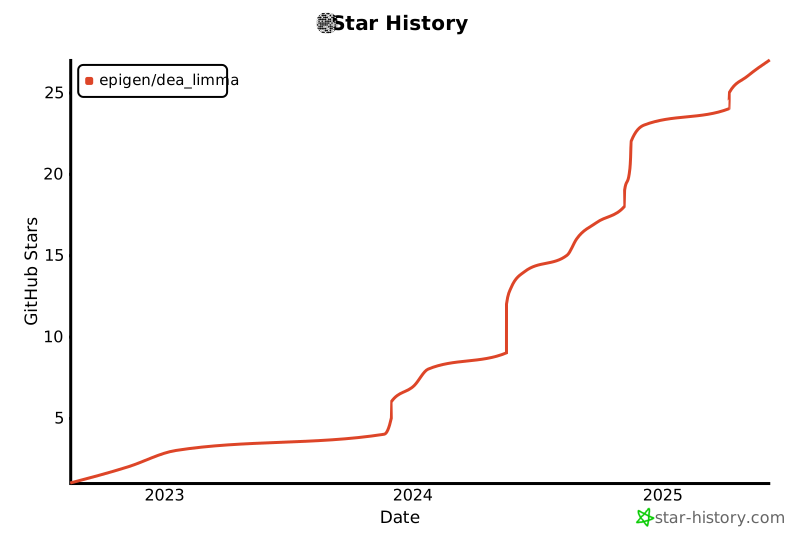
# ⭐ Star History
[](https://star-history.com/#epigen/dea_limma&Date)