https://github.com/erdemkosk/jet-file-transfer
An application that allows you to transfer files from one computer to another, regardless of the operating system.
https://github.com/erdemkosk/jet-file-transfer
desktop-app file java tcp transfer udp
Last synced: about 2 months ago
JSON representation
An application that allows you to transfer files from one computer to another, regardless of the operating system.
- Host: GitHub
- URL: https://github.com/erdemkosk/jet-file-transfer
- Owner: erdemkosk
- License: apache-2.0
- Created: 2020-08-18T12:42:33.000Z (almost 6 years ago)
- Default Branch: master
- Last Pushed: 2025-06-01T09:17:29.000Z (about 1 year ago)
- Last Synced: 2025-06-01T17:45:07.882Z (about 1 year ago)
- Topics: desktop-app, file, java, tcp, transfer, udp
- Language: Java
- Homepage: https://sourceforge.net/projects/jet-file-transfer/
- Size: 98.6 KB
- Stars: 6
- Watchers: 2
- Forks: 2
- Open Issues: 0
-
Metadata Files:
- Readme: README.md
- License: LICENSE
Awesome Lists containing this project
README
# Jet File Transfer
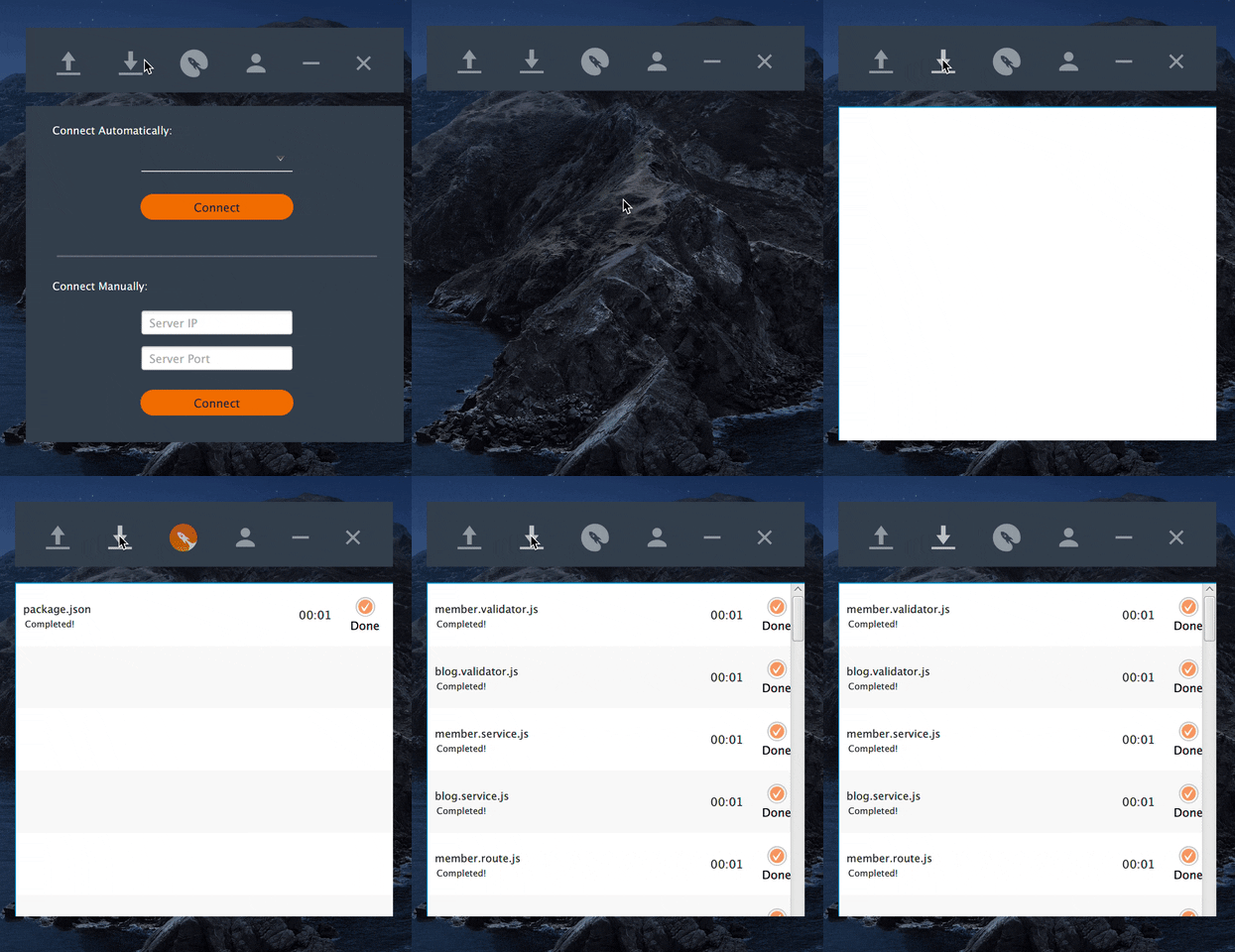
Jet File Transfer lets you share files and folders between devices on the same local network without using the internet. Launch one device as a server and another as a client — they discover each other automatically.
[](https://www.youtube.com/watch?v=g4C_jfIkYe4)
## Download
Pre-built packages are published on [GitHub Releases](https://github.com/erdemkosk/jet-file-transfer/releases):
| Platform | File |
|----------|------|
| macOS (Apple Silicon) | `JetFileTransfer-macos-aarch64.dmg` |
| macOS (Intel) | `JetFileTransfer-macos-x64.dmg` |
| Windows | `JetFileTransfer-windows-x64.zip` |
| Linux | `JetFileTransfer-linux-x64.tar.gz` |
Release builds include a bundled Java runtime — **you do not need to install Java** to run the desktop app.
---
## macOS installation
1. Download the DMG for your Mac from GitHub Releases:
- Apple Silicon (M1/M2/M3): `JetFileTransfer-macos-aarch64.dmg`
- Intel Mac: `JetFileTransfer-macos-x64.dmg`
2. Open the DMG and drag **Jet File Transfer** into **Applications**.
3. Run the commands below before the first launch.
### Why do I need to run a terminal command?
macOS **Gatekeeper** blocks apps downloaded from the internet when they are not signed and notarized by Apple. Our open-source builds are ad-hoc signed, so macOS may show:
> *"Apple cannot verify that JetFileTransfer is free of malware"*
This does **not** mean the app is malicious. It only means Apple has not reviewed the build. Removing the quarantine flag tells macOS you trust this download:
```bash
xattr -cr /Applications/JetFileTransfer.app
open /Applications/JetFileTransfer.app
```
**Alternative (no terminal):** try opening the app once, then go to **System Settings → Privacy & Security** and click **Open Anyway**.
> A fully signed and notarized build (no warning, no extra steps) requires an Apple Developer account. That may be added in a future release.
---
## Windows installation
1. Download `JetFileTransfer-windows-x64.zip`.
2. Extract the archive.
3. Run `JetFileTransfer/JetFileTransfer.exe`.
If SmartScreen shows a warning, click **More info → Run anyway** — the app is unsigned, which is common for open-source releases.
---
## Linux installation
1. Download `JetFileTransfer-linux-x64.tar.gz`.
2. Extract the archive:
```bash
tar -xzf JetFileTransfer-linux-x64.tar.gz
```
3. Run the launcher:
```bash
./JetFileTransfer/bin/JetFileTransfer
```
---
## Requirements
### End users (release builds)
| | |
|---|---|
| **Java** | Not required — bundled in the release package |
| **Network** | Local network (Wi‑Fi / LAN). Internet is not used for file transfer |
| **macOS** | Apple Silicon or Intel (download matching DMG). See [macOS installation](#macos-installation) above |
| **Windows** | 64-bit Windows 10 or later |
| **Linux** | 64-bit Linux with glibc (most modern distros) |
### Developers (building from source)
| | |
|---|---|
| **Java** | **JDK 17** or later |
| **OpenJFX** | **17.0.12** (pulled automatically via Maven) |
| **Maven** | 3.6+ |
| **Python** | 3 + Pillow (optional, only to regenerate app icons) |
Since JDK 11, JavaFX is no longer bundled with the JDK. This project uses [OpenJFX](https://openjfx.io/) as a Maven dependency, so you do not need a separate JavaFX SDK install for development.
### Run from source
```bash
git clone https://github.com/erdemkosk/jet-file-transfer.git
cd jet-file-transfer
mvn clean javafx:run
```
### Build a local package
```bash
mvn clean package -Djavafx.platform=mac-aarch64 # macOS Apple Silicon
mvn clean package -Djavafx.platform=win # Windows
mvn clean package -Djavafx.platform=linux # Linux
```
Platform packages are created with `jpackage` in CI. See [`.github/workflows/release.yml`](.github/workflows/release.yml) for the full pipeline.
---
## Tech stack
- **Java 17** + **OpenJFX 17**
- **JFoenix** — Material Design UI components
- **Gson** — settings / JSON
- **TCP/IP** — file transfer
- **UDP** — device discovery on the local network
---
## FAQ
| Question | Answer |
|----------|--------|
| Which file types are supported? | All file types |
| Does it use the internet? | No. A local network connection is required, but traffic stays on your LAN |
| Which platforms are supported? | macOS, Windows, Linux (desktop), and [Android on Google Play](https://play.google.com/store/apps/details?id=com.jetfiletransfer.mek.jetfiletransfer) |
---
## License
Apache 2.0
## Links
- [GitHub Releases](https://github.com/erdemkosk/jet-file-transfer/releases)
- [Google Play (Android)](https://play.google.com/store/apps/details?id=com.jetfiletransfer.mek.jetfiletransfer)
- [Legacy desktop downloads (SourceForge)](https://sourceforge.net/projects/jet-file-transfer/)