https://github.com/erickwendel/nodered-google-sheets-to-json-stream
This Node-RED custom node lets you consume google sheets spreadsheets on demand.
https://github.com/erickwendel/nodered-google-sheets-to-json-stream
etl google google-auth gooogle-sheets nodered
Last synced: about 1 year ago
JSON representation
This Node-RED custom node lets you consume google sheets spreadsheets on demand.
- Host: GitHub
- URL: https://github.com/erickwendel/nodered-google-sheets-to-json-stream
- Owner: ErickWendel
- Created: 2024-07-19T18:55:34.000Z (about 2 years ago)
- Default Branch: main
- Last Pushed: 2025-06-07T21:38:42.000Z (about 1 year ago)
- Last Synced: 2025-06-07T22:29:10.404Z (about 1 year ago)
- Topics: etl, google, google-auth, gooogle-sheets, nodered
- Language: JavaScript
- Homepage: https://flows.nodered.org/node/nodered-contrib-google-sheets-to-json-stream
- Size: 1.69 MB
- Stars: 35
- Watchers: 1
- Forks: 4
- Open Issues: 1
-
Metadata Files:
- Readme: README.md
- Contributing: CONTRIBUTING.md
Awesome Lists containing this project
README
# nodered-contrib-google-sheets-to-json-stream
This Node-RED custom node lets you consume google sheets spreadsheets on demand.

## Why
My inspiration for creating this module was that the popular [node-red-contrib-google-sheets](https://flows.nodered.org/node/node-red-contrib-google-sheets) puts all the spreadsheet data in memory overloading Node.js and causing crashes while working with big sets of data (such as 10K+ sheets lines).
It also doesn't automatically set the sheet range nor parse data to JSON nor allow you to filter only the columns you want.
### Solution and features
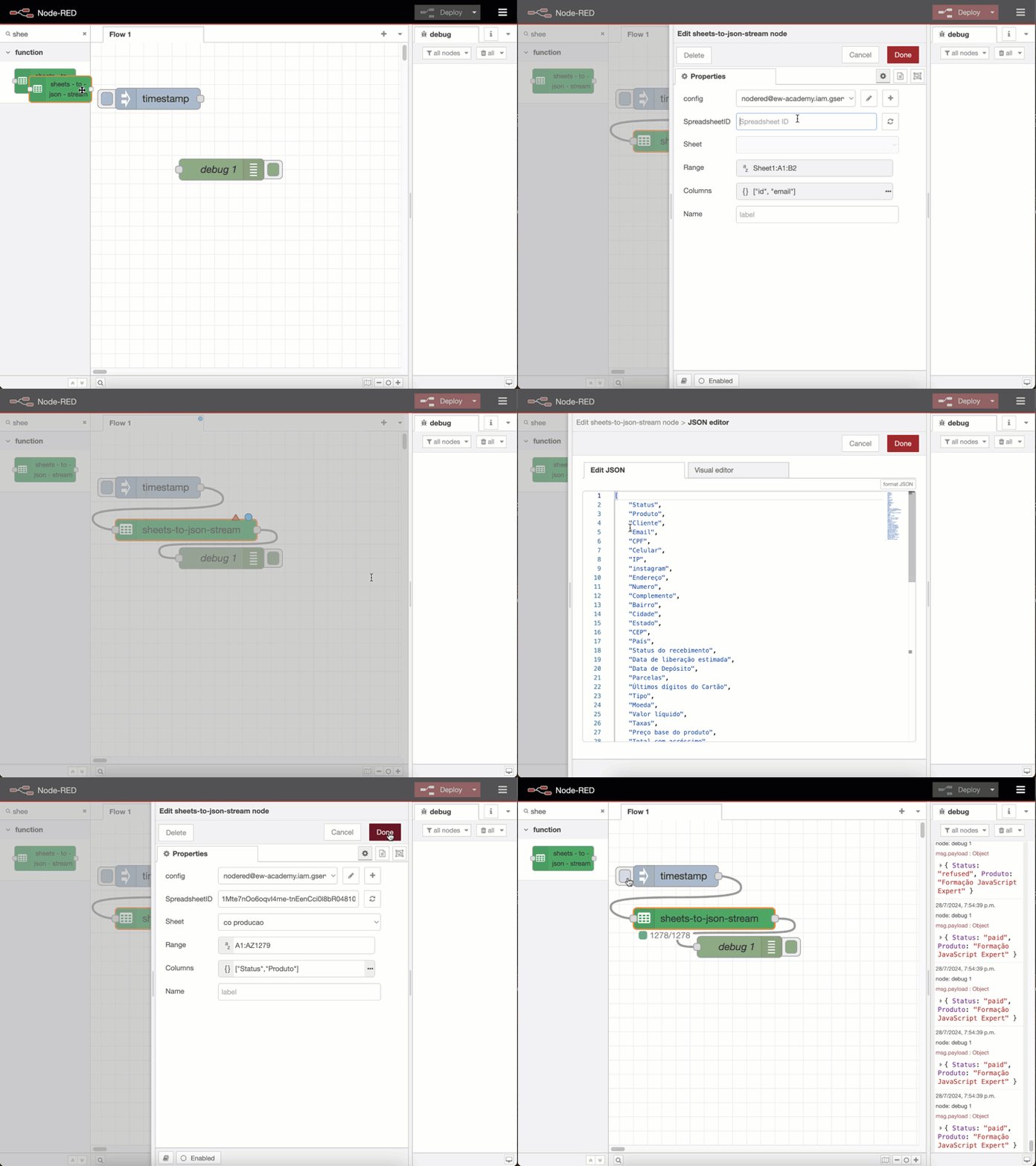
This module **nodered-contrib-google-sheets-to-json-stream** came to solve these problems by processing data on demand and providing a good developer experience.
Once you add your google sheets credentials and put the spreadSheetId, it:
- auto completes fields listing all sheets in the spreadsheet
- automatically sets the range of lines and columns available in the sheets
- parses the available columns (using the sheet's first line) into JSON
- processes items on demand (currently process 500 items per time if the range is bigger than 500)
- in the status, shows how many lines were processed vs how many is missing
- if you trigger this module twice, stops the current processing
### Demo
## Configuration
### Auth
To setup auth this node uses a google service account:
Create a new service account from [This Page](https://console.cloud.google.com/iam-admin/serviceaccounts?_ga=2.184919274.-272657095.1578084478)
Download a JSON credentials object for the service account.
Give that account access to the [sheets API](https://console.cloud.google.com/apis/library/sheets.googleapis.com).
Share your sheet with the email address of the service account eg `nodered@nodered-12345.iam.gserviceaccount.com`
> credits: I got this piece of info from [node-red-contrib-google-sheets](https://flows.nodered.org/node/node-red-contrib-google-sheets)
## Preparing your sheet
1. This module use the your sheet's first line to determine what columns the JSON will have
- Make sure your sheet won't have blank lines in the beggining
2. This module gets `range` from the A1 until the line **google sheets api** returns but sometimes empty lines are in the end
- Make sure you delete all blank lines in the end of the file to avoid processing empty fields
3. If you spreadsheet contains blank items, the google API might skip this line
- Replace all blank items with `" "` (see [how-do-you-replace-blank-cells-with-zero-in-google-sheets](https://scales.arabpsychology.com/stats/how-do-you-replace-blank-cells-with-zero-in-google-sheets/#google_vignette)) to know how to fix it
### Sheets
The sheet ID can be found in the URL of your google sheet, for example in
`https://docs.google.com/spreadsheets/d/1UuVIH2O38XK0TfPMGHk0HG_ixGLtLk6WoBKh4YSrDm4/edit#gid=0`
Where the ID will be `1UuVIH2O38XK0TfPMGHk0HG_ixGLtLk6WoBKh4YSrDm4`
## Example
You an checkout the examples in [./examples](https://github.com/ErickWendel/nodered-google-sheets-to-json-stream/blob/main/examples/)
```json
[{"id":"d652ac160cab2b75","type":"inject","z":"node-456d53ee","name":"","props":[{"p":"payload"},{"p":"topic","vt":"str"}],"repeat":"","crontab":"","once":false,"onceDelay":0.1,"topic":"","payload":"","payloadType":"date","x":120,"y":60,"wires":[["c3338b4dcfe5389b"]]},{"id":"c3338b4dcfe5389b","type":"sheets-to-json-stream","z":"node-456d53ee","config":"node-44ef3d66","sheetId":"","sheetList":"","sheetListValues":"","range":"","columns":"","name":"","x":180,"y":100,"wires":[["e5933f1826546203"]]},{"id":"e5933f1826546203","type":"debug","z":"node-456d53ee","name":"debug 1","active":true,"tosidebar":true,"console":false,"tostatus":false,"complete":"false","statusVal":"","statusType":"auto","x":200,"y":140,"wires":[]}]
```
## Dependencies
- It uses the `"@googleapis/sheets": "^9.0.0"` and `"google-auth-library": "^9.11.0"`
## Contributing
Contributions are always welcome, consider opening an issue first and discuss with the community before opening a pull request
See [CONTRIBUTING.md](https://github.com/ErickWendel/nodered-google-sheets-to-json-stream/blob/main/CONTRIBUTING.md) to learn how you can run all tests before changing the code