https://github.com/ericrocha97/bluefin
A Bluefin DX-based bootc image with GNOME + COSMIC dual desktop, focused on development and built with the Bluefin multi-stage OCI pattern.
https://github.com/ericrocha97/bluefin
bluefin bluefin-dx bootc container-linux cosmic developer-workstation fedora gnome immutable-os linux-desktop multi-stage oci ublue
Last synced: 21 days ago
JSON representation
A Bluefin DX-based bootc image with GNOME + COSMIC dual desktop, focused on development and built with the Bluefin multi-stage OCI pattern.
- Host: GitHub
- URL: https://github.com/ericrocha97/bluefin
- Owner: ericrocha97
- License: apache-2.0
- Created: 2026-01-21T01:47:46.000Z (5 months ago)
- Default Branch: main
- Last Pushed: 2026-05-01T11:23:36.000Z (about 1 month ago)
- Last Synced: 2026-05-01T13:29:10.643Z (about 1 month ago)
- Topics: bluefin, bluefin-dx, bootc, container-linux, cosmic, developer-workstation, fedora, gnome, immutable-os, linux-desktop, multi-stage, oci, ublue
- Language: Shell
- Homepage: https://artifacthub.io/packages/container/bluefin-cosmic-dx/bluefin-cosmic-dx
- Size: 2.15 MB
- Stars: 0
- Watchers: 0
- Forks: 1
- Open Issues: 1
-
Metadata Files:
- Readme: README.md
- Contributing: CONTRIBUTING.md
- License: LICENSE
- Agents: AGENTS.md
Awesome Lists containing this project
README
# bluefin-cosmic-dx
[](https://artifacthub.io/packages/search?repo=bluefin-cosmic-dx)
[](https://github.com/ericrocha97/bluefin/pkgs/container/bluefin-cosmic-dx)
This project was created using the finpilot template: .
Portuguese version: [README.pt-BR.md](README.pt-BR.md)
It builds a custom bootc image based on Bluefin DX, using the multi-stage OCI pattern from the Bluefin ecosystem.
## Build and Publish
- Official image build and publication runs via self-hosted Jenkins (`Jenkinsfile`).
- Published image registry: `ghcr.io/ericrocha97/bluefin-cosmic-dx`.
- GitHub Actions (`.github/workflows/build.yml`) now runs only as a PR check (`pull_request` for `main`) and does not publish images.
## What Makes this Raptor Different?
Here are the changes from Bluefin DX. This image is based on Bluefin and includes these customizations:
### Added Packages (Build-time)
- **System packages**: Full COSMIC desktop environment including:
- Core desktop stack: session, compositor, panel, launcher, applets, greeter
- Native applications: Settings, Files (file manager), Edit (text editor), Terminal, Store (app store), Player (media player), Screenshot tool
- System components: wallpapers, icons, notifications, OSD, app library, workspaces manager
- Desktop portal integration (xdg-desktop-portal-cosmic)
- **CLI Tools**: copr-cli (COPR repository management and monitoring)
- **System Tools**: earlyoom (OOM prevention), ffmpegthumbnailer (video thumbnails)
- **Codecs**: Full multimedia codecs via negativo17/fedora-multimedia (base image), plus optional `libvdpau-va-gl` when available in Fedora repos
- **Third-party apps**: VSCode Insiders, Warp Terminal, Vicinae
### Added Applications (Runtime)
- **CLI Tools (Homebrew)**: None (no Brewfiles included yet).
- **GUI Apps (Flatpak)**: Zen Browser.
### Removed/Disabled
- None.
### System Optimizations (CachyOS/LinuxToys)
- **sysctl**: CachyOS VM/network/kernel tweaks (swappiness, vfs_cache_pressure, dirty bytes, etc.)
- **udev rules**: IO schedulers (BFQ/mq-deadline/none), audio PM, SATA, HPET, CPU DMA latency
- **modprobe**: NVIDIA PAT + dynamic power management, AMD GPU options, module blacklist
- **tmpfiles**: Transparent Huge Pages (defer+madvise, shrinker at 80%)
- **journald**: Journal size limited to 50MB
- **earlyoom**: 5% memory/swap threshold, D-Bus notifications
- **Auto-updates**: rpm-ostreed AutomaticUpdatePolicy=stage
- **GNOME**: mutter check-alive-timeout set to 20s
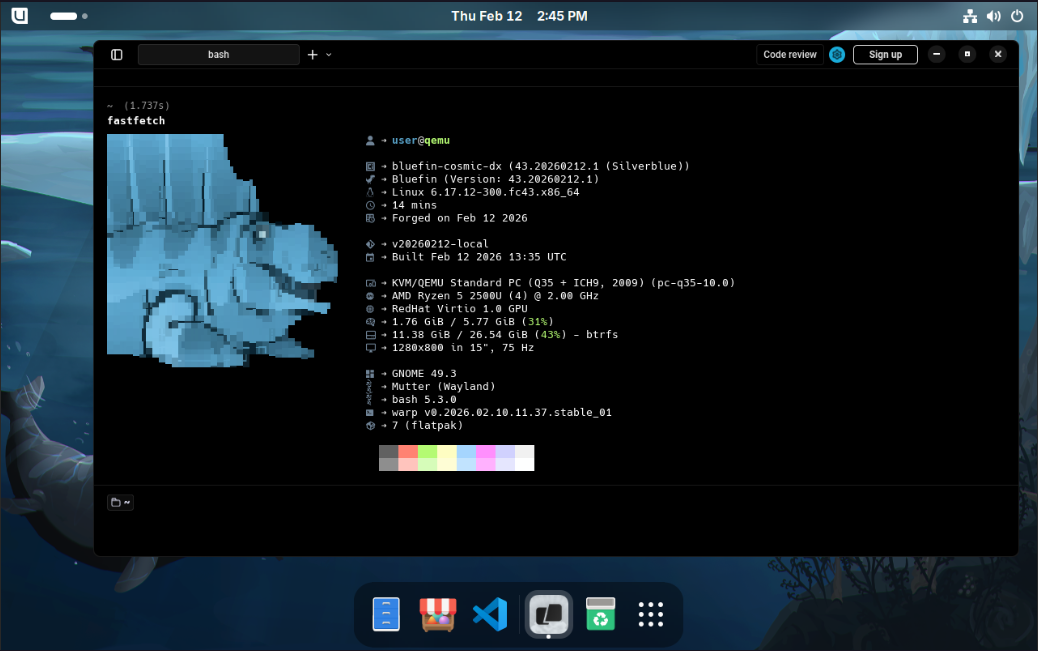
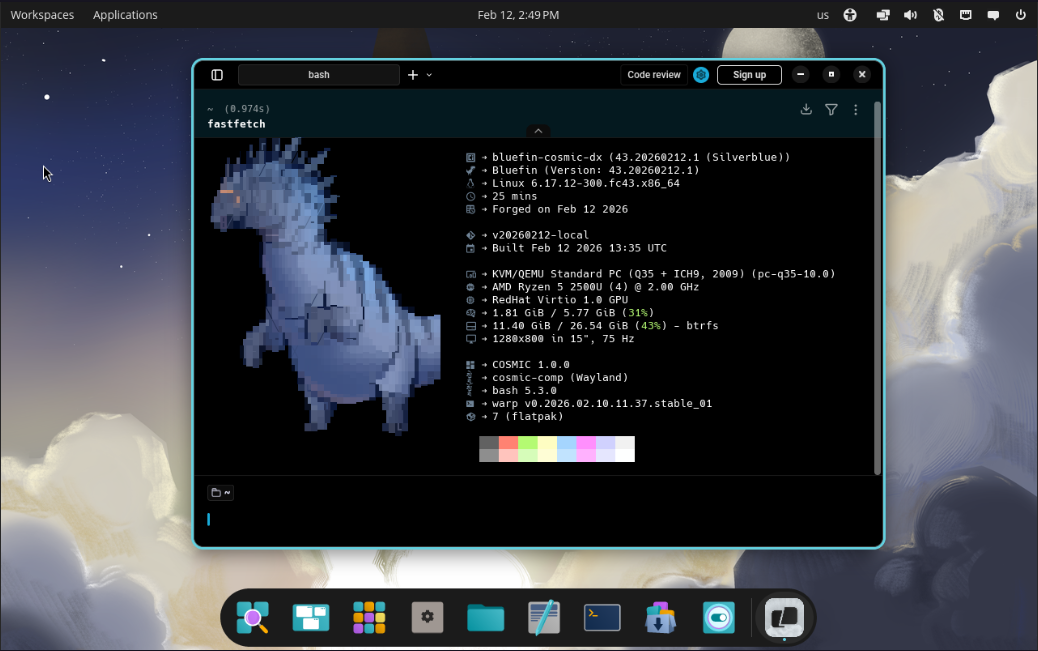
- **Fastfetch**: Custom config showing image name/version, COSMIC version, and build date (overrides upstream Bluefin config)
### Configuration Changes
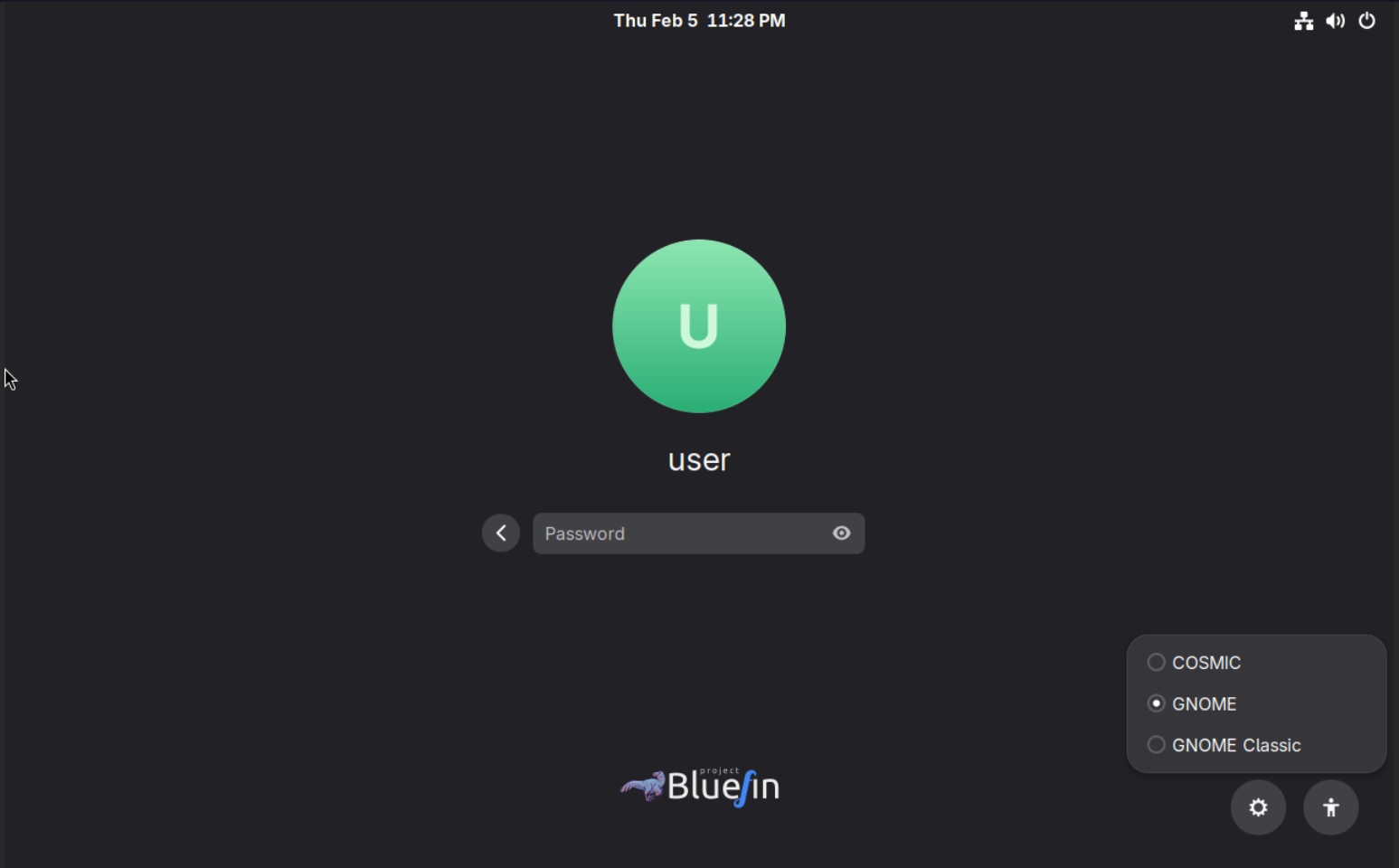
- Dual desktop sessions available in GDM (GNOME and COSMIC).
- Custom ujust commands available: install-nvm, install-sdkman, install-dev-managers.
*Last updated: 2026-03-14*
## What is this image
bluefin-cosmic-dx is a developer-focused Bluefin image with **GNOME + COSMIC dual desktop** support. You can choose which desktop environment to use at the login screen.
## What changes in this version
Based on **Bluefin DX**, this image adds:
- **COSMIC desktop** (System76) as an alternative to GNOME
- **VSCode Insiders** installed via RPM
- **Warp Terminal** installed via RPM
- **Vicinae** installed via Terra repo (Bazzite-compatible)
- **Dual desktop support**: Choose GNOME or COSMIC at login (GDM)
- All Bluefin DX features (containers, DevPods, CLI tools, etc.)
Base image: `ghcr.io/ublue-os/bluefin-dx:stable-daily`
## Jenkins Pipeline Operations
For Jenkins CI/CD operations (GHCR publishing, GitHub release automation, n8n webhook ingestion, Postgres persistence, and email alerting), see `docs/jenkins/README.md` (PT-BR).
## Basic usage
### Just Commands
This project uses [Just](https://just.systems/) as a command runner. Here are the main commands available:
**Building:**
```bash
just build # Build the container image
just build-vm # Build VM image (QCOW2) - alias for build-qcow2
just build-qcow2 # Build QCOW2 VM image
just build-iso # Build ISO installer image
just build-raw # Build RAW disk image
```
**Running:**
```bash
just run-vm # Run the VM - alias for run-vm-qcow2
just run-vm-qcow2 # Run VM from QCOW2 image
just run-vm-iso # Run VM from ISO image
just run-vm-raw # Run VM from RAW image
```
**Utilities:**
```bash
just clean # Clean all temporary files and build artifacts
just lint # Run shellcheck on all bash scripts
just format # Format all bash scripts with shfmt
just --list # Show all available commands
```
**Custom ujust commands (in the image):**
This image includes custom `ujust` commands for development managers:
```bash
ujust install-nvm
ujust install-sdkman
ujust install-dev-managers
```
There are no Brewfiles included by default. If you add `.Brewfile` files (matching the `*.Brewfile` pattern) anywhere in `custom/brew/`, they will be copied during build automatically.
**Complete workflow:**
```bash
# Build everything and run the VM
just build && just build-vm && just run-vm
# Or step by step:
just build # 1. Build container image
just build-qcow2 # 2. Build VM image
just run-vm-qcow2 # 3. Run the VM
```
### Deploying to Your System
Switch your system to this image:
```bash
sudo bootc switch ghcr.io/ericrocha97/bluefin-cosmic-dx:stable
sudo systemctl reboot
```
Roll back to Bluefin DX:
```bash
sudo bootc switch ghcr.io/ublue-os/bluefin-dx:stable
sudo systemctl reboot
```
## Optional: Enable Image Signing
Image signing is optional. The repository keeps Cosign signing steps in `.github/workflows/build.yml` for future reuse, but this workflow currently runs only on PR checks and does not publish/sign release images.
- Generate keys with `cosign generate-key-pair`
- Add private key content as repository secret `SIGNING_SECRET`
- Keep `cosign.key` private (never commit); only `cosign.pub` may be committed
If you decide to re-enable GitHub Actions release builds later, these signing steps can be reactivated there. For the current production flow, Jenkins is responsible for build/publish.
## Choosing Desktop at Login
At the GDM login screen, click the **⚙️ gear icon** to select:
- **GNOME** - Default Bluefin desktop
- **COSMIC** - System76's new desktop environment
## Troubleshooting
### COSMIC session does not appear in GDM
1. Verify packages: `rpm -qa | grep -i cosmic`
2. Check session file: `ls /usr/share/wayland-sessions/cosmic.desktop`
3. Restart GDM: `sudo systemctl restart gdm`
### VSCode or Warp fails to start
- Verify RPM install: `rpm -q code-insiders warp-terminal`
- Ensure /opt is writable inside the image (required for RPM installs)
### Local build fails
- Free disk space: `df -h`
- Clean and retry: `just clean && just build`
- Check logs: `journalctl -xe`
### VM does not boot
- Ensure KVM is available: `ls -l /dev/kvm`
- Rebuild VM image: `just build-qcow2`
## Screenshots
View screenshots
### GDM session selector
### COSMIC desktop
### GNOME desktop