https://github.com/errec/muncak
Example of landing page using my Pug-Sass Boilerplate Starter Kit
https://github.com/errec/muncak
Last synced: 4 months ago
JSON representation
Example of landing page using my Pug-Sass Boilerplate Starter Kit
- Host: GitHub
- URL: https://github.com/errec/muncak
- Owner: Errec
- Created: 2019-01-04T13:47:46.000Z (over 7 years ago)
- Default Branch: master
- Last Pushed: 2019-01-10T02:13:14.000Z (over 7 years ago)
- Last Synced: 2025-10-19T11:29:51.997Z (9 months ago)
- Language: HTML
- Size: 1.67 MB
- Stars: 1
- Watchers: 1
- Forks: 0
- Open Issues: 0
-
Metadata Files:
- Readme: README.md
Awesome Lists containing this project
README

# Pug-Sass Boilerplate Starter Kit
Pug-Sass Boilerplate Starter Kit is a Front-end web kit and boilerplate for building web apps or small sites using Pug(Jade) and Sass
## Inspiration
This project is based on a simple and fast workflow focused mainly on the front-end task. It gives a solid starting point for newcomers who wants a ready-to-deploy local environment setup. The sources used to build this project includes:
* [H5BP Project](https://github.com/h5bp/html5-boilerplate)
* [React Redux Starter Kit](https://github.com/davezuko/react-redux-starter-kit)
* [Mark Goodyear's Blog](https://markgoodyear.com/2014/01/getting-started-with-gulp/)
* [Web Starter Kit](https://github.com/google/web-starter-kit)
## Features
* Pug-Sass ready.
* Easy to deploy your production files
* Performance optimization: minify and concatenate JavaScript, CSS, HTML and images
* Live browser reloading with `BrowserSync`
* Includes:
* [`Normalize.css`](https://necolas.github.com/normalize.css/) for CSS normalizations and common bug fixes
* [`jQuery`](https://jquery.com/) via CDN and Bower installation
* [`Bootstrap`](http://getbootstrap.com/) via CDN and Bower installation
* [`html5shiv`](https://github.com/aFarkas/html5shiv) via CDN
* [`Respond`](https://github.com/scottjehl/Respond) via CDN
* [`gulpfile.js`](http://gulpjs.com/) with Gulp presets
* `Sass variables` with with popular color palettes from [Material Design Palette](https://www.materialpalette.com/) and [Flat UI Colors](https://flatuicolors.com/)
## Requirements
* [Node.js](https://nodejs.org)
* [npm](https://www.npmjs.com)
* [Gulp](http://gulpjs.com/)
## Optionals
* [Bower](https://bower.io/)
## Getting Started
After [Node.js](https://nodejs.org/en/download/), [npm](https://docs.npmjs.com/getting-started/installing-node), [Gulp](https://github.com/gulpjs/gulp/blob/master/docs/getting-started.md) and [Bower](https://bower.io/#install-bower)(optional) installation, you can create a new project based on `pug-sass-boilerplate-starter-kit` by doing the following:
### Install From Source
First, clone the project:
```bash
$ git clone https://github.com/Errec/pug-sass-boilerplate-starter-kit.git
```
Initialize `npm` on `` directory
```bash
$ cd
$ npm init
```
Install `Gulp` locally
```bash
$ sudo npm install gulp --save-dev
```
Finally, install `Gulp` required dependencies
```bash
$ sudo npm install gulp-uglify browser-sync gulp-plumber gulp-autoprefixer gulp-sass gulp-pug gulp-imagemin gulp-cache gulp-clean-css gulp-sourcemaps gulp-concat beeper gulp-util gulp-rename gulp-notify --save-dev
```
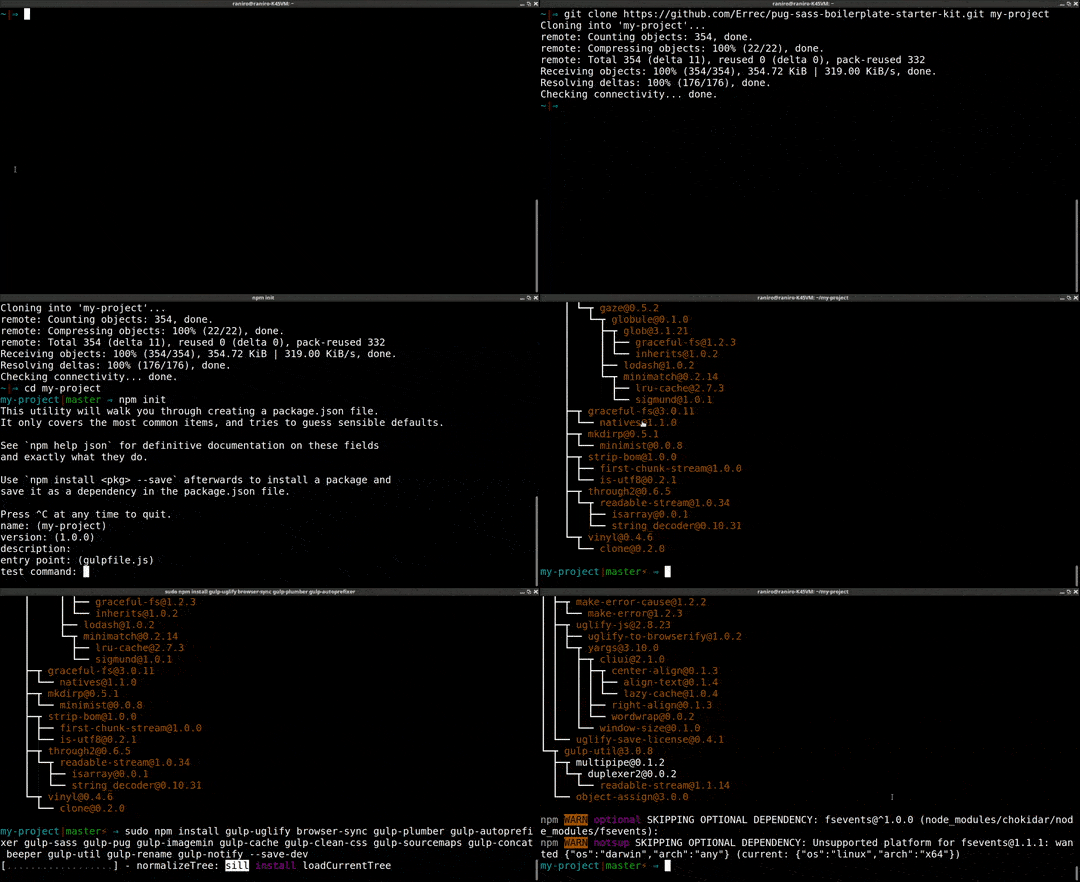
Optionally, if you want to add external components and libraries, initialize `Bower` and install the dependencies to be used in your next project (e.g.: jQuery, Bootstrap, Modernizer).
```bash
$ bower init
$ bower install jquery --save
$ bower install bootstrap --save
```
### Running Your Local Server With Gulp
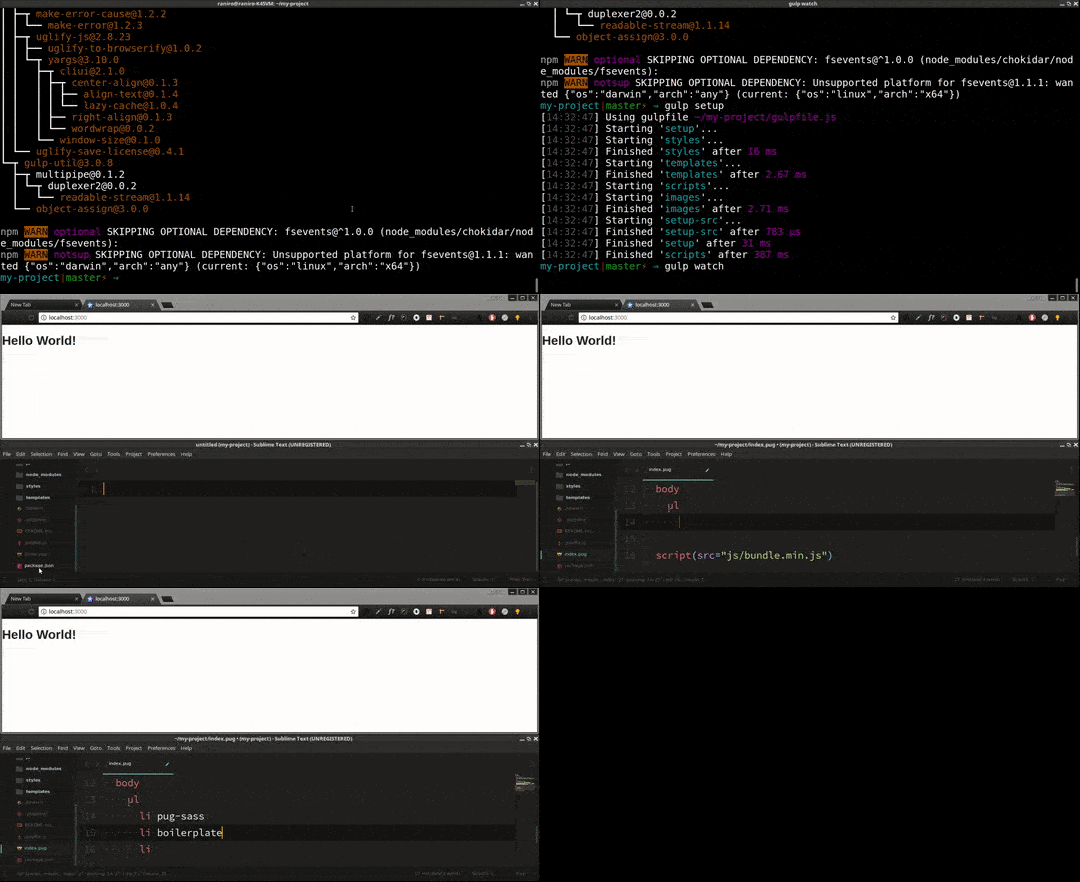
After the installation of all requirements and its dependencies, your local web development environment is ready to run. Setup your initial files with `gulp setup`. This command is only necessary the first time the project is set or if the build folder is deleted.
```bash
$ gulp setup
```
Now run your local server using the `watch` task
```bash
$ gulp watch
```
This task will open the browser window usually with the URL http://localhost:3000/. Any saved changes made to the project files, will reload automatically the browser.
## Project Structure
The structure presented in this boilerplate is grouped primarily by folder content and file type. Please note that this structure is only meant to serve as a guide, it is by no means prescriptive.
```
.
├── build/ # Store processed/minified files - your project's deployable output
├── img/ # Main folder for image files
├── js/ # Main folder for JS files
│ ├── vendor/ # Store third part library files (e.g.: jquery, bootstrap)
│ └── main.js # Index JS code goes here
├── styles/ # Main folder for cascade style files
│ ├── modules/ # Store third party modules and initializers (e.g.: normalize, reset)
│ ├── variables/ # Store sass variables files
│ └── main.scss # Index Sass goes here
├── templates/ # Main folder for pug template files
├── .bowerrc # Change bower library destination path from its default
├── gulpfile.js # Setup Gulp tasks
└── index.pug # Index pug markup goes here
```
### The build/ Contents
```
.
├── build/
├── img/ # Contains the compressed and optimized image files
├── css/ # Contains the concatenated/minified .css files and .map files
├── js/ # Contains the concatenated/minified/uglyfied .js files and .map files
│ └── vendor/ # Store third party libraries
└── index.html # Minified html index file
```
## The Gulp plugins
* [Autoprefixer](https://github.com/postcss/autoprefixer) : Write CSS rules without vendor prefixes.
* [beeper](https://github.com/sindresorhus/beeper) : Beeps when an error happens.
* [BrowserSync](https://github.com/browsersync/browser-sync) : Keep multiple browsers in sync after file save.
* [cache](https://github.com/jgable/gulp-cache) : Keeps an in-memory cache of files images so only changed images are compressed with Imagemin plugin.
* [clean-css](https://github.com/jakubpawlowicz/clean-css) : CSS optimizer and minifier.
* [concat](https://github.com/contra/gulp-concat) : Concatenates `.js` files into `bundle.js`.
* [imagemin](https://github.com/sindresorhus/gulp-imagemin) : Minify PNG, JPEG, GIF and SVG images.
* [notify](https://github.com/mikaelbr/gulp-notify) : Send error messages to Mac Notification Center, Linux notifications or Windows >= 8.
* [plumber](https://github.com/floatdrop/gulp-plumber) : Prevent pipe breaking caused by errors from gulp plugins.
* [Pug](https://github.com/pugjs/gulp-pug) : Compile your Pug templates into HTML.
* [rename](https://github.com/hparra/gulp-rename) : Rename minified files adding `.min` suffix.
* [SASS](https://github.com/dlmanning/gulp-sass) : Compile your SASS or SCSS into CSS.
* [sourcemaps](https://github.com/floridoo/gulp-sourcemaps) : Create CSS and JavaScript map files to debug the code within compressed files.
* [uglify](https://github.com/terinjokes/gulp-uglify) : Minify JavaScript files.
* [gutil](https://github.com/gulpjs/gulp-util) : Log the error message with red highlighting for easier reading.