https://github.com/erriez/erriezserialterminal
Serial Terminal library for Arduino
https://github.com/erriez/erriezserialterminal
arduino commandline documentation esp32 esp8266 getting library serial started terminal universal uno
Last synced: over 1 year ago
JSON representation
Serial Terminal library for Arduino
- Host: GitHub
- URL: https://github.com/erriez/erriezserialterminal
- Owner: Erriez
- License: mit
- Created: 2018-07-22T14:23:18.000Z (almost 8 years ago)
- Default Branch: master
- Last Pushed: 2022-03-10T20:12:49.000Z (over 4 years ago)
- Last Synced: 2024-10-11T00:35:14.855Z (almost 2 years ago)
- Topics: arduino, commandline, documentation, esp32, esp8266, getting, library, serial, started, terminal, universal, uno
- Language: C++
- Homepage: https://github.com/Erriez/ErriezArduinoLibrariesAndSketches
- Size: 934 KB
- Stars: 27
- Watchers: 4
- Forks: 13
- Open Issues: 3
-
Metadata Files:
- Readme: README.md
- License: LICENSE
Awesome Lists containing this project
README
# Serial Terminal library for Arduino
This is a universal Serial Terminal library for Arduino to parse ASCII commands and arguments.
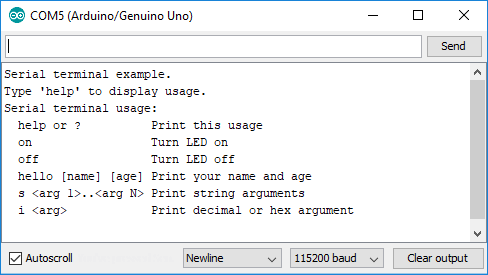
## Hardware
Any Arduino hardware with a serial port, such as:
Arduino:
* UNO
* Nano
* Micro
* Pro or Pro Mini
* Mega or Mega2560
* Leonardo
Other targets:
* DUE
* ESP8266
* ESP32
* SAMD21
* STM32F1
## Examples
Arduino IDE | Examples | Erriez Serial Terminal |
* [ErriezSerialTerminal](https://github.com/Erriez/ErriezSerialTerminal/blob/master/examples/ErriezSerialTerminal/ErriezSerialTerminal.ino)
## Documentation
- [Online HTML](https://erriez.github.io/ErriezSerialTerminal)
- [Download PDF](https://github.com/Erriez/ErriezSerialTerminal/raw/master/ErriezSerialTerminal.pdf)
## Usage
**Initialization**
Create a Serial Terminal object. This can be initialized with optional newline and delimiter characters.
Default newline character: ```'\n'```
Default delimiter character: ```Space```
```c++
#include
// Newline character '\r' or '\n'
char newlineChar = '\n';
// Separator character between commands and arguments
char delimiterChar = ' ';
// Create serial terminal object
SerialTerminal term(newlineChar, delimiterChar);
void setup()
{
// Initialize serial port
Serial.begin(115200);
// Initialize the built-in LED
pinMode(LED_BUILTIN, OUTPUT);
digitalWrite(LED_BUILTIN, LOW);
}
```
**Register new commands**
Commands must be registered at startup with a corresponding ```callback handler``` . This registers the command only, excluding arguments.
The callback handler will be called when the command has been received including the newline character.
An example of registering multiple commands:
```c++
void setup()
{
...
// Add command callback handlers
term.addCommand("?", cmdHelp);
term.addCommand("help", cmdHelp);
term.addCommand("on", cmdLedOn);
term.addCommand("off", cmdLedOff);
}
void cmdHelp()
{
// Print usage
Serial.println(F("Serial terminal usage:"));
Serial.println(F(" help or ? Print this usage"));
Serial.println(F(" on Turn LED on"));
Serial.println(F(" off Turn LED off"));
}
void cmdLedOn()
{
// Turn LED on
Serial.println(F("LED on"));
digitalWrite(LED_BUILTIN, HIGH);
}
void cmdLedOff()
{
// Turn LED off
Serial.println(F("LED off"));
digitalWrite(LED_BUILTIN, LOW);
}
```
**Set default handler**
Optional: The default handler will be called when the command is not recognized.
```c++
void setup()
{
...
// Set default handler for unknown commands
term.setDefaultHandler(unknownCommand);
}
void unknownCommand(const char *command)
{
// Print unknown command
Serial.print(F("Unknown command: "));
Serial.println(command);
}
```
**Read from serial port**
Read from the serial port in the main loop:
```c++
void loop()
{
// Read from serial port and handle command callbacks
term.readSerial();
}
```
**Get next argument**
Get pointer to next argument in serial receive buffer:
```c++
char *arg;
// Get next argument
arg = term.getNext();
if (arg != NULL) {
Serial.print(F("Argument: "));
Serial.println(arg);
} else {
Serial.println(F("No argument"));
}
```
**Get remaining characters**
Get pointer to remaining characters in serial receive buffer:
```c++
char *arg;
// Get remaining characters
arg = term.getRemaining();
if (arg != NULL) {
Serial.print(F("Remaining: "));
Serial.println(arg);
}
```
**Clear buffer**
Optional: The serial receive buffer can be cleared with the following call:
```c++
term.clearBuffer();
```
**Enable/Disable Character Echoing**
Optional: Allow for any entered charecters to be printed back to the Serial interface.
This is useful for terminal programs like PuTTY.
Supports both backspace characters, ^H and ^127.
```c++
term.setSerialEcho(true); //Enable Character Echoing
```
**Set Post Command Handler**
Optional: Add a function to be called AFTER a command has been handled.
```c++
void setup()
{
...
// Set handler to be run AFTER a command has been handled.
term.setPostCommandHandler(postCommandHandler);
}
void setPostCommandHandler()
{
// Print '> ' for a primitive user UI
Serial.print(F("> "));
}
```
## Library configuration
```SerialTerminal.h``` contains the following configuration macro's:
* ```ST_RX_BUFFER_SIZE``` : The default serial receive buffer size is 32 Bytes. This includes the command and arguments, excluding the ```'\0'``` character.
* ```ST_NUM_COMMAND_CHARS```: The default number of command characters is 8 Bytes, excluding the ```'\0'``` character.
## Library dependencies
* None.
## Library installation
Please refer to the [Wiki](https://github.com/Erriez/ErriezArduinoLibrariesAndSketches/wiki) page.
## Other Arduino Libraries and Sketches from Erriez
* [Erriez Libraries and Sketches](https://github.com/Erriez/ErriezArduinoLibrariesAndSketches)