https://github.com/etetoolkit/ete
Python package for building, comparing, annotating, manipulating and visualising trees. It provides a comprehensive API and a collection of command line tools, including utilities to work with the NCBI taxonomy tree.
https://github.com/etetoolkit/ete
phylogenetics phylogenomic python tree-structure treeview visualization
Last synced: about 1 year ago
JSON representation
Python package for building, comparing, annotating, manipulating and visualising trees. It provides a comprehensive API and a collection of command line tools, including utilities to work with the NCBI taxonomy tree.
- Host: GitHub
- URL: https://github.com/etetoolkit/ete
- Owner: etetoolkit
- License: gpl-3.0
- Created: 2010-11-13T16:04:25.000Z (over 15 years ago)
- Default Branch: ete4
- Last Pushed: 2025-04-27T10:59:46.000Z (about 1 year ago)
- Last Synced: 2025-04-27T11:43:14.197Z (about 1 year ago)
- Topics: phylogenetics, phylogenomic, python, tree-structure, treeview, visualization
- Language: Python
- Homepage: http://etetoolkit.org
- Size: 126 MB
- Stars: 822
- Watchers: 34
- Forks: 217
- Open Issues: 234
-
Metadata Files:
- Readme: README.md
- Contributing: CONTRIBUTING.md
- Funding: .github/FUNDING.yml
- License: LICENSE
- Code of conduct: CODE_OF_CONDUCT.md
Awesome Lists containing this project
README
[](https://travis-ci.org/etetoolkit/ete)
[](https://gitter.im/jhcepas/ete?utm_source=badge&utm_medium=badge&utm_campaign=pr-badge&utm_content=badge)

[](https://stackoverflow.com/questions/tagged/etetoolkit+or+ete4)
[](https://www.biostars.org/t/etetoolkit,ete,ete2,ete3,ete4/)
[](CODE_OF_CONDUCT.md)
# Overview
ETE (Environment for Tree Exploration) is a toolkit that assists in
the automated manipulation, analysis and visualization of trees. It is
mainly written in Python, and includes many extra functionalities for
phylogenetic trees.
Its main features include:
- Read and write support for trees in Newick format
- Multiple functions for traversing, searching and manipulating tree topologies and node annotations
- Integration with NCBI Taxonomic database
- Integration with GTDB database
- Programmatic visualization framework
- Visualization of huge trees based on adaptive zooming
- Comparing trees
- Phylogenetic functions
- orthology detection
- phylogenetic distance
- Command line tools
- phylogenetic reconstruction protocols
- tree comparison
- tree diff
The official website of ETE is http://etetoolkit.org. You can find
downloading instructions and further documentation there.
If you use ETE, please cite:
Jaime Huerta-Cepas, François Serra and Peer Bork. "ETE 3: Reconstruction,
analysis and visualization of phylogenomic data." Mol Biol Evol (2016) doi:
10.1093/molbev/msw046
# Installation
## Quick way
```sh
pip install https://github.com/etetoolkit/ete/archive/ete4.zip
```
## For local development
To install ETE in a local directory to help with the development, you can:
- Clone this repository (`git clone https://github.com/etetoolkit/ete.git`)
- Install dependecies
- If you are using [conda](https://conda.io/):
`conda install -c conda-forge cython bottle brotli numpy scipy`
- Otherwise, you can install them with `pip install `
- Build and install ete4 from the repository's root directory: `pip install -e .`
## Optional dependencies
If you want to use the `treeview` module (which depends on
[PyQt](https://www.riverbankcomputing.com/software/pyqt/)), you can
add `[treeview]` to the pip installation.
For example with `pip install -e .[treeview]` for a local editable
installation. Or `pip install -e .[treeview,test,doc,render_sm]` to
also include the modules for testing, generating the documentation,
and smartview file rendering.
# Exploring a tree
To simply load a tree from a file (`my_tree.nw`) and start exploring
it interactively, you can use the `ete4` utility and run:
```sh
ete4 explore -t my_tree.nw
```
Or start a python session and write:
```py
from ete4 import Tree
t = Tree(open('my_tree.nw'))
t.explore()
```
It will open a browser window with an interface to explore the tree.
# Documentation
Most documentation is automatically generated with
[sphinx](https://www.sphinx-doc.org) from the contents of the `doc`
directory, and is available at https://etetoolkit.github.io/ete/ .
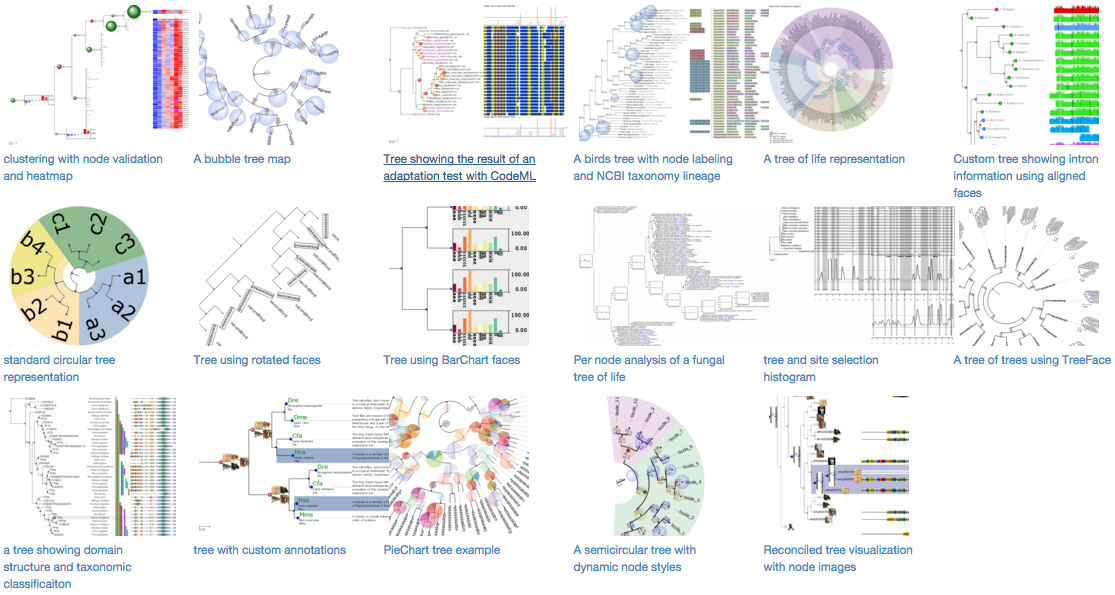
# Gallery of examples
# Getting support
Rather than sending direct support-related emails to the developers,
it is better to keep the communication public.
For question on how to use ETE in the bioinformatics context, use
[Biostars](http://biostars.org) with the `etetoolkit` tag, or [stack
overflow](https://stackoverflow.com/questions/tagged/etetoolkit+or+ete4).
[](https://www.biostars.org/post/search/?query=etetoolkit+or+ete+or+ete2+or+ete3+or+ete4)
[](https://stackoverflow.com/questions/tagged/etetoolkit+or+ete3+or+ete4)
For bug reports, feature requests and general discussion, use
https://github.com/etetoolkit/ete/issues
For more technical problems, you can also use the official ETE mailing
list at https://groups.google.com/d/forum/etetoolkit. To avoid spam,
messages from new users are moderated. Expect some delay until your
first message appears after your account is validated.
For any other inquiries (collaborations, sponsoring, etc), please
contact jhcepas@gmail.com.
# Tests
You can launch some tests by running:
```sh
./run_tests.py
```
# Contributing and bug reporting
https://github.com/etetoolkit/ete/wiki/Contributing
# Roadmap
https://github.com/etetoolkit/ete/wiki/ROADMAP