https://github.com/eva-library/channel-whatsapp
Twilio connector that allows you to connect eva with whatsapp
https://github.com/eva-library/channel-whatsapp
channels eva twilio whatsapp
Last synced: over 1 year ago
JSON representation
Twilio connector that allows you to connect eva with whatsapp
- Host: GitHub
- URL: https://github.com/eva-library/channel-whatsapp
- Owner: eva-library
- Created: 2021-03-30T19:36:55.000Z (about 5 years ago)
- Default Branch: main
- Last Pushed: 2021-11-22T13:32:47.000Z (over 4 years ago)
- Last Synced: 2024-10-24T10:07:27.889Z (over 1 year ago)
- Topics: channels, eva, twilio, whatsapp
- Language: JavaScript
- Homepage:
- Size: 45.9 KB
- Stars: 1
- Watchers: 1
- Forks: 0
- Open Issues: 0
-
Metadata Files:
- Readme: README.md
Awesome Lists containing this project
README
[](https://eva.bot/)
## Pre-requisites
- [Twilio account](https://www.twilio.com/)
## Create account Twlilio
> The first thing we must do is create an account in Twilio.
> Once the account is created, we go to the Functions option and create one.
| Create Function | |
| ------ | ------ |
| Function Name | sendMessage |
| Path | URL_TWILIO/sendMessage |
And in the option code insert a similar code.
```sh
const axios = require('axios');
const { escape } = require('querystring');
let sessions = {};
exports.handler = function (context, event, callback) {
let twiml = new Twilio.twiml.MessagingResponse();
let query = decodeURIComponent(escape(event.Body));
let number1 = escape(event.From);
let mediaContent = ''
let link = ''
if(event.MediaContentType0 == "application/pdf"){
query = query+' Link del pdf '
link = event.MediaUrl0
}else if(event.MediaUrl0){
const image = event.MediaUrl0
const type = event.MediaContentType0
mediaContent = {
image,
type
}
}
const number = number1.slice(14);
let inputText = query.replace(/%20/g, " ");
console.log(number)
const body = {
"text": query,
"phoneNumber": number,
"userChannel": 'twilio',
"mediaUrl": mediaContent,
"mediaLink": link
};
let headers = {
'Content-Type': 'application/json'
};
console.log(body);
axios.post('URL_TO_SERVICE_POST/api/wsp/receive', body, { headers: headers });
}
```
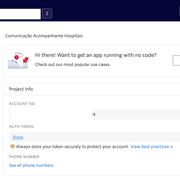
> We modify the whatsapp connector. Open the **messagesAPI.js** file and find the variables
- accountSid
- authToken
[](https://i.ibb.co/GRNHBHG/001.png)
> And replace with the credentials that your twilio account gives you.
> With all the connector variables modified, it only remains to deploy the code in any cloud (Azure, GCP, Aws, etc..)
Thanks!
**eva professional services**
*Components are not supported