https://github.com/evidence-dev/sqltools-duckdb-driver
DuckDB Driver for SQLTools
https://github.com/evidence-dev/sqltools-duckdb-driver
duckdb sqltools sqltools-driver
Last synced: about 1 year ago
JSON representation
DuckDB Driver for SQLTools
- Host: GitHub
- URL: https://github.com/evidence-dev/sqltools-duckdb-driver
- Owner: evidence-dev
- License: mit
- Created: 2023-07-18T17:49:44.000Z (almost 3 years ago)
- Default Branch: master
- Last Pushed: 2024-12-02T22:39:48.000Z (over 1 year ago)
- Last Synced: 2025-04-22T17:46:01.810Z (about 1 year ago)
- Topics: duckdb, sqltools, sqltools-driver
- Language: TypeScript
- Homepage: https://marketplace.visualstudio.com/items?itemName=Evidence.sqltools-duckdb-driver
- Size: 50.4 MB
- Stars: 25
- Watchers: 3
- Forks: 7
- Open Issues: 14
-
Metadata Files:
- Readme: README.md
- Changelog: CHANGELOG.md
- License: LICENSE.md
Awesome Lists containing this project
README
[](https://opensource.org/licenses/MIT)
#  VS Code SQLTools for DuckDB
Query and explore [DuckDB](https://duckdb.org/) databases in VSCode.
## Latest DuckDB Support: v1.0.0
A VSCode extension that extends [SQLTools](https://marketplace.visualstudio.com/items?itemName=mtxr.sqltools), with a driver for DuckDB.
This driver is maintained by [Evidence](https://evidence.dev): Publish BI reports with just SQL and Markdown.
## Install
Install from the [VSCode Marketplace](https://marketplace.visualstudio.com/items?itemName=Evidence.sqltools-duckdb-driver).
## Features
- Latest DuckDB support (currently 1.0.0)
- **Connect** to a local, in-memory or MotherDuck (via service token) DuckDB instance
- **Run queries** against a DuckDB instance
- **Explore DB** tables and columns in the sidebar
- **View** table results by selecting them in the sidebar
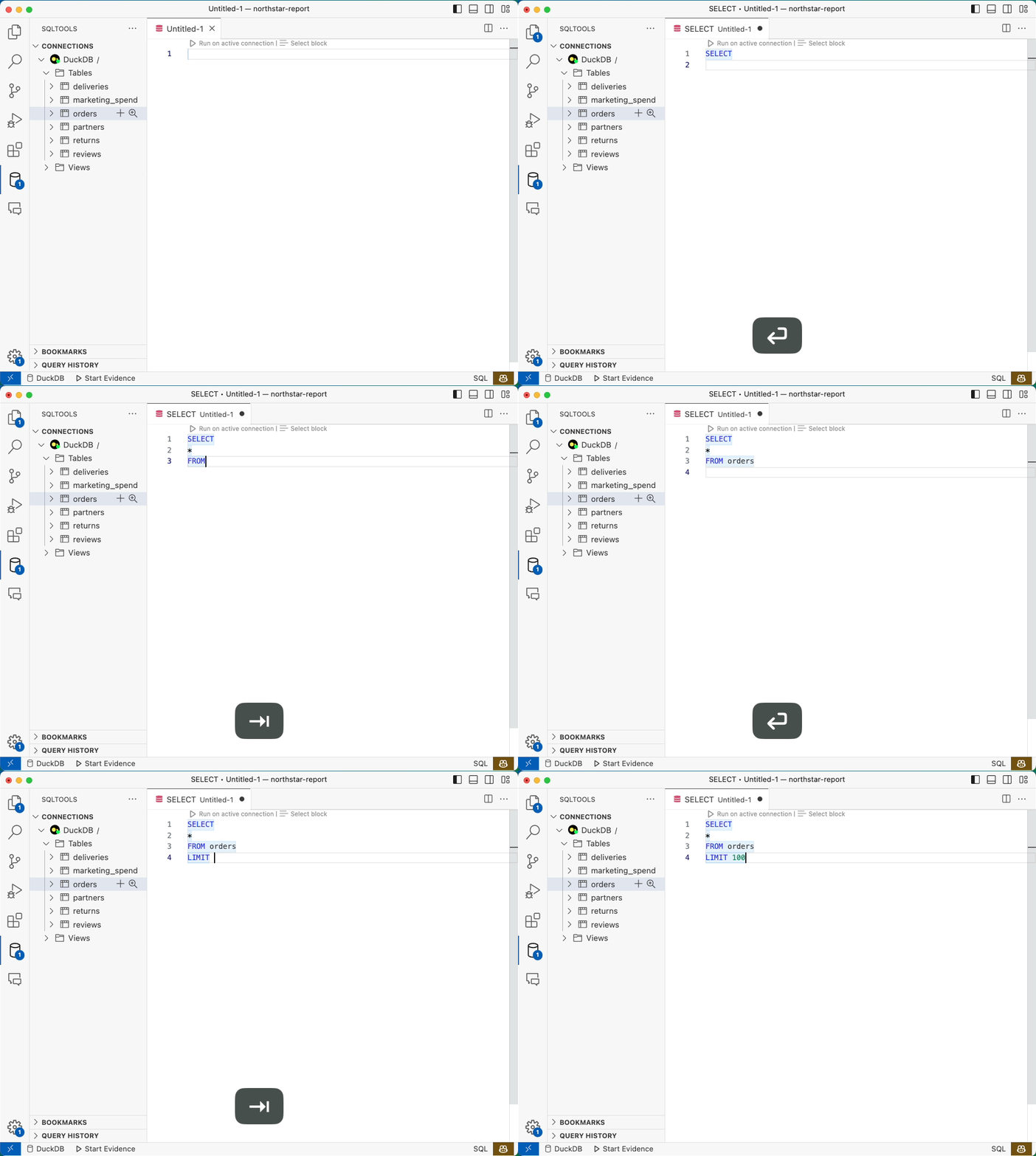
- **Autocomplete** for common keywords (e.g. SELECT, FROM, WHERE) and table names
- **Read/Write** connections
### Connect Local and In-Memory DBs


### Run Query

### Explore DB

### Autocomplete
### Read/Write Connections
DuckDB has two access modes:
1. **Read/Write:** One process can both read and write to the database.
2. **Read Only:** Multiple processes can read from the database, but no processes can write.
If you open another connection to a database that is already open in read/write mode, you may get an error. Close the read/write connection to resolve this.
[More Info](https://duckdb.org/faq#how-does-duckdb-handle-concurrency)
## Not Supported
- Loading extensions not included in the [default Node.js installation](#DuckDB-Extensions-Supported)
## DuckDB Extensions Supported
For clarity, the following DuckDB extensions are supported
| Extension | Supported |
|------------------|-----------|
| arrow | |
| autocomplete | |
| fts | |
| httpfs | |
| icu | 1 |
| inet | |
| jemalloc | |
| json | 1 |
| motherduck | 1 |
| parquet | 1 |
| postgres_scanner | |
| spatial | |
| sqlite_scanner | |
| tpcds | |
| tpch | |
## MotherDuck
To use MotherDuck, you need your [service token](https://motherduck.com/docs/authenticating-to-motherduck#fetching-the-service-token).
You should use the filename `md:?motherduck_token=` when connecting to MotherDuck.
## Contributing
- If you encounter bugs or have feature requests, feel free to open an issue.
- PRs welcome
### Maintained by [ ](https://www.evidence.dev)