https://github.com/evolvingweb/redmine_atjs
Integration of redmine with at.js
https://github.com/evolvingweb/redmine_atjs
Last synced: 7 months ago
JSON representation
Integration of redmine with at.js
- Host: GitHub
- URL: https://github.com/evolvingweb/redmine_atjs
- Owner: evolvingweb
- Created: 2013-10-17T23:57:58.000Z (almost 13 years ago)
- Default Branch: master
- Last Pushed: 2024-05-22T07:45:36.000Z (about 2 years ago)
- Last Synced: 2024-05-22T08:42:46.033Z (about 2 years ago)
- Language: JavaScript
- Size: 447 KB
- Stars: 4
- Watchers: 4
- Forks: 3
- Open Issues: 1
-
Metadata Files:
- Readme: README.md
- Changelog: CHANGELOG.md
Awesome Lists containing this project
README
# redmine-atjs
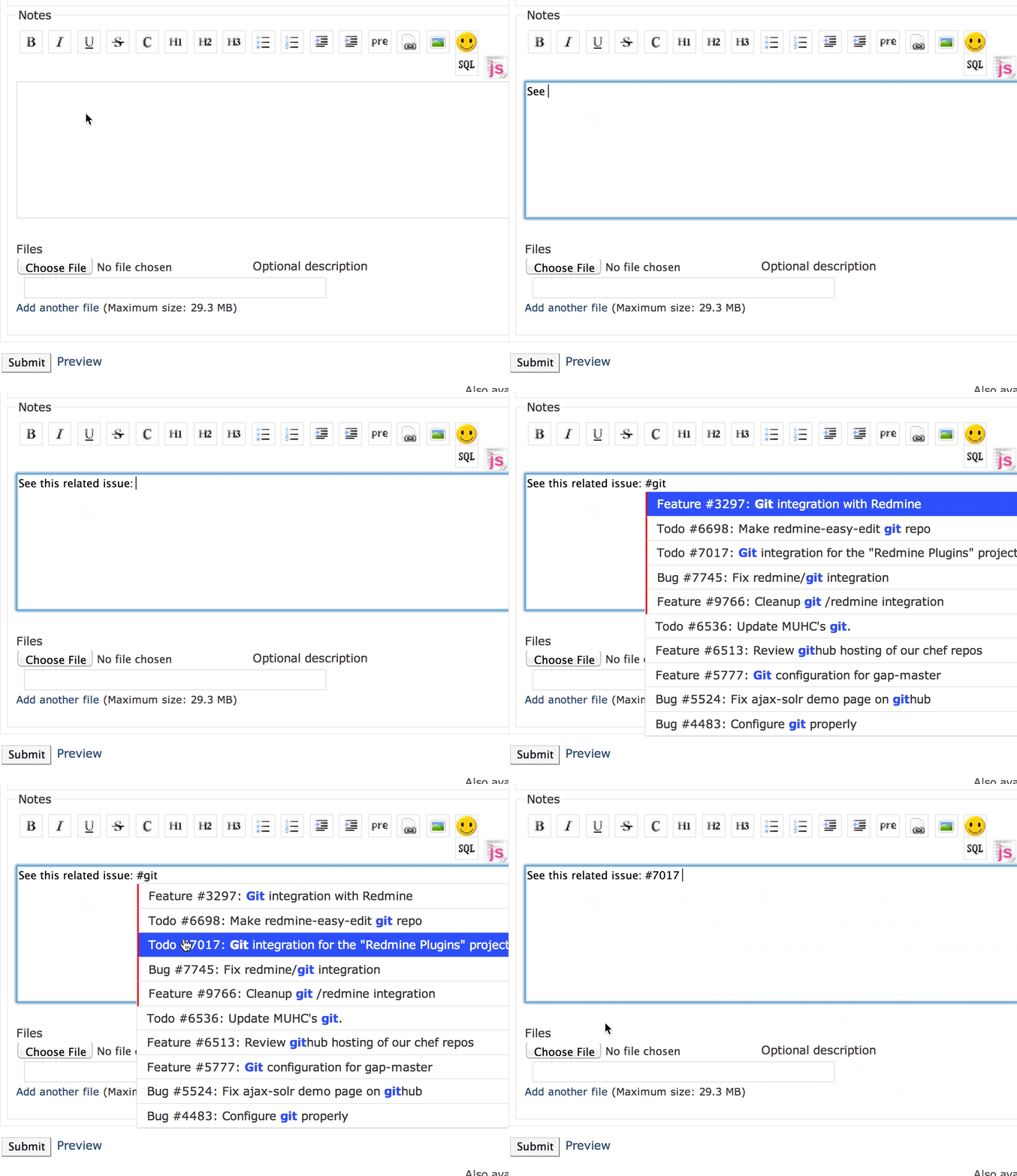
Redmine plugin that integrates [At.js library](http://ichord.github.io/At.js/) to enable auto-completion
based on issue titles, while editing wiki and issue pages.
## Installation
Tested with Redmine 3.4 and 4.1
```bash
cd /opt/redmine
git clone https://github.com/dergachev/redmine_atjs.git plugins/redmine_atjs
# fix permissions as appropriate for your installation
sudo chown -R www-data:www-data plugins/redmine_atjs
# restart your redmine app, however you do it (nginx/apache2/unicorn/etc...)
sudo service nginx restart
```
## TODO
* Support multi-word searching (IMPORTANT)
* consider creating AtjsController to provide optimized/customizable autocomplete endpoint.
* write tests
## Development
This project comes with a Vagrantfile, that allows you to easily spin up a
redmine 2.3 development VM, with this plugin installed. To use it, do the following:
```bash
# download and install Vagrant, Virtualbox...
# required vagrant plugins
vagrant plugin install vagrant-omnibus
vagrant plugin install vagrant-cachier
# install librarian, a bundler-like tool for chef cookbooks
gem install librarian
# clone this repo to your home directory somewhere
git clone https://github.com/dergachev/redmine_atjs.git ~/code/redmine_atjs
cd ~/code/redmine_atjs
# install dependent chef cookbooks
librarian-chef install
# spin up the vm... this will take a while.
vagrant up
vagrant ssh
ls /vagrant # your ~/code/redmine_atjs directory is "mounted" by Virtualbox here
cd /opt/redmine # redmine root
ls -al plugins # /opt/redmine/plugins/redmine_atjs --symlinks--> /vagrant/
ls -al public/plugin_assets/redmine_atjs/javascripts
# contains all the JS files from plugin (copied on rails restart)
# public/plugin_assets/redmine_atjs/javascripts/redmine-atjs.js --symlinks--> /vagrant/assets/javascripts/redmine-atjs.js
# this means tweaking the JS file doesn't require rails restart
# if you change any code in a rails plugin, need to restart rails to test it (even in RAILS_ENV=development)
sudo service unicorn_redmine restart
```
If this succeeds, you can visit http://localhost:8080 to login to redmine (credentials: admin/admin)
If it fails, you might need to debug/tweak the [redmine cookbook](https://github.com/dergachev/chef_redmine).
To do this:
```bash
cd ~/code/redmine_atjs
mkdir site-cookbooks
git clone https://github.com/dergachev/chef_redmine site-cookbooks/redmine
vim Cheffile # ensure redmine is sourced from local path instead of git url
librarian-chef install
# tweak chef attributes in Vagrantfile, if necessary
# modify code in site-cookbooks/redmine/recipes/*, if necessary
# re-run chef on the VM, with the cookbook modifications
vagrant provision
```