https://github.com/exceedsystem/vscode-pict
Using pict with vscode
https://github.com/exceedsystem/vscode-pict
combination-test pairwise pairwise-testing testing testing-tool vscode vscode-extension
Last synced: 6 months ago
JSON representation
Using pict with vscode
- Host: GitHub
- URL: https://github.com/exceedsystem/vscode-pict
- Owner: exceedsystem
- License: mit
- Created: 2023-10-22T09:49:02.000Z (almost 3 years ago)
- Default Branch: master
- Last Pushed: 2025-12-29T04:37:06.000Z (7 months ago)
- Last Synced: 2026-01-01T00:50:47.794Z (7 months ago)
- Topics: combination-test, pairwise, pairwise-testing, testing, testing-tool, vscode, vscode-extension
- Language: TypeScript
- Homepage:
- Size: 306 KB
- Stars: 1
- Watchers: 1
- Forks: 0
- Open Issues: 0
-
Metadata Files:
- Readme: README.md
- Changelog: CHANGELOG.md
- License: LICENSE
Awesome Lists containing this project
README
# VSCode PICT
This extension generates pairwise test patterns using Microsoft PICT.
**Limitations:**
Currently, it works only on Microsoft Windows(x64), but we hope to support Mac and Linux in the future.
## How to use?
1. Open a new text editor and create a PICT model file as follows.
```
#
# This is a sample model for testing volume creation
#
Type: Primary, Logical, Single, Span, Stripe, Mirror, RAID-5
Size: 10, 100, 500, 1000, 5000, 10000, 40000
Format method: quick, slow
File system: FAT, FAT32, NTFS
Cluster size: 512, 1024, 2048, 4096, 8192, 16384, 32768, 65536
Compression: on, off
```
2. If you would like to specify a parameter arguments for PICT, specify it as is in the header comment section `# Options`.
```
#
# This is a sample model for testing volume creation
#
# Options /o:2 /d:, /a:| /n:~ /r:1 /c
Type: Primary, Logical, Single, Span, Stripe, Mirror, RAID-5
Size: 10, 100, 500, 1000, 5000, 10000, 40000
Format method: quick, slow
File system: FAT, FAT32, NTFS
Cluster size: 512, 1024, 2048, 4096, 8192, 16384, 32768, 65536
Compression: on, off
```
The following parameters can be used.
```
Usage: pict model [options]
Options:
/o:N|max - Order of combinations (default: 2)
/d:C - Separator for values (default: ,)
/a:C - Separator for aliases (default: |)
/n:C - Negative value prefix (default: ~)
/e:file - File with seeding rows
/r[:N] - Randomize generation, N - seed
/c - Case-sensitive model evaluation
/s - Show model statistics
```
3. Save the created model file with a name of your choice, such as 'testcase_001.txt'.
4. Please Open command palette and run `Run PICT` command.

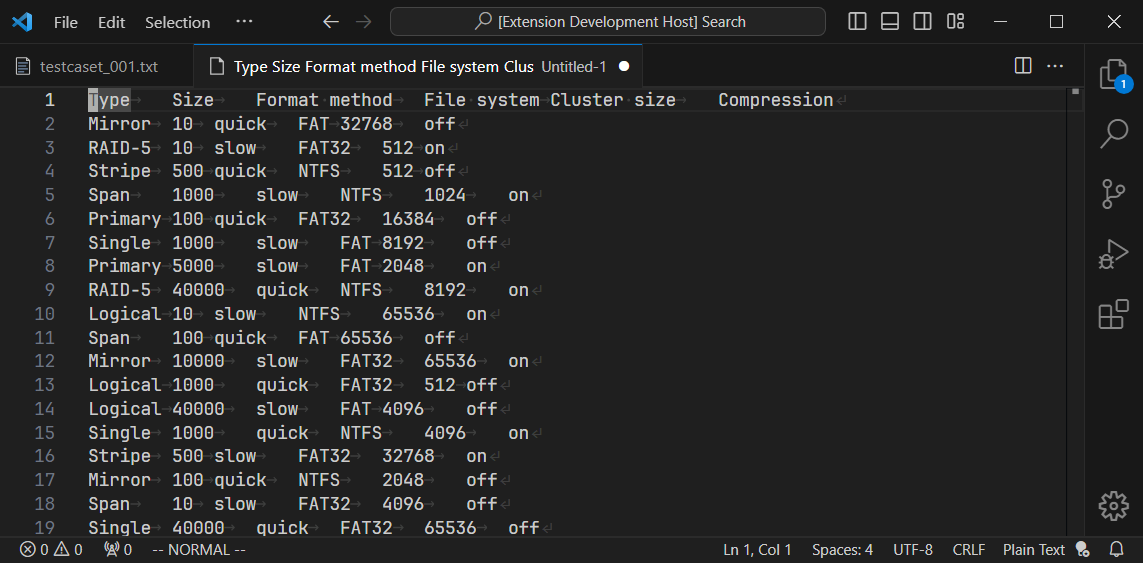
5. After PICT is run, the generated test cases will be displayed in a new editor tab.
## Additional information
**Bundled PICT executable file**
https://github.com/microsoft/pict/releases/download/v3.7.4/pict.exe
**SHA1**
2f3145acec23240c10e9f476c8ca77846d9c458f
**VirusTotal scan result**
https://www.virustotal.com/gui/file/80aba862739cf18b4faa13d408163324d188a1c4efccdd977d9c5ba3f8950bbd
## References
**microsoft/pict**
https://github.com/microsoft/pict
**Learn how to write test case for PICT**
https://github.com/Microsoft/pict/blob/main/doc/pict.md