https://github.com/excel-dna/exceldnadoc
Command-line utility to create a compiled HTML Help Workshop file (.chm) for Excel-DNA
https://github.com/excel-dna/exceldnadoc
Last synced: 11 months ago
JSON representation
Command-line utility to create a compiled HTML Help Workshop file (.chm) for Excel-DNA
- Host: GitHub
- URL: https://github.com/excel-dna/exceldnadoc
- Owner: Excel-DNA
- License: other
- Created: 2013-11-21T15:58:49.000Z (over 12 years ago)
- Default Branch: master
- Last Pushed: 2024-11-16T13:50:27.000Z (over 1 year ago)
- Last Synced: 2025-01-08T18:54:16.820Z (over 1 year ago)
- Language: HTML
- Homepage: http://excel-dna.github.io/ExcelDnaDoc/
- Size: 6.97 MB
- Stars: 33
- Watchers: 11
- Forks: 17
- Open Issues: 13
-
Metadata Files:
- Readme: README.md
- License: LICENSE.txt
Awesome Lists containing this project
README
ExcelDnaDoc
===================
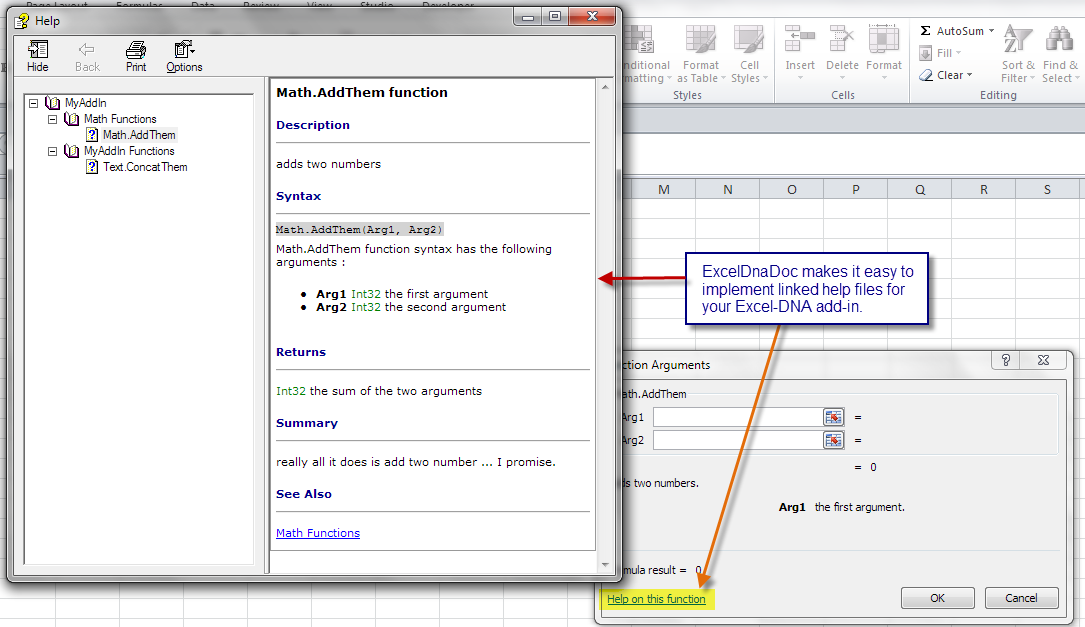
ExcelDnaDoc is a command-line utility to create a compiled HTML Help Workshop file (.chm) for ExcelDna.
* single help file created even if multiple library are specified in the "dna" file.
* can use customized templates and content
Use the issues log to report any issues or give feedback for future enhancements.
NuGet Package
------------------
https://www.nuget.org/packages/ExcelDnaDoc/
To build a compiled help file (.chm) the HTML Help Workshop (HHW) must be installed.
HHW is no longer available from Microsoft (it used to be at http://msdn.microsoft.com/en-us/library/windows/desktop/ms669985(v=vs.85).aspx).
You can download the installer from the Internet Archive: https://web.archive.org/web/20200918004813/https://download.microsoft.com/download/0/A/9/0A939EF6-E31C-430F-A3DF-DFAE7960D564/htmlhelp.exe
Or install using the Chocolatey installer (https://community.chocolatey.org/packages/html-help-workshop / https://chocolatey.org/install).
ExcelDnaDoc expects HHW to be installed at `C:\Program Files (x86)\HTML Help Workshop\`.
If it is installed at another location change `packages/ExcelDnaDoc/tools/ExcelDnaDoc.exe.config`
to reference the proper directory before compiling your project.
When installed from NuGet it will edit the default .dna file installed by Excel-DNA and adds post
build steps to build the .chm documentation file whenever the project is build.
Notes
------------------
Uses the `ExcelFunction`, `ExcelArgument`, and `ExcelCommand` attributes in Excel-DNA to build
documentation for your Excel-DNA add-in.
The following fields are can be used to create documentation :
### _ExcelFunction Attribute_
| | |
| ----------------- | ------------------------------------------------------------------------- |
| `Name` | if not given the actual method name is used |
| `Description` | if not used no description will be included in documentation |
| `Category` | if not given functions will be grouped under "** Functions" |
| `HelpTopic` | can be used to link function to generated help in Excel's function wizard |
### _ExcelArgument Attribute_
| | |
| ----------------- | ------------------------------------------------------------------------- |
| `Name` | if not given the actual parameter name is used |
| `Description` | if not used no description will be included in documentation |
### _ExcelCommand Attribute_
| | |
| ----------------- | ------------------------------------------------------------------------- |
| `Name` | if not given the actual parameter name is used |
| `Description` | if not used no description will be included in documentation |
| `HelpTopic` | can be used to link function to generated help in Excel's function wizard |
| `ShortCut` | if not used no shortcut will be included in documentation |
If ExcelDna.Documentation is included as a reference (default in NuGet package) then an additional
attribute `ExcelFunctionDoc` is available as a replacement to the `ExcelFunction` attribute
which includes additional fields that can be used for additional documentation.
### _ExcelFunctionDoc Attribute_
| | |
| ----------------- | ------------------------------------------------------------------------- |
| `Name` | if not given the actual method name is used |
| `Description` | if not used no description will be included in documentation |
| `Category` | if not given functions will be grouped under "** Functions" |
| `HelpTopic` | can be used to link function to generated help in Excel's function wizard |
| `Returns` | description of the return value |
| `Summary` | longer discussion of function included in documentation |
| `Remarks` | remarks on usage and / or possible errors |
| `Example` | sample code to demonstrate correct usage |
Example
------------------
**F#**
```fsharp
namespace DocTest
open ExcelDna.Integration
open ExcelDna.Documentation
module Math =
[]
let addThem
(
[]a,
[]b
) =
a+b
```
**C#**
```csharp
namespace DocTest
{
using ExcelDna.Integration;
public class Text
{
[ExcelFunction( Name = "Text.ConcatThem",
Description = "concatenates two strings",
HelpTopic = "DocTest-AddIn.chm!1002")]
public static object ConcatThem(
[ExcelArgument(Description="the first string")] object a,
[ExcelArgument(Description="the second string")] object b)
{
return string.Concat(a.ToString(), b.ToString());
}
}
}
```
Command Line Usage
------------------
ExcelDnaDoc.exe dnaPath [/X]
`dnaPath` The path to the primary .dna file for the ExcelDna add-in.
`/X` Optional. Excludes hidden functions from being documented if provided.
Example: `ExcelDnaDoc.exe \SampleLib-AddIn.dna`
The HTML Help Workshop content will be created in `\HelpContent\`.
External libraries will be searched for UDFs and Commands
that are exposed to Excel and documented using the ExcelFunctionAttribute and the ExcelArgumentAttribute.
If The ExcelDna.Documentation library has been referenced then the ExcelFunctionDocAttribute
is also available to include additional documentation fields that will not be exposed in the Excel Function
Wizard, but will be included in the HTML Help Workshop content.
Dependencies
------------------
NuGet Package Manager(http://nuget.codeplex.com/)
FAKE (F# MAKE) (http://fsharp.github.io/FAKE/)
Excel-DNA (http://exceldna.codeplex.com/)
RazorEngine(https://github.com/Antaris/RazorEngine)
HTML Help Workshop(http://msdn.microsoft.com/en-us/library/windows/desktop/ms669985(v=vs.85).aspx / https://web.archive.org/web/20200918004813/https://download.microsoft.com/download/0/A/9/0A939EF6-E31C-430F-A3DF-DFAE7960D564/htmlhelp.exe)