https://github.com/exp-codes/mojo-web-archetype
Maven项目规范骨架(Web版)
https://github.com/exp-codes/mojo-web-archetype
maven mvn programming
Last synced: about 1 month ago
JSON representation
Maven项目规范骨架(Web版)
- Host: GitHub
- URL: https://github.com/exp-codes/mojo-web-archetype
- Owner: EXP-Codes
- License: gpl-3.0
- Created: 2018-09-12T17:33:04.000Z (almost 8 years ago)
- Default Branch: master
- Last Pushed: 2023-01-16T18:04:41.000Z (over 3 years ago)
- Last Synced: 2025-08-08T23:34:43.158Z (12 months ago)
- Topics: maven, mvn, programming
- Language: Java
- Homepage:
- Size: 3.07 MB
- Stars: 1
- Watchers: 0
- Forks: 0
- Open Issues: 0
-
Metadata Files:
- Readme: README.md
- Funding: .github/FUNDING.yml
- License: LICENSE
Awesome Lists containing this project
README
# mojo-web-archetype
Maven项目规范骨架(Web版)
------
- 自动化构建项目(告别重复劳动)
- 规范项目结构(只要创建,就是规范)
- 自动管理依赖构件(告别构件版本混乱)
- 一键发布项目/基线(告别dos/unix脚本命令)
## 运行环境
 
## 软件介绍
快速创建一个规范架构的**Java Web项目(Maven版)**,使得**项目中自动内置**:
- **Spring/SpringMVC架构**
- [经验构件库](https://github.com/lyy289065406/exp-libs):*用于快速开发的辅助包*
- war项目发布插件:*第三方插件`maven-war-plugin`,用于快速发布一个可运行应用到生产环境*
- 基线发布插件:*第三方插件`maven-release-plugin`,用于发布项目基线到版本库和 Nexus私服*
> 注:此骨架只能在J2EE中使用,若在J2SE中,会因为缺少Java Web组件而报错
## 使用说明
- 01. 本地已安装并部署好 `apache-maven-3.2.5`(或更高版本)
- 02. 下载本骨架项目 `mojo-web-archetype` 到本地,拷贝 `mojo-web-archetype/conf/archetype-catalog.xml` 文件到 `apache-maven-3.2.5/conf` 目录下,若目录下已存在同名文件,则只需把 `archetype-catalog.xml` 的内容附加进去即可:
```
exp.libs
mojo-web-archetype
1.0
http://127.0.0.1:8081/nexus/content/repositories/releases
exp.libs
mojo-web-archetype
1.0-SNAPSHOT
http://127.0.0.1:8081/nexus/content/repositories/snapshots
```
- 03. 通过 `maven install` 命令安装骨架到本地 Maven Repository
- 04. (可选)若本地部署了 Nexus 私服,可通过 `maven deploy` 命令直接发布骨架到私服
- 05. 新建Maven项目,并选择此骨架进行项目构建:

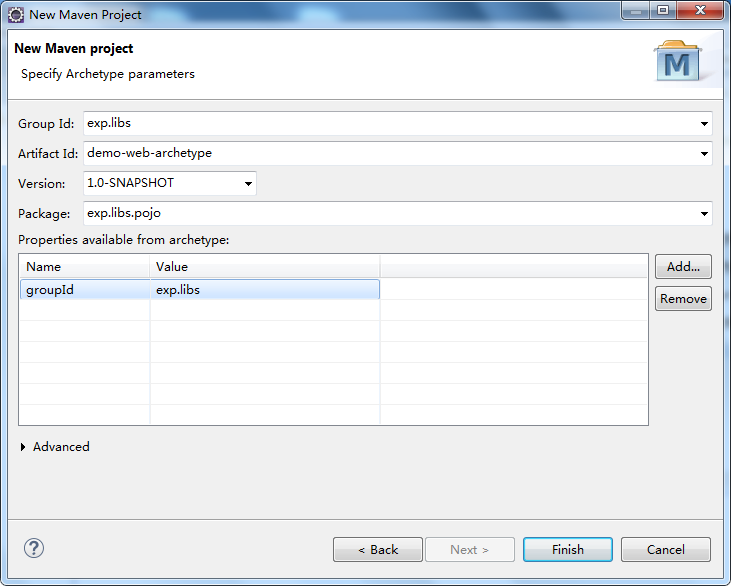
- 06. 填写项目必要信息:
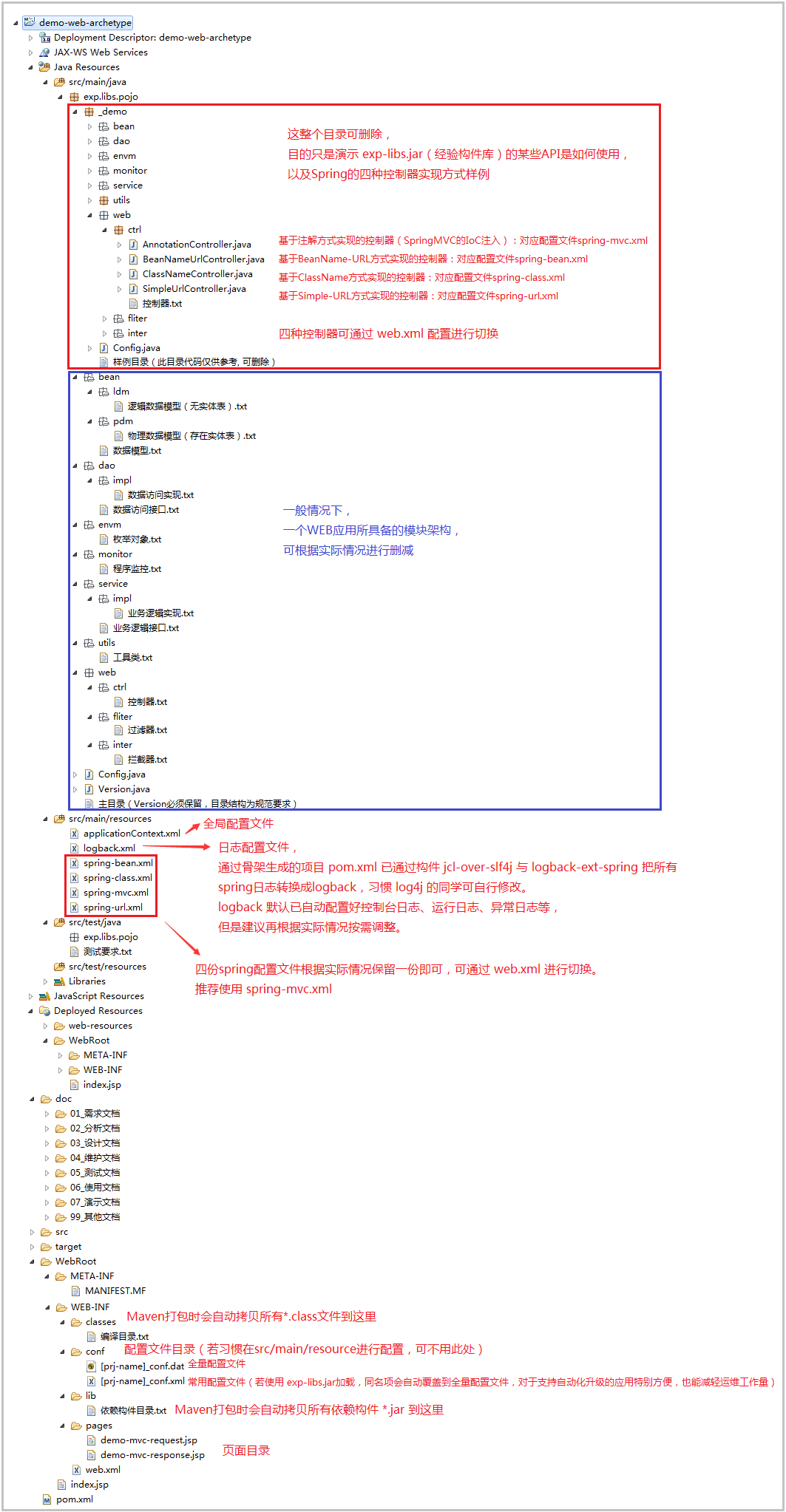
- 07. 通过骨架所生成的项目,项目中会引用到 [`构件经验库 exp-libs`](https://github.com/lyy289065406/exp-libs) 的一些功能,其组织结构如下:
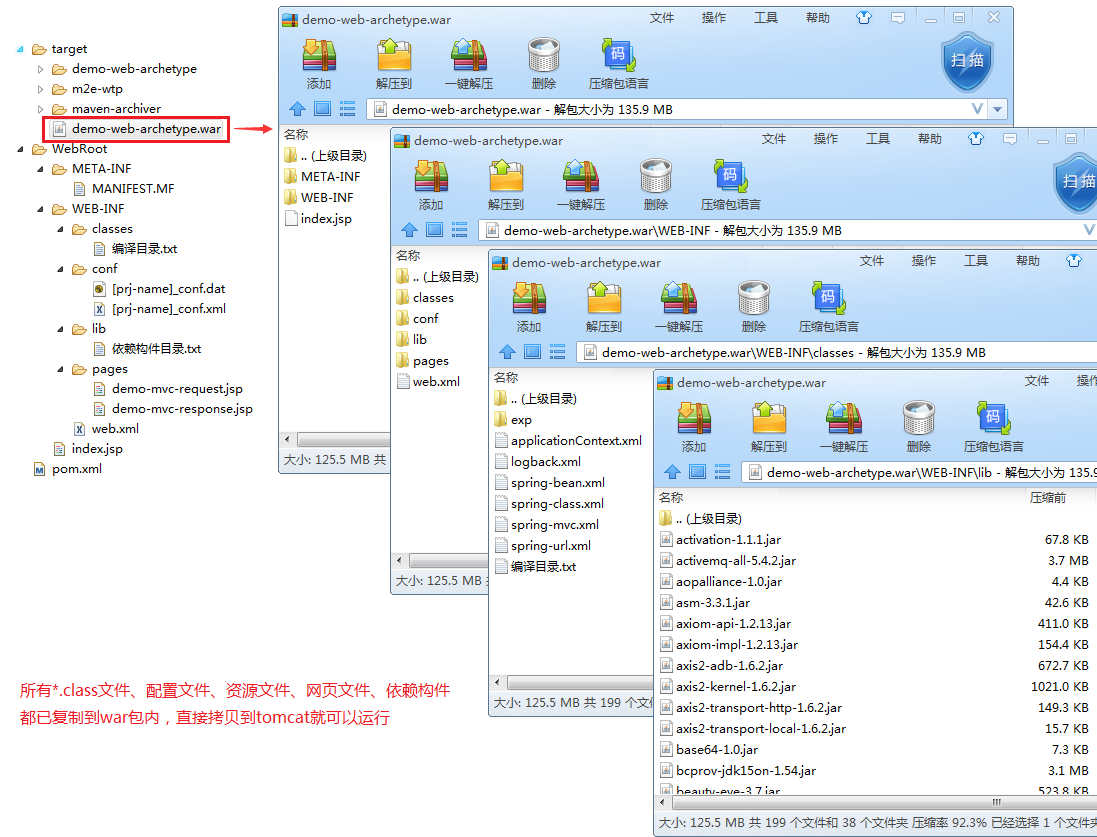
- 08. 通过 `maven install` 在 `target` 目录直接发布war包(拷贝到tomcat即可运行):
## 运行效果
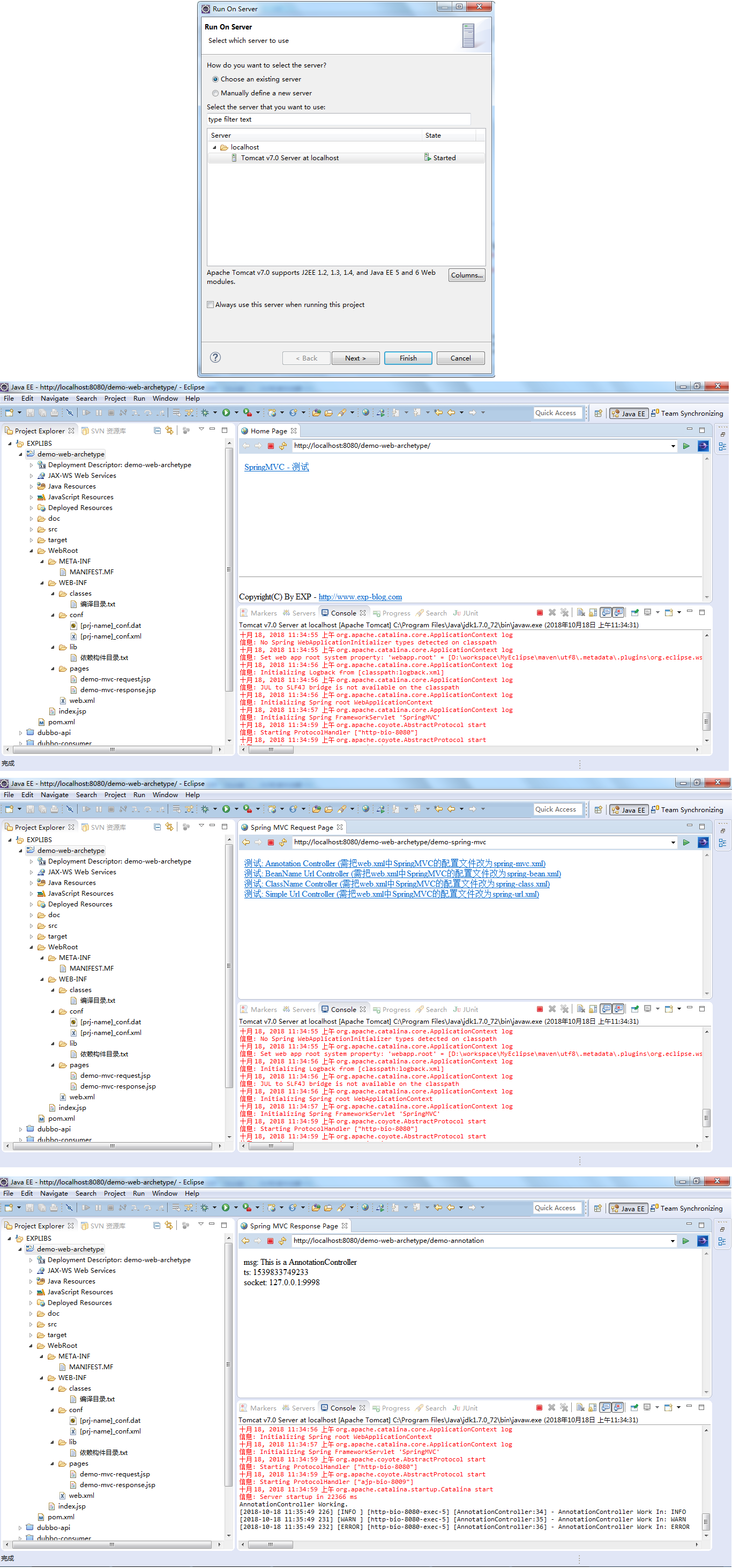
通过 `Run on Server` 方式可在 Eclipse 中直接运行项目(当然把war包放到tomcat运行也是可以的):
> 注:在 web.xml 切换 spring 配置文件可测试不同的控制器效果
## 补充:通过本骨架所生成示例项目的 pom.xml 与 web.xml 文件
> 点击 [这里](https://github-production-release-asset-2e65be.s3.amazonaws.com/148517374/e2d0c580-d2d5-11e8-8a97-a6ea0726b95d?X-Amz-Algorithm=AWS4-HMAC-SHA256&X-Amz-Credential=AKIAIWNJYAX4CSVEH53A%2F20181018%2Fus-east-1%2Fs3%2Faws4_request&X-Amz-Date=20181018T071339Z&X-Amz-Expires=300&X-Amz-Signature=b5eeaead55a227cead3d6fc4a7b92d8ab57a300a5aa0a3f6825132c84d3a7403&X-Amz-SignedHeaders=host&actor_id=17040287&response-content-disposition=attachment%3B%20filename%3Ddemo-web-archetype.war&response-content-type=application%2Foctet-stream) 下载示例项目
- **pom.xml**
```xml
4.0.0
exp.libs
demo-web-archetype
1.0-SNAPSHOT
war
项目名称(可选)
项目描述(可选)
项目SVN路径(可选)
工程的初始时间(可选)
EXPLIBS-API-ONLINE
https://lyy289065406.github.io/api-online/
jenkins
http://127.0.0.1:8080/jenkins/
scm:svn:http://127.0.0.1:81/svn/release/???/trunk
scm:svn:http://127.0.0.1:81/svn/release/???/trunk
scm:svn:http://127.0.0.1:81/svn/release/???/trunk
UTF-8
1.6
3.1.2.RELEASE
1.0
exp.libs
exp-libs
${explibs.version}
javax.servlet
javax.servlet-api
3.1.0
org.springframework
spring-core
${spring.version}
org.springframework
spring-beans
${spring.version}
org.springframework
spring-context
${spring.version}
org.springframework
spring-jdbc
${spring.version}
org.springframework
spring-webmvc
${spring.version}
org.springframework
spring-aop
${spring.version}
org.springframework
spring-test
${spring.version}
javax.servlet.jsp.jstl
jstl-api
1.2
javax.servlet.jsp.jstl
jstl
1.2
sources
org.slf4j
jcl-over-slf4j
1.7.12
org.logback-extensions
logback-ext-spring
0.1.2
junit
junit
4.8.2
test
demo-web-archetype
org.apache.maven.plugins
maven-release-plugin
2.3.2
http://172.168.27.5:81/svn/release/???/tags
org.apache.maven.plugins
maven-surefire-plugin
2.7.2
once
-Dfile.encoding=UTF-8
net.sourceforge.cobertura.datafile
target/cobertura/cobertura.ser
true
org.apache.maven.plugins
maven-compiler-plugin
${jdk.version}
${jdk.version}
${project.build.sourceEncoding}
true
maven-war-plugin
2.4
${project.artifactId}
WebRoot
false
Releases
http://127.0.0.1:8081/nexus/content/repositories/releases
Snapshots
http://127.0.0.1:8081/nexus/content/repositories/snapshots
```
- **web.xml**
```xml
demo-web-archetype
index.html
index.htm
index.jsp
encodingFilter
org.springframework.web.filter.CharacterEncodingFilter
encoding
UTF-8
encodingFilter
/*
logbackConfigLocation
classpath:logback.xml
ch.qos.logback.ext.spring.web.LogbackConfigListener
org.springframework.web.context.ContextLoaderListener
contextConfigLocation
classpath*:applicationContext*.xml
SpringMVC
org.springframework.web.servlet.DispatcherServlet
contextConfigLocation
classpath*:spring-mvc.xml
1
SpringMVC
/
TestSpringMVC
/WEB-INF/pages/demo-mvc-request.jsp
TestSpringMVC
/demo-spring-mvc
```
## 版权声明
[-2016~2019%20By%20EXP-blue.svg)](http://exp-blog.com) [](https://www.gnu.org/licenses/gpl-3.0)
- Site: [http://exp-blog.com](http://exp-blog.com)
- Mail: 289065406@qq.com
------