https://github.com/eylandoo/openvpn_webpanel_manager
A powerful, self-hosted web panel for managing OpenVPN servers, users, resellers (sub-admins), and multi-node deployments with a feature-rich UI and full API support.
https://github.com/eylandoo/openvpn_webpanel_manager
cisco eylan eylanpanel ipsec l2tp multi-node openvpn openvpn-management reseller-panel security self-hosted user-management vpn vpn-manager vpn-panel vpn-server
Last synced: 5 months ago
JSON representation
A powerful, self-hosted web panel for managing OpenVPN servers, users, resellers (sub-admins), and multi-node deployments with a feature-rich UI and full API support.
- Host: GitHub
- URL: https://github.com/eylandoo/openvpn_webpanel_manager
- Owner: eylandoo
- License: other
- Created: 2025-05-06T11:06:44.000Z (about 1 year ago)
- Default Branch: main
- Last Pushed: 2025-12-29T20:41:13.000Z (6 months ago)
- Last Synced: 2025-12-31T04:18:41.837Z (6 months ago)
- Topics: cisco, eylan, eylanpanel, ipsec, l2tp, multi-node, openvpn, openvpn-management, reseller-panel, security, self-hosted, user-management, vpn, vpn-manager, vpn-panel, vpn-server
- Language: Shell
- Homepage: https://eylandoo.github.io
- Size: 359 KB
- Stars: 171
- Watchers: 2
- Forks: 36
- Open Issues: 3
-
Metadata Files:
- Readme: README.md
- License: LICENSE
Awesome Lists containing this project
README
# OVPN Manager: A High-Performance Multi-Protocol Web Panel
[](https://www.python.org/)
[](https://flask.palletsprojects.com/)
[](https://tailwindcss.com/)
[](LICENSE)
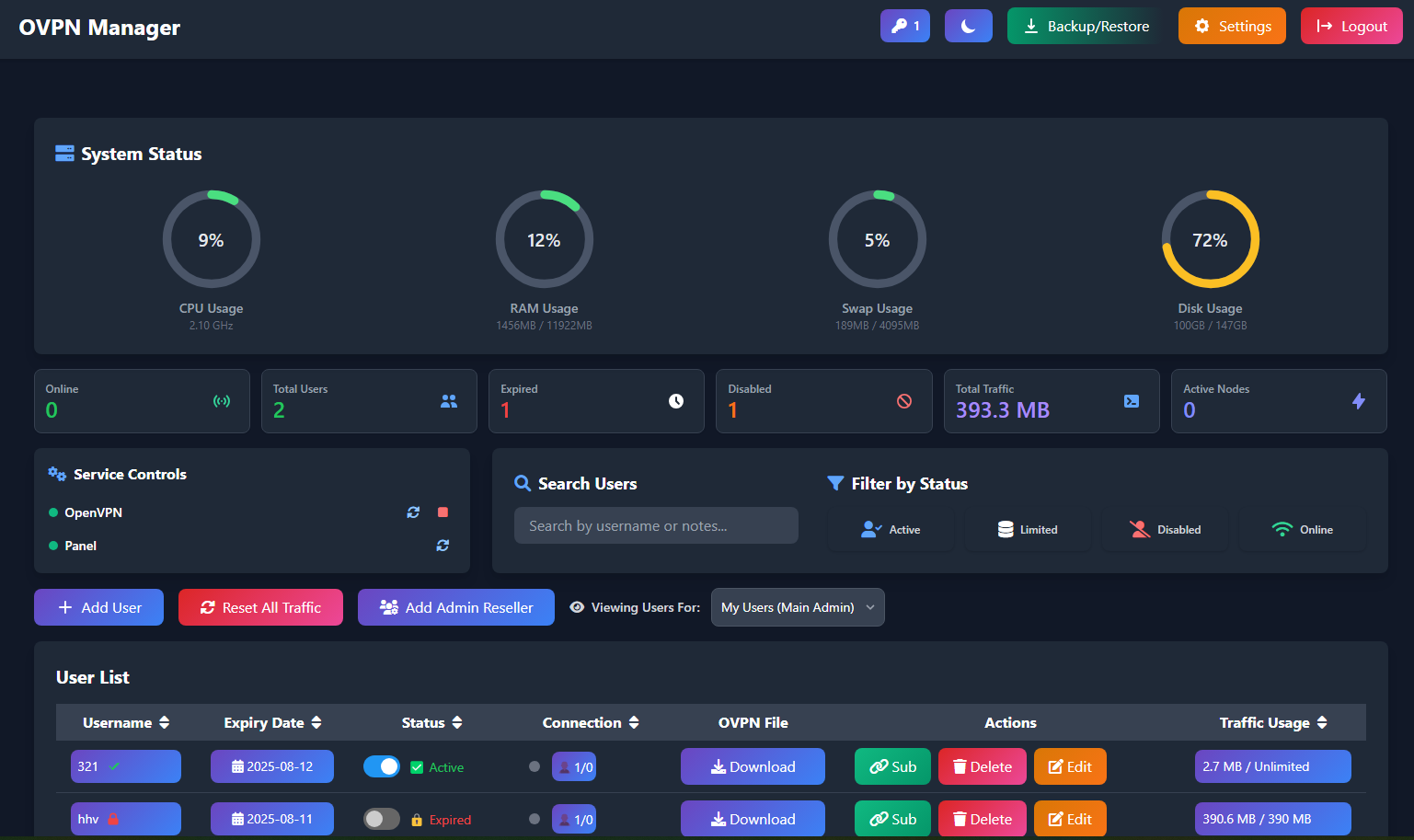
**OVPN Manager 3.0.0** is a comprehensive, self-hosted web panel built on Flask, engineered for high scalability and stability. It centralizes the management of not just OpenVPN, but also **Cisco AnyConnect (Ocserv)**, **L2TP/IPsec**, and now **WireGuard (wg1)**.
This major update transforms the panel into a high-performance solution for managing users, resellers, and multi-node deployments across diverse VPN protocols.
The panel is designed for administrators demanding granular control over user access, traffic, and server resources with a focus on core architecture stability.
### 📸 Dashboard Preview
---
## ✨ Key Features (v3.0.0 Update)
### 🛡️ Multi-Protocol & Core Stability
* **Multi-Protocol Support**: Full integration and management for:
* **OpenVPN** (UDP/TCP)
* **Cisco AnyConnect (Ocserv)**
* **L2TP/IPsec**
* **WireGuard (wg1)**
* **Database Scalability**: Added core support for **PostgreSQL** alongside SQLite. Includes a **Smart Migration Engine** to securely and automatically transfer all existing user data from SQLite to PostgreSQL for high-load environments.
* **Persistent Security Key**: Implemented a security fix to store the `SECRET_KEY` persistently, enhancing session security and preventing forced admin logouts after service restarts.
* **Concurrency Fixes**: Major architectural upgrade with the implementation of `DB_WRITE_LOCK` and `GLOBAL_SYNC_LOCK` to eliminate deadlocks and database corruption under high traffic/activity.
### User Management
* **Create Users**: Add single or bulk users.
* **Protocol-Specific Passwords**: Set unique passwords for L2TP and Cisco for each user.
* **WireGuard User Data**: Automatically manage WireGuard (wg1) user requirements (keys/IP) alongside other protocols.
* **Detailed Limits**: Set specific limits for each user:
* **Data Limit**: Assign quotas in GB or MB.
* **Connection Limit**: Define the maximum number of simultaneous connections (per protocol).
* **Expiry Date**: Set fixed expiration dates or flexible durations.
* **Real-time Control**: Activate or deactivate users instantly.
* **Traffic Monitoring**: View live and cumulative data usage (Upload/Download) for each user.
* **Subscription Page**: Each user gets a unique, token-based subscription page showing their stats, QR code, and download links.
### Sub-Admin (Reseller) System
* **Create Sub-Admins**: Main admin can create sub-admin (reseller) accounts.
* **Assign Quotas**: Set limits for each sub-admin, including maximum number of users they can create and a total data quota they can assign.
* **Independent Management**: Sub-admins manage their own users within the limits you've set.
### Multi-Node Support
* **Centralized Control**: Manage and sync users across multiple servers (nodes) for OpenVPN, Cisco, L2TP, and WireGuard from a single main panel.
* **Node Health Monitoring**: View the live status of all connected nodes.
* **Protocol Provisioning**: New nodes are intelligently configured to support all enabled protocols automatically during setup.
* **Tunnel Visibility**: Granular control to show/hide specific protocol configurations (OpenVPN, Cisco, L2TP, WireGuard) for users connected to a particular tunnel.
### Server & Panel Administration
* **Scheduler Upgrade**: Switched from `GeventExecutor` to **`ThreadPoolExecutor`** for background jobs, significantly improving the stability and responsiveness of the panel under load.
* **Enhanced SSL Management**: Includes a re-written SSL engine with advanced support for SNI (Server Name Indication) and automated "Double-Tap Restart" to ensure smooth certificate renewal and application.
* **Backup & Restore**: Create full backups, now including configurations and user data for all supported protocols (OpenVPN, Cisco, L2TP, WireGuard).
* **Advanced Configuration**: Directly edit configuration files for the main server and each node, including `server.conf`, `ocserv.conf`, IPsec settings, and WireGuard configuration as applicable.
* **Customization**: Change the panel port, set a custom admin URL path, and switch between dark and light themes.
### API
* **Full Automation**: A secure, key-based RESTful API allows for programmatic management of users, including creation, editing, deletion, and status retrieval.
* **Documentation**: Full API documentation is available at [**eylandoo.github.io**](https://eylandoo.github.io).
---
## 🛠️ Architecture & Tech Stack
The panel is a robust Flask application acting as the central management brain.
* **Backend**: **Flask**, **Gevent** (for WSGI), **SQLAlchemy** (for database ORM)
* **Database**: **PostgreSQL** (Recommended for scale) or **SQLite**
* **Core Management**: Interacts directly with `systemctl` and dedicated scripts for managing **OpenVPN**, **Ocserv**, **Libreswan (L2TP/IPsec)**, and **WireGuard (wg1)** services.
* **Frontend**: **Tailwind CSS**, **Font Awesome**, Vanilla JavaScript
* **Scheduling**: **APScheduler** utilizing **ThreadPoolExecutor** for high-stability background tasks.
---
## 🚀 Installation Guide
The installation process is fully automated using a management script.
### *Prerequisites*
* A server running **Ubuntu 22.04 (x86_64)**. The installer will not work on other versions.
* Root (`sudo`) access to the server.
### *Step 1: Run the Installer*
Connect to your server via SSH and run the single command below. This will download the main management script and start the installation menu.
```bash
wget -q -O /root/vpn_manager.sh https://raw.githubusercontent.com/eylandoo/openvpn_webpanel_manager/main/vpn_manager.sh && chmod +x /root/vpn_manager.sh && /root/vpn_manager.sh
```
### Step 2: Install VPN Cores
After running the command, an interactive menu will appear.
1. Select the **Install OpenVPN Core**, **Install Cisco AnyConnect**, **Install L2TP/IPsec** , or **Install Wireguard** option(s).
2. Follow the prompts to configure the desired protocols.
3. The script will handle all installations automatically.
### Step 3: Install the Web Panel
Once the necessary cores are installed, you will return to the main menu.
1. Select the **Install OpenVPN Web Panel** option.
2. The script will ask for the following details:
* **Admin Username**: The username for logging into the web panel.
* **Admin Password**: The password for the web panel.
* **Panel Port**: The port on which the web panel will be accessible.
3. The installer will then set up all dependencies, download the panel application, and configure the services.
### Step 4: Access Your Panel
After the installation is complete, the script will display the access details for your new web panel, including the URL, username, and password.
---
## 🔧 Post-Installation Management
You can manage your installation at any time by running the manager script again:
```bash
vpn_manager
```
This will open the main menu where you can:
* Uninstall the Web Panel or any of the installed VPN Cores (OpenVPN, Cisco, L2TP).
* View your panel's login information.
* Access the **Panel Settings** to change the username, password, or port.
* Update the web panel to the latest version.
## 📞 Contact & Support
* **7-Day Trial:** To receive a 7-day trial license, please visit our Telegram bot: [@eylan_licensebot](https://t.me/eylan_licensebot)
* **Purchase & Inquiries:** For purchasing a full license or setup assistance, please get in touch via Telegram: [@eylandooo](https://t.me/eylandooo)
* **Telegram Channel:** [@eylanpanel](https://t.me/eylanpanel)