https://github.com/f-meloni/easytoast
Swift Toasts Library
https://github.com/f-meloni/easytoast
android-like ios screenshot swift toast
Last synced: about 1 year ago
JSON representation
Swift Toasts Library
- Host: GitHub
- URL: https://github.com/f-meloni/easytoast
- Owner: f-meloni
- License: mit
- Created: 2016-08-08T14:13:00.000Z (almost 10 years ago)
- Default Branch: master
- Last Pushed: 2019-10-02T10:32:55.000Z (over 6 years ago)
- Last Synced: 2025-04-13T22:39:45.769Z (about 1 year ago)
- Topics: android-like, ios, screenshot, swift, toast
- Language: Swift
- Homepage: https://cocoapods.org/pods/EasyToast
- Size: 2.86 MB
- Stars: 21
- Watchers: 1
- Forks: 10
- Open Issues: 2
-
Metadata Files:
- Readme: README.md
- Changelog: CHANGELOG.md
- License: LICENSE
Awesome Lists containing this project
README
# EasyToast

[](http://cocoapods.org/pods/EasyToast)
[](http://cocoapods.org/pods/EasyToast)
[](http://cocoapods.org/pods/EasyToast)
Android-like toast with simple interface, using a toast queue to handle multiple toasts allowing to push or present a ViewController without disappear
## Requirements
- Swift: 4.x
- iOS: 8+
## Swift Version
Depending on which version of Swift your project uses, you should use specific versions of EasyToast.
|Swift version |EasyToast version |
|:---------------------|:-------------------|
|Swift 4.2 - 5.0 |`3.0.0` or later |
|Swift 3 |`2.0.x` |
|Swift 2.2 |`1.1.2` |
## Example Project
To run the example project, clone the repo, and run `pod install` from the Example directory first.
## Installation
EasyToast is available throgugh [CocoaPods](http://cocoapods.org). To install
it, simply add the following line to your Podfile:
```ruby
pod "EasyToast"
```
## Show Toasts
### Show default toasts
```swift
self.view.showToast("Toast Text", position: .Bottom, popTime: 5, dismissOnTap: false)
self.view.showToast("Toast Text", position: .Bottom, popTime: kToastNoPopTime, dismissOnTap: true)
```
### Personalize toasts
```swift
self.view.showToast("Toast Text", position: .Bottom, popTime: 5, dismissOnTap: false, bgColor: UIColor.blackColor(), textColor: UIColor.whiteColor(), font: UIFont.boldSystemFontOfSize(19))
self.view.showToast("Toast Text", position: .Bottom, popTime: kToastNoPopTime, dismissOnTap: true, bgColor: UIColor.redColor(), textColor: UIColor.blackColor(), font: UIFont.boldSystemFontOfSize(19))
```
### Personalize all toasts in view
```swift
self.view.toastBackgroundColor = UIColor.blackColor().colorWithAlphaComponent(0.7)
self.view.toastTextColor = UIColor.redColor()
self.view.toastFont = UIFont.boldSystemFontOfSize(19)
self.view.showToast("Toast Text", position: .Bottom, popTime: 5, dismissOnTap: false)
self.view.showToast("Toast Text", position: .Bottom, popTime: kToastNoPopTime, dismissOnTap: true)
```
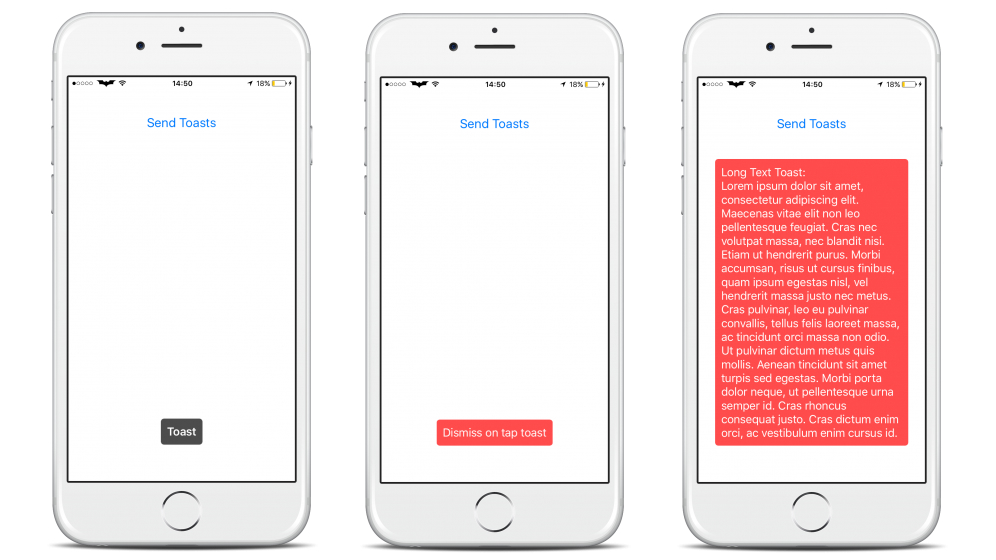
## Example
On button click will be executed this code
```swift
self.view.toastBackgroundColor = UIColor.blackColor().colorWithAlphaComponent(0.7)
self.view.toastTextColor = UIColor.whiteColor()
self.view.toastFont = UIFont.boldSystemFontOfSize(19)
self.view.showToast("Toast", position: .Bottom, popTime: 2, dismissOnTap: false)
self.view.showToast("Dismiss on tap toast", position: .Bottom, popTime: kToastNoPopTime, dismissOnTap: true, bgColor: UIColor.redColor().colorWithAlphaComponent(0.7), textColor: UIColor.whiteColor(), font: UIFont.systemFontOfSize(19))
self.view.showToast("Long Text Toast:\n" +
"Lorem ipsum dolor sit amet, consectetur adipiscing elit. Maecenas vitae elit non leo pellentesque feugiat. Cras nec volutpat massa, nec blandit nisi. Etiam ut hendrerit purus. Morbi accumsan, risus ut cursus finibus, quam ipsum egestas nisl, vel hendrerit massa justo nec metus. Cras pulvinar, leo eu pulvinar convallis, tellus felis laoreet massa, ac tincidunt orci massa non odio. Ut pulvinar dictum metus quis mollis. Aenean tincidunt sit amet turpis sed egestas. Morbi porta dolor neque, ut pellentesque urna semper id. Cras rhoncus consequat justo. Cras dictum enim orci, ac vestibulum enim cursus id.",
position: .Bottom,
popTime: 5,
dismissOnTap: true,
bgColor: UIColor.redColor().colorWithAlphaComponent(0.7),
textColor: UIColor.whiteColor(),
font: UIFont.systemFontOfSize(19))
```

## Configure Toasts
```swift
EasyToastConfiguration.toastInnerPadding = 10
EasyToastConfiguration.animationDuration = 0.6
EasyToastConfiguration.initialSpringVelocity = 0.07
EasyToastConfiguration.dampingRatio = 0.65
```
## Toast tag
To avoid multiple toasts with the same argument, e.g. if a user taps many times on the same button that shows a toast, you can tag it to prevent multiple toast displaying
#### Example
```swift
view.showToast("Toast", tag:"test", position: .Bottom, popTime: kToastNoPopTime, dismissOnTap: false)
view.showToast("Toast", tag:"test", position: .Bottom, popTime: kToastNoPopTime, dismissOnTap: false)
view.showToast("Toast", tag:"test", position: .Bottom, popTime: kToastNoPopTime, dismissOnTap: false)
```
This code will show only the first toast
## Screenshots
## Author
Franco Meloni, franco.meloni91@gmail.com
## License
EasyToast is available under the MIT license. See the LICENSE file for more info.