https://github.com/fabiobiondi/spinner-games
Spinner Games for your website for Angular, React, Vue and Web Components
https://github.com/fabiobiondi/spinner-games
angular react vue webcomponent
Last synced: about 8 hours ago
JSON representation
Spinner Games for your website for Angular, React, Vue and Web Components
- Host: GitHub
- URL: https://github.com/fabiobiondi/spinner-games
- Owner: fabiobiondi
- License: mit
- Created: 2026-06-02T20:54:18.000Z (about 1 month ago)
- Default Branch: main
- Last Pushed: 2026-06-18T22:01:09.000Z (27 days ago)
- Last Synced: 2026-06-18T23:22:28.014Z (27 days ago)
- Topics: angular, react, vue, webcomponent
- Language: TypeScript
- Homepage: https://spinner-games.vercel.app/
- Size: 322 KB
- Stars: 6
- Watchers: 0
- Forks: 0
- Open Issues: 0
-
Metadata Files:
- Readme: README.md
- License: LICENSE
Awesome Lists containing this project
README
# spinner-games
[](https://www.npmjs.com/package/spinner-games)
[](https://www.npmjs.com/package/spinner-games)
[](https://github.com/fabiobiondi/spinner-games/blob/main/LICENSE)
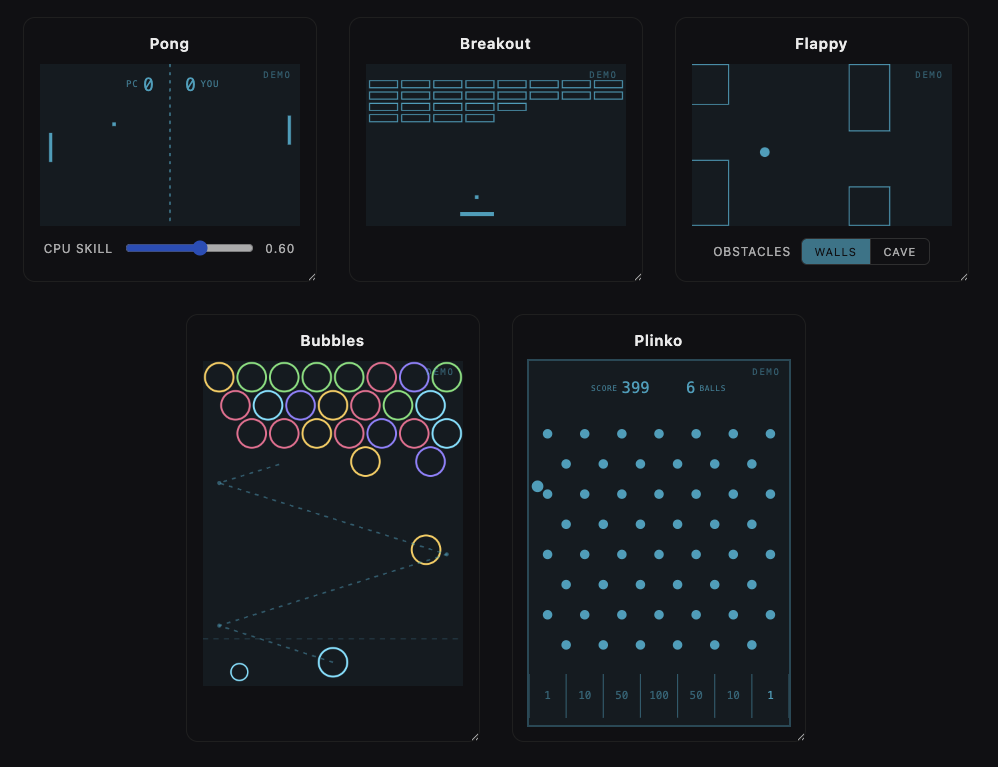
Tiny, playable **web-component games** you can drop in as loaders/spinners
instead of the classic spinning circle. Built with [Lit](https://lit.dev) +
TypeScript + Vite, shippable as a standalone library.
## Status
Playable mini-games (``, ``,
``, ``, ``) are in place, usable
as interactive loaders or self-running demos.
|
# USAGE
Install the package:
```bash
npm install spinner-games
```
The games are framework-agnostic custom elements. Import the package once to
register the tags, then for Angular, React, Vue and Web Components:
```js
import 'spinner-games'
```
```html
```
## Documentation
Per-environment install & usage guides live in [`docs/`](docs/):
- [Web components (no framework)](docs/web-components.md) — plain HTML, bundlers, CDN
- [React](docs/react.md) — `spinner-games/react`
- [Vue](docs/vue.md) — `spinner-games/vue`
- [Angular](docs/angular.md) — `spinner-games/angular`
## Framework wrappers
The same components ship with thin, typed wrappers for React, Vue, and Angular
via subpath exports — no `customElements` boilerplate, full prop type-checking.
Each subpath registers the underlying custom elements for you. Install the
package alongside your framework (declared as optional peer dependencies):
```bash
npm install spinner-games
```
### React (`spinner-games/react`)
Built on [`@lit/react`](https://www.npmjs.com/package/@lit/react), so props map
to the element's reactive properties (not stringified attributes) and `ref`
points at the element instance.
```tsx
import { Pong, Flappy } from 'spinner-games/react'
export function Loader() {
return (
<>
>
)
}
```
### Vue (`spinner-games/vue`)
Typed `defineComponent` wrappers — use them straight from a SFC:
```vue
import { Bubbles } from 'spinner-games/vue'
```
Prefer the raw tags instead? Tell Vue they're custom elements and the bundled
`GlobalComponents` types will type them in templates:
```ts
// vite.config.ts
vue({ template: { compilerOptions: { isCustomElement: (t) => t.startsWith('spinner-') } } })
```
### Angular (`spinner-games/angular`)
Standalone **directives** matching each tag — import the one(s) you need (or the
`SPINNER_GAMES_DIRECTIVES` bundle). The directive makes the tag a known element
(no `CUSTOM_ELEMENTS_SCHEMA` needed) and gives its inputs full type-checking,
while rendering the real custom element with no extra DOM node:
```ts
import { Component } from '@angular/core'
import { SpinnerPong } from 'spinner-games/angular'
@Component({
standalone: true,
imports: [SpinnerPong],
template: ``,
})
export class LoaderComponent {}
```
## Shared conventions
Every game is responsive (fills its parent, height from a
`--spinner-*-aspect` ratio) and shares the `--spinner-color` token. These
opt-in attributes are common to the playable games (``,
``, ``, ``,
``):
| Attribute | Default | What it does |
| ---------------------- | ------- | ---------------------------------------------------------------------------- |
| `autoplay` | off | **Demo mode**: the game plays itself forever and user input is disabled. |
| `show-background` | **on** | Paint the panel background behind the game (a faint `--spinner-color` tint, overridable via `--spinner-bg`). Set it off to drop the background so the game floats transparently over whatever is behind it. |
| `track-outside` | off | Keep following the mouse even after the pointer leaves the canvas (pointer-steered games only — `` flaps and ignores it). |
| `allowOutsideControls` | off | Extend the game's pointer controls past the canvas edge — a superset of `track-outside`. The mouse keeps steering off the element **and** a click outside still acts: it fires a shot in `` and flaps in `` (the only game where it adds a control without `track-outside`). ``/`` have no in-game click, so for them it just extends steering. |
```html
```
### Color
Color isn't an attribute or prop — every game reads the `--spinner-color` CSS
custom property. Set it **inline**, in a **stylesheet**, or on any **ancestor**
(it cascades), and it works identically in HTML, React, Vue and Angular:
```html
```
```css
/* in a stylesheet — recolors every game on the page */
spinner-pong {
--spinner-color: #4ade80; /* green */
}
/* …or set it once on a parent and it cascades into every game inside */
.loaders {
--spinner-color: #e879f9;
}
```
The panel background is a faint tint of this color; override it on its own with
`--spinner-bg`. See each framework's guide in [`docs/`](docs/) for idiomatic
snippets (e.g. React needs a `React.CSSProperties` cast for the inline form).
`` also takes `showNewLine=""` — every that-many
seconds a new row of bubbles drops in from the top and the stack slides down,
ramping up the difficulty (`0`, the default, disables it):
```html
```
`` takes `obstacles` to choose what the ball threads through —
`walls` (the default: classic paired pipes with a gap) or `cave` (an irregular
rocky ceiling and floor with a winding passage between them). It works in both
the playable and `autoplay` modes:
```html
```
`` is a Plinko / Galton board: a ball drops from the top, bounces
through a staggered grid of pegs and lands in a scoring slot. The default 7-slot
board subtracts `1 · 10 · 50 · 100 · 50 · 10 · 1` (biggest in the center). You
start at `startScore` (default 500) and burn it down: aim with the mouse and
click (or press Space) to drop each ball, and reach 0 within your `balls`
(default 10) to win — a hit fires a confetti burst; run out of balls first and
the run is over. Tune it with `rows` (peg rows), `slots` (scoring bins), `balls`
(drops you get) and `startScore` (where the countdown begins):
```html
```
## Contributions
```bash
npm install
npm run dev # open the playground (Vite dev server)
```
## Scripts
| Script | What it does |
| --------------------- | ---------------------------------------------------------- |
| `npm run dev` | Dev server + playground (`index.html`) |
| `npm run build` | Build everything: core + React/Vue + Angular into `dist/` |
| `npm run build:lib` | Build core web components + React/Vue wrappers (Vite + tsc) |
| `npm run build:angular` | Build the Angular wrappers (ng-packagr, partial-Ivy) |
| `npm run preview` | Preview the production build |
| `npm run typecheck` | Type-check only, no emit
## Adding a game
Each game is a self-registering custom element:
1. Create `src/components/spinner-.ts` extending `LitElement`.
2. Register it with `@customElement('spinner-')`.
3. Re-export it from `src/index.ts`.
## Project structure
```
index.html # dev playground
src/ # the core web components (the published `spinner-games`)
index.ts # library entry — re-exports all components
components/
spinner-pong.ts # self-playing Pong loader
spinner-breakout.ts # self-playing Arkanoid/Breakout loader
spinner-bubbles.ts # self-playing Puzzle Bobble / bubble-shooter loader
spinner-flappy.ts # self-playing Flappy Bird loader (a ball for a bird)
spinner-plinko.ts # self-playing Plinko / Galton board loader
wrappers/ # framework wrappers — each imports the core as `spinner-games`
react/index.ts # React wrappers (subpath: spinner-games/react)
vue/index.ts # Vue wrappers (subpath: spinner-games/vue)
angular/ # Angular wrappers — separate ng-packagr build
src/ # standalone directives + public-api
ng-package.json # (subpath: spinner-games/angular)
tsconfig.lib.json
vite.config.ts # core build (src → dist/index.*)
vite.config.wrappers.ts # React/Vue build (wrappers → dist/react, dist/vue)
```