https://github.com/fabioluciano/tmux-powerkit
The Ultimate tmux Status Bar Framework
https://github.com/fabioluciano/tmux-powerkit
tmux tmux-framework tmux-plugin tmux-theme
Last synced: 4 months ago
JSON representation
The Ultimate tmux Status Bar Framework
- Host: GitHub
- URL: https://github.com/fabioluciano/tmux-powerkit
- Owner: fabioluciano
- License: mit
- Created: 2023-05-02T00:50:12.000Z (over 3 years ago)
- Default Branch: main
- Last Pushed: 2026-03-27T23:37:47.000Z (4 months ago)
- Last Synced: 2026-03-28T05:52:05.892Z (4 months ago)
- Topics: tmux, tmux-framework, tmux-plugin, tmux-theme
- Language: Shell
- Homepage:
- Size: 11 MB
- Stars: 497
- Watchers: 1
- Forks: 83
- Open Issues: 2
-
Metadata Files:
- Readme: README.md
- Changelog: CHANGELOG.md
- License: LICENSE
Awesome Lists containing this project
- awesome-github-repos - fabioluciano/tmux-powerkit - The Ultimate tmux Status Bar Framework (Shell)
- awesome-tmux - tmux-powerkit - Already have 36+ plugins, and 2 themes. (<a name="tools"></a>Tools and session management)
README
# ⚡ PowerKit
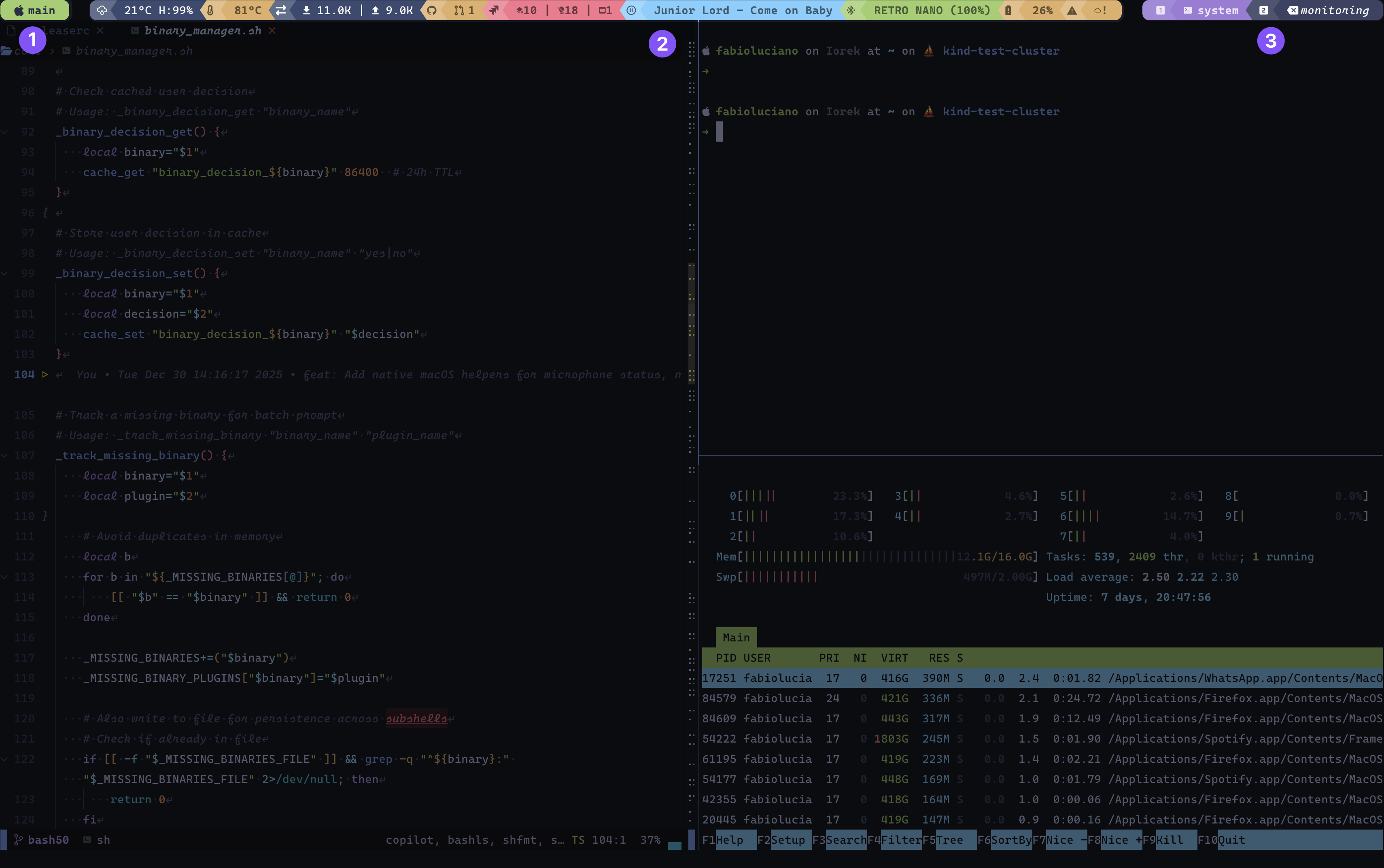
① Session – Current tmux session name with mode-aware icon (changes on prefix/copy mode)
② Plugins – Modular status indicators with health-based colors (cpu, memory, git, datetime, etc.)
③ Windows – Window list with index icons, names, and state indicators (active, zoomed, activity)
## The Ultimate tmux Status Bar Framework
45 Plugins • 43 Themes • Infinite Possibilities
[](https://github.com/fabioluciano/tmux-powerkit/releases)
[](LICENSE)
[](https://github.com/fabioluciano/tmux-powerkit/actions)
[](https://github.com/fabioluciano/tmux-powerkit/stargazers)
Transform your tmux status bar into a powerful, beautiful, and intelligent command center
[**Getting Started**](#-quick-start) • [**Plugins**](#-plugins) • [**Themes**](#-themes) • [**Documentation**](https://github.com/fabioluciano/tmux-powerkit/wiki)
---
## ✨ What Makes PowerKit Special?
### 🎨 **Beautiful by Default**
Choose from **43 carefully crafted themes** with **71 variants** including Catppuccin, Dracula, Monokai, Nord, Tokyo Night, and more. Every theme supports automatic color variants (light/lighter/dark/darker) for perfect contrast.
### ⚡ **Blazingly Fast**
Smart **multi-layer caching**, **Stale-While-Revalidate (SWR) lazy loading**, and optimized background rendering ensure minimal overhead even with dozens of plugins active. Returns stale data immediately while refreshing in background - never blocks on slow API calls or external commands.
### 🧩 **Truly Modular**
**45 production-ready plugins** covering system monitoring, development tools, productivity, media control, and more. Mix and match to create your perfect setup.
### 🔧 **Extensible Architecture**
Contract-based plugin system with strict separation of concerns. Create your own plugins, themes, and helpers with ease.
---
## 🚀 Quick Start
### Installation with TPM
Add to your `~/.tmux.conf`:
```bash
# PowerKit plugin
set -g @plugin 'fabioluciano/tmux-powerkit'
# Basic configuration
set -g @powerkit_plugins "datetime,battery,cpu,memory,git,hostname"
set -g @powerkit_theme "catppuccin"
set -g @powerkit_theme_variant "mocha"
# Initialize TPM (keep at bottom)
run '~/.tmux/plugins/tpm/tpm'
```
Then press `prefix + I` to install.
### Manual Installation
For faster download (~1.5 MB), use shallow clone:
```bash
git clone --depth 1 https://github.com/fabioluciano/tmux-powerkit.git ~/.tmux/plugins/tmux-powerkit
```
Add to `~/.tmux.conf`:
```bash
run-shell ~/.tmux/plugins/tmux-powerkit/tmux-powerkit.tmux
```
> See [Installation Guide](https://github.com/fabioluciano/tmux-powerkit/wiki/Installation) for more options (tarball, full clone).
### Nix/NixOS
Add to `flake.nix`:
```nix
{
inputs.tmux-powerkit.url = "github:fabioluciano/tmux-powerkit";
}
```
Add to `configuration.nix` or `home.nix`:
```nix
programs.tmux = {
enable = true;
plugins = [{
plugin = inputs.tmux-powerkit.packages.${pkgs.system}.default;
extraConfig = ''
set -g @powerkit_plugins "datetime,battery,cpu,memory,git"
set -g @powerkit_theme "catppuccin"
set -g @powerkit_theme_variant "mocha"
'';
}];
};
```
For non-flake install, add to your `configuration.nix` or `home.nix`:
```nix
let
tmux-powerkit = pkgs.callPackage (pkgs.fetchFromGitHub {
owner = "fabioluciano";
repo = "tmux-powerkit";
rev = "main"; # or pin to a specific commit
sha256 = ""; # nix will provide correct hash on first build
} + "/default.nix") {};
in {
programs.tmux = {
enable = true;
plugins = [ tmux-powerkit ];
extraConfig = ''
set -g @powerkit_plugins "datetime,battery,cpu,memory,git"
set -g @powerkit_theme "catppuccin"
set -g @powerkit_theme_variant "mocha"
'';
};
}
```
### Your First Customization
```bash
# Choose your separator style
set -g @powerkit_separator_style "rounded" # or normal, flame, pixel, honeycomb
# Enable spacing between elements
set -g @powerkit_elements_spacing "both"
# Customize update interval
set -g @powerkit_status_interval "5"
# Make it transparent
set -g @powerkit_transparent "true"
```
**That's it!** Reload tmux and enjoy your new status bar.
---
## 🎯 Plugins
### 📊 System Monitoring (13 plugins)
Monitor every aspect of your system in real-time:
| Plugin | Description | Highlights |
|--------|-------------|-----------|
| `battery` | Battery level with charge state | Shows charging status, time remaining, health indicators |
| `cpu` | CPU usage with per-core support | Thresholds, multi-core detection, platform-specific |
| `memory` | RAM usage and availability | Multiple formats (percentage, usage, available) |
| `swap` | Swap memory usage | Cross-platform, threshold alerts, multiple display formats |
| `disk` | Disk usage by mount point | Configurable thresholds, multiple drives |
| `loadavg` | System load average | 1/5/15 minute averages, per-core normalization |
| `temperature` | CPU temperature | macOS (osx-cpu-temp), Linux (hwmon) |
| `fan` | Fan speed monitoring | Dell SMM, ThinkPad, generic hwmon, macOS |
| `gpu` | GPU utilization | NVIDIA, AMD, Intel, macOS support |
| `iops` | Disk I/O operations | Read/write operations per second |
| `brightness` | Screen brightness | Linux only (sysfs, brightnessctl, light, xbacklight) |
| `uptime` | System uptime | Human-readable format |
| `hostname` | System hostname | Color-coded by environment |
### 🌐 Network (7 plugins)
Stay connected and informed:
| Plugin | Description | Features |
|--------|-------------|----------|
| `netspeed` | Upload/download speed | Real-time bandwidth monitoring |
| `wifi` | WiFi SSID + signal strength | Signal quality indicators |
| `vpn` | VPN connection status | Detects active VPN tunnels |
| `ping` | Network latency | Configurable host, threshold alerts |
| `external_ip` | Public IP address | Cached with configurable TTL |
| `ssh` | SSH session indicator | Shows when connected via SSH |
| `weather` | Weather from wttr.in | Location-based, customizable format |
### 🎵 Media (7 plugins)
Control your media experience:
| Plugin | Description | Platform |
|--------|-------------|----------|
| `volume` | System volume level | macOS only |
| `brightness` | Screen brightness | Linux only |
| `nowplaying` | Current music track | Music.app, Spotify (macOS) |
| `audiodevices` | Active audio output device | macOS (SwitchAudioSource) |
| `camera` | Camera usage indicator | macOS (lsof) |
| `microphone` | Microphone mute status | macOS (osascript) |
| `bluetooth` | Bluetooth status + devices | macOS (blueutil), Linux (bluetoothctl) |
### 💻 Development (11 plugins)
Supercharge your development workflow:
| Plugin | Description | Features |
|--------|-------------|----------|
| `git` | Git branch + status | Modified files, branch info, repo state |
| `github` | GitHub notifications | PRs, issues, notifications (gh CLI) |
| `gitlab` | GitLab merge requests | MRs, todos (glab CLI) |
| `bitbucket` | Bitbucket pull requests | PR count via API |
| `jira` | Jira assigned issues | Issue count via API |
| `kubernetes` | K8s context + namespace | Current context and namespace |
| `terraform` | Terraform workspace | Active workspace indicator |
| `cloud` | Cloud provider profile | AWS/Azure/GCP active profile |
| `cloudstatus` | Cloud service status | Service health monitoring |
| `yadm` | yadm dotfile status | Modified/untracked dotfiles, ahead/behind counts |
| `packages` | Pending system updates | brew, apt, yum, pacman support |
### ⏰ Productivity (5 plugins)
Boost your productivity:
| Plugin | Description | Features |
|--------|-------------|----------|
| `datetime` | Date and time | 15 format presets, fully customizable |
| `timezones` | Multiple timezones | Display multiple zones simultaneously |
| `pomodoro` | Pomodoro timer | Work/break phases, keybindings |
| `bitwarden` | Bitwarden vault status | Lock status, quick access |
| `smartkey` | Custom environment variables | Display any env var or command output |
### 💰 Financial (2 plugins)
Track your investments:
| Plugin | Description | Source |
|--------|-------------|--------|
| `crypto` | Cryptocurrency prices | CoinGecko API |
| `stocks` | Stock prices | Yahoo Finance API |
---
## 🎨 Themes
PowerKit comes with **43 beautiful themes** and **71 variants**, each carefully designed for optimal readability and aesthetics
### Popular Themes
Tokyo Night
night • storm • day
Catppuccin
mocha • macchiato • frappe • latte
Dracula
dark
Nord
dark
Gruvbox
dark • light
Rose Pine
main • moon • dawn
Material
default • ocean • palenight • lighter
Solarized
dark • light
GitHub
dark • light
Ayu
dark • mirage • light
Night Owl
default • light
Moonlight
default
Plus **Monokai**, **Cobalt2**, **SynthWave '84**, **Horizon**, **Iceberg**, **Snazzy**, **Spacegray**, **Molokai**, **Vesper**, **Poimandres**, **Flexoki**, **Slack**, and more!
### Theme Features
- ✅ **Automatic color variants** - Each base color generates 6 variants (light/lighter/lightest/dark/darker/darkest)
- ✅ **Smart health mapping** - Plugin states automatically map to theme colors
- ✅ **Transparent mode** - All themes support transparent backgrounds
- ✅ **Consistent contrast** - Automated foreground color selection for perfect readability
### Quick Theme Switch
```bash
# Tokyo Night - Night variant
set -g @powerkit_theme "tokyo-night"
set -g @powerkit_theme_variant "night"
# Catppuccin - Mocha variant
set -g @powerkit_theme "catppuccin"
set -g @powerkit_theme_variant "mocha"
# Dracula
set -g @powerkit_theme "dracula"
set -g @powerkit_theme_variant "dark"
```
**See all themes:** [Themes Documentation](https://github.com/fabioluciano/tmux-powerkit/wiki/Themes)
---
## 🎭 Separator Styles
Choose from **9 beautiful separator styles** to customize your status bar appearance:
| Style | Right | Left | Unicode |
|-------|-------|------|---------|
| **normal** | | | E0B0/E0B2 |
| **rounded** | | | E0B4/E0B6 |
| **slant** | | | E0B8/E0BA |
| **slantup** | | | E0BC/E0BE |
| **trapezoid** | | | E0C8/E0CA |
| **flame** | | | E0C0/E0C2 |
| **pixel** | | | E0C4/E0C6 |
| **honeycomb** | | | E0CC/E0CD |
| **none** | - | - | - |
```bash
# Configure separator style
set -g @powerkit_separator_style "rounded"
# Different style for edge separators
set -g @powerkit_edge_separator_style "flame"
# Add spacing between elements
set -g @powerkit_elements_spacing "both" # false, true, both, windows, plugins
```
---
## ⚙️ Advanced Configuration
### Plugin-Specific Options
Every plugin is highly customizable. Example with the `battery` plugin:
```bash
# Battery plugin options
set -g @powerkit_plugin_battery_warning_threshold "30"
set -g @powerkit_plugin_battery_critical_threshold "15"
set -g @powerkit_plugin_battery_icon ""
set -g @powerkit_plugin_battery_icon_charging ""
set -g @powerkit_plugin_battery_cache_ttl "5"
set -g @powerkit_plugin_battery_show_only_on_threshold "false"
```
### CPU Plugin with Thresholds
```bash
set -g @powerkit_plugin_cpu_warning_threshold "70"
set -g @powerkit_plugin_cpu_critical_threshold "90"
set -g @powerkit_plugin_cpu_show_cores "false"
set -g @powerkit_plugin_cpu_icon ""
```
### Git Plugin
```bash
set -g @powerkit_plugin_git_icon ""
set -g @powerkit_plugin_git_show_branch "true"
set -g @powerkit_plugin_git_show_files "true"
set -g @powerkit_plugin_git_max_length "30"
```
### Network Speed
```bash
set -g @powerkit_plugin_netspeed_interface "auto" # or eth0, wlan0, etc.
set -g @powerkit_plugin_netspeed_icon_up ""
set -g @powerkit_plugin_netspeed_icon_down ""
set -g @powerkit_plugin_netspeed_format "both" # up, down, both
```
### DateTime Formats
Choose from **15 preset formats** or create your own:
```bash
set -g @powerkit_plugin_datetime_format "preset_1" # %Y-%m-%d %H:%M:%S
set -g @powerkit_plugin_datetime_format "preset_7" # %I:%M %p
set -g @powerkit_plugin_datetime_format "preset_12" # %a %b %d
# Or custom format
set -g @powerkit_plugin_datetime_format "%Y-%m-%d %A"
```
---
## 🎮 Keybindings
PowerKit includes powerful interactive helpers with keybindings:
```bash
# Built-in keybindings (all customizable)
set -g @powerkit_options_key "C-e" # View all options
set -g @powerkit_keybindings_key "C-y" # View keybindings
set -g @powerkit_theme_selector_key "C-r" # Theme selector
set -g @powerkit_cache_clear_key "C-d" # Clear cache
# Plugin-specific keybindings
set -g @powerkit_plugin_bitwarden_keybinding_unlock "C-b u"
set -g @powerkit_plugin_bitwarden_keybinding_lock "C-b l"
set -g @powerkit_plugin_pomodoro_keybinding_start "C-p s"
set -g @powerkit_plugin_pomodoro_keybinding_pause "C-p p"
```
### Interactive Helpers
PowerKit includes several interactive helpers:
- **Options Viewer** (`prefix + C-e`) - Browse all configuration options
- **Keybindings Viewer** (`prefix + C-y`) - View all active keybindings
- **Theme Selector** (`prefix + C-r`) - Interactively switch themes
- **Cache Manager** (`prefix + C-d`) - Clear plugin cache
- **Bitwarden Selector** - Quick password access
- **Audio Device Selector** - Switch audio outputs
---
## 🏗️ Architecture
PowerKit uses a **contract-based architecture** with strict separation of concerns:
```text
┌─────────────────────────────────────────────────────────────────┐
│ POWERKIT CORE │
│ Lifecycle • Cache • Options • Datastore • Theme Loader │
└───────┬──────────────────────┬──────────────────┬───────────────┘
│ │ │
▼ ▼ ▼
┌──────────────┐ ┌─────────────────┐ ┌─────────────┐
│ PLUGINS │ │ RENDERER │ │ THEMES │
├──────────────┤ ├─────────────────┤ ├─────────────┤
│ • Data │─────▶│ • Colors │◀──│ • Color │
│ • State │ │ • Icons │ │ Palette │
│ • Health │ │ • Separators │ │ │
│ • Context │ │ • Formatting │ │ │
└──────────────┘ └─────────────────┘ └─────────────┘
```
### Key Principles
1. **Plugins** provide data and semantics (state, health, context)
2. **Renderer** handles all UI decisions (colors, icons, formatting)
3. **Themes** define color palettes only
4. **Core** orchestrates the lifecycle and manages caching
This architecture ensures:
- ✅ Plugins never decide colors or formatting
- ✅ Themes are purely declarative
- ✅ Rendering is consistent across all plugins
- ✅ Easy to extend without breaking existing code
**Learn more:** [Architecture Documentation](https://github.com/fabioluciano/tmux-powerkit/wiki/Architecture)
---
## 📐 Layout Options
### Single vs Double Layout
```bash
# Single line layout (default)
set -g @powerkit_bar_layout "single"
# Double line layout (session on top, plugins on bottom)
set -g @powerkit_bar_layout "double"
```
### Element Order and Centered Layout
PowerKit supports flexible element ordering with automatic centered layout:
```bash
# 2-element orders (auto-expanded with windows):
set -g @powerkit_status_order "session,plugins" # Standard: session+windows LEFT, plugins RIGHT
set -g @powerkit_status_order "plugins,session" # Inverted: plugins LEFT, windows+session RIGHT
# 3-element orders enable CENTERED layout:
set -g @powerkit_status_order "session,windows,plugins" # session LEFT, windows CENTER, plugins RIGHT
set -g @powerkit_status_order "plugins,windows,session" # plugins LEFT, windows CENTER, session RIGHT
set -g @powerkit_status_order "session,plugins,windows" # session LEFT, plugins CENTER, windows RIGHT
```
Any element in the middle position will be automatically centered in the status bar.
### Lazy Loading (SWR Caching)
PowerKit uses Stale-While-Revalidate caching for optimal performance:
```bash
# Enable lazy loading (default: true)
set -g @powerkit_lazy_loading "true"
# Stale multiplier: how many times the TTL before data is considered "too old"
# Example: TTL=300s, multiplier=3 → data up to 900s old can be returned while refreshing
set -g @powerkit_stale_multiplier "3"
```
**How it works:**
- Fresh data (within TTL): Returns cached data immediately
- Stale data (within TTL × multiplier): Returns stale data immediately, refreshes in background
- Too old data (beyond TTL × multiplier): Blocks and refreshes synchronously
This ensures your status bar never hangs waiting for slow API calls or network requests.
### Plugin Groups
Group related plugins together using the `group(...)` syntax for visual cohesion:
```bash
# Group related plugins with shared separator backgrounds
set -g @powerkit_plugins "group(cpu,memory,loadavg),group(git,github),datetime"
```
Groups are assigned colors from the `@powerkit_plugin_group_colors` palette in order:
```bash
# Customize group color palette (comma-separated theme colors or hex values)
set -g @powerkit_plugin_group_colors "info-base-darker,window-active-base-darker,ok-base-darker,warning-base-darker,error-base-darker,disabled-base"
```
By default, group colors only affect the separator backgrounds between plugins in the same group. Each plugin still uses its own health-based colors for the segment itself.
To create a fully unified visual band where all plugins in a group share the same background color, enable group coloring:
```bash
# Apply group palette colors to plugin segment backgrounds (default: false)
set -g @powerkit_plugin_group_coloring "true"
```
When group coloring is enabled:
- Plugin segment backgrounds use the group's palette color instead of health-based colors
- Health feedback is preserved through **bold text styling** (warning/error states render bold)
- Special states (`inactive`, `failed`) still use their semantic colors and are not overridden
- Transparent mode (`@powerkit_transparent "true"`) disables group coloring and falls back to health-based colors
- Stale data applies a darkened variant of the group color, consistent with the normal stale behavior
---
## 🔧 Creating Your Own Plugin
PowerKit makes it easy to create custom plugins. Here's a minimal example:
```bash
#!/usr/bin/env bash
POWERKIT_ROOT="${POWERKIT_ROOT:-$(cd "$(dirname "${BASH_SOURCE[0]}")/../.." && pwd)}"
. "${POWERKIT_ROOT}/src/contract/plugin_contract.sh"
plugin_get_metadata() {
metadata_set "id" "my_plugin"
metadata_set "name" "My Plugin"
metadata_set "description" "What this plugin does"
}
plugin_declare_options() {
declare_option "icon" "icon" "" "Plugin icon"
declare_option "cache_ttl" "number" "60" "Cache duration"
}
plugin_collect() {
# Collect your data
local value="42"
plugin_data_set "value" "$value"
}
plugin_get_content_type() { printf 'dynamic'; }
plugin_get_presence() { printf 'always'; }
plugin_get_state() { printf 'active'; }
plugin_get_health() { printf 'ok'; }
plugin_render() {
local value=$(plugin_data_get "value")
printf '%s' "$value"
}
plugin_get_icon() {
printf '%s' "$(get_option 'icon')"
}
```
**Learn more:** [Developing Plugins](https://github.com/fabioluciano/tmux-powerkit/wiki/DevelopingPlugins)
---
## 🎨 Creating Your Own Theme
Themes are simple color definitions:
```bash
#!/usr/bin/env bash
declare -A THEME_COLORS=(
# Status bar
[statusbar-bg]="#1a1b26"
[statusbar-fg]="#c0caf5"
# Session
[session-bg]="#7aa2f7"
[session-fg]="#1a1b26"
# Windows (variants auto-generated)
[window-active-base]="#7aa2f7"
[window-inactive-base]="#3b4261"
# Health states (variants auto-generated)
[ok-base]="#9ece6a"
[info-base]="#7dcfff"
[warning-base]="#e0af68"
[error-base]="#f7768e"
)
```
The system automatically generates **6 color variants** (light/lighter/lightest/dark/darker/darkest) for each base color!
**Learn more:** [Developing Themes](https://github.com/fabioluciano/tmux-powerkit/wiki/DevelopingThemes)
---
## 📚 Complete Documentation
| Resource | Description |
|----------|-------------|
| [**Installation Guide**](https://github.com/fabioluciano/tmux-powerkit/wiki/Installation) | Detailed setup instructions |
| [**Quick Start**](https://github.com/fabioluciano/tmux-powerkit/wiki/Quick-Start) | Get started in 5 minutes |
| [**Configuration Reference**](https://github.com/fabioluciano/tmux-powerkit/wiki/Configuration) | All configuration options explained |
| [**Plugin Documentation**](https://github.com/fabioluciano/tmux-powerkit/wiki/Home#plugins-45-available) | Detailed docs for all 45 plugins |
| [**Theme Gallery**](https://github.com/fabioluciano/tmux-powerkit/wiki/Themes) | Preview all themes and variants |
| [**Developing Plugins**](https://github.com/fabioluciano/tmux-powerkit/wiki/DevelopingPlugins) | Create your own plugins |
| [**Developing Themes**](https://github.com/fabioluciano/tmux-powerkit/wiki/DevelopingThemes) | Create custom themes |
| [**Architecture**](https://github.com/fabioluciano/tmux-powerkit/wiki/Architecture) | Understanding the contract system |
| [**API Reference**](https://github.com/fabioluciano/tmux-powerkit/wiki/API-Reference) | Core APIs and utilities |
### 📋 Complete Options Reference
A fully documented configuration file with **all available options** is maintained at:
```text
wiki/assets/powerkit-options.conf
```
**[📥 Download powerkit-options.conf](https://raw.githubusercontent.com/wiki/fabioluciano/tmux-powerkit/assets/powerkit-options.conf)**
Use this file as a reference or copy the options you need to your `~/.tmux.conf`. Every option includes descriptions, valid values, and defaults.
---
## 🚦 Requirements
- **tmux** 3.0 or higher
- **Bash** 5.0 or higher (5.1+ recommended for optimal performance)
- **TPM** (Tmux Plugin Manager)
- **Nerd Font** (recommended for icons)
> **Note for macOS users:** macOS ships with Bash 3.x. Install a modern version with `brew install bash`.
### Bash Version Features Used
| Version | Features Used |
|---------|--------------|
| 5.0+ | `$EPOCHSECONDS`, `$EPOCHREALTIME`, `${var,,}`, `${var^^}` |
| 5.1+ | `assoc_expand_once` (performance optimization) |
### Platform Support
- ✅ **macOS** (Intel & Apple Silicon)
- ✅ **Linux** (Ubuntu, Debian, Fedora, Arch, and more)
- ✅ **FreeBSD** (limited testing)
- ✅ **WSL** (Windows Subsystem for Linux)
---
## 💡 Example Configurations
### Minimal Setup
```bash
set -g @powerkit_plugins "datetime,hostname"
set -g @powerkit_theme "tokyo-night"
set -g @powerkit_separator_style "rounded"
```
### Developer Setup
```bash
set -g @powerkit_plugins "git,github,kubernetes,terraform,cpu,memory,datetime"
set -g @powerkit_theme "dracula"
set -g @powerkit_plugin_git_show_files "true"
set -g @powerkit_plugin_kubernetes_show_namespace "true"
```
### System Monitor Setup
```bash
set -g @powerkit_plugins "cpu,memory,disk,loadavg,temperature,fan,netspeed,datetime"
set -g @powerkit_theme "gruvbox"
set -g @powerkit_theme_variant "dark"
set -g @powerkit_plugin_cpu_show_cores "true"
set -g @powerkit_plugin_netspeed_format "both"
```
### Productivity Setup
```bash
set -g @powerkit_plugins "pomodoro,datetime,timezones,bitwarden,git,battery"
set -g @powerkit_theme "catppuccin"
set -g @powerkit_theme_variant "mocha"
set -g @powerkit_plugin_timezones_zones "UTC,America/New_York,Europe/London"
```
---
## 🤝 Contributing
We welcome contributions! Here's how you can help:
### Ways to Contribute
- 🐛 **Report bugs** - Open an issue with details
- 💡 **Suggest features** - Share your ideas
- 📝 **Improve documentation** - Fix typos, add examples
- 🔌 **Create plugins** - Share your custom plugins
- 🎨 **Design themes** - Create beautiful color schemes
- 💻 **Submit PRs** - Fix bugs or add features
### Development Workflow
1. **Fork** the repository
2. **Create** a feature branch (`git checkout -b feature/amazing-feature`)
3. **Commit** your changes (`git commit -m 'Add amazing feature'`)
4. **Push** to the branch (`git push origin feature/amazing-feature`)
5. **Open** a Pull Request
### Development Tools
```bash
# Validate syntax
bash -n src/**/*.sh
# Run shellcheck
shellcheck src/**/*.sh
# Test render
POWERKIT_ROOT="$(pwd)" ./bin/powerkit-render
# Test specific plugin
POWERKIT_ROOT="$(pwd)" ./bin/powerkit-plugin battery
```
**See:** [Development Guide](https://github.com/fabioluciano/tmux-powerkit/wiki/DevelopingPlugins)
---
## 🏆 Credits & Acknowledgments
PowerKit is built on the shoulders of giants:
- **[Powerline](https://github.com/powerline/powerline)** - Original inspiration
- **[tmux](https://github.com/tmux/tmux)** - The best terminal multiplexer
- **[TPM](https://github.com/tmux-plugins/tpm)** - Tmux Plugin Manager
- All theme creators for their beautiful color schemes
- The tmux community for continuous feedback and support
---
## 📄 License
PowerKit is released under the **MIT License**.
See [LICENSE](LICENSE) for full details.
---
## 📬 Support & Community
- 🐛 **Bug Reports:** [GitHub Issues](https://github.com/fabioluciano/tmux-powerkit/issues)
- 📖 **Documentation:** [Wiki](https://github.com/fabioluciano/tmux-powerkit/wiki)
- ⭐ **Show Support:** Star this repository!
---
### Made with ❤️ by [@fabioluciano](https://github.com/fabioluciano)
If PowerKit improves your tmux experience, please consider starring the repo! ⭐
[⬆ Back to Top](#-powerkit)