https://github.com/fabiosantoscode/example-get-started-s3
Example get started (metrics and plots in S3)
https://github.com/fabiosantoscode/example-get-started-s3
Last synced: 7 months ago
JSON representation
Example get started (metrics and plots in S3)
- Host: GitHub
- URL: https://github.com/fabiosantoscode/example-get-started-s3
- Owner: fabiosantoscode
- Created: 2020-06-26T15:06:55.000Z (over 5 years ago)
- Default Branch: master
- Last Pushed: 2020-06-25T22:46:51.000Z (over 5 years ago)
- Last Synced: 2025-03-18T07:17:32.120Z (11 months ago)
- Size: 11.7 KB
- Stars: 0
- Watchers: 1
- Forks: 0
- Open Issues: 0
-
Metadata Files:
- Readme: README.md
Awesome Lists containing this project
README
# DVC Get Started
This is an auto-generated repository for use in DVC
[Get Started](https://dvc.org/doc/get-started). It is a step-by-step quick
introduction into basic DVC concepts.
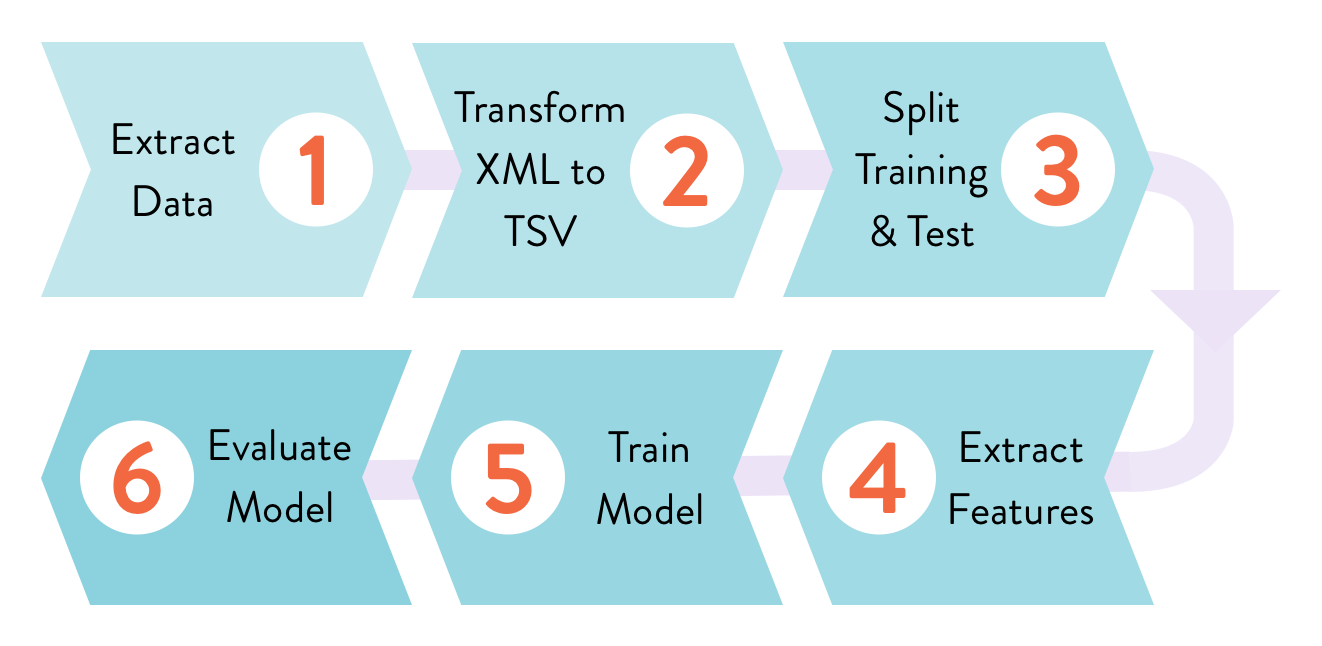
The project is a natural language processing (NLP) binary classifier problem of
predicting tags for a given StackOverflow question. For example, we want one
classifier which can predict a post that is about the Python language by tagging
it `python`.
🐛 Please report any issues found in this project here -
[example-repos-dev](https://github.com/iterative/example-repos-dev).
## Installation
Python 3.6+ is required to run code from this repo.
```console
$ git clone https://github.com/iterative/example-get-started
$ cd example-get-started
```
Now let's install the requirements. But before we do that, we **strongly**
recommend creating a virtual environment with a tool such as
[virtualenv](https://virtualenv.pypa.io/en/stable/):
```console
$ virtualenv -p python3 .env
$ source .env/bin/activate
$ pip install -r src/requirements.txt
```
This DVC project comes with a preconfigured DVC
[remote storage](https://dvc.org/doc/commands-reference/remote) that holds raw
data (input), intermediate, and final results that are produced. This is a
read-only HTTP remote.
```console
$ dvc remote list
storage https://remote.dvc.org/get-started
```
You can run [`dvc pull`](https://man.dvc.org/pull) to download the data:
```console
$ dvc pull
```
## Running in your environment
Run [`dvc repro`](https://man.dvc.org/repro) to reproduce the
[pipeline](https://dvc.org/doc/commands-reference/pipeline):
```console
$ dvc repro
Data and pipelines are up to date.
```
If you'd like to test commands like [`dvc push`](https://man.dvc.org/push),
that require write access to the remote storage, the easiest way would be to set
up a "local remote" on your file system:
> This kind of remote is located in the local file system, but is external to
> the DVC project.
```console
$ mkdir -P /tmp/dvc-storage
$ dvc remote add local /tmp/dvc-storage
```
You should now be able to run:
```console
$ dvc push -r local
```
## Existing stages
This project with the help of the Git tags reflects the sequence of actions that
are run in the DVC [get started](https://dvc.org/doc/get-started) guide. Feel
free to checkout one of them and play with the DVC commands having the
playground ready.
- `0-git-init`: Empty Git repository initialized.
- `1-dvc-init`: DVC has been initialized. `.dvc/` with the cache directory
created.
- `2-track-data`: Raw data file `data.xml` downloaded and tracked with DVC using
[`dvc add`](https://man.dvc.org/add). First `.dvc` file created.
- `3-config-remote`: Remote HTTP storage initialized. It's a shared read only
storage that contains all data artifacts produced during next steps.
- `4-import-data`: Use `dvc import` to get the same `data.xml` from the DVC data
registry.
- `5-source-code`: Source code downloaded and put into Git.
- `6-prep-stage`: Create `dvc.yaml` and the first pipeline stage with
[`dvc run`](https://man.dvc.org/run). It transforms XML data into TSV.
- `8-ml-pipeline`: Feature extraction and train stages created. It takes data in
TSV format and produces two `.pkl` files that contain serialized feature
matrices. Tain runs random forest classifier and creates the `model.pkl` file.
- `9-evaluate`: Evaluation stage. Runs the model on a test dataset to produce
its performance AUC value. The result is dumped into a DVC metric file so that
we can compare it with other experiments later.
- `10-bigrams-model`: Bigrams experiment, code has been modified to extract more
features. We run [`dvc repro`](https://man.dvc.org/repro) for the first time
to illustrate how DVC can reuse cached files and detect changes along the
computational graph, regenerating the model with the updated data.
- `11-bigrams-experiment`: Reproduce the evaluation stage with the bigrams based
model.
There are two additional tags:
- `baseline-experiment`: First end-to-end result that we have performance metric
for.
- `bigrams-experiment`: Second experiment (model trained using bigrams
features).
These tags can be used to illustrate `-a` or `-T` options across different
[DVC commands](https://man.dvc.org/).
## Project structure
The data files, DVC files, and results change as stages are created one by one.
After cloning and using [`dvc pull`](https://man.dvc.org/pull) to download data
tracked by DVC, the workspace should look like this:
```console
$ tree
.
├── README.md
├── data # <-- Directory with raw and intermediate data
│ ├── data.xml # <-- Initial XML StackOverflow dataset (raw data)
│ ├── data.xml.dvc # <-- .dvc file - a placeholder/pointer to raw data
│ ├── features # <-- Extracted feature matrices
│ │ ├── test.pkl
│ │ └── train.pkl
│ └── prepared # <-- Processed dataset (split and TSV formatted)
│ ├── test.tsv
│ └── train.tsv
├── dvc.lock
├── dvc.yaml # <-- DVC pipeline file
├── model.pkl # <-- Trained model file
├── params.yaml # <-- Parameters file
├── prc.json # <-- Precision-recall curve data points
├── scores.json # <-- Binary classifier final metrics (e.g. AUC)
└── src # <-- Source code to run the pipeline stages
├── evaluate.py
├── featurization.py
├── prepare.py
├── requirements.txt # <-- Python dependencies needed in the project
└── train.py
```