https://github.com/fajarkim/termux-games
This is a simple tools for played games in Termux App 🎮
https://github.com/fajarkim/termux-games
game games termux termux-games tool tools
Last synced: 4 months ago
JSON representation
This is a simple tools for played games in Termux App 🎮
- Host: GitHub
- URL: https://github.com/fajarkim/termux-games
- Owner: FajarKim
- License: bsd-3-clause
- Created: 2022-06-20T05:21:58.000Z (about 4 years ago)
- Default Branch: master
- Last Pushed: 2025-03-23T08:31:43.000Z (over 1 year ago)
- Last Synced: 2025-08-03T03:29:36.520Z (11 months ago)
- Topics: game, games, termux, termux-games, tool, tools
- Language: Shell
- Homepage: https://fajarkim.github.io/termux-games/
- Size: 1.85 MB
- Stars: 8
- Watchers: 1
- Forks: 4
- Open Issues: 0
-
Metadata Files:
- Readme: README.md
- Funding: .github/FUNDING.yml
- License: LICENSE
Awesome Lists containing this project
README
**Termux Games** is a lightweight and easy-to-use utility designed for playing games directly in the Termux app. Perfect for users with limited internal storage or without internet access, this tool offers an engaging and responsive graphical interface.
## Table of Contents
- [Features](#features)
- [Installation](#installation)
- [Usage](#usage)
- [List Games](#list-games)
- [Contributions](#contributions)
- [License](#license)
- [Contact](#contact)
- [Donate](#donate)
- [Changelog](#changelog)
## Features
Termux Games offers a variety of features:
- Play a collection of simple, interactive games directly in Termux.
- Ideal for users with limited storage or no internet connection.
- Enjoy 20 of the most engaging games available.
- Experience a sleek, responsive, and user-friendly GUI.
## Installation
Follow these steps to install Termux Games:
1. Update and upgrade packages:
```bash
pkg update -y && pkg upgrade -y
```
2. Install the `git` package and the dependencies that will be needed:
```bash
pkg install git xz-utils
```
3. Clone the repository:
```bash
git clone https://github.com/FajarKim/termux-games.git
```
4. Change to the `termux-games` directory:
```bash
cd termux-games
```
To install all the required packages, you can run the `install.sh` file:
```bash
bash install.sh
```
## Usage
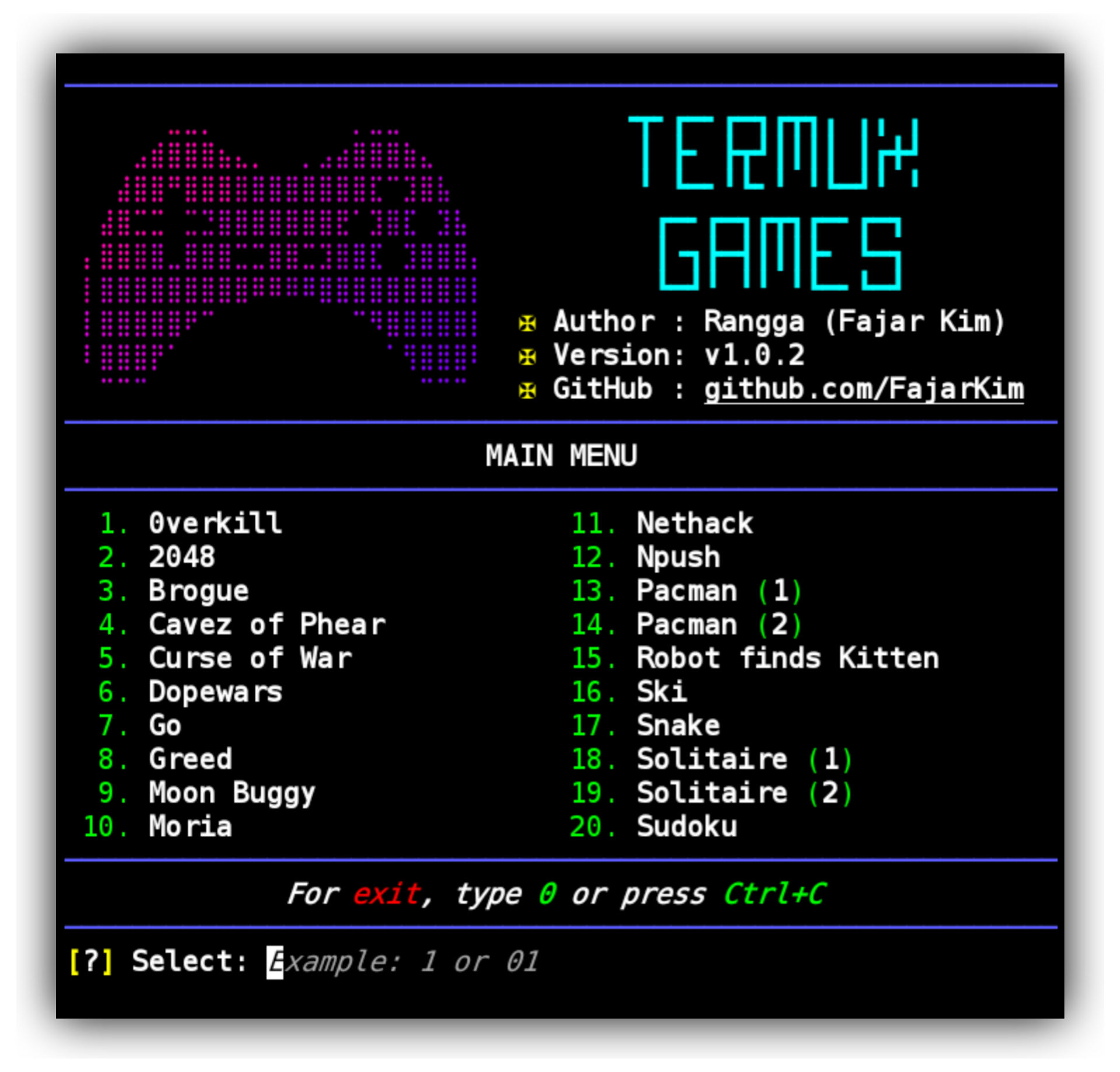
To start Termux Games, simply run the `games.sh` script using Bash. Once launched, choose your desired game from the menu.
```bash
bash games.sh
```
Screenshot of the program in action:
## List Games
Below is the list of games available in Termux Games along with their source links:
1. [0verkill](https://github.com/hackndev/0verkill)
2. [2048](https://github.com/mevdschee/2048.c)
3. [Brogue](https://sites.google.com/site/broguegame/)
4. [Cavez of Phear](https://github.com/AMDmi3/cavezofphear)
5. [Curse of War](http://a-nikolaev.github.io/curseofwar/)
6. [Dopewars](https://dopewars.sourceforge.io)
7. [Go](https://www.gnu.org/software/gnugo/)
8. [Greed](http://www.catb.org/~esr/greed/)
9. [Moon Buggy](https://github.com/seehuhn/moon-buggy)
10. [Moria](https://umoria.org)
11. [Nethack](http://www.nethack.org/)
12. [Npush](http://npush.sourceforge.net/)
13. [Pacman (1)](https://sites.google.com/site/doctormike/pacman.html)
14. [Pacman (2)](https://sourceforge.net/projects/myman/)
15. [Robot finds Kitten](https://github.com/noncombatant/robotfindskitten)
16. [Ski](https://sourceforge.net/projects/gnuski)
17. [Snake](https://github.com/alexdantas/nSnake)
18. [Solitaire (1)](https://github.com/nielssp/csol)
19. [Solitaire (2)](https://github.com/mpereira/tty-solitaire)
20. [Sudoku](http://jubalh.github.io/nudoku/)
## Contributions
Found a bug or have an idea for improvement? Feel free to open a pull request or report an issue on [GitHub Issues](https://github.com/FajarKim/termux-games/issues/new/choose). Every contribution is highly appreciated!
## License
Termux Games is distributed under the BSD-3 Clause License. See the [LICENSE](/LICENSE) file for full details.
## Contact
For questions or suggestions, please reach out via:
[](mailto:fajarrkim@gmail.com)
[](https://wa.me/6285659850910)
[](https://t.me/FajarThea)
## Donate
Your support helps us continue improving Termux Games. If you enjoy using this tool, please consider making a donation:
[](https://paypal.me/agusbirawan)
[](https://ko-fi.com/fajarkim)
[](https://trakteer.id/fajarkim)
Every donation, no matter the size, is greatly appreciated! ❤️
## Changelog
Stay updated with the latest improvements and changes by visiting the [Changelog](https://github.com/FajarKim/termux-games/releases).

Created with ❤️ and Shell
Copyright 2022-present Rangga Fajar Oktariansyah





