https://github.com/fajarnugraha37/node-forwarder
[WIP] Node Forwarder A simple, Request forwarder built with Node.js. It includes features like caching, rate limiting, blacklisting, whitelisting, etc.
https://github.com/fajarnugraha37/node-forwarder
forward-proxy forwarder http https node nodejs typescript
Last synced: 2 months ago
JSON representation
[WIP] Node Forwarder A simple, Request forwarder built with Node.js. It includes features like caching, rate limiting, blacklisting, whitelisting, etc.
- Host: GitHub
- URL: https://github.com/fajarnugraha37/node-forwarder
- Owner: fajarnugraha37
- License: mit
- Created: 2024-11-05T12:14:40.000Z (over 1 year ago)
- Default Branch: main
- Last Pushed: 2024-11-06T17:18:36.000Z (over 1 year ago)
- Last Synced: 2025-03-27T06:16:02.527Z (over 1 year ago)
- Topics: forward-proxy, forwarder, http, https, node, nodejs, typescript
- Language: TypeScript
- Homepage:
- Size: 328 KB
- Stars: 0
- Watchers: 1
- Forks: 0
- Open Issues: 0
-
Metadata Files:
- Readme: README.md
- License: LICENSE
Awesome Lists containing this project
README

Node Forwarder A simple, Request forwarder built with Node.js. It includes features like caching, rate limiting, blacklisting, whitelisting, etc. Designed for ease of use, and flexible.
---
## ⚠️ **Attention**
This project, is currently under development and is not yet ready for use.
## Roadmap
- Protocol Support:
- [X] HTTP
- [X] HTTPS
- [ ] Websocket
- Configuration support:
- [X] Dot Env file
- [X] JSON file
- [ ] YAML file
- Middleware Support:
- [X] Custom middleware when request comes (HTTP & HTTPS)
- [X] Custom middleware when response from remote server comes (HTTP & HTTPS)
- [X] Middleware when request CONNECT from client (HTTPS only)
- Rate Limiting Support:
- [ ] By IP Address
- [ ] By Target Host
- [ ] By Path/URL
- Whitelisting Support:
- [ ] By IP Address
- [ ] By Target Host
- Blacklisting Support:
- [ ] By IP Address
- [ ] By Target Host
- Caching Support:
- [ ] TTL for expiration.
- [ ] In-memory adapter
- [ ] Disk adapter
- [ ] Custom adapter
- [ ] Automatic Cache Cleanup
- [ ] Compression support
- [ ] Pre-fetch scheduling
- [ ] Cache invalidation based on URL patterns/cache-control headers
- Monitoring support:
- [X] logging
- [ ] Trace Header
- [ ] Shadowing Request
- Authentication Support:
- [X] Proxy auth
- [ ] API key
- [ ] JWT
- [ ] OAuth
- Optimization:
- [ ] Request Throttling
- [ ] Retry Mechanism
- [ ] Content-Length Limit
- [ ] Request Timeout
- Deployment support:
- [ ] Docker
- [ ] Kubernetes
- Admin Dashboard:
- [ ] Admin dashboard
- [ ] Maintenance Mode
- [ ] Dynamic configuration
- [ ] Customize error messages
## Demo
## Request Flow
### HTTP
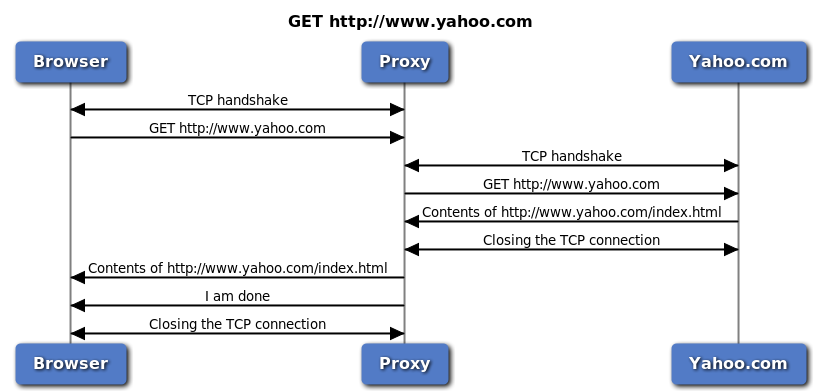
The browser uses plain HTTP (i.e. no TLS). Both forwarding proxies and TLS termination proxies work the same way in this case.
Let's assume we've typed http://www.yahoo.com into the browser. Let's forget that we get a 302 redirect in the real world and assume that yahoo.com is available over HTTP.
The browser makes a TCP connection to the proxy (SYN-SYNACK-ACK) and then sends a GET request to the targeted server:
### HTTPS
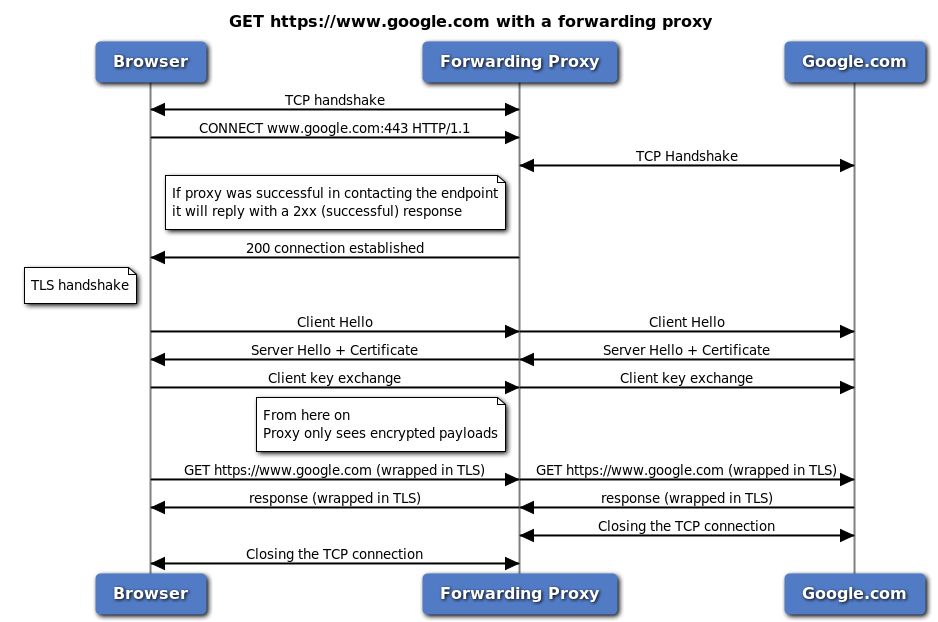
#### Original HTTPS Flow on Proxy:
#### HTTPS Flow implemented with TLS Termination:
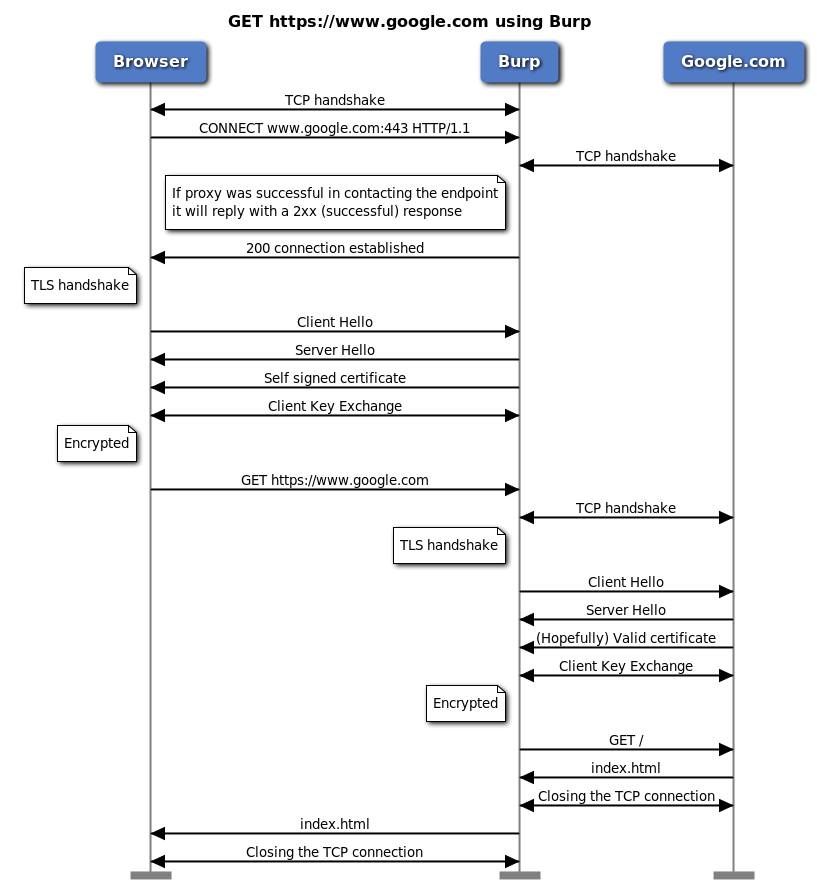
**NOTE:** This approach is used so that the proxy can read packets sent from the client to the target server with the aim that the proxy can manipulate the packet and implement several features. It should be underlined that this approach has security concerns, **make sure you understand it before using it**.
## Quick Start
### Prerequisites
- Node v18.17.0+
- NPM 9.6.7+
### Installation
1. SL/TLS Setup: Generate your SSL certificate and key files (for HTTPS requests). For development, you can create a self-signed certificate:
```bash
$ openssl req -x509 -sha256 -nodes -newkey rsa:2048 -days 365 -keyout ./cert/localhost.key -out ./cert/localhost.crt
```
2. rename ".env.example" to ".env" and adjust its contents to your environment:
```.env
CONFIG_TYPE=json
CONFIG_PATH=.env.json
NODE_ENV=local
```
3. rename ".env.example.json" to ".env.json" and adjust its contents to your desired configuration:
```json
{
"port": 9292,
"host": "0.0.0.0",
"ssl": {
"certPath": "cert/localhost.crt",
"keyPath": "cert/localhost.key"
},
"auth":{
"type": "none"
}
}
```
4. Clone the repository:
```bash
$ git clone git@github.com:fajarnugraha37/node-forwarder.git
$ cd ./node-forwarder/backend
```
5. Install dependencies:
```bash
$ pnpm install
```
6. create main file and initiate application as below:
```typescript
import { configServer, RequestForwarderServer } from './lib';
main();
async function main() {
const requestForwarder = new RequestForwarderServer(configServer.get());
process.addListener('SIGINT', () => requestForwarder.stop());
process.addListener('SIGTERM', () => requestForwarder.stop());
await requestForwarder.start();
}
```