https://github.com/fareedkhan-dev/save-llm-api-cost
A straightforward method to reduce your LLM inference API costs and token usage.
https://github.com/fareedkhan-dev/save-llm-api-cost
ai api artificial-intelligence gemini large-language-models llm openai
Last synced: about 2 months ago
JSON representation
A straightforward method to reduce your LLM inference API costs and token usage.
- Host: GitHub
- URL: https://github.com/fareedkhan-dev/save-llm-api-cost
- Owner: FareedKhan-dev
- License: mit
- Created: 2025-05-18T18:39:17.000Z (about 1 year ago)
- Default Branch: main
- Last Pushed: 2025-05-18T18:43:25.000Z (about 1 year ago)
- Last Synced: 2025-06-13T12:49:37.600Z (about 1 year ago)
- Topics: ai, api, artificial-intelligence, gemini, large-language-models, llm, openai
- Language: Jupyter Notebook
- Homepage: https://medium.com/@fareedkhandev/e3da975c0424
- Size: 33.2 KB
- Stars: 11
- Watchers: 1
- Forks: 1
- Open Issues: 0
-
Metadata Files:
- Readme: README.md
- License: LICENSE
Awesome Lists containing this project
README
# Save LLM API Cost with Memory Efficiency
[](https://www.python.org/downloads/release/python-370/) [](https://cloud.nebius.ai/services/llm-embedding) [](https://openai.com/) [](https://medium.com/@fareedkhandev/saving-40-tokens-in-llm-api-to-reduce-the-cost-using-memory-efficiency-algorithm-e3da975c0424)
You have likely used APIs such as OpenAI LLM, Claude, Gemini, or others, and you may have noticed that when creating a chatbot, whether through RAG or as a standalone system the cost increases with every run.
This is primarily because memory is attached to the chatbot, meaning the model retains the history of conversations to make the chatbot more conversational, similar to how ChatGPT remembers your previous chats.
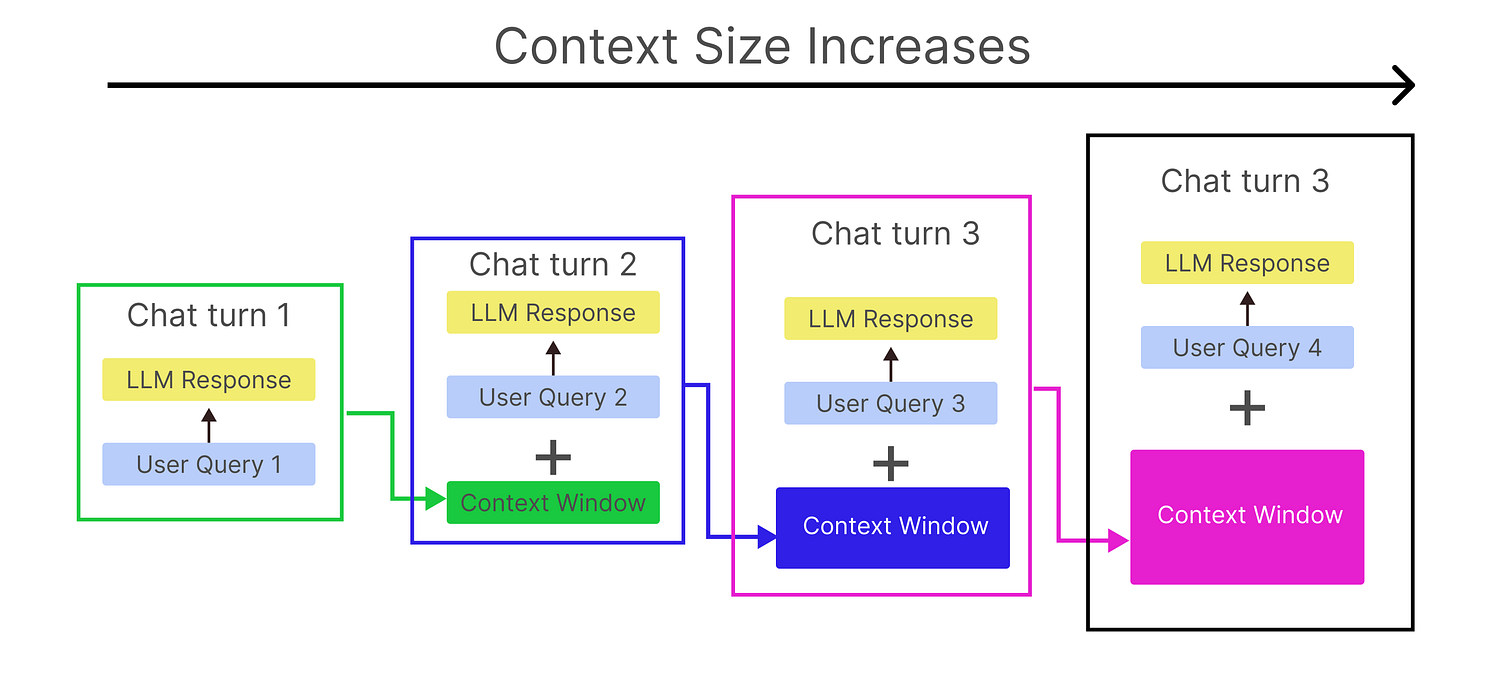
This increase leads to higher costs. In this blog, we are going to use a [**memory-efficient algorithm**](https://mem0.ai/research) to reduce the number of tokens stored in memory by up to 40%, significantly lowering the cost of running inferences for your chatbot.
Take a look at the comparison between our memory-efficient algorithm and the raw approach.
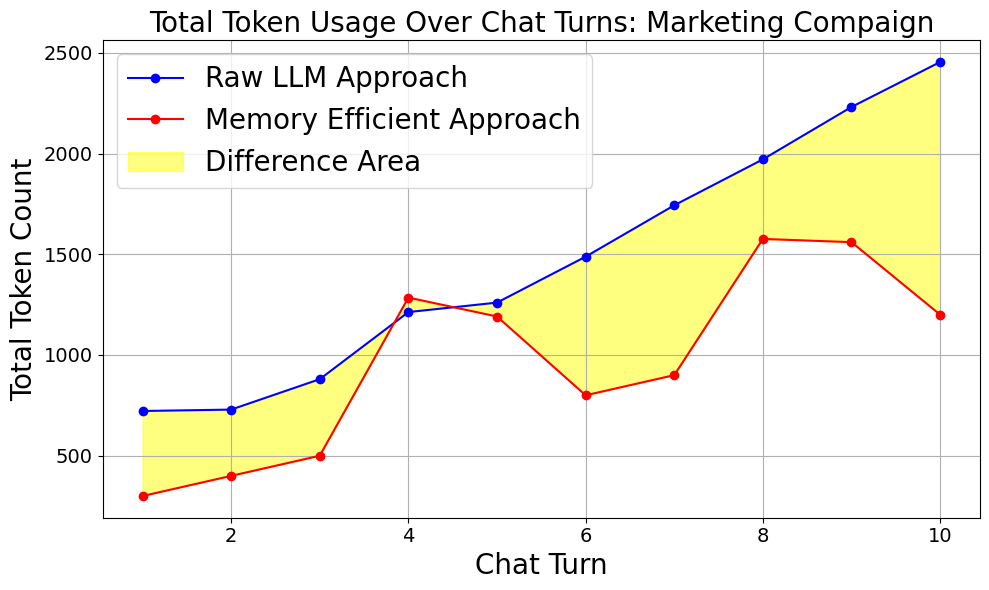
As the number of chats increases, the difference in total token count continues to grow. With our algorithmic approach, the total token count increases steadily.
The spikes in the graph represent instances where the LLM is generating responses, while the other points indicate knowledge improvement updates.
This gap becomes significantly larger as the number of chats rises, which you will clearly see in the comparative analysis section.
# Table of Contents
- [Setting up the stage](#setting-up-the-stage)
- [What is the Problem?](#what-is-the-problem)
- [Memory Efficiency as a Solution](#memory-efficiency-as-a-solution)
- [Our Conversational Scenario](#our-conversational-scenario)
- [Implementing Raw LLM Approach](#implementing-raw-llm-approach)
- [Embedding and Response Generation](#embedding-and-response-generation)
- [Memory Storing Feature](#memory-storing-feature)
- [Classifying User Input](#classifying-user-input)
- [Fact Extraction](#fact-extraction)
- [Memory Update (ADD, UPDATE, NOOP)](#memory-update-add-update-noop)
- [Retrieval for Answering Queries](#retrieval-for-answering-queries)
- [Running Mem0 Algorithm](#running-mem0-algorithm)
- [Comparative Analysis](#comparative-analysis)
- [What’s Next](#whats-next)
# Setting up the stage
Before we start, we need to import some basic libraries, which will be used throughout this blog, you most probably be aware of them. let’s do that.
```python
# Import required standard and third-party libraries for memory, LLM, and data handling
import os # OS interactions (not used directly here)
import json # For JSON parsing/generation (LLM outputs)
import time # For delays between API calls
import uuid # For unique memory item IDs
from datetime import datetime # For timestamps
import numpy as np # For embedding vectors
import pandas as pd # For DataFrame/tabular analysis
from openai import OpenAI # For OpenAI-compatible LLM/embedding API
from sklearn.metrics.pairwise import cosine_similarity # For embedding similarity
```
Now that we have imported the libraries, let’s move on to the next steps, where we will understand what the memorization approach is and what the actual problem is.
# What is the Problem?
I am using the NebiusAI API, which operates under the OpenAI module and provides access to open-source LLMs. You can use any LLM API provider you prefer, just make sure that the response includes the total token count for analysis purposes.
First, let’s initialize the client for our LLM provider along with a simple system message for the LLM.
```python
# Initialize OpenAI client with Nebius API
client = OpenAI(
base_url="YOUR_BASE_URL", # Replace with your actual base url
api_key="YOU_LLM_API_KEY" # Replace with your actual key securely
)
# Chat history buffer (list of messages)
chat_history = [
{"role": "system", "content": "You are a helpful assistant."}
]
```
Let’s create a function that incorporates a chat history feature into your LLM chatbot. After each query, it should print two things: the LLM response and the token usage information, so we can identify any issues.
```python
def chat_with_history(user_input, max_length=100):
# Add user input to history
chat_history.append({"role": "user", "content": user_input})
# Send request to model
response = client.chat.completions.create(
model="meta-llama/Llama-3.2-1B-Instruct",
temperature=0.7,
messages=chat_history
)
# Get assistant message
assistant_message = response.choices[0].message.content
truncated_response = (assistant_message[:max_length] + '...') if len(assistant_message) > max_length else assistant_message
# Add assistant response to chat history
chat_history.append({"role": "assistant", "content": assistant_message})
# Print required info
print(truncated_response)
print(f"Prompt tokens: {response.usage.prompt_tokens}")
print(f"Completion tokens: {response.usage.completion_tokens}")
```
We are using the **LLaMA 3.2 1B LLM**. Let’s look at a simple example of how a user typically interacts with an LLM.
```python
# Asking two consecutive question to our LLM
chat_with_history("Hello, who won the last FIFA World Cup?")
chat_with_history("And who was the top scorer?")
## OUTPUT ##
=== AI Response (truncated) ===
The last FIFA World Cup was held in 2022, and the winning ...
=== Token Usage ===
Prompt tokens: 50
Completion tokens: 64
===============================
=== AI Response (truncated) ===
The top scorer at the 2022 FIFA World Cup was Ciro Immobile ...
=== Token Usage ===
Prompt tokens: 130
Completion tokens: 29
===============================
```
I simply call the function with consecutive messages, You can see that the second message ***“Who was the top scorer?”*** depends on the previous one. Otherwise, the LLM wouldn’t know what sport and in what year user is referring to.
The most important detail here is the history tokens. In the second message, you can see that the total prompt tokens are 130 (50 previous user tokens + 64 previous answer tokens + 26 current user query).
You might have already guessed that …
> the deeper the conversation gets, the more tokens are passed to the LLM
Take a look at this graph, where we ask our LLaMA 3.2 1B LLM to create **a children story**, an example where chat history plays an important role (because we definitely be updating the story according to our need).

You can clearly see that when we use our LLM function to create a marketing campaign, the prompt tokens increase rapidly with each message, up to the 10th message.
This happens because, as we observed earlier, all previous messages are included in each new prompt. So, by the time we reach the 10th message, it includes all the previous 9 messages in the context.
# Memory Efficiency as a Solution
Now that we understand the problem, we need to look at the solution. I call it **memory efficiency,** a technique designed to reduce the token load.
Let’s first visualize how it works, and then we will understand it thoroughly.
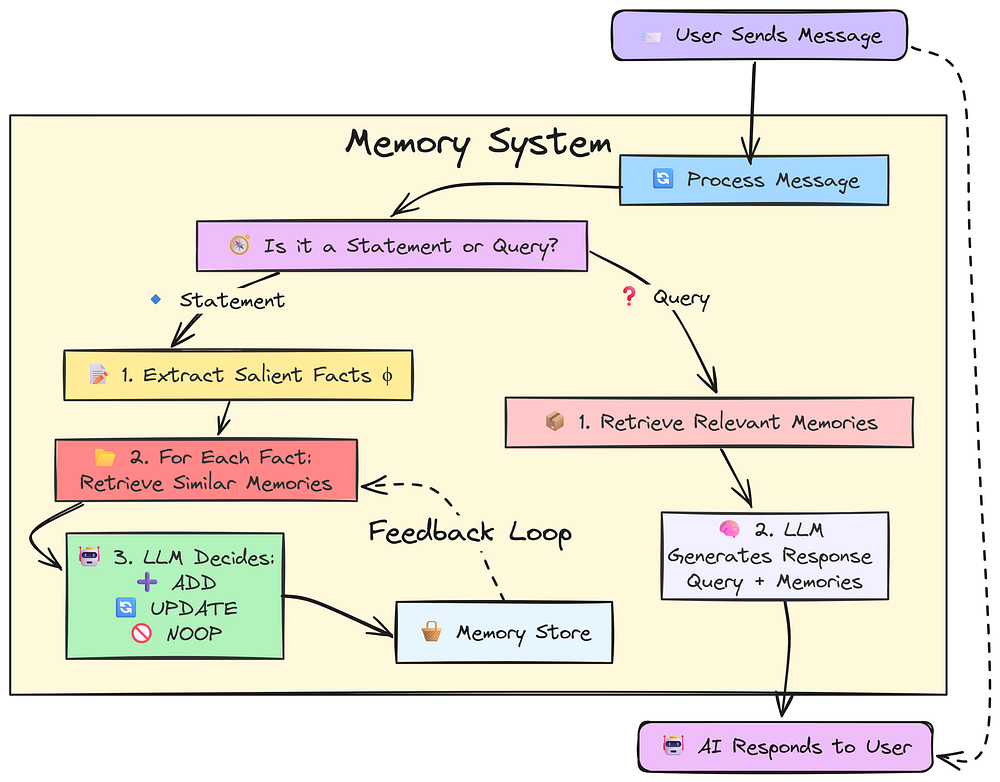
Let’s understand how memory system works:
* User sends a message to the AI (LLM)
* System receives the message
* System checks: Is it a **statement** or a **question**?
**If it’s a statement:**
* Extract key facts from the message
* For each fact, find similar information in the memory store
* Decide what to do with each fact: **ADD** if it’s new, **UPDATE** if it changes or improves something already stored, **NOOP** if it’s already known and doesn’t change anything
* Store the updated or new information in memory
**If it’s a question:**
* Search memory store for relevant information based on the query
* Use the query and found information to generate a helpful response
* Send the answer back to the user
The key idea is that not everything we send to an LLM is a question, most of the time, it’s a statement that needs to be stored. Only the relevant statements should be retrieved and used as a source when forming a response.
This approach not only reduces the memory size for the LLM but also makes the interaction more efficient.
# Our Conversational Scenario
I will be using the marketing campaign strategy scenario with our llm as it is much closer to a real world example where you create a let say (rag/standalone) chatbot that answer query related to marketing campaings.
First let’s define a normal user conversation scenario:
```python
conversation_script = [
{"role": "user", "content": "Hi, let's start planning the 'New Marketing Campaign'. My primary goal is to increase brand awareness by 20%."},
{"role": "user", "content": "For this campaign, the target audience is young adults aged 18-25."},
{"role": "user", "content": "I want to allocate a budget of $5000 for social media ads for the New Marketing Campaign."},
{"role": "user", "content": "What's the main goal for the New Marketing Campaign?"},
{"role": "user", "content": "Who are we targeting for this campaign?"},
{"role": "user", "content": "Let's also consider influencers. Add a task: 'Research potential influencers for the 18-25 demographic' for the New Marketing Campaign."},
{"role": "user", "content": "Actually, let's increase the social media ad budget for the New Marketing Campaign to $7500."},
{"role": "user", "content": "What's the current budget for social media ads for the New Marketing Campaign?"},
{"role": "user", "content": "What tasks do I have pending for this campaign?"},
{"role": "user", "content": "Also, for the New Marketing Campaign, I prefer visual content for this demographic, like short videos and infographics."}
]
```
These are typical conversations we might have with our LLM, where we alternate between asking questions and making statements. A *statement* means we’re providing information or context to the LLM, helping it improve its responses or tailor them to our needs.
For example, in the first chat, we ask the LLM to start planning a marketing campaign. It responds with a campaign outline. Then, in the second message, we describe the target audience, to make the LLM response based on our goals, and so on.
# Implementing Raw LLM Approach
So, now that we have our conversation scenario ready, We’ll simulate 10 such interactions using the **raw approach** conversation strategy and observe how it performs.
```python
# Run the scripted conversation through the LLM, storing each turn's input and response
raw_conversation = []
for turn in conversation_script:
user_input = turn["content"] # Extract user message from the script
response = chat_with_history(user_input) # Get LLM response using chat history
raw_conversation.append(response) # Store the result for later analysis
```
This will run as conversation between our messages and LLM responses, let’s see the last message total number of tokens (i.e, 10th message).
```python
print(f"Prompt tokens used in the last turn: {raw_conversation[-1]['prompt_tokens']}")
print(f"Completion tokens used in the last turn: {raw_conversation[-1]['completion_tokens']}")
## OUTPUT ##
Prompt tokens used in the last turn: 4446
Completion tokens used in the last turn: 451
```
The total prompt tokens in our last message exceeded **4,000+**, which is quite high for just 10 chat messages.
Let’s now visualize this growing history to better understand the impact.
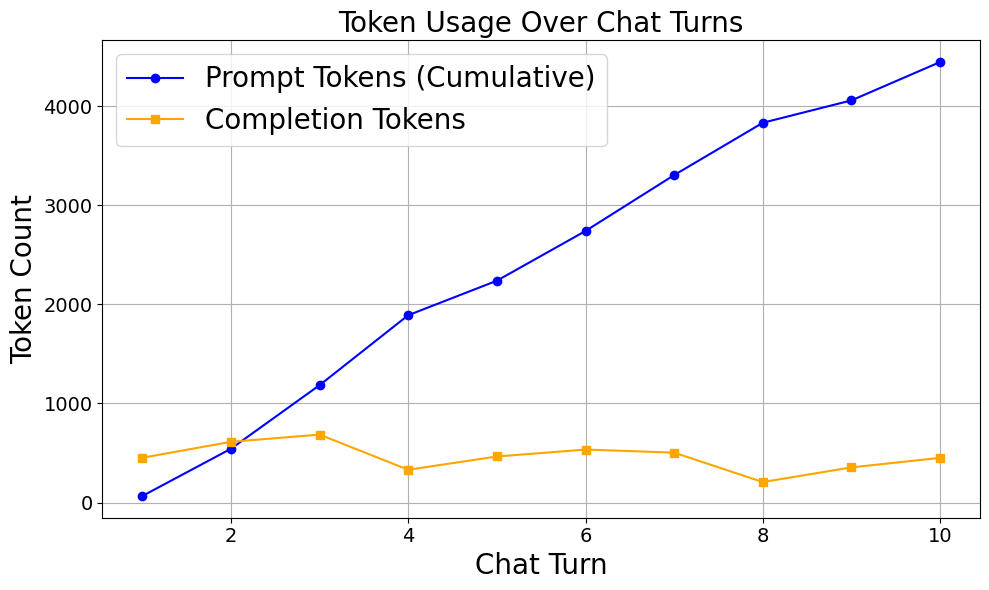
Later, we will use this prompt token count to measure the percentage change. For now, we have documented the result of the **raw LLM approach** as our baseline.
# Embedding and Response Generation
Before we start coding the memory-efficient approach, we need to implement some helper functions to avoid code duplication.
The first function we will create is an **embedding generation function**. This will help us find the relationship between the user query and the stored memory state.
```python
# Embedding Model Name
EMBEDDING_MODEL = "BAAI/bge-multilingual-gemma2"
# Function to generate embedding
def get_embedding(text_to_embed):
"""
Returns the embedding vector for the given text.
Parameters:
- text_to_embed: The input text to embed.
- verbose: Not used here (kept for compatibility).
Returns:
- A NumPy array containing the embedding.
"""
response = client.embeddings.create(model=EMBEDDING_MODEL, input=text_to_embed)
return np.array(response.data[0].embedding)
```
Second, we need to create an **LLM generation function** that will handle generating responses from the model.
```python
def get_llm_chat_completion(messages):
"""
Sends a chat request to the language model and returns the response content and token usage.
Parameters:
- messages: List of messages in chat format (role/content).
Returns:
- content: The generated response text.
- prompt_tokens: Number of tokens used in the input.
- completion_tokens: Number of tokens used in the output.
"""
# Send request to the chat model
response = client.chat.completions.create(
model=LLM_MODEL, # Assuming LLM_MODEL is defined, e.g., "meta-llama/Llama-3.2-1B-Instruct"
messages=messages
)
# Extract the generated text
content = response.choices[0].message.content
# Get token usage info (if available)
prompt_tokens = response.usage.prompt_tokens
completion_tokens = response.usage.completion_tokens
return content, prompt_tokens, completion_tokens
```
Now that we have coded the two helper functions for our memory-efficient approach, let’s start building the main logic for it.
# Memory Storing Feature
So, normally you do use a **vector database** to properly implement this feature, since it would store embedding vectors and handle similarity searches efficiently.
However, since this is a beginner-friendly guide, we ll keep things simple and apply **OOP principles** instead.
Here’s the idea:
* **Memory** refers to user-provided statements that enhance the LLM’s understanding, rather than trigger immediate responses.
* These statements may inform future queries, where the LLM can retrieve relevant context.
* To manage this, each memory entry needs a **unique identity**.
Let’s now define a class structure to create and manage this identity for each memory.
```python
class MemoryItem:
def __init__(self, text_content, source_turn_indices_list, verbose_embedding=False):
"""
Initializes a MemoryItem instance.
Parameters:
- text_content: The text to store in memory.
- source_turn_indices_list: List of conversation turn indices this item is based on.
- verbose_embedding: Whether to print debug info during embedding.
"""
self.id = str(uuid.uuid4()) # Unique ID for the memory item
self.text = text_content # The text content of the memory
self.embedding = get_embedding(text_content) # Removed verbose=verbose_embedding as get_embedding doesn't take it
self.creation_timestamp = datetime.now() # Time when this item was created
self.last_accessed_timestamp = self.creation_timestamp # Time when it was last accessed
self.access_count = 0 # How many times this memory was accessed
self.source_turn_indices = list(source_turn_indices_list) # Reference to conversation turns
def __repr__(self):
"""
String representation showing a brief summary of the memory item.
"""
return (f"MemoryItem(id={self.id}, text='{self.text[:60]}...', "
f"created={self.creation_timestamp.strftime('%H:%M:%S')}, accessed={self.access_count})")
def mark_accessed(self):
"""
Updates the access time and count when the memory is accessed.
"""
self.last_accessed_timestamp = datetime.now()
self.access_count += 1
```
This is just a unique identifier for each memory, we haven’t implemented the **memory storing** feature yet.
So, let’s go ahead and code the part that **stores memory entries**, allowing us to keep track of user-provided statements for future reference.
```python
class MemoryStore:
def __init__(self, verbose=False): # Added verbose to __init__
self.memories = {} # Dictionary to store memory items by their ID
self.verbose = verbose # Store verbose flag
def add_memory_item(self, item):
self.memories[item.id] = item
def get_memory_item_by_id(self, memory_id):
item = self.memories.get(memory_id)
if item:
item.mark_accessed()
return item
def update_existing_memory_item(self, memory_id, new_text, turn_indices):
item = self.memories.get(memory_id)
if not item:
if self.verbose:
print(f"[MemoryStore] UPDATE FAILED: ID {memory_id} not found.")
return False
item.text = new_text
item.embedding = get_embedding(new_text) # Removed verbose=self.verbose
item.creation_timestamp = datetime.now()
item.source_turn_indices = list(set(item.source_turn_indices + turn_indices))
item.mark_accessed()
return True
def find_semantically_similar_memories(self, query_embedding, top_k=3, threshold=0.5):
# Filter out memory items with invalid embeddings
candidates = [
(mid, mem.embedding) for mid, mem in self.memories.items()
if mem.embedding is not None and mem.embedding.size > 0 and np.any(mem.embedding)
]
if not candidates: # Handle case with no valid embeddings
return []
# Stack embeddings into matrix for similarity comparison
ids, embeddings = zip(*candidates)
embeddings = np.vstack(embeddings)
query_embedding = query_embedding.reshape(1, -1)
# Compute cosine similarity and sort results
similarities = cosine_similarity(query_embedding, embeddings)[0]
sorted_indices = np.argsort(similarities)[::-1]
# Return top-k results above threshold
return [
(self.memories[ids[i]], similarities[i])
for i in sorted_indices[:top_k]
if similarities[i] >= threshold
]
```
This might seem a bit complex at first, but it’s actually quite easy to understand. Our **memory store** class includes four key functionalities:
1. **Add** a memory item if it doesn’t already exist
2. **Update** an existing memory item
3. **Retrieve** memory items relevant to the user’s query
4. **Find** semantically similar memories using embeddings
Optionally, you can also add a **delete** feature to remove unused memories and reduce memory size but that’s entirely up to you.
Now that we have defined the core helper functions for our **memory-efficient approach**, you might be wondering how can we tell if the user query is a statement or not?, this is what we will be identifying in the next section.
# Classifying User Input
Before processing, we need to know if the user is making a statement or asking a question. An LLM can help with this classification.
```python
def classify_input(user_input):
"""
Classifies the user input as either a 'query' or a 'statement'.
Parameters:
- user_input: The text input from the user.
Returns:
- A string: either 'query' or 'statement'.
"""
# Instruction for the LLM to act as a classifier
system_prompt = (
"You are a classifier. "
"A 'query' is a question or request for information. "
"A 'statement' is a declaration, instruction, or information that is not a question. "
"Respond with only one word: either 'query' or 'statement'."
)
# Send the classification request to the model
response = client.chat.completions.create(
model="meta-llama/Llama-3.2-1B-Instruct",
messages=[
{"role": "system", "content": system_prompt},
{"role": "user", "content": f"Classify this: {user_input}"}
]
)
# Return the classification result (in lowercase)
return response.choices[0].message.content.strip().lower()
```
This LLM function will help us determine whether the user query is a **question** or a **statement**. This distinction is crucial, as it dictates what memory action should be taken, whether to store, retrieve, or ignore memory.
In a production setting, this check would run **every time** the user submits a query. But since we already have a predefined conversation scenario, we’ll run this classification on our existing conversation data and observe how it performs.
```bash
# We'll add this classification to our conversation_script items
for turn in conversation_script:
classification = classify_input(turn["content"])
turn["type"] = classification
```
It will classify all of the user’s queries.
Let’s print one of them and check its **classification type** to see whether it’s identified as a **question** or a **statement**.
```bash
# Printing first item
conversation_script[0]
## OUTPUT ##
{
'role': 'user',
'content': "Hi, let's start planning the 'New Marketing ... ",
'type': 'statement'
}
```
It classifies our first user query as a **statement**, which is correct because it provides information rather than asking a question, it’s meant to inform the LLM.
# Fact Extraction
Now that we know our LLM can differentiate between a query and a statement, the next step is:
* If the user query is a **question**, the LLM will generate a response.
* If it’s a **statement**, it should extract facts and features from it to be stored in the memory we previously coded.
We need a prompt template that will help us extract facts and features from a statement.
Let’s define that prompt first.
*(Note: The original HTML showed `fact_prompt` being defined with f-string placeholders `{recent_turns_window_text}` and `{current_user_statement_text}`. These would need to be populated dynamically when the prompt is used, or the function using it should construct this prompt.)*
```python
# This is how the prompt would be constructed within a function
# def construct_fact_prompt(current_user_statement_text, recent_turns_window_text):
# return f"""
# Extract concise, declarative facts from the 'New User Statement' based on the 'Recent Conversation Context'.
# Focus on user's goals, plans, preferences, decisions, and key entities.
# Ignore questions, acknowledgements, fluff, or inference.
# Context:
# ---BEGIN---
# {recent_turns_window_text or "(No prior context)"}
# ---END---
# Statement: "{current_user_statement_text}"
# Output ONLY a JSON list of strings (facts). Return [] if none.
# """
# For demonstration, here's a static version of what the prompt aims for:
fact_prompt_template_text = """
Extract concise, declarative facts from the 'New User Statement' based on the 'Recent Conversation Context'.
Focus on user's goals, plans, preferences, decisions, and key entities.
Ignore questions, acknowledgements, fluff, or inference.
Context:
---BEGIN---
{recent_turns_window_text_placeholder_or_empty}
---END---
Statement: "{current_user_statement_text_placeholder}"
Output ONLY a JSON list of strings (facts). Return [] if none.
"""
```
This prompt template will extract facts and features from the statement. You can customize it to fit the specific domain your chatbot focuses on, but for now, this is the best template I have found after multiple attempts.
Let’s go ahead and code the function that performs the feature extraction.
```python
def mem0_extract_salient_facts_from_turn(current_user_statement_text, recent_turns_window_text, current_turn_index_in_script):
"""
Extracts salient facts from the current user statement and recent conversation turns.
Parameters:
- current_user_statement_text: Text of the current user statement.
- recent_turns_window_text: Text from recent conversation turns for context.
- current_turn_index_in_script: Index of the current turn in the overall script.
Returns:
- facts: A list of extracted facts (parsed from JSON).
"""
# Construct the fact_prompt dynamically
fact_prompt = f"""
Extract concise, declarative facts from the 'New User Statement' based on the 'Recent Conversation Context'.
Focus on user's goals, plans, preferences, decisions, and key entities.
Ignore questions, acknowledgements, fluff, or inference.
Context:
---BEGIN---
{recent_turns_window_text or "(No prior context)"}
---END---
Statement: "{current_user_statement_text}"
Output ONLY a JSON list of strings (facts). Return [] if none.
"""
messages = [
{"role": "system", "content": "Expert extraction AI. Output ONLY valid JSON list of facts."},
{"role": "user", "content": fact_prompt}
]
# Call the LLM chat completion function
response_text, prompt_tokens, completion_tokens = get_llm_chat_completion(
messages
)
# (Assuming global token counters for demo purposes, initialize them if not present)
# global total_prompt_tokens_mem0_extract, total_completion_tokens_mem0_extract
# total_prompt_tokens_mem0_extract += prompt_tokens
# total_completion_tokens_mem0_extract += completion_tokens
# Extract JSON array from the response text safely
facts = []
try:
start = response_text.find('[')
end = response_text.rfind(']')
if start != -1 and end != -1 and end + 1 > start:
json_candidate = response_text[start:end + 1]
facts = json.loads(json_candidate)
else:
print(f"Warning: Could not find JSON list in response: {response_text}")
except json.JSONDecodeError:
print(f"Warning: JSONDecodeError for response: {response_text}")
# Fallback or error handling
return facts
```
This function will extract facts from the statement in the form of a JSON array. We’ll parse this using some basic code.
Once extracted, these facts will be stored in our memory, where they can be either **added** as new entries or **updated** if they already exist.
# Memory Update (ADD, UPDATE, NOOP)
There is currently no link between the **extracted facts** and the **memory database** we coded earlier.
To establish that connection, we need to create a function that determines the appropriate relationship and action.
But before we do that, we need a **prompt template** that evaluates:
* The **incoming statement**
* The **available memory entries**
This prompt will guide the model in deciding what action to take, such as updating an existing memory or storing a new one.
Let’s define that prompt template first.
*(Similar to `fact_prompt`, this prompt is dynamic)*
```python
# This is how the prompt would be constructed within a function
# def construct_update_prompt(candidate_fact_text, similar_segment):
# return f"""
# You manage a memory store. Decide how to handle this new fact:
# "{candidate_fact_text}"
# {similar_segment}
# Choose ONE:
# - ADD: New info.
# - UPDATE: Improves one existing memory (give memory ID and new text).
# - NOOP: Redundant.
# Respond with JSON:
# {{"operation": "ADD"}} or
# {{"operation": "UPDATE", "target_memory_id": "ID", "updated_memory_text": "Text"}} or
# {{"operation": "NOOP"}}
# Decision:
# """
# For demonstration:
update_prompt_template_text = """
You manage a memory store. Decide how to handle this new fact:
"{candidate_fact_text_placeholder}"
{similar_segment_placeholder}
Choose ONE:
- ADD: New info.
- UPDATE: Improves one existing memory (give memory ID and new text).
- NOOP: Redundant.
Respond with JSON:
{{"operation": "ADD"}} or
{{"operation": "UPDATE", "target_memory_id": "ID", "updated_memory_text": "Text"}} or
{{"operation": "NOOP"}}
Decision:
"""
```
This prompt template will define the **action** that needs to be taken based on the user’s statement, whether it’s to add new memory, update existing memory, or take no action.
Let’s now code the function that performs the appropriate action based on the response.
```python
S_SIMILAR_MEMORIES_FOR_UPDATE_DECISION = 3 # Number of similar memories to consider
# (Initialize token counters if they are global for demo purposes)
# total_prompt_tokens_mem0_update = 0
# total_completion_tokens_mem0_update = 0
def mem0_decide_memory_operation_with_llm(candidate_fact_text, similar_existing_memories_list):
"""
Uses the LLM to decide whether a candidate fact should:
- be added as a new memory,
- update an existing memory,
- or be ignored (no-op).
Parameters:
- candidate_fact_text: The new fact to evaluate.
- similar_existing_memories_list: List of (MemoryItem, similarity_score) tuples.
Returns:
- A dictionary with one of the following formats:
{"operation": "ADD"}
{"operation": "UPDATE", "target_memory_id": "ID", "updated_memory_text": "Text"}
{"operation": "NOOP"}
"""
# Format the similar memories section for the prompt
similar_segment = "No similar memories."
if similar_existing_memories_list:
formatted = [
f"{i+1}. ID: {mem.id}, Sim: {sim_score:.4f}, Text: '{mem.text}'"
for i, (mem, sim_score) in enumerate(similar_existing_memories_list)
]
similar_segment = "Similar Memories:\n" + "\n".join(formatted)
# Construct the prompt dynamically
prompt = f"""
You manage a memory store. Decide how to handle this new fact:
"{candidate_fact_text}"
{similar_segment}
Choose ONE:
- ADD: New info.
- UPDATE: Improves one existing memory (give memory ID and new text).
- NOOP: Redundant.
Respond with JSON:
{{"operation": "ADD"}} or
{{"operation": "UPDATE", "target_memory_id": "ID", "updated_memory_text": "Text"}} or
{{"operation": "NOOP"}}
Decision:
"""
# Build the message for the LLM
messages = [
{"role": "system", "content": "Decide memory action. Output ONLY valid JSON."},
{"role": "user", "content": prompt}
]
# Get the LLM's response
response_text, p_tokens, c_tokens = get_llm_chat_completion(
messages
)
# Track token usage (assuming global counters for demo)
# global total_prompt_tokens_mem0_update, total_completion_tokens_mem0_update
# total_prompt_tokens_mem0_update += p_tokens
# total_completion_tokens_mem0_update += c_tokens
# Extract and parse the JSON from the response
decision = {}
try:
start = response_text.find('{')
end = response_text.rfind('}')
if start != -1 and end != -1 and end + 1 > start:
json_candidate = response_text[start:end + 1]
decision = json.loads(json_candidate)
else:
print(f"Warning: Could not find JSON object in response: {response_text}")
decision = {"operation": "NOOP"} # Fallback
except json.JSONDecodeError:
print(f"Warning: JSONDecodeError for response: {response_text}")
decision = {"operation": "NOOP"} # Fallback
return decision
```
This will work similarly to our previous function that extracted facts from the LLM response in a list format.
The key difference is that this one will extract information as a **JSON string**, defining the relationship between the current statement and the existing memory. Aside from that, the structure and logic remain largely the same.
# Retrieval for Answering Queries
If you’re familiar with **RAG**, this step will feel very similar.
When the user asks a **query**, we **retrieve relevant memories** and pass them along with the query to help the LLM generate a more accurate and context-aware response.
This logic can be easily wrapped into a single function, let’s implement that.
```python
# Default number of top similar memories to retrieve
K_MEMORIES_TO_RETRIEVE_FOR_QUERY = 3
def mem0_retrieve_and_format_memories_for_llm_query(user_query_text, memory_store_instance, turn_log_entry, top_k_results=K_MEMORIES_TO_RETRIEVE_FOR_QUERY):
"""
Retrieves and formats top-k relevant memories from the store for a given user query.
Parameters:
- user_query_text: The current user query.
- memory_store_instance: Instance of MemoryStore to search in.
- turn_log_entry: Dict to store memory retrieval info for logging.
- top_k_results: Number of top similar memories to retrieve.
Returns:
- A formatted string of relevant memories or a fallback message.
"""
turn_log_entry['retrieved_memories_for_query'] = []
# Get embedding for the user query
query_embedding = get_embedding(user_query_text)
# Find top-k similar memories based on the query embedding
retrieved = memory_store_instance.find_semantically_similar_memories(query_embedding, top_k=top_k_results)
# Build formatted memory list
if not retrieved:
return "Relevant memories:\n(No relevant memories found)"
output = "Relevant memories:\n"
for i, (mem, score) in enumerate(retrieved):
memory_store_instance.get_memory_item_by_id(mem.id) # Mark as accessed
output += f"{i+1}. {mem.text} (Similarity: {score:.3f})\n"
# Log retrieval details
turn_log_entry['retrieved_memories_for_query'].append({
'id': mem.id,
'text': mem.text,
'similarity': score
})
return output.strip()
```
This function will simply **retrieve relevant memories** based on the user’s query, **if it’s not a statement**.
In this case, the user is seeking an **answer**, not trying to improve the LLM knowledge. So, instead of storing anything, we search for related context to assist in generating a more accurate and informed response.
# Running Mem0 Algorithm
So, we have coded everything needed for our memory-efficient algorithm.
Next, let’s build the **main loop** of the algorithm, which will process each message in our conversation scenario. Based on the type of each message (question or statement), it will take the appropriate action, ‘whether generating a response or updating memory.
*(Note: The following code block uses variables like `script`, `memory_store_instance`, `M_RECENT_RAW_TURNS_FOR_EXTRACTION_CONTEXT`, `raw_conversation_log_for_extraction_context`, `VERBOSE_MEM0_RUN`, `current_short_term_llm_chat_history`, `total_prompt_tokens_mem0_conversation`, `total_completion_tokens_mem0_conversation`, `SHORT_TERM_CHAT_HISTORY_WINDOW`. These would need to be initialized appropriately before this loop runs. The `mem0_process_user_statement_for_memory` function is also implied and would combine `mem0_extract_salient_facts_from_turn` and `mem0_decide_memory_operation_with_llm` along with MemoryStore operations.)*
```python
# ---- Helper function implied by the main loop ----
def mem0_process_user_statement_for_memory(
current_user_statement_text,
recent_turns_window_text,
memory_store_instance,
current_turn_index,
turn_log_entry,
verbose=False
):
# 1. Extract facts
facts = mem0_extract_salient_facts_from_turn(
current_user_statement_text, recent_turns_window_text, current_turn_index
)
if verbose:
print(f"[Extractor LLM] Parsed {len(facts)} fact(s).")
turn_log_entry['extracted_facts'] = facts
if not facts:
return
if verbose:
print(f"[MemoryOrchestrator] Extracted {len(facts)} fact(s).")
turn_log_entry['memory_operations'] = []
for fact_text in facts:
fact_embedding = get_embedding(fact_text)
similar_memories = memory_store_instance.find_semantically_similar_memories(
fact_embedding, top_k=S_SIMILAR_MEMORIES_FOR_UPDATE_DECISION
)
decision = mem0_decide_memory_operation_with_llm(fact_text, similar_memories)
turn_log_entry['memory_operations'].append({'fact': fact_text, 'decision': decision})
if verbose:
print(f"[MemoryOrchestrator] Fact {fact_text[:30]}...: LLM Decision -> {decision['operation']}")
if decision['operation'] == 'ADD':
new_mem_item = MemoryItem(fact_text, [current_turn_index])
memory_store_instance.add_memory_item(new_mem_item)
elif decision['operation'] == 'UPDATE':
target_id = decision.get('target_memory_id')
updated_text = decision.get('updated_memory_text')
if target_id and updated_text:
memory_store_instance.update_existing_memory_item(target_id, updated_text, [current_turn_index])
else:
if verbose: print("UPDATE decision missing target_id or updated_text.")
# NOOP means do nothing
# ---- Initialization for the main loop (Example values) ----
script = conversation_script # Already defined with 'type' by classify_input
memory_store_instance = MemoryStore(verbose=True)
M_RECENT_RAW_TURNS_FOR_EXTRACTION_CONTEXT = 4 # Example: last 2 user turns + 2 assistant turns
raw_conversation_log_for_extraction_context = []
VERBOSE_MEM0_RUN = True
current_short_term_llm_chat_history = [{"role": "system", "content": "You are a helpful assistant."}]
SHORT_TERM_CHAT_HISTORY_WINDOW = 3 # Example: Keep last 3 user/assistant pairs + system prompt
total_prompt_tokens_mem0_conversation = 0
total_completion_tokens_mem0_conversation = 0
# Initialize other token counters if used globally, e.g., total_prompt_tokens_mem0_extract, etc.
mem0_turn_logs = [] # To store log entries
# ---- Main Loop ----
# Iterate over each turn in the script
for turn_index, turn_data in enumerate(script):
user_msg = turn_data['content'] # User input text
turn_type = turn_data['type'] # Type: 'statement', or 'query'
if VERBOSE_MEM0_RUN:
print(f"\n--- Mem0 Turn {turn_index + 1}/{len(script)} ({turn_type}) ---")
print(f"User: {user_msg[:70]}...")
# Log for this turn
turn_log_entry = {
"turn": turn_index + 1,
"type": turn_type,
"user_content": user_msg
}
assistant_response = "(Ack/Internal Processing)" # Default placeholder
# Handle statements and updates
if turn_type == 'statement': # Simplified, original had 'statement_update'
# Collect recent user-assistant raw conversation log for context
recent = "\n".join(raw_conversation_log_for_extraction_context[-M_RECENT_RAW_TURNS_FOR_EXTRACTION_CONTEXT:])
# Process the user message for fact extraction and memory update
mem0_process_user_statement_for_memory(
user_msg, recent, memory_store_instance, turn_index, turn_log_entry, verbose=VERBOSE_MEM0_RUN
)
# Assistant's response depends on statement type
assistant_response = "Okay, noted." # if turn_type == 'statement' else "Okay, updated."
# Log zero tokens since this path does not invoke LLM for conversational response
turn_log_entry.update({
'assistant_response_conversational': assistant_response,
'prompt_tokens_conversational_turn': 0,
'completion_tokens_conversational_turn': 0
})
# Handle queries (e.g., questions)
elif turn_type == 'query':
# Retrieve relevant memories based on semantic similarity to the query
retrieved = mem0_retrieve_and_format_memories_for_llm_query(user_msg, memory_store_instance, turn_log_entry)
# Create prompt for LLM with memory context and query
messages_for_llm = list(current_short_term_llm_chat_history) + [{
"role": "user",
"content": f"User Query: '{user_msg}'\n\nRelevant Info from Memory:\n{retrieved}"
}]
# Get LLM response
# Assuming get_llm_chat_completion can take max_tokens and verbose
assistant_response, p_tokens, c_tokens = get_llm_chat_completion(messages_for_llm) # Removed max_tokens, verbose for simplicity unless defined in get_llm_chat_completion
# Track token usage for this query
total_prompt_tokens_mem0_conversation += p_tokens
total_completion_tokens_mem0_conversation += c_tokens
# Update turn log with LLM output and token info
turn_log_entry.update({
'assistant_response_conversational': assistant_response,
'prompt_tokens_conversational_turn': p_tokens,
'completion_tokens_conversational_turn': c_tokens
})
if VERBOSE_MEM0_RUN:
print(f"Assistant: {assistant_response[:70]}...")
# Update raw log used for memory extraction context
raw_conversation_log_for_extraction_context += [
f"T{turn_index+1} U: {user_msg}",
f"T{turn_index+1} A: {assistant_response}"
]
# Update short-term history for future LLM context
current_short_term_llm_chat_history += [
{"role": "user", "content": user_msg},
{"role": "assistant", "content": assistant_response}
]
# Keep only the most recent chat history within the sliding window
if len(current_short_term_llm_chat_history) > (1 + SHORT_TERM_CHAT_HISTORY_WINDOW * 2): # 1 for system prompt
current_short_term_llm_chat_history = [current_short_term_llm_chat_history[0]] + \
current_short_term_llm_chat_history[-(SHORT_TERM_CHAT_HISTORY_WINDOW * 2):]
# Log the memory store size after processing this turn
turn_log_entry['mem_store_size_after_turn'] = len(memory_store_instance.memories)
mem0_turn_logs.append(turn_log_entry)
```
When we start the above loop, the **memory efficiency mechanism** kicks in.
In a production setup, this would run live, each time a user sends a query, the system would:
1. Determine whether it’s a question or a statement,
2. Retrieve or update memory accordingly, and
3. Generate a response if needed.
Now, let’s take a look at what it starts logging in the terminal.
```python
## OUTPUT OF OUR MEMO ALGORITHM ##
--- Mem0 Turn 1/10 (statement) ---
User: Hi, lets start planning the New Marketing Campaign. My primary goal is to inc...
[Extractor LLM] Parsed 2 fact(s).
[MemoryOrchestrator] Extracted 2 fact(s).
[MemoryOrchestrator] Fact The user wants to start planni...: LLM Decision -> ADD
[MemoryOrchestrator] Fact The users primary goal for th...: LLM Decision -> ADD
Assistant (Ack): Okay, noted.
--- Mem0 Turn 2/10 (statement) ---
User: For this campaign, the target audience is young adults aged 18-25....
[Extractor LLM] Parsed 1 fact(s).
[MemoryOrchestrator] Extracted 1 fact(s).
[MemoryOrchestrator] Fact The target audience for the N...: LLM Decision -> ADD
Assistant (Ack): Okay, noted.
--- Mem0 Turn 3/10 (statement) ---
User: I want to allocate a budget of $5000 for social media ads for the New Marketing ...
[Extractor LLM] Parsed 1 fact(s).
[MemoryOrchestrator] Extracted 1 fact(s).
[MemoryOrchestrator] Fact The user wants to allocate a b...: LLM Decision -> ADD
Assistant (Ack): Okay, noted.
--- Mem0 Turn 4/10 (query) ---
User: Whats the main goal for the New Marketing Campaign?...
Assistant: The main goal for the New Marketing Campaign is to **increase brand awareness by...
....
```
So, from the output of the first four chat turns:
* The **first three inputs** were identified as **statements**, so the LLM didn’t generate any response, it simply stored the extracted facts into memory.
* The **fourth input** was a **question**, so the LLM used the relevant memory and generated a proper response.
This confirms that the **memory is being correctly updated** with meaningful context.
However, to really understand the impact of this approach, we need to perform a **comparative analysis**.
This analysis will show the actual **difference in token usage** between the raw LLM approach and the memory-efficient one.
Let’s move on to that comparison.
# Comparative Analysis
We have already computed the **raw LLM approach** and recently ran the **memory-efficient approach** for our 10-message conversation.
Now, let’s create a **DataFrame** to organize the token usage data from both approaches. This will help us clearly see the difference and then we can **plot a graph** to visualize the comparison.
We need to do some basic cleaning stuff to transform our output into a proper dataframe.
*(Note: The following code assumes that variables like `final_raw_prompt_tokens`, `final_mem0_overall_prompt_tokens`, etc., have been calculated and stored from the previous runs. You would need to sum up tokens from your logs for this.)*
```python
# Placeholder values for DataFrame creation if above sums are not implemented for this snippet
final_raw_prompt_tokens, final_raw_completion_tokens, final_raw_total_tokens = 4446, 451, 4897 # From earlier
final_mem0_overall_prompt_tokens, final_mem0_overall_completion_tokens, final_mem0_overall_total_tokens = 2800, 300, 3100 # Hypothetical
final_mem0_conv_prompt_tokens, final_mem0_conv_completion_tokens = 1000, 200 # Hypothetical
final_mem0_extr_prompt_tokens, final_mem0_extr_completion_tokens = 1200, 50 # Hypothetical
final_mem0_upd_prompt_tokens, final_mem0_upd_completion_tokens = 600, 50 # Hypothetical
# Prepare comparison data between Raw and Mem0 approaches
data = {
'Metric': [
'Prompt Tokens', # Total prompt tokens used
'Completion Tokens', # Total completion tokens used
'Total Tokens', # Sum of prompt + completion
'', # Empty row for spacing
# Breakdown of token usage for Mem0 approach
'Mem0: Conv Prompt', # Prompt tokens for conversation turns
'Mem0: Conv Completion', # Completion tokens for conversation turns
'Mem0: Extract Prompt', # Prompt tokens for memory extraction
'Mem0: Extract Completion', # Completion tokens for memory extraction
'Mem0: Update Prompt', # Prompt tokens for memory updates
'Mem0: Update Completion' # Completion tokens for memory updates
],
'Raw Approach': [
final_raw_prompt_tokens, # Raw prompt tokens
final_raw_completion_tokens, # Raw completion tokens
final_raw_total_tokens, # Raw total tokens
'', # Empty value for spacer row
'-', '-', '-', '-', '-', '-' # No breakdown available for raw approach
],
'Mem0 Approach': [
final_mem0_overall_prompt_tokens, # Total prompt tokens across Mem0
final_mem0_overall_completion_tokens, # Total completion tokens across Mem0
final_mem0_overall_total_tokens, # Total tokens in Mem0
'', # Spacer
final_mem0_conv_prompt_tokens, # Prompt tokens for conversation
final_mem0_conv_completion_tokens, # Completion tokens for conversation
final_mem0_extr_prompt_tokens, # Prompt tokens for extraction
final_mem0_extr_completion_tokens, # Completion tokens for extraction
final_mem0_upd_prompt_tokens, # Prompt tokens for updates
final_mem0_upd_completion_tokens # Completion tokens for updates
]
}
# Create a DataFrame for display and analysis
comparison_df = pd.DataFrame(data)
print(comparison_df.to_string()) # Print DataFrame to console
```
Here is what our **comparison DataFrame** is.
| # | Metric | Raw Approach | Mem0 Approach | Percentage Difference (%) |
|-----|----------------------------------|--------------|----------------|----------------------------|
| 0 | Prompt Tokens | 7616 | 5037 | 33.86 |
| 1 | Completion Tokens | 1372 | 410 | 70.12 |
| 2 | Total Tokens | 8988 | 5447 | 39.40 |
| 3 | | | | NaN |
| 4 | Mem0: Conversational Prompt | - | 788 | NaN |
| 5 | Mem0: Conversational Completion | - | 98 | NaN |
| 6 | Mem0: Extraction Prompt | - | 1453 | NaN |
| 7 | Mem0: Extraction Completion | - | 168 | NaN |
| 8 | Mem0: Update Logic Prompt | - | 2796 | NaN |
| 9 | Mem0: Update Logic Completion | - | 144 | NaN |
We have been able to reduce the prompt tokens by up to 40% within just 10 chat conversations. Let’s visualize this now.

The red line our memory efficieny algorithm shows jump only on that run user actually ask a response but not a statement this happens on (4,5,8,9) turns while for the rest the total tokens count (Prompt+completition) didnt increase as rapidly as we see in raw llm approach.
The yellow regin shows the different and this difference will increase on a greater number of chats, here is a proove for 100 chat conversations.
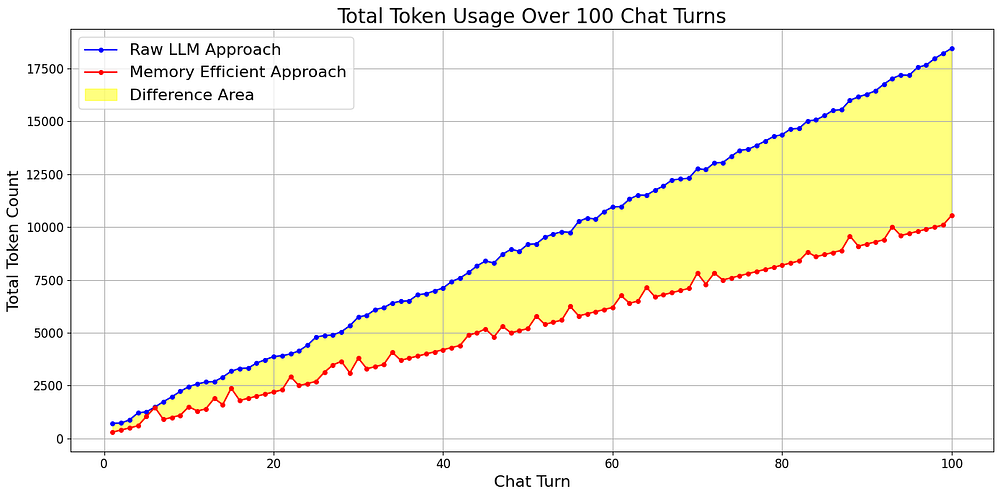
There is a huge difference after up to 100 conversations up to more than **60% save**, the impact is clear and significant, as it saves costs, which is the most important factor here.
# What’s Next
So, it’s clear that the memory-efficient approach is significantly better and quickly adaptable.
You can use my notebook and enhance it further by developing more powerful prompts and adding features to improve speed and efficiency.
Additionally, you can incorporate evaluation techniques to assess the quality of responses from both approaches.
Based on these evaluations, the algorithm can be refined to boost both efficiency and accuracy.
> It’s great to hear your thoughts on how this approach can be improved.