https://github.com/farisc0de/storefrontbackend
A Basic back-end system for an e-commerce website
https://github.com/farisc0de/storefrontbackend
Last synced: 8 months ago
JSON representation
A Basic back-end system for an e-commerce website
- Host: GitHub
- URL: https://github.com/farisc0de/storefrontbackend
- Owner: farisc0de
- Created: 2023-01-13T23:12:54.000Z (over 3 years ago)
- Default Branch: main
- Last Pushed: 2023-01-13T23:15:18.000Z (over 3 years ago)
- Last Synced: 2025-07-18T23:38:16.972Z (11 months ago)
- Language: TypeScript
- Size: 138 KB
- Stars: 1
- Watchers: 1
- Forks: 0
- Open Issues: 0
-
Metadata Files:
- Readme: README.md
- Codeowners: CODEOWNERS
Awesome Lists containing this project
README
# Storefront Backend Project
## Getting Started
This repo contains a basic Node and Express app to get you started in constructing an API. To get started, clone this repo and run `yarn` in your terminal at the project root.
## Required Technologies
Your application must make use of the following libraries:
- Postgres for the database
- Node/Express for the application logic
- dotenv from npm for managing environment variables
- db-migrate from npm for migrations
- jsonwebtoken from npm for working with JWTs
- jasmine from npm for testing
## Steps to Completion
### 1. Plan to Meet Requirements
In this repo there is a `REQUIREMENTS.md` document which outlines what this API needs to supply for the frontend, as well as the agreed upon data shapes to be passed between front and backend. This is much like a document you might come across in real life when building or extending an API.
Your first task is to read the requirements and update the document with the following:
- Determine the RESTful route for each endpoint listed. Add the RESTful route and HTTP verb to the document so that the frontend developer can begin to build their fetch requests.
**Example**: A SHOW route: 'blogs/:id' [GET]
- Design the Postgres database tables based off the data shape requirements. Add to the requirements document the database tables and columns being sure to mark foreign keys.
**Example**: You can format this however you like but these types of information should be provided
Table: Books (id:varchar, title:varchar, author:varchar, published_year:varchar, publisher_id:string[foreign key to publishers table], pages:number)
**NOTE** It is important to remember that there might not be a one to one ratio between data shapes and database tables. Data shapes only outline the structure of objects being passed between frontend and API, the database may need multiple tables to store a single shape.
### 2. DB Creation and Migrations
Now that you have the structure of the databse outlined, it is time to create the database and migrations. Add the npm packages dotenv and db-migrate that we used in the course and setup your Postgres database. If you get stuck, you can always revisit the database lesson for a reminder.
You must also ensure that any sensitive information is hashed with bcrypt. If any passwords are found in plain text in your application it will not pass.
### 3. Models
Create the models for each database table. The methods in each model should map to the endpoints in `REQUIREMENTS.md`. Remember that these models should all have test suites and mocks.
### 4. Express Handlers
Set up the Express handlers to route incoming requests to the correct model method. Make sure that the endpoints you create match up with the enpoints listed in `REQUIREMENTS.md`. Endpoints must have tests and be CORS enabled.
### 5. JWTs
Add JWT functionality as shown in the course. Make sure that JWTs are required for the routes listed in `REQUIUREMENTS.md`.
### 6. QA and `README.md`
Before submitting, make sure that your project is complete with a `README.md`. Your `README.md` must include instructions for setting up and running your project including how you setup, run, and connect to your database.
Before submitting your project, spin it up and test each endpoint. If each one responds with data that matches the data shapes from the `REQUIREMENTS.md`, it is ready for submission!
## How to install
```
npm install
```
## How to run
```
npm run dev
```
## How to Test
First set the enviorment to test in the `.env`
```
ENV=test
```
Then run the tests
```
npm run test
```
## How to connect to the database
Update the dotenv file with required values
```
DATABASE_HOST=localhost
DATABASE_USER=
DATABASE_PASS=
DATABASE_NAME=
```
I am using the port: 5432
## How to setup encryption
Generate keys from this website
https://www.allkeysgenerator.com/Random/Security-Encryption-Key-Generator.aspx
Update the dotenv values with the required values
```
BCRYPT_PASSWORD=
SALT_ROUNDS=10
TOKEN_SECRET=
```
## How to migrate database
```
npm install -g db-migrate
```
Then
```
db-migrate up
```
If you want to go this way please update database.json
```
{
"dev": {
"driver": "pg",
"host": "127.0.0.1",
"database": "storefront",
"user": "postgres",
"password": "farisksa1997"
},
"test": {
"driver": "pg",
"host": "127.0.0.1",
"database": "storefront",
"user": "postgres",
"password": "farisksa1997"
}
}
```
Or you can execute these SQL commands in your psql terminal
### Create Users table
```sql
CREATE TABLE users (
id serial,
firstName varchar(255),
lastName varchar(255),
username VARCHAR(100),
password varchar(255),
PRIMARY KEY(id)
);
```
### Create products table
```sql
CREATE TABLE products (
id serial,
name varchar(255),
price varchar(255),
category int,
PRIMARY KEY(id)
);
```
### Create orders table
```sql
CREATE TABLE orders (
id serial,
user_id int,
status varchar(255),
PRIMARY KEY(id)
);
```
### Create categories table
```sql
CREATE TABLE categories (
id serial,
name varchar(255),
PRIMARY KEY(id)
);
```
### Create orders products table
```sql
CREATE TABLE orderproducts (
id serial,
order_id int not null REFERENCES orders (id) ON UPDATE CASCADE ON DELETE CASCADE,
product_id int not null REFERENCES products (id) ON UPDATE CASCADE ON DELETE CASCADE,
PRIMARY KEY (id)
);
```
### Create your first user
```sql
INSERT INTO users (firstName, lastName, username, password) VALUES (
'faris',
'mohammed',
'admin',
'$2a$12$9g5Z7JTppRhzVPZI3NzDAeF4CJD42rO/gz9CmBjuUmADFmN0X.dMe'
);
```
### Create your first category
```sql
INSERT INTO categories (name) VALUES ('car');
```
### Create your first product
```sql
INSERT INTO products (name, price, category) VALUES (
'Camry 2022',
'250000',
1
);
```
### Create your first order
```sql
INSERT INTO orders (user_id, status) VALUES (1, 'active');
```
## Environment variables
```
PORT=3000
URL=
ENV=
DATABASE_HOST=localhost
DATABASE_USER=
DATABASE_PASS=
DATABASE_NAME=
BCRYPT_PASSWORD=
SALT_ROUNDS=10
TOKEN_SECRET=
```
## Default Username and Password
- Username: faris
- Password: faris
## Routes
Users
```
(POST) /users
(GET) /user/:id
(GET) /user
(POST) /login
(POST) /register
```
Orders
```
(GET) /users/:user_id/completed
(GET) /orders/:user_id/active
(GET) /order/add/:product_id/:order_id
(GET) /order/quantity/:order_id
(POST) /orders
```
Products
```
(POST) /products
(GET) /products
(GET) /product/:id
(GET) /products/:id
```
## Data Shapes

## Database Scheme
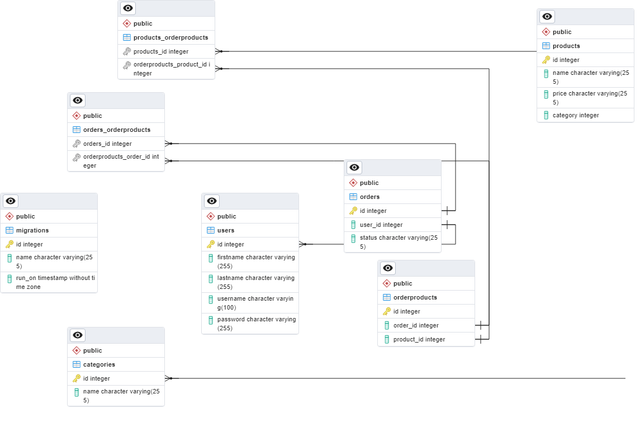
#### Product
- id: number
- name: string
- price: number
- [OPTIONAL] category: number
#### User
- id: number
- firstName: string
- lastName: string
- password: string
#### Orders
- id: number
- user_id: number
- status of order (active or complete): string
### Categories
- id: number
- name: string
### OrderProducts
- id: number
- product_id: number
- order_id: number
## Copyright
MIT