https://github.com/farrelad/basic-php-restful-api
Demonstrate a basic RESTful API written in native PHP 🐘
https://github.com/farrelad/basic-php-restful-api
basic http http-server php php-native php-restful-api php-server request-response restful-api
Last synced: about 2 months ago
JSON representation
Demonstrate a basic RESTful API written in native PHP 🐘
- Host: GitHub
- URL: https://github.com/farrelad/basic-php-restful-api
- Owner: FarrelAD
- License: mit
- Created: 2024-10-21T09:52:11.000Z (over 1 year ago)
- Default Branch: main
- Last Pushed: 2025-10-27T06:59:43.000Z (9 months ago)
- Last Synced: 2025-10-27T08:36:30.727Z (9 months ago)
- Topics: basic, http, http-server, php, php-native, php-restful-api, php-server, request-response, restful-api
- Language: PHP
- Homepage:
- Size: 27.3 KB
- Stars: 6
- Watchers: 1
- Forks: 2
- Open Issues: 0
-
Metadata Files:
- Readme: README.md
- License: LICENSE
Awesome Lists containing this project
README
          # Basic RESTful API in PHP

## Overview

This project is a simple RESTful API built in native PHP. It serves as a learning resource for those interested in understanding how to create a basic RESTful API from scratch. The API provides endpoints to manage user data, allowing users to perform CRUD (Create, Read, Update, Delete) operations.

## Features

- Fully implemented in native PHP with minimal dependencies.

- Basic CRUD operations for user data.

- Clean and organized code structure.

- Custom error handling and responses.

## API Endpoints

Here are the available API endpoints:

- Get All Users

    ```bash

    GET /api/users

    ```

    Retrieves a list of all users

- Add New User

    ```bash

    POST /api/users

    ```

    Adds a new user to the database. Requires name, age, and job in the request body.

- Get User by ID

    ```bash

    GET /api/users/:id

    ```

    Retrieves user data for a specified user ID.

- Update User Data

    ```bash

    PATCH /api/users/:id

    ```

    Updates user data for a specified user ID. Requires at least one of the following fields in the request body: **name**, **age**, or **job**.

- Delete User by ID

    ```bash

    DELETE /api/users/:id

    ```

    Deletes the user with the specified user ID.

## Project Structure

The main components of the project include:

- **public**: Contains `index.php` file as entry point for the project

- **config**: Contains configuration files and environment variables.

- **src/routes**: Contains route for HTTP request

- **src/controllers**: Contains logic for handling API requests. Example: `UsersController.php`

- **src/models**: Contains database interaction logic. Example: `User.php`

## Getting Started

To get started with this project, follow the steps below.

### Prerequisites

- PHP 7.4 or higher

- A web server (e.g., Apache, Nginx, or PHP built in web server)

- Composer (for dependency management)

### Installation

1. Clone the repository:

    ```

    git clone https://github.com/FarrelAD/Basic-PHP-RESTful-API.git

    ```

2. Navigate to the project directory:

    ```bash

    cd Basic-PHP-RESTful-API

    ```

3. Install the dependencies:

    ```bash

    composer install

    ```

### Configuration

#### Environment file

Create a **.env** file in the project root directory to store your environment variables. This is essential for configuring database connections and other settings.

Example .env file:

```env

DB_HOST=localhost

DB_USER=root

DB_PASS=my_password

DB_NAME=db_php_restful_api

```

#### Error Log

Create an **error.log** file in the logs directory to store all error logs that occur when the application runs.

```

(root)

├───config

├───logs

│   └───error.log       # This is new file to log the error

├───public

├───src

│   ├───controllers

│   ├───models

│   └───routes

└───vendor

```

## Usage

After setting up the project, you can start the web server first. You can use Apache HTTPD, NGINX or PHP built in web server.

```bash

composer run dev

```

After that, you can access the API endpoints using a tool like Postman or cURL.Below are some examples of how to use the endpoints:

### Get All Users

```bash

curl -X GET http://localhost:8000/api/users

```

### Add New User

```bash

curl -X POST http://localhost:8000/api/users -d "name=John Doe&age=30&job=Developer"

```

### Get User By ID

```bash

curl -X GET http://localhost:8000/api/users/1

```

### Update User Data

```bash

curl -X PATCH http://localhost:8000/api/users/1 -d '{"name": "Jane Doe"}'

```

### Delete User By ID

```bash

curl -X DELETE http://localhost:8000/api/users/1

```

## Error Handling

### API Response Code

The API includes custom error handling to manage different scenarios, such as:

- 404 Not Found: When a user is not found.

- 400 Bad Request: When the request body is empty or required data is missing.

- 500 Internal Server Error: For unexpected errors during processing.

All responses are returned in JSON format, providing a consistent structure for success and error messages.

### Error Log

All server errors are logged to a file located at **logs/error.log**. This log file can be used to monitor your web application when it is live in production, helping to identify and troubleshoot issues effectively.

## License

This project is open-source and available under the MIT License. Feel free to modify and use it as a learning resource.

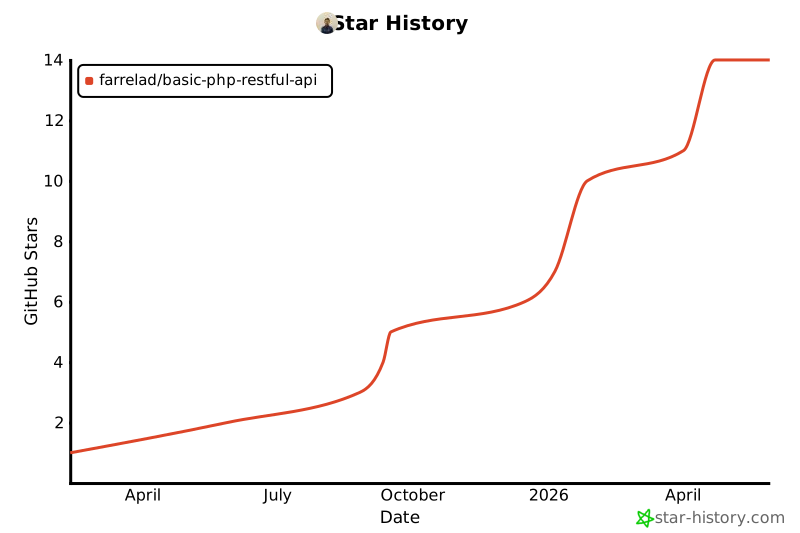
## Star History