https://github.com/fatiando/transform21
Material for the Harmonica tutorial at Transform21
https://github.com/fatiando/transform21
Last synced: about 1 year ago
JSON representation
Material for the Harmonica tutorial at Transform21
- Host: GitHub
- URL: https://github.com/fatiando/transform21
- Owner: fatiando
- License: cc-by-4.0
- Created: 2021-03-15T12:40:45.000Z (over 5 years ago)
- Default Branch: main
- Last Pushed: 2021-08-10T21:12:30.000Z (almost 5 years ago)
- Last Synced: 2025-04-05T11:34:13.837Z (over 1 year ago)
- Language: Jupyter Notebook
- Size: 11 MB
- Stars: 11
- Watchers: 5
- Forks: 9
- Open Issues: 0
-
Metadata Files:
- Readme: README.md
- License: LICENSE
Awesome Lists containing this project
README
# Processing gravity data with Harmonica
The [Harmonica tutorial at Transform 21](http://schedule.softwareunderground.org/) 💚
Instructors:
[Santiago Soler](https://santisoler.github.io)1,2,
[Andrea Balza Morales](https://www.andreabalza.com/)3 and
[Agustina Pesce](https://aguspesce.github.io/)1,2
> 1 CONICET, Argentina
>
> 2 Instituto Geofísico Sismológico Volponi, UNSJ, Argentina
>
> 3 RWTH Aachen, Applied Geophysics and Geothermal Energy, Germany
| | Info |
|--------:|:-----|
| When | Thursday, April 22 • 17:00 - 19:00 GMT |
| Slack (Q&A) | [Software Underground](https://softwareunderground.org/) channel `t21-thurs-harmonica` |
| Live stream | https://youtu.be/0bxZcCAr6bw |
| conda environment | `t21-thurs-harmonica` |
| Harmonica documentation | https://www.fatiando.org/harmonica |
## BEFORE THE TUTORIAL
Make sure you've done these things **before the tutorial on Thursday**:
1. Sign-up for the [Software Underground Slack](https://softwareunderground.org/slack)
1. Join the channel `t21-thurs-harmonica`. This is where **all communication will
happen**.
1. Set up your computer ([instructions below](#setup)). We will not have time to
solve many computer issues during the tutorial so make sure you do this
ahead of time. If you need any help, ask at the `t21-thurs-harmonica` channel on
Slack.
## About
In this tutorial we’ll take a tour around
[Harmonica](https://www.fatiando.org/harmonica), a Python library for forward
modelling, inversion and processing gravity data, focusing on the processing
workflow. We will start with a real dataset of scattered gravity observations
and finally produce a regular grid of the Bouguer gravity disturbance. We will
accomplish this by following these steps:
- Load the gravity dataset.
- Compute **gravity disturbance** by removing the **normal gravity** through
**Boule**.
- **Project** the data to plain coordinates.
- Load a digital elevation model (DEM) of the survey area.
- Compute **Bouguer gravity disturbance** by forward modelling the
**topography** with **prisms**.
- **Interpolate** the Bouguer gravity disturbance onto a **regular grid** at
a constant height through the equivalent layer technique.
- Obtain the Bouguer gravity disturbance on a **profile** using the same
**equivalent layer**.
## Prerequisites
* Some knowledge of Python is assumed (for example, you might want to attend
[this](https://transform2020.sched.com/event/c7Jm/getting-started-with-python) or
[this](https://transform2020.sched.com/event/c7Jn/more-python-for-subsurface) tutorial).
* All coding will be done in Jupyter notebooks. I'll explain how they work
briefly but it will help if you've used them before.
* We'll use [numpy](https://numpy.org/), [pandas](https://pandas.pydata.org/),
[xarray](http://xarray.pydata.org/), and [matplotlib](https://matplotlib.org/).
You don't need to be an expert in these tools but some familiarity will help.
## Setup
There are a few things you'll need to follow the tutorial:
1. A working Python installation ([Anaconda](https://www.anaconda.com/) or Miniconda)
2. The Harmonica tutorial *conda environment* installed
3. A web browser that works with Jupyter notebooks
(basically anything except Internet Explorer)
To get things setup, please do the following.
**If you have any trouble**, please ask for help in the
`t21-thurs-harmonica` channel on the Software Underground slack.
**Windows users:** When you see "*terminal*" in the instructions,
this means the "*Anaconda Prompt*" program for you.
### Step 1
**Install a Python distribution:**
In this tutorial we will be using the [Anaconda](https://www.anaconda.com/)
Python distribution along with the `conda` package manager. If you already have
Anaconda or Miniconda installed, you can skip this step.
If not, please follow the instructions for getting Anaconda up and running in
your system: https://docs.anaconda.com/anaconda/install/
### Step 2
**Create the `t21-thurs-harmonica` conda environment:**
1. Download the `environment.yml` file from
[here](https://raw.githubusercontent.com/fatiando/transform21/master/environment.yml)
(right-click and select "Save page as" or similar)
1. Make sure that the file is called `environment.yml`. Windows sometimes adds a
`.txt` to the end, which you should remove.
1. Open a terminal (*Anaconda Prompt* if you are running Windows). The
following steps should be done in the terminal.
1. Navigate to the folder that has the downloaded environment file
(if you don't know how to do this, take a moment to read [the Software
Carpentry lesson on the Unix shell](http://swcarpentry.github.io/shell-novice/)).
1. Create the conda environment by running `conda env create --file environment.yml`
(this will download and install all of the packages used in the tutorial).
### Step 3
**Verify that the installation works:**
1. Download the `test_install.py` script from
[here](https://raw.githubusercontent.com/fatiando/transform21/master/test_install.py)
1. Open a terminal. The following steps should be done in the terminal.
1. Activate the environment: `conda activate t21-thurs-harmonica`
1. Navigate to the folder where you downloaded `test_install.py`
1. Run the test script: `python test_install.py`
1. You should this text in the terminal (the last part of the second line will depend on your system):
```
Harmonica version: 0.2.1
Downloading file 'south-africa-gravity.ast.xz' from 'https://github.com/fatiando/harmonica/raw/v0.2.0/data/south-africa-gravity.ast.xz' to '/home/USER/.cache/harmonica/v0.2.0'.
```
1. The following figure should pop up:
[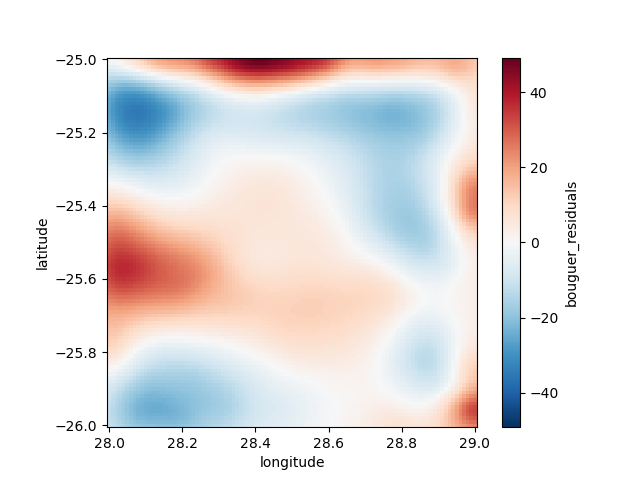](https://raw.githubusercontent.com/fatiando/transform21/master/test_install_output.png)
If none of these commands gives an error, then your installation should be working.
If you get any errors or the outputs look significantly different,
please let us know on Slack at `#t21-thurs-harmonica`.
### Step 4
**Start JupyterLab:**
1. **Windows users:** Make sure you set a default browser that is **not Internet Explorer**.
1. Activate the conda environment: `conda activate t21-thurs-harmonica`
1. Start the JupyterLab server: `jupyter lab`
1. Jupyter should open in your default web browser. We'll start from here in the
tutorial and create a new notebook together.
### IF EVERYTHING ELSE FAILS
If you really can't get things to work on your computer,
you can run the code online through Google Colab (you will need a Google account).
A starter notebook that installs Harmonica can be found here:
https://swu.ng/t21-harmonica-colab
To save a copy of the Colab notebook to your own account, click on the
"Open in playground mode" and then "Save to Drive".
You might be interested in
[this tutorial](https://transform2020.sched.com/event/c7Jn/tutorial-using-python-subsurface-tools-no-install-required)
for an overview of Google Colab.
#### I don't have a Google account
If you cannot use Google Colab, a second alternative option is to use to the
Software Underground JupyterHub.
You need to sign in with your Slack credentials on this website:
https://jupyter-dev.softwareunderground.org/
For more information about the login process, please read this:
https://github.com/softwareunderground/jupyterhub-deployment/tree/first-deployment#login-process
Once you are logged in, JupyterHub will ask you to choose a server
configuration, please choose the `t21-thurs-harmonica` option.
After JupyterHub sets up an instance for you, it will prompt a JupyterLab
interface.
In order to create a new notebook for running during the tutorial, please click
the `Python [conda env:t21-thurs-harmonica]` button in the Launcher.
It will create a new notebook running the `t21-thurs-harmonica` environment, so
you don't need to install any dependency, they are already installed! 🎉
> ⚠️ The Software Undeground JupyterHub instances are still in **experimental
> phase**. You may expect some unwanted behaviour or sudden crushes. Use it
> carefully and download the notebook every once in a while to have a backup.⚠️
Thanks [Filippo Broggini](https://www.filippobroggini.com/) for setting this up!
## License
This work is licensed under a
[Creative Commons Attribution 4.0 International License][cc-by].
[![CC BY 4.0][cc-by-image]][cc-by]
[cc-by]: http://creativecommons.org/licenses/by/4.0/
[cc-by-image]: https://i.creativecommons.org/l/by/4.0/88x31.png