https://github.com/fayaz07/app_intro
A library for flutter app, that can easily show some introduction screens to the user and describe about the app
https://github.com/fayaz07/app_intro
introduction onboarding-screen
Last synced: 10 months ago
JSON representation
A library for flutter app, that can easily show some introduction screens to the user and describe about the app
- Host: GitHub
- URL: https://github.com/fayaz07/app_intro
- Owner: fayaz07
- License: apache-2.0
- Created: 2019-01-31T18:07:47.000Z (over 7 years ago)
- Default Branch: master
- Last Pushed: 2020-06-26T11:04:46.000Z (about 6 years ago)
- Last Synced: 2023-08-20T21:25:30.581Z (almost 3 years ago)
- Topics: introduction, onboarding-screen
- Language: Dart
- Homepage: https://pub.dartlang.org/packages/app_intro
- Size: 8.95 MB
- Stars: 9
- Watchers: 2
- Forks: 3
- Open Issues: 2
-
Metadata Files:
- Readme: README.md
- Changelog: CHANGELOG.md
- License: LICENSE
Awesome Lists containing this project
README
# App Intro
A light weight package that helps developers easily provide few introduction screens and describe about their app
[Get the library](https://pub.dartlang.org/packages/app_intro) | [Example](https://github.com/fayaz07/app_intro/tree/master/example)
[](https://www.buymeacoffee.com/fayaz)
[](https://www.linkedin.com/in/fayaz07) [](https://github.com/fayaz07) [](https://github.com/fayaz07/app_intro/fork) [](https://github.com/fayaz07/app_intro/star) [](https://github.com/fayaz07/app_intro/)
[](https://pub.dartlang.org/packages/app_intro) [](https://github.com/fayaz07/app_intro/tree/master/example)
## Supported Dart Versions
**Dart SDK version >= 2.1.0**
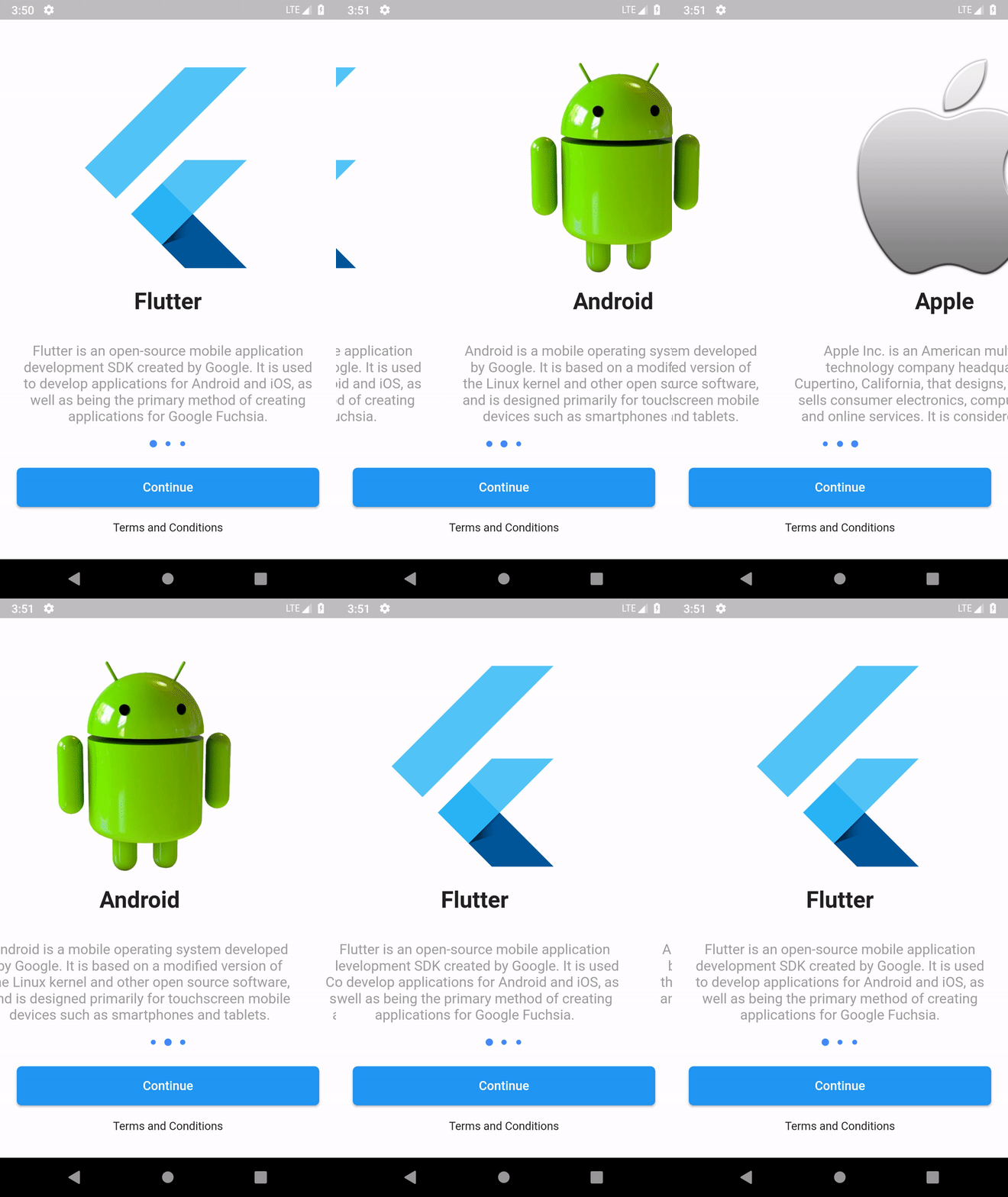
## Demo
# Usage
> Import the package to your dart file
```dart
import 'package:app_intro/app_intro.dart';
```
> Get ready with the stuff
Collect titles, description and relevant images for slides. Create a list of slides and pass it as a parameter
*Note: Image path must be local
```dart
List slides= [
new Slide('Title-1','Description-1','image-1-path'),
new Slide('Title-2','Description-2','image-2-path'),
new Slide('Title-3','Description-3','image-3-path'),
new Slide('Title-4','Description-4','image-4-path'),
...
];
```
The user is provided with two buttons
* Terms and Conditions
* General Button(You must provide what text should be shown there)
Create a terms and conditions page for your app and you can navigate to TnC page when the user clicks on the Terms and Conditions button. Also when these intro slides are finished, user clicks on Gerneral button, write the code what you need to do at then as below.
```dart
VoidCallback onTermsAndConditionsButtonClick = (){
// Write your code
// Ex: Navigating to Terms and Conditions Screen
}
VoidCallback onGeneralButtonClick = (){
// Write your code
// Ex: Navigating to home screen
}
```
> Name the button
You should specify the name or text that should be shown on the button
```dart
String button_text = 'Login with OTP';
```
> Create an instance of SingleButtonIntro
Create an instance for SingleButtonIntro and pass the variables you just created.
*Note: No optional parameters here
```dart
SingleButtonIntro app_intro = new SingleButtonIntro(
slides,
onTermsAndConditionsButtonClick,
button_text,
onGeneralButtonClick
);
```
> Attatch app_intro to root
The final step is to place the app_intro object in the body of your screen
```dart
void main(){
runApp(
MaterialApp(
title: 'Intro Screens',
home:_appIntro,
)
);
}
```