https://github.com/fboender/sla
The Simple Little Automator
https://github.com/fboender/sla
build-script build-system build-tool builder make makefile task-runner
Last synced: 9 months ago
JSON representation
The Simple Little Automator
- Host: GitHub
- URL: https://github.com/fboender/sla
- Owner: fboender
- License: mit
- Created: 2018-11-19T20:07:33.000Z (over 7 years ago)
- Default Branch: master
- Last Pushed: 2023-09-12T09:15:14.000Z (over 2 years ago)
- Last Synced: 2025-08-23T06:03:17.567Z (9 months ago)
- Topics: build-script, build-system, build-tool, builder, make, makefile, task-runner
- Language: Shell
- Size: 139 KB
- Stars: 12
- Watchers: 2
- Forks: 0
- Open Issues: 0
-
Metadata Files:
- Readme: README.md
- License: LICENSE
Awesome Lists containing this project
README
# sla - Simple Little Automator 🥗
Tired of Make's moronic syntax and rules? Not working on a project that
requires incremental compilation? 😭 when you need to install 2.4
GiB of Ruby dependencies for a simple build system? Want to be able to execute
simple build rules from anywhere in your project tree? Then `sla` is for you!
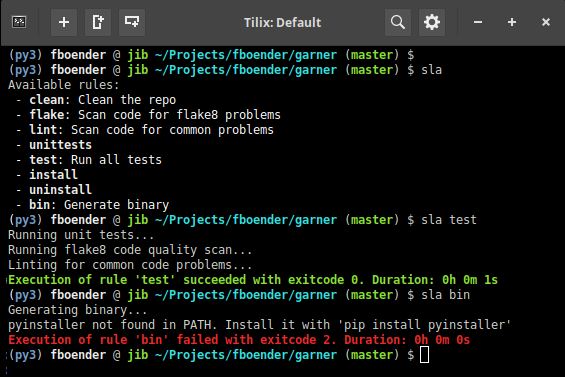
sla is the Simple Little Automator. It's a tiny shell script that invokes
shell functions found in a `build.sla` script in your project's root dir. It
is ideal for smaller projects and projects that don't require compilation,
such as scripting languages.
## Why?
Every task running / build system I've researched is either for a specific
language, too large or complicated or uses declarative style build rules.
Declarative rules are very limited in their capabilities. It's often not even
possible, or very awkward, to do loops. This immediately leads to the
creation of helper shell scripts. The build tool then becomes nothing more
than a wrapper around those scripts. So why not use shell scripts right away?
That's what Sla does.
Using shell scripting has several benefits:
* It's not limited to a single language. Most projects don't just need to
compile code. They also need to setup projects, run tests, generate
documentation, etc. Interpreted languages don't require incremental builds
at all, making most build systems' core functionality useless.
* It's cross-platform, so it will run everywhere.
* It's powerful. You can script basically anything.
* You don't even need Sla installed. You can run build rules directly through
the shell. Sla is just a simple convenient wrapper.
* It's easy to call other build systems such as Make through sla, so we don't
lose any functionality such as incremental builds.
Additionally, Sla has some benefits of its own:
* It allows you to list the available rules, something Make still can't do
properly after 43 years.
* You can include short and long descriptions / help for build rules.
* You can run target rules from anywhere in your project.
* Sla automatically times your builds.
## Installation
You can install `sla` with itself from the repo.
System-wide:
git clone https://github.com/fboender/sla.git
cd sla
sudo install -m 755 sla /usr/local/bin
Just for your user:
git clone https://github.com/fboender/sla.git
cd sla
install -m 755 -D sla ~/.local/bin
For the above to work, you should have `~/.local/bin` in your PATH.
## Usage
Here's the output of `--help`, although there's not much to see:
Usage: sla [-hdv] [--version] [param [param...]]
Simple Little Automator. Find and execute tasks from a shell script.
Arguments:
-h, --help Show this help message
-d, --debug Show debug information
-v, --verbose Verbose output
-V, --version Show sla version
If no is specified, lists the available rules.
Use 'sla --help' to show a rule's full description.
You can use the `--verbose` option to show what your rules are executing.
Basically the same as doing `set -x` in your script.
### Example usage
Here's an example of running `sla` with the `test` rule:
~/Projects/my_project/src/llt/ $ sla test
./src/tools.py:25:80: E501 line too long (111 > 79 characters)
Exection of rule 'test' failed with exitcode 2. Duration: 0h 0m 1s
`sla` searches up the current path until it finds a `build.sla` file, changes
to that directory, sources it in the shell, and executes the requested shell
function. Here's what the `build.sla` file for the above 'test' rule might
look like:
~/Projects/my_project/src/llt/ $ cat ../../build.sla
#
# This is a script containing functions that are used as build rules. You can
# use the Simple Little Automator (https://github.com/fboender/sla) to run
# these rules, or you can run them directly in your shell:
#
# $ bash -c ". build.sla && test"
#
clean () {
# Clean artifacts and trash from repo
find ./ -name "*.pyc" -delete
find ./ -name "*.tmp" -delete
}
test () {
# Run some code tests
clean # Depend on 'clean' rule
flake8 --exclude src/llt --ignore=E501 src/*.py
}
As you can see, build rules are just plain old shell functions. Sla used bash,
which should be available just about everywhere.
Creating dependencies on other rules is as simple as calling it as a normal
shell function.
You can list available rules by simply omitting a rule name:
$ sla
Available rules:
- doc: Generate documentation
- clean: Clean artifacts and trash from repo
- test: Run some code tests
- install: Install the program
Functions that start with an underscore ('`_`') are not shown.
### Documenting rules
Comments at the start of a function / rule definition are parsed as
documentation. Take the following rule definition for example:
install () {
# Install sla
# Install sla to $PREFIX (/usr/local by default).
#
# You can specify the prefix with an environment variable:
#
# $ PREFIX=/usr sla install
# Set the prefix
PREFIX=${PREFIX:-/usr/local}
DEST="$PREFIX/bin/sla"
env install -m 755 ./sla "$DEST"
echo "sla installed in $DEST"
}
In this case the first line is the short description. It is shown when listing
the rules. The rest of the comments, up to the empty line, are shown when
requesting a rule's documentation with `sla --help`. For example:
$ sla install --help
install: Install sla
Install sla to $PREFIX (/usr/local by default).
You can specify the prefix with an environment variable:
$ PREFIX=/usr sla install
### Running rules without `sla`
Since `sla` rules are just plain old shell functions, you don't even need
`sla` installed to run them!:
~/Projects/my_project $ bash -c ". build.sla && test"
./src/tools.py:25:80: E501 line too long (111 > 79 characters)
That's useful so that people don't need to install the build system you prefer
just to do a `make install`.
### Passing values
You can pass values as environment variables:
$ export TARGET=/usr/local
$ sla install # installs in /usr/local
or
TARGET=/usr/local sla install
You can also pass command-line arguments:
sla install /usr/local
These become available as normal positional arguments in a rule / shell
function:
install () {
TARGET=$1
}
### Dependencies
Creating dependencies is as easy as calling a shell function. In the following
example, the `test` rule depends on the `lint` rule and the `unittest` rule:
lint () {
# Scan code for common problems
flake8 src/*.py
}
unittest () {
# Run all unit tests
cd src/
nosetests
}
test () {
# Run all tests
lint
unittest
}
If a dependency only needs to be executed once (such as `clean` rules), just
set a flag in the rule. For example:
clean () {
if [ -z "$CLEANED" ]; then
echo "Cleaning"
# Your cleaning instructions here.
CLEANED=1
fi
}
### Flags
Sla sets various flags when running. For example, if the user runs `sla -v`
(verbose), the `FLAG_VERBOSE` flag is set to `1`. You can use this in your
build scripts:
if [ "$FLAG_VERBOSE" -eq 1 ]; then
echo "Additional info"
fi
or
[ "$FLAG_VERBOSE" -eq 1 ] && echo "Additional info"
The following flags are set:
* `FLAG_DEBUG=1`: Show internal sla debugging info
* `FLAG_VERBOSE=1`: Show build rule execution debugging info
### Disabling strictness
`sla` will stop running as soon as a command returns a non-zero exit code. You
can turn this off by wrapping a block of code with `set +e` statements:
set +e
# these commands won't cause Sla to stop if their exit codes are != 0
rm nonexisting
set -e
### 'install' rule
If you have a rule called "install", and you also want to use the `install`
unix tool to install software, you'll end up with an endless loop, unless you
specify that you want to use the system's `install` and not the shell function
you just wrote. You can use `env` for that:
install () {
env install -m 755 ./sla "$DEST"
}
### Bash Autocompletion
To get auto completion for bash, put in your `~/.bashrc`:
# Complete sla rules
_complete_sla_rules()
{
COMPREPLY=()
cur="${COMP_WORDS[COMP_CWORD]}"
comp=$(sla 2>/dev/null | grep "^ -" | sed "s/^ - \([^:]*\).*/\1/")
COMPREPLY=( $(compgen -W "${comp}" -- $cur))
return 0
}
complete -F _complete_sla_rules sla
### Automatic execution of rules
You can use a tool like [entr](http://entrproject.org/) to automatically
execute rules when files change:
$ find ./ -name "*.1.md" | entr sla doc
Converting sec-diff.1.md
Execution of rule 'doc' succeeded with exitcode 0. Duration: 0h 0m 0s
The `doc` rule converts a Markdown file to a manual page. `entr` watches all
changes to `*.1.md` files in the project, and if any of them change, it
executes `sla doc` to regenerate all man pages.
## License
sla is licensed under the MIT License:
Copyright (c) 2022 Ferry Boender
Permission is hereby granted, free of charge, to any person obtaining a
copy of this software and associated documentation files (the "Software"),
to deal in the Software without restriction, including without limitation
the rights to use, copy, modify, merge, publish, distribute, sublicense,
and/or sell copies of the Software, and to permit persons to whom the
Software is furnished to do so, subject to the following conditions:
The above copyright notice and this permission notice shall be included in
all copies or substantial portions of the Software.
THE SOFTWARE IS PROVIDED "AS IS", WITHOUT WARRANTY OF ANY KIND, EXPRESS OR
IMPLIED, INCLUDING BUT NOT LIMITED TO THE WARRANTIES OF MERCHANTABILITY,
FITNESS FOR A PARTICULAR PURPOSE AND NONINFRINGEMENT. IN NO EVENT SHALL
THE AUTHORS OR COPYRIGHT HOLDERS BE LIABLE FOR ANY CLAIM, DAMAGES OR OTHER
LIABILITY, WHETHER IN AN ACTION OF CONTRACT, TORT OR OTHERWISE, ARISING
FROM, OUT OF OR IN CONNECTION WITH THE SOFTWARE OR THE USE OR OTHER
DEALINGS IN THE SOFTWARE.