https://github.com/fcanas/formulary
Declarative iOS TableView Forms in Swift (pre-SwiftUI)
https://github.com/fcanas/formulary
declarative-ui form-builder form-validation ios swift
Last synced: over 1 year ago
JSON representation
Declarative iOS TableView Forms in Swift (pre-SwiftUI)
- Host: GitHub
- URL: https://github.com/fcanas/formulary
- Owner: fcanas
- License: mit
- Created: 2015-01-16T22:14:22.000Z (over 11 years ago)
- Default Branch: master
- Last Pushed: 2018-04-01T02:55:11.000Z (over 8 years ago)
- Last Synced: 2025-04-06T17:12:50.538Z (over 1 year ago)
- Topics: declarative-ui, form-builder, form-validation, ios, swift
- Language: Swift
- Homepage: https://fabiancanas.com/Formulary/
- Size: 8.41 MB
- Stars: 82
- Watchers: 5
- Forks: 10
- Open Issues: 9
-
Metadata Files:
- Readme: README.md
- Changelog: CHANGELOG.md
- License: LICENSE
Awesome Lists containing this project
README
# Formulary [](https://travis-ci.org/fcanas/Formulary)
Formulary is a Swift library for creating dynamic, declarative, table view forms for iOS.
Formulary is in early stages of design and development, so if you jump in now, you can have a big impact on its design, power, and utility.
Formulary is inspired by XLForm, written in Swift, and designed for simplicity and development speed.
## Basic Use
### Text Entry
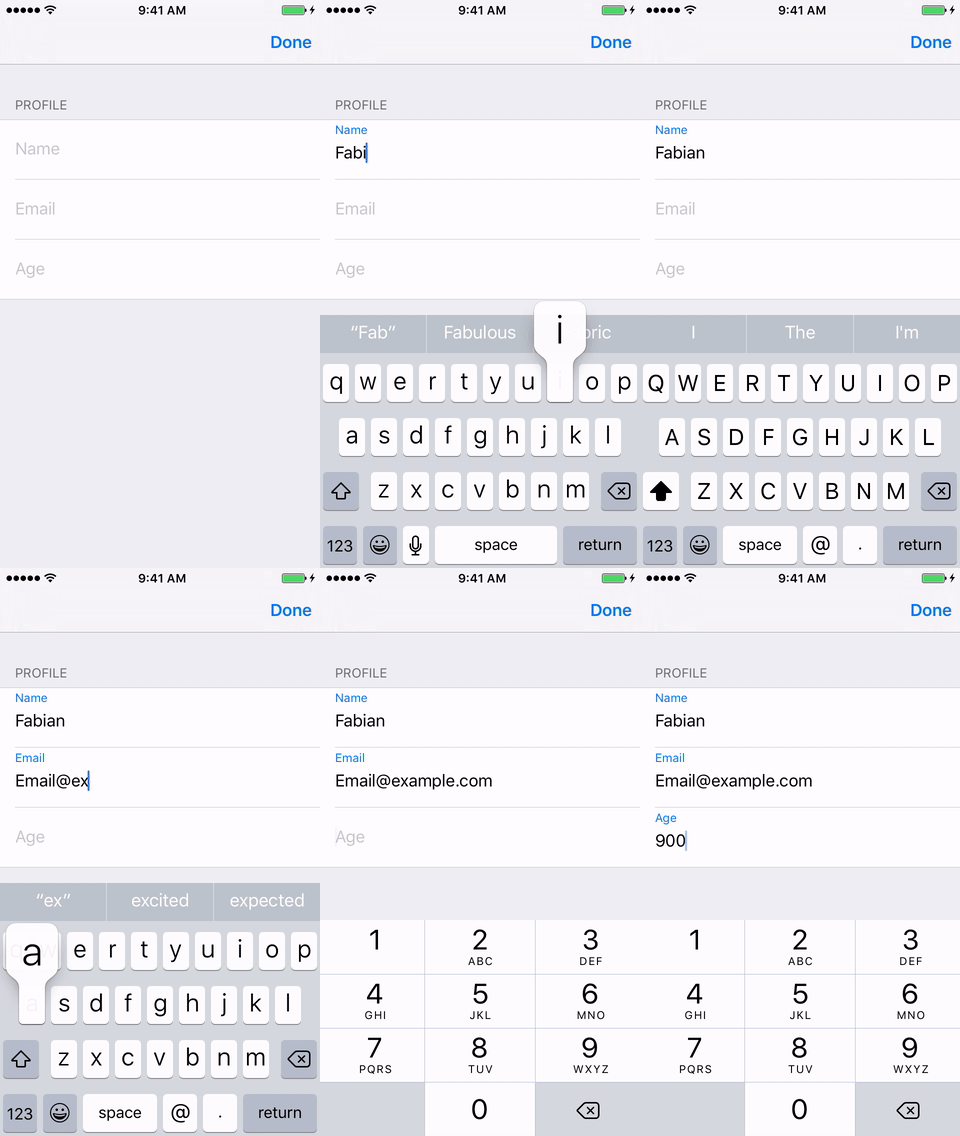
A basic text entry form shows Formulary's simple declarative style. A row's name is shown as placeholder text and as a label for the row. A row may also specify the kind of text entry it expects, controlling the keyboard style.
```swift
let form = Form(sections: [FormSection(rows: [TextEntryFormRow(name:"Name"),
TextEntryFormRow(name: "Email", textType: TextEntryType.Email),
TextEntryFormRow(name:"Age", textType: TextEntryType.Number)],
name:"Profile")])
let formViewController = FormViewController(form: form)
presentViewController(formViewController, animated: true, completion: nil)
```
#### NSFormatters in Text Entry
`NSFormatter`s can be injected to format text entry or enforce valid text. In this example the number formatter will prevent the user from entering more than two decimal places, more than one decimal point, or any non-numeric characters.
```swift
let decimalFormatter = NSNumberFormatter()
decimalFormatter.maximumFractionDigits = 2
TextEntryFormRow(name:"Age", textType: .Decimal, formatter: decimalFormatter)
```
#### Validations
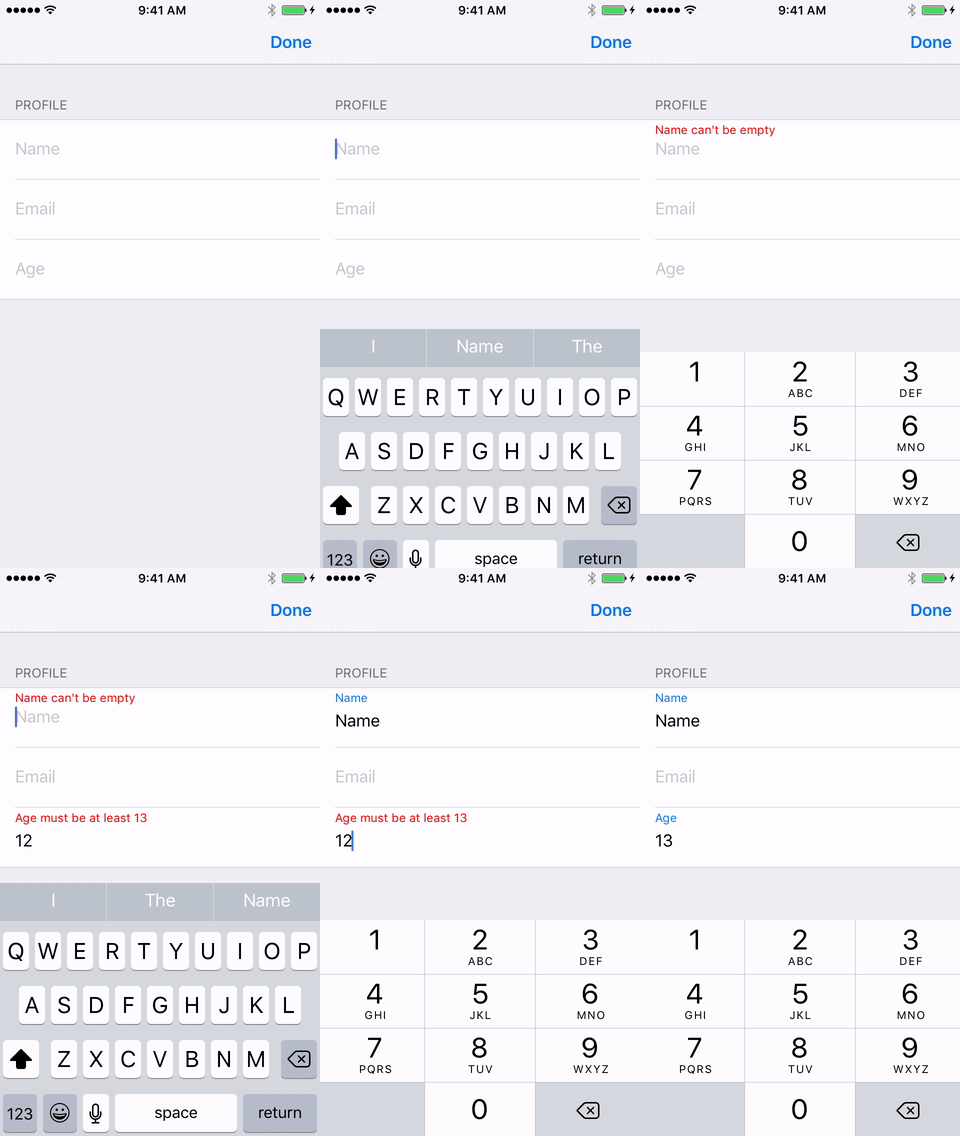
Text entry rows can have validations. Validations are assertions about the value of a row.
Validations show users error messages. Validation results for individual rows are aggregated to validate the overall Form.
Some Validations are provided such as `MaximumNumber`, `MinimumNumber`, and `RequiredString`.
```swift
TextEntryFormRow(name:"Name", validation: RequiredString("Name"))
TextEntryFormRow(name:"Age", textType: TextEntryType.Number, validation:MinimumNumber("Age", 13))
```
A Validation is any function that accepts a `String` and returns a tuple indicating the validity of the input and any reason for it.
```swift
typealias Validation = (String?) -> (valid: Bool, reason: String)
```
This allows for powerful and flexible composition of Validations, which Formulary facilitates with logical operations on Validations.
### Other Row Types
#### Toggle Switch
```swift
FormRow(name:"Do you like goats?", type: .Switch)
```
#### Buttons
```swift
FormRow(name:"Show an Alert", type: .Button, action: { _ in
let alert = UIAlertController(title: "Hi!", message: "Somebody pressed a button.", preferredStyle: UIAlertControllerStyle.Alert)
alert.addAction(UIAlertAction(title: "Ok", style: UIAlertActionStyle.Default, handler: nil))
self.presentViewController(alert, animated: true, completion: nil)
})
```
#### Options
```swift
OptionSection(rowValues:["Ice Cream", "Pizza", "Beer"], name: "Food")
```
## Example
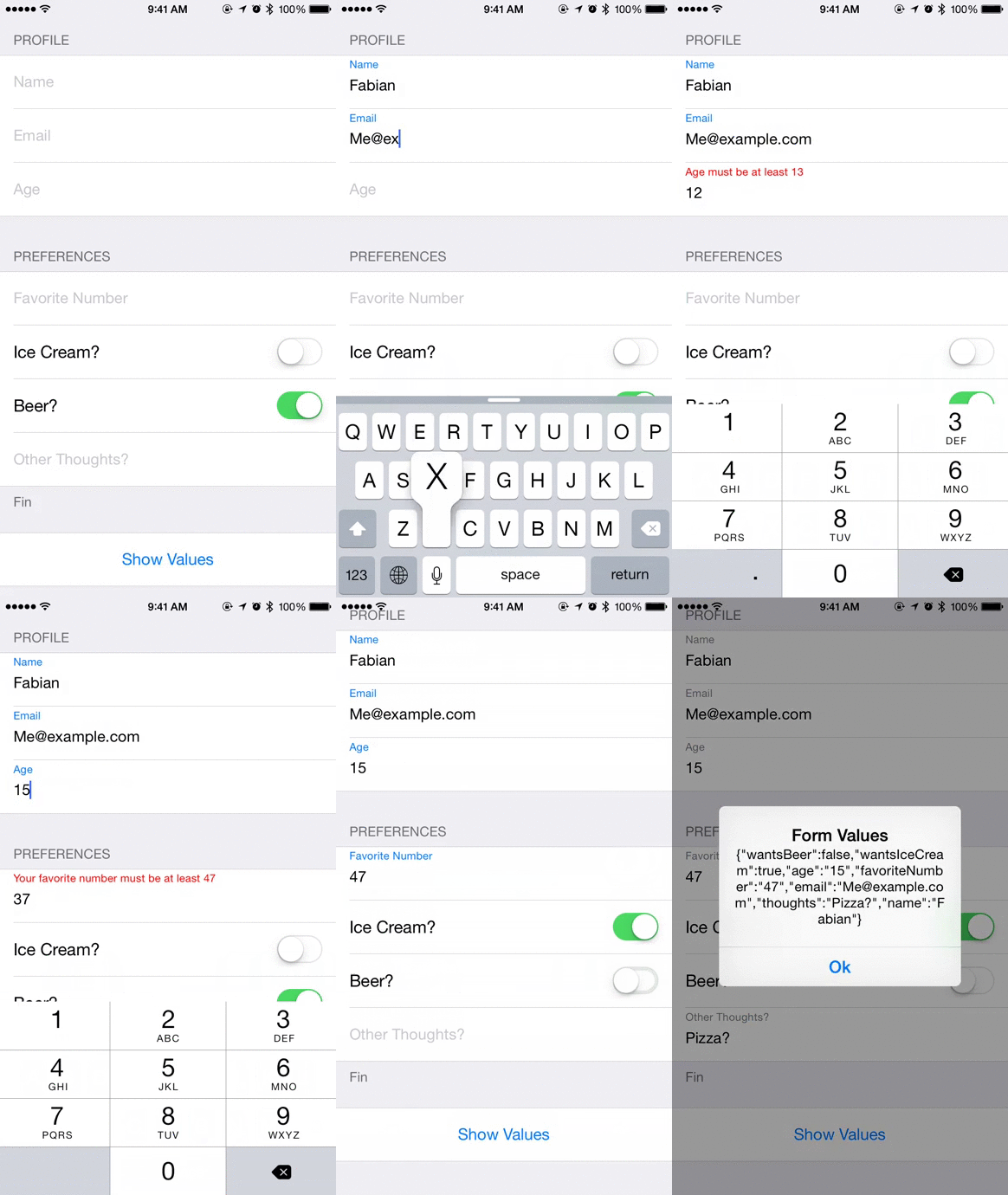
```swift
let decimalFormatter = NSNumberFormatter()
decimalFormatter.maximumFractionDigits = 5
let integerFormatter = NSNumberFormatter()
self.form = Form(sections: [
FormSection(rows: [
TextEntryFormRow(name:"Name", tag: "name", validation: RequiredString("Name")),
TextEntryFormRow(name: "Email", tag: "email", textType: TextEntryType.Email),
TextEntryFormRow(name:"Age", tag: "age", textType: TextEntryType.Number, validation: MinimumNumber("Age", 13), formatter: integerFormatter)],
name:"Profile"),
FormSection(rows: [
TextEntryFormRow(name:"Favorite Number", tag: "favoriteNumber", value: nil, textType: .Decimal, validation: MinimumNumber("Your favorite number", 47) && MaximumNumber("Your favorite number", 47), formatter: decimalFormatter),
FormRow(name:"Do you like goats?", tag: "likesGoats", type: .Switch, value: false),
TextEntryFormRow(name:"Other Thoughts?", tag: "thoughts", textType: .Plain),],
name:"Preferences",
footerName: "Fin"),
OptionSection(rowValues:["Ice Cream", "Pizza", "Beer"], name: "Food", value: ["Pizza", "Ice Cream"]),
FormSection(rows: [
FormRow(name:"Show Values", tag: "show", type: .Button, value: nil, action: { _ in
let data = NSJSONSerialization.dataWithJSONObject(values(self.form), options: nil, error: nil)!
let s = NSString(data: data, encoding: NSUTF8StringEncoding)
let alert = UIAlertController(title: "Form Values", message: s as? String, preferredStyle: UIAlertControllerStyle.Alert)
alert.addAction(UIAlertAction(title: "Ok", style: UIAlertActionStyle.Default, handler: nil))
self.presentViewController(alert, animated: true, completion: nil)
})
])
])
```
## Development Status
I'm using this in production, and the way I'm using works fine. YMMV.
Before a 1.0.0 release, this project follows a modified [SemVer](http://semver.org/).
> Major version zero (0.y.z) is for initial development. Anything may change at any time. The public API should not be considered stable.
Reasonable effort is put forth to use Patch version Z (x.y.Z | x = 0) when new, backwards compatible functionality is introduced to the public API. And for Minor version Y (x.Y.z | x = 0) when any backwards incompatible changes are introduced to the public API.
I intend to release a 1.0.0 early and have the major version number jump quickly rather than continuing with 0.y.z releases. Check Formulary's [pulse](https://github.com/fcanas/Formulary/pulse) if you're wondering about the health of the project.
## Author
Fabian Canas ([@fcanas](http://twitter.com/fcanas))
## License
Formulary is available under the MIT license.