https://github.com/fecommunity/reactpress
🔥 ReactPress is a free blog and CMS system developed using Next.js and AntDesign.(ReactPress是一个基于Next.js+Antd5.0的博客&CMS系统)Demo:https://blog.gaoredu.com
https://github.com/fecommunity/reactpress
antd blog cms mardown mysql nestjs nextjs react reactpress
Last synced: 4 months ago
JSON representation
🔥 ReactPress is a free blog and CMS system developed using Next.js and AntDesign.(ReactPress是一个基于Next.js+Antd5.0的博客&CMS系统)Demo:https://blog.gaoredu.com
- Host: GitHub
- URL: https://github.com/fecommunity/reactpress
- Owner: fecommunity
- License: mit
- Created: 2024-09-08T16:24:21.000Z (almost 2 years ago)
- Default Branch: master
- Last Pushed: 2025-07-12T09:31:59.000Z (about 1 year ago)
- Last Synced: 2025-07-12T11:43:16.901Z (about 1 year ago)
- Topics: antd, blog, cms, mardown, mysql, nestjs, nextjs, react, reactpress
- Language: TypeScript
- Homepage: https://reactpress.surge.sh
- Size: 20.6 MB
- Stars: 482
- Watchers: 12
- Forks: 53
- Open Issues: 10
-
Metadata Files:
- Readme: README-zh_CN.md
- Changelog: CHANGELOG.md
- License: LICENSE
Awesome Lists containing this project
README

ReactPress 2.0
基于 React、Next.js 和 NestJS 构建的现代化全栈发布平台
[](https://github.com/fecommunity/reactpress/blob/master/LICENSE)
[](https://www.npmjs.com/package/@fecommunity/reactpress)
[](https://github.com/fecommunity/reactpress/pulls)
[](http://www.typescriptlang.org/)
[](https://nextjs.org/)
[](https://nestjs.com/)
[](https://vercel.com/new/clone?repository-url=https://github.com/fecommunity/reactpress)
[](https://github.com/fecommunity/reactpress/actions/workflows/npm-publish.yml)
报告错误
·
请求功能
·
English Documentation
## 🌟 现代化发布平台
**ReactPress 2.0** 是一个现代化的全栈发布平台,使开发者和内容创作者能够轻松构建专业博客、网站和内容管理系统。
[](https://gaoredu.com)
## ✨ 主要特性
### ⚡ 5分钟快速安装
- **零配置设置**,具有智能默认值
- **WordPress 式安装向导**,提供直观的设置体验
- **自动数据库配置**,具有自动模式迁移
### 🎨 高级定制
- **动态主题切换**,支持亮/暗模式
- **组件级定制**,通过模块化架构实现
- **国际化支持**(中文和英文)
### 🔧 统一开发体验
- **Monorepo 架构**,具有模块化包
- **TypeScript**,为前端和后端提供类型安全
- **PM2 进程管理**,用于生产部署
### 🚀 现代技术栈
- **前端**:React 17 + Next.js 12 Pages Router
- **后端**:NestJS 6 模块化架构
- **数据库**:MySQL + TypeORM
- **UI**:Ant Design v5 组件
## 📸 截图
### 安装向导
[](https://gaoredu.com)
### 内容管理仪表板
[](https://gaoredu.com)
### 演示站点
[](https://gaoredu.com)
## 🚀 快速开始
### 📋 前置要求
- Node.js >= 16.5.0
- MySQL 数据库
- pnpm 包管理器
### 🏁 安装选项
#### 选项 1:统一 CLI(推荐)
```bash
# 全局安装 ReactPress
npm install -g @fecommunity/reactpress
# 启动服务
reactpress server start
reactpress client start
```
#### 选项 2:独立服务
```bash
# 安装并启动 ReactPress 服务器
npx @fecommunity/reactpress-server
# 独立安装并运行客户端
npx @fecommunity/reactpress-client
```
## 📟 命令行界面 (CLI)
ReactPress 提供了一个统一的命令行界面来管理服务器和客户端组件。
### 统一 CLI 命令
全局安装 ReactPress 后,您可以使用 `reactpress` 命令:
```bash
# 显示帮助
reactpress --help
# 启动服务器
reactpress server start
# 启动客户端
reactpress client start
# 使用 PM2 启动服务器
reactpress server start --pm2
# 使用 PM2 启动客户端
reactpress client start --pm2
```
### 独立包命令
您也可以直接使用各个包的命令:
```bash
# 启动服务器
npx @fecommunity/reactpress-server
# 启动客户端
npx @fecommunity/reactpress-client
# 使用 PM2 启动服务器
npx @fecommunity/reactpress-server --pm2
# 使用 PM2 启动客户端
npx @fecommunity/reactpress-client --pm2
```
## 📦 包与组件
ReactPress 组织为**具有模块化包的 monorepo**:
### 核心包
| 包 | 描述 | 版本 |
|---------|-------------|---------|
| [`@fecommunity/reactpress`](.) | 主 CLI 和统一入口点 | 2.0.0 |
| [`@fecommunity/reactpress-client`](./client) | Next.js 12 前端应用 | 1.0.0 |
| [`@fecommunity/reactpress-server`](./server) | NestJS 6 后端 API | 1.0.0 |
| [`@fecommunity/reactpress-toolkit`](./toolkit) | 自动生成的 API 客户端 SDK | 1.0.0 |
### 模板
| 模板 | 描述 | 包名 |
|----------|-------------|--------------|
| [`hello-world`](./templates/hello-world) | 用于快速原型设计的最小模板 | `@fecommunity/reactpress-template-hello-world` |
| [`twentytwentyfive`](./templates/twentytwentyfive) | 功能丰富的博客模板 | `@fecommunity/reactpress-template-twentytwentyfive` |
## 🔧 配置
在根目录中创建 `.env` 文件用于本地开发:
```env
# 数据库配置
DB_HOST=127.0.0.1
DB_PORT=3306
DB_USER=reactpress
DB_PASSWD=reactpress
DB_DATABASE=reactpress
# 客户端配置
CLIENT_SITE_URL=http://localhost:3001
# 服务器配置
SERVER_SITE_URL=http://localhost:3002
```
## 🚀 部署选项
### 使用 Vercel 部署(推荐)
[](https://vercel.com/new/clone?repository-url=https://github.com/fecommunity/reactpress)
### PM2 部署(推荐)
```bash
# 全局安装 PM2
npm install -g pm2
# 使用 PM2 启动 ReactPress 服务器
npx @fecommunity/reactpress-server --pm2
# 使用 PM2 启动 ReactPress 客户端
npx @fecommunity/reactpress-client --pm2
# 或者使用统一 CLI
reactpress server start --pm2
reactpress client start --pm2
```
### 传统部署(自托管)
```bash
# 构建生产版本
pnpm run build
# 启动生产服务器
pnpm run start
```
## 🤝 贡献
我们欢迎各种形式的贡献!无论是错误修复、新功能、文档改进还是翻译,您的帮助都受到赞赏。
### 📋 开发设置
1. Fork 仓库
2. 克隆您的 fork:`git clone https://github.com/your-username/reactpress.git`
3. 安装依赖:`pnpm install`
4. 启动开发服务器:`pnpm run dev`
### 📦 发布
要将包发布到 npm:
1. 确保您已登录 npm:`pnpm login`
2. 运行发布脚本:`pnpm run release`
3. 按照交互式提示选择包和版本增量
请阅读我们的[贡献指南](https://github.com/fecommunity/reactpress/blob/master/CONTRIBUTING.md)了解我们的行为准则和开发流程详情。
## ❤️ 致谢
ReactPress 受到许多优秀开源项目的启发和构建:
- [Next.js](https://github.com/vercel/next.js) - React 框架
- [NestJS](https://github.com/nestjs/nest) - 渐进式 Node.js 框架
- [Ant Design](https://github.com/ant-design/ant-design) - UI 设计语言
- [TypeORM](https://github.com/typeorm/typeorm) - TypeScript 和 JavaScript 的 ORM
我们感谢这些项目的作者和贡献者的出色工作。
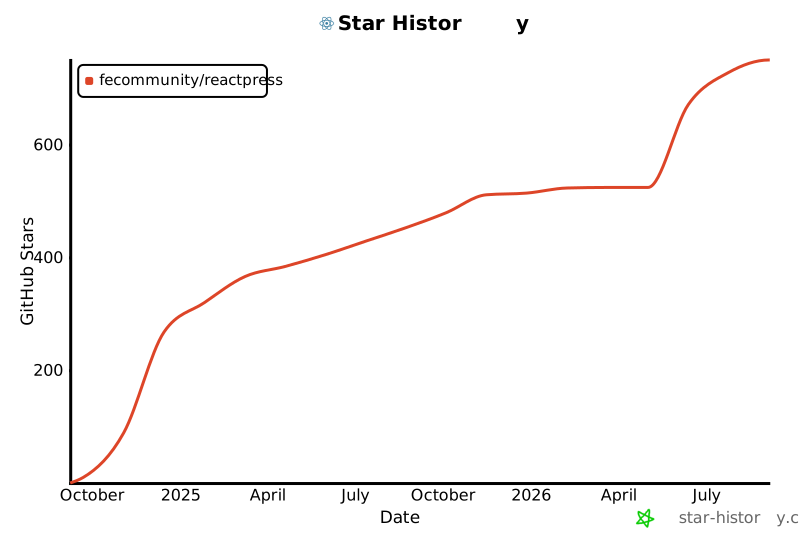
## 📈 Star 历史
[](https://star-history.com/#fecommunity/reactpress&Date)