https://github.com/feedzai/repo-analyzer
https://github.com/feedzai/repo-analyzer
Last synced: 11 months ago
JSON representation
- Host: GitHub
- URL: https://github.com/feedzai/repo-analyzer
- Owner: feedzai
- License: mit
- Created: 2019-09-24T20:58:23.000Z (almost 7 years ago)
- Default Branch: master
- Last Pushed: 2023-01-04T22:03:15.000Z (over 3 years ago)
- Last Synced: 2025-07-08T03:26:56.468Z (12 months ago)
- Language: JavaScript
- Size: 1.41 MB
- Stars: 17
- Watchers: 18
- Forks: 4
- Open Issues: 3
-
Metadata Files:
- Readme: README.md
- Changelog: CHANGELOG.md
- License: LICENSE
Awesome Lists containing this project
README
# Frontend Repo Analyzer
[](https://travis-ci.com/feedzai/repo-analyzer)
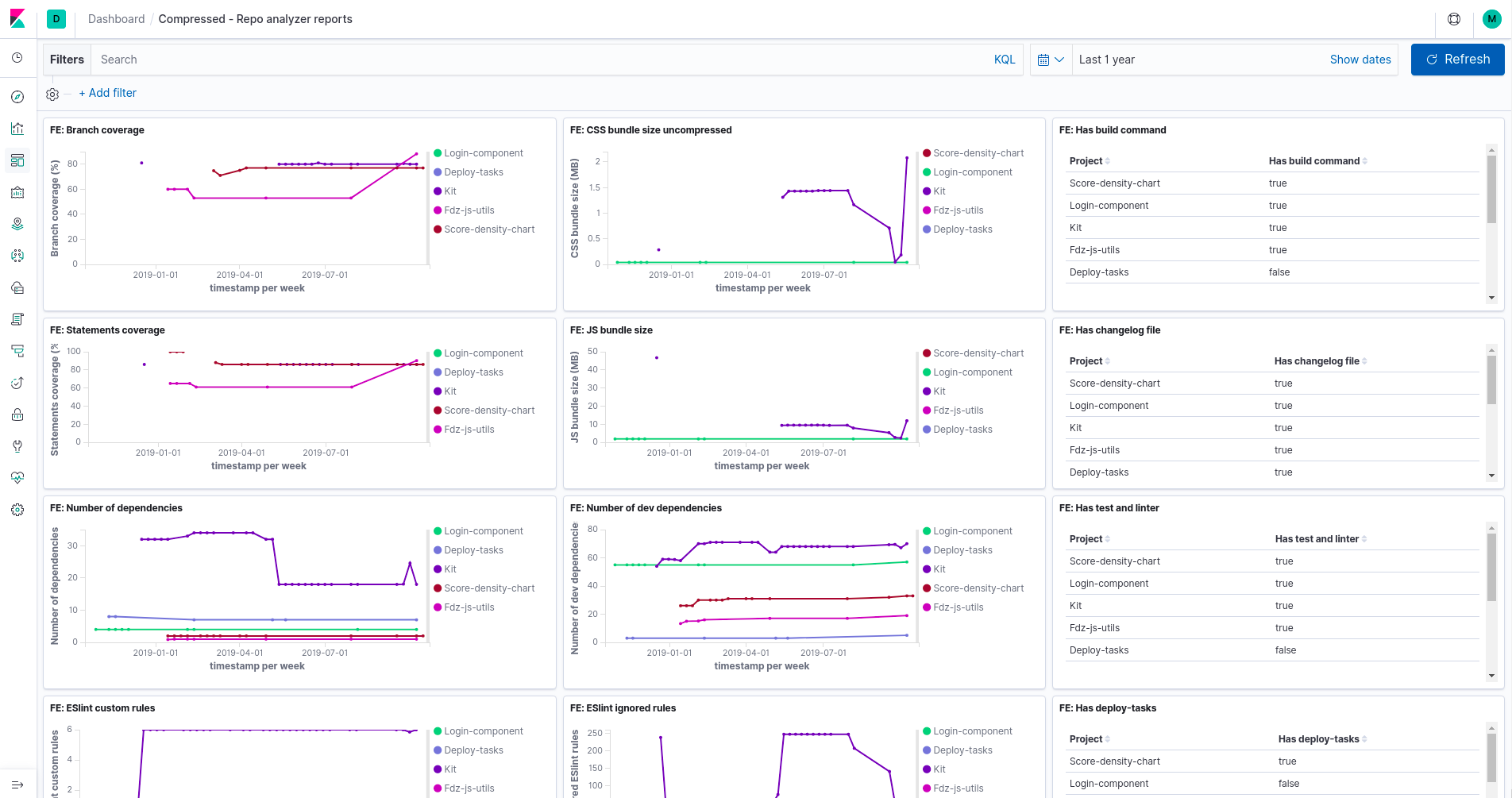
This small tool can analyze Git repositories and report metrics about them, these will then be sent to Elastic/Kibana or optionally to file or the console.
This tool was designed to be plugable, can work with an unlimited number of repositories and metrics.
## Table of Contents
1. [Installation and usage ](#installation-and-usage)
2. [Configuration](#configuration)
3. [Add custom metrics](#add-custom-metrics)
4. [Custom config file](#custom-config-file)
5. [Reporters](#reporters)
6. [Arguments](#arguments)
7. [FAQ](#faq)
8. [License](#license)
## Installation and Usage
Prerequisites: [Node.js](https://nodejs.org/en/) (+8.x), npm version +6.X.
To install run:
`$ npm i @feedzai/repo-analyzer --save-dev`
After installing the tool, we recommend that you add it to the npm scripts:
`"analyze": "repo-analyzer --username=john.doe --password=password"`
The `username` and `password` parameters will be used to connect to Elasticsearch.
More detail on this configuration can be found in the next section.
The first time you run the tool it will create a `.repo-analyzer` file. We recommend the configuration to be on a separate repository and be linked to in `.repo-analyzer`. The default file will point to the [feedzai configuration](https://github.com/feedzai/repo-analyzer-feedzai-config). If you want to use it you need to run:
`$ npm i @feedzai/feedzai-config --save-dev`
For details on what metrics are available here, plese consult the documentation in the [repo](https://github.com/feedzai/repo-analyzer-feedzai-config).
We recommend configuring the tool to run in CI at each commit.
It is also recommend to run the tool in the "history" mode to calculate historical data and have better dashboards (more details on that below).
### Configure Elasticsearch/Kibana
In order to use the whole potencial provided by the tool, we recommend you to use elasticsearch and kibana. They will provide a pretty good way to store and visualize your data.
You can find the complete configuration guide [here](https://github.com/feedzai/repo-analyzer-feedzai-config/blob/master/elastic.md)
One important detail: the Feedzai configuration assumes that your Kibana instance is on your local machine.
## History mode
The tool is capable of collecting data about the project‘s history based on the commit history.
This feature may be useful if you want to know how your project has varied over time, and what impact some dependency made in your bundesize for example.
In order to analyze the project’s history you just need to pass the “--history” flag into the tool:
`$ npm run analyze -- --history`
This will calculate the metrics in each commit. For large repos it's possible to pass a parameter that will do an exponential sampling as time goes back:
`$ npm run analyze -- --history --factor=1`
## Creating a custom configuration
In some cases you might want to implement custom metrics or have a custom configuration.
Currently the tool gets its configuration from an npm package, similarly to eslint.
The only requirements for this configuration project is that it returns an array with the metrics you want to use and some extra configuration. See this [repo](https://github.com/feedzai/repo-analyzer-feedzai-config) for an example.
In order to use this custom configuration you must add the name of the package to the `.repo-analyzer` file and add your configuration as a dependency to your local project.
### Creating new metrics
When you create a new metric, you must implement the base metric and his main 3 methods ( info, verify, execute ). Both verify and execute are async.
- **info()**: returns an object containing the metric name and group. This group can be modified in . Grouping metrics can be useful when you have a lot of metrics.
- **verify()**: returns a boolean and specifies whether its possible to run this metric for a given repository or not. For example, when calculation the coverage, if the repo does not have jest, it's impossible to calculate the metric therefore **verify()** should return false.
- **execute()**: returns and object with the result for the metric being calculated. In this method occurs the calculation for the metric.
- **schema()**: returns the schema configuration sent to Kibana/Elastic. If you don't to send the metrics to Kibana it is not necessary to implement this method.
Examples [here](https://github.com/feedzai/repo-analyzer-feedzai-config/tree/master/metrics).
## Reporters
Besides sending the data to Kibana it is also possible to output to a json file or to console.
See examples of how to do that [here](https://github.com/feedzai/repo-analyzer-feedzai-config/blob/master/index.js).
## Arguments
- **username=elastic** Elastic's username required to send elasticsearch reports to protected instances.
- **password=password** Elastic's password needed to send elasticsearch reports. Only valid when using the **username** flag.
- **factor=1** Factor used to jump commits when calculating project's history. The bigger the factor the bigger the jumps.
- **history** when used will calculate the history for the repos with "calculate-history": true in the config file.
- **elastic** creates elasticsearch's indexes automatically based on the metrics loaded and its schema.
- **commits=1,2,3** analyzes a group of commits, this flag is only valid when analyzing the history
- **from=1** the commit to start analyze, only valid when used with **to** when running on history mode.
- **to=10** the commit where it stop calculating, only valid when used with **from** and in history mode.
## License
MIT