https://github.com/feflow/builder-webpack4
腾讯IVWEB团队使用的基于Webpack4的业务开发构建器
https://github.com/feflow/builder-webpack4
Last synced: about 1 year ago
JSON representation
腾讯IVWEB团队使用的基于Webpack4的业务开发构建器
- Host: GitHub
- URL: https://github.com/feflow/builder-webpack4
- Owner: feflow
- License: mit
- Created: 2018-10-08T08:08:32.000Z (over 7 years ago)
- Default Branch: master
- Last Pushed: 2021-01-19T16:21:49.000Z (over 5 years ago)
- Last Synced: 2025-04-12T11:08:37.596Z (about 1 year ago)
- Language: TypeScript
- Homepage:
- Size: 164 KB
- Stars: 67
- Watchers: 7
- Forks: 19
- Open Issues: 7
-
Metadata Files:
- Readme: README.md
- Changelog: CHANGELOG.md
- License: LICENSE
Awesome Lists containing this project
README
# builder-webpack
[](https://travis-ci.com/feflow/builder-webpack4)
[](https://github.com/iv-web/feflow/blob/master/LICENSE)
[](https://www.npmjs.org/package/builder-webpack4)
[](https://npmjs.org/package/builder-webpack4)
[](https://github.com/cpselvis/builder-webpack4/pulls)
[](https://github.com/feflow/feflow)
Webpack 构建器, 适用于NOW直播业务和活动类型的项目构建
## 特性
- 使用webpack4 + babel7 最新的构建解决方案
- 对H5开发友好,默认集成 Rem 方案,解决适配问题
- 支持多页面打包的开发方式
- 支持less和typescript的文件打包
- 支持CSS Modules
## 安装
确保feflow的版本在 v0.12.0 以上, 可以通过如下命令安装最新feflow版本
```
$ npm install feflow-cli -g
```
## 快速使用
### 添加feflow.json配置文件
在项目根目录添加 `feflow.json` 配置文件
``` sh
{
"builderType": "builder-webpack3",
"builderOptions": {
"product": "now", // 产品,此处可以是 now 或者 shangfen
"domain": "now.qq.com", // 域名,离线包的域名需要使用
"cdn": "11.url.cn", // 资源发布到的cdn名称
"moduleName": "mobile", // 部署的模块
"bizName": "category", // 业务名称
"minifyHTML": true, // 是否压缩 html
"minifyCSS": true, // 是否压缩 js
"minifyJS": true, // 是否压缩 css
"inlineCSS": true, // 生成的 css 是否内联到首屏
"usePx2rem": true, // 是否使用 Rem
"useReact": true, // 是否是 React,如果为false,则不会在 html 中引用 React 框架
"remUnit": 37.5, // Rem 单位,对于 375 视觉稿,此处填写 37.5,750视觉稿需要改成 75
"remPrecision": 8, // Rem 的精度,即 px 转换成了 rem 后的小数点后位数
"inject": true, // 打包生成的 js 文件是否自动注入到 html 文件 body 之后
"port": 8001, // 本地开发的 webpack 构建服务进程端口号
"babelrcPath": "" // 指定.babelrc文件相对根目录的路径,默认加载根目录的.babelrc
"externals": [ // 基础框架不打入到 bundle 里面
{
"module": "react",
"entry": "//11.url.cn/now/lib/16.2.0/react.min.js?_bid=3123",
"global": "React"
},
{
"module": "react-dom",
"entry": "//11.url.cn/now/lib/16.2.0/react-dom.min.js?_bid=3123",
"global": "ReactDOM"
}
]
}
}
```
### 命令
```sh
$ feflow dev # 本地开发时的命令
$ feflow build # 发布时的打包命令, 打出的包在工程的public目录, 包含 cdn, webserver 和 offline 三个文件夹
```
## 文档
### 内联
同时支持Fis3项目的inline语法糖写法和ejs的写法
- 内联 html:
``` sh
```
- 内联 javascript
``` sh
```
备注:如果希望内联某个 JS 文件,需要使用相对路径的写法。
### 代理设置
- 执行 `feflow dev` 命令后会在本地的 8001 端口开启一个 WDS 服务,所有的静态资源(html, css, js, img) 都会在内存里面。可以通过 http://127.0.0.1:8001/webpack-dev-server 查看
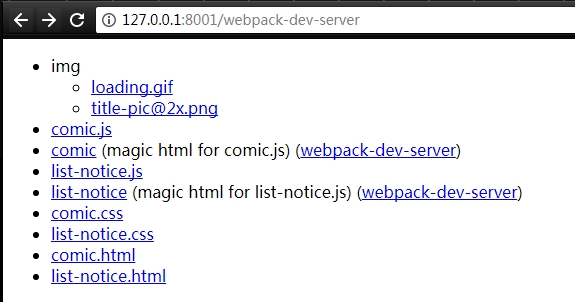
- Fiddler配置把之前的本地绝对路径改成 本地server 路径即可:

### 热更新支持
- 如果要支持热更新,需要再增加一条代理`_webpack_hmr`的配置,如:
`/^https?://now\.qq\.com/(__webpack_hmr)$/ http://127.0.0.1:8001/$1`
- 在项目中,用`react-hot-loader`将`pageComponent`变为可接受热更新的组件
```js
import { hot } from 'react-hot-loader'
class pageComponent extends Component {
...
}
export default hot(module)(pageComponent)
```
### 使用CSS Modules
本构建器默认启用CSS Modules,可生成全局唯一的类名/id名,避免样式污染。只需将样式文件命名为[name].module.(css|less),那么定义在里面的类名和id就会经过CSS Modules转化,不按此规则命名的样式文件,其内容不会经过CSS Modules处理。推荐结合babel-plugin-react-css-modules使用,可简化语法,在项目中**安装配置**:
```shell
npm i -S babel-plugin-react-css-modules postcss-less
```
然后在项目根目录下添加一个babel.config.js文件,内容如下:
```javascript
const path = require('path');
const loaderUtils = require('loader-utils');
/**
* 用于css-loader转换类名,与构建器内置的一致:
* 1.去除样式文件名的'.module'前缀;
* 2.遇到以'index.module.xxx'命名的样式文件使用文件夹名代替文件名来组成转换后的类名。
* 此方法基于'react-dev-utils/getCSSModuleLocalIdent',增加less正则匹配(https://www.npmjs.com/package/react-dev-utils)
* @param context webpack传给css-loader的context对象
* @param localIdentName css-loader的options.localIdentName,没传默认是'[hash:base64]',这里用不到
* @param localName 原始css类名
* @param options css-loader中三个配置项的组合,长这样:
{
regExp: options.localIdentRegExp,
hashPrefix: options.hashPrefix || '',
context: options.context,
}
*/
function getCSSModulesLocalIdent(
context,
localIdentName,
localName,
options
) {
// Use the filename or folder name, based on some uses the index.js / index.module.(css|scss|sass) project style
const fileNameOrFolder = context.resourcePath.match(
/index\.module\.(css|scss|sass|less)$/
)
? '[folder]'
: '[name]';
// Create a hash based on a the file location and class name. Will be unique across a project, and close to globally unique.
const hash = loaderUtils.getHashDigest(
path.posix.relative(context.rootContext, context.resourcePath) + localName,
'md5',
'base64',
5
);
// Use loaderUtils to find the file or folder name
const className = loaderUtils.interpolateName(
context,
fileNameOrFolder + '_' + localName + '__' + hash,
options
);
// remove the .module that appears in every classname when based on the file.
return className.replace('.module_', '_');
}
/**
* 由于入参不一致,这里包装一层调用getCSSModulesLocalIdent
* @param name 原始类名
* @param filename 样式文件路径
*/
function generateScopedName(name, filename) {
const loaderContext = {
rootContext: process.cwd(), // 保持与webpack loader context的rootContext一致(默认是项目根目录)
resourcePath: filename
};
return getCSSModulesLocalIdent(
loaderContext,
undefined,
name,
{}
);
}
module.exports = function (api) {
api.cache(true);
const presets = [];
const plugins = [
[
'react-css-modules',
{
context: process.cwd(), // 保持与webpack loader context的rootContext一致(默认是项目根目录)
filetypes: {
'.less': {
syntax: 'postcss-less'
}
},
generateScopedName,
webpackHotModuleReloading: true,
autoResolveMultipleImports: true
}
]
];
return {
presets,
plugins
};
};
```
然后启动项目,那么在[name].module.(css|less)中定义的类名就可以在React组件中通过`styleName` prop引用。
> 如果你同时需要使用feflow.json的`babelrcPath`配置,那么请同样以js的形式定义babel配置,并把上述内容整合进去,然后再指定给`babelrcPath`(因为指定了`babelrcPath`就不能同时读取根目录的babel.confis.js)。
相关资料:
* CSS Modules官网:https://github.com/css-modules/css-modules
* babel-plugin-react-css-modules:https://github.com/gajus/babel-plugin-react-css-modules
* **[荐]**关于CSS Modules用法的详细介绍(内网):[http://km.oa.com/group/29185/articles/show/382256#3.%20CSS%20Modules%E4%BD%BF%E7%94%A8%E7%BB%8F%E9%AA%8C](http://km.oa.com/group/29185/articles/show/382256#3. CSS Modules使用经验)
* **[荐]**收集了CSS Modules + babel-plugin-react-css-modules常用示例的仓库(内网):https://git.code.oa.com/alexqxxu/CSS-Modules-Demo
### 测试
1. `git clone`这个用于烟雾测试的[模板项目](https://github.com/feflow/generator-smoking-test)
2. 配置`.travis.yml`,可以参考模板项目[README](https://github.com/feflow/generator-smoking-test)
3. 在[Travis-ci](https://travis-ci.org/feflow/builder-webpack3)中打开此项目的自动构建
## 版本日志
[版本日志](CHANGELOG.md)
## 许可证
[MIT](https://tldrlegal.com/license/mit-license)