https://github.com/feiskyer/mcs
Multi-Cluster Service Operator on Azure
https://github.com/feiskyer/mcs
kubernetes-operator multi-cluster
Last synced: about 1 year ago
JSON representation
Multi-Cluster Service Operator on Azure
- Host: GitHub
- URL: https://github.com/feiskyer/mcs
- Owner: feiskyer
- License: apache-2.0
- Created: 2021-03-14T02:37:33.000Z (over 5 years ago)
- Default Branch: main
- Last Pushed: 2021-07-05T05:42:25.000Z (almost 5 years ago)
- Last Synced: 2025-03-28T10:21:22.474Z (about 1 year ago)
- Topics: kubernetes-operator, multi-cluster
- Language: Go
- Homepage:
- Size: 126 KB
- Stars: 3
- Watchers: 2
- Forks: 2
- Open Issues: 0
-
Metadata Files:
- Readme: README.md
- License: LICENSE
Awesome Lists containing this project
README
# Multi-Cluster Service Operator on Azure
An operator for exposing services from multiple Kubernetes clusters by leveraging [Azure cross-region load balancer](https://docs.microsoft.com/en-us/azure/load-balancer/cross-region-overview).
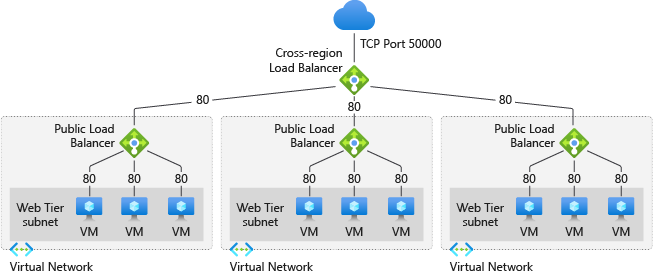
- **Status:** DRAFT
- **Issues:** due to limitations of Global LoadBalancer, FloatingIP needs to be enabled on both Global LoadBalancer and regional LoadBalancer. And the the global VIP needs to be configured on each nodes to make FloatingIP work (this could be done by adding global VIP to each cluster's `service.status.loadBalancer.ingress[]`.
## How to deploy MCS operator
Create Azure service principal and then create the the following `cloud-config` file:
```json
{
"cloud": "AzurePublicCloud",
"tenantId": "",
"subscriptionId": "",
"aadClientId": "",
"aadClientSecret": "",
"globalLoadBalancerName": "",
"globalVIPLocation": "",
"globalLoadBalancerResourceGroup": ""
}
```
Then create a secret based on this config file:
```sh
kubectl create secret generic azure-mcs-config --from-file=cloud-config
```
After that, deploy the MCS operator in MCS cluster (it could be any Kubernetes cluster):
```sh
kubectx mcs-cluster
make deploy
```
## Samples
### Create KubeCluster
Assume you have two Kubernetes clusters running on Azure, one is created via aks-engine and the other is created via AKS.
Switch kubeconfig to MCS cluster, and then create the following two KubeCluster:
```sh
# For cluster aks-engine
kubectl create secret generic aks-engine --from-file=kubeconfig
cat <"
- cluster: default/aks-cluster
ip: 20.198.185.119
resourceGroup: ""
vip: 23.98.101.30
# verify the vip is available
$ curl 23.98.101.30
```